A quick look at HDR in the demo for Onimusha: Way of The Sword on PC, Xbox and Playstation consoles.
It's HDR as bad as it gets 😑
- Max brightness is only 670 nits
- HDR and SDR look vastly different
- Black level raise.
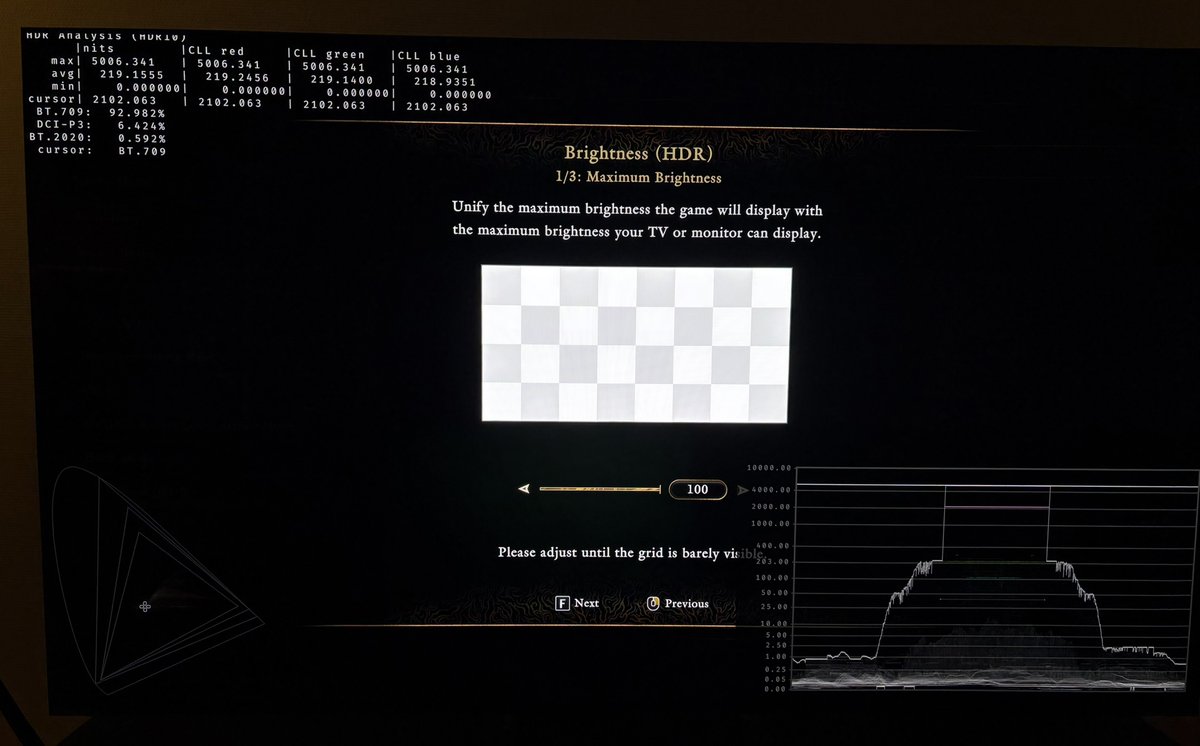
When we start up the demo, the game asks us to setup HDR using the setup screens in picture 2 and 3.
The first screen goes up to 2100 nits. Why ask us to do that if the game only outputs 670 nits in-game (see picture 4) ???
It's only a 30 minute demo, so just set the maximum brightness slider all the way to the right, leave the brightness slider at default, and enjoy the demo.
I hope they improve HDR in the final game.
Turn off film grain in 007 First Light.
It breaks HDR so it outputs up to 10000 nits.
Picture 1 is 10000 nits and picture 2 is 1000 nits. Only difference is film grain on and off.
I didn’t notice this when testing the HDR, because I always turn off film grain, chromatic aberration, motion blur etc. in my games.
The HDR output of #007FirstLight can be explained in a much more simple way than I did in my earlier post (a bit of sleep helped☺️).
We have one in-game brightness slider.
This slider is what sets up peak brightness and paper white / midtone brightness in the game. It increases the brightness (midtones, highlights) in a liniar way. We see that in the data below. However, it does not effect the black level floor - not much anyway.
First number is brightness on the in-game slider. Second number is what the game maxium outputs in the Crash Site scene.
100 / 470
150 / 700
200 / 930
250 / 1140
300 / 1360
350 / 1560
400 / 1760
450 / 1950
500 / 2130
550 / 2300
600 / 2450
700 / 2730
800 / 2960
The game cuts all detail in highlights above your peak brightness, that the game automatically gets from Xbox's and PS5's HDR system settings or Windows HDR calibration App.
Your TV wont be able to output more anyway, if peak brightness is setup correctly.
This is how simple it is, basically.
You should setup the brightness slider to what looks must natural to you. This value is somewhat dependend on personal preference and ambient light in the room.
However, I think if you game in a dark room then you can use these brightness values as guidelines or starting points;
- 180-250 nits brightness (500-1000 nits displays)
- 250-300 nits brightness (1000-1500 nits displays)
- 300-350 nits brightness (1500-2300 nits displays)
The conclusion in my earlier post is the same:
I don't like that paper white (brightness) and peak brightess are not decoupled when setting up HDR. It's not intuitive to me and it usually means higher nits displays gets underutilized.
On top of the above, the games bright lightsources are mostly much dimmer than the above tested peak brightness output. I showed that we only get around 1000-1200 nits peak brightness in disco lights in the Night Club scene on my 2000 nits OLED display. OLED Displays in 2026 have up to 3000 nits peak brightness. So a huge under-utilization of current display technology.
The HDR output of #007FirstLight can be explained in a much more simple way than I did in my earlier post (a bit of sleep helped☺️).
We have one in-game brightness slider.
This slider is what sets up peak brightness and paper white / midtone brightness in the game. It increases the brightness (midtones, highlights) in a liniar way. We see that in the data below. However, it does not effect the black level floor - not much anyway.
First number is brightness on the in-game slider. Second number is what the game maxium outputs in the Crash Site scene.
100 / 470
150 / 700
200 / 930
250 / 1140
300 / 1360
350 / 1560
400 / 1760
450 / 1950
500 / 2130
550 / 2300
600 / 2450
700 / 2730
800 / 2960
The game cuts all detail in highlights above your peak brightness, that the game automatically gets from Xbox's and PS5's HDR system settings or Windows HDR calibration App.
Your TV wont be able to output more anyway, if peak brightness is setup correctly.
This is how simple it is, basically.
You should setup the brightness slider to what looks must natural to you. This value is somewhat dependend on personal preference and ambient light in the room.
However, I think if you game in a dark room then you can use these brightness values as guidelines or starting points;
- 180-250 nits brightness (500-1000 nits displays)
- 250-300 nits brightness (1000-1500 nits displays)
- 300-350 nits brightness (1500-2300 nits displays)
The conclusion in my earlier post is the same:
I don't like that paper white (brightness) and peak brightess are not decoupled when setting up HDR. It's not intuitive to me and it usually means higher nits displays gets underutilized.
On top of the above, the games bright lightsources are mostly much dimmer than the above tested peak brightness output. I showed that we only get around 1000-1200 nits peak brightness in disco lights in the Night Club scene on my 2000 nits OLED display. OLED Displays in 2026 have up to 3000 nits peak brightness. So a huge under-utilization of current display technology.
@Timebringer That I didn't notice.
Midtones look very muted to me.
When you combine that with lifted blacks and very dim highlights, then the game looks very flat and boring.
Maybe other areas in the game will look better ?
A quick look at HDR in the demo for Onimusha: Way of The Sword on PC, Xbox and Playstation consoles.
It's HDR as bad as it gets 😑
- Max brightness is only 670 nits
- HDR and SDR look vastly different
- Black level raise.
When we start up the demo, the game asks us to setup HDR using the setup screens in picture 2 and 3.
The first screen goes up to 2100 nits. Why ask us to do that if the game only outputs 670 nits in-game (see picture 4) ???
It's only a 30 minute demo, so just set the maximum brightness slider all the way to the right, leave the brightness slider at default, and enjoy the demo.
I hope they improve HDR in the final game.
A quick look at HDR in the demo for Onimusha: Way of The Sword on PC, Xbox and Playstation consoles.
It's HDR as bad as it gets 😑
- Max brightness is only 670 nits
- HDR and SDR look vastly different
- Black level raise.
When we start up the demo, the game asks us to setup HDR using the setup screens in picture 2 and 3.
The first screen goes up to 2100 nits. Why ask us to do that if the game only outputs 670 nits in-game (see picture 4) ???
It's only a 30 minute demo, so just set the maximum brightness slider all the way to the right, leave the brightness slider at default, and enjoy the demo.
I hope they improve HDR in the final game.
A quick look at HDR in the demo for Onimusha: Way of The Sword on PC, Xbox and Playstation consoles.
It's HDR as bad as it gets 😑
- Max brightness is only 670 nits
- HDR and SDR look vastly different
- Black level raise.
When we start up the demo, the game asks us to setup HDR using the setup screens in picture 2 and 3.
The first screen goes up to 2100 nits. Why ask us to do that if the game only outputs 670 nits in-game (see picture 4) ???
It's only a 30 minute demo, so just set the maximum brightness slider all the way to the right, leave the brightness slider at default, and enjoy the demo.
I hope they improve HDR in the final game.
A quick look at HDR in the demo for Onimusha: Way of The Sword on PC, Xbox and Playstation consoles.
It's HDR as bad as it gets 😑
- Max brightness is only 670 nits
- HDR and SDR look vastly different
- Black level raise.
When we start up the demo, the game asks us to setup HDR using the setup screens in picture 2 and 3.
The first screen goes up to 2100 nits. Why ask us to do that if the game only outputs 670 nits in-game (see picture 4) ???
It's only a 30 minute demo, so just set the maximum brightness slider all the way to the right, leave the brightness slider at default, and enjoy the demo.
I hope they improve HDR in the final game.
@Mycontrolonly HDR in this demo is very bad.
I think we have good/decent HDR in 007 and Forza 6. Its HDR with issues, especially for higher nits display owners, but it still look good overall.
HDR in Saros also looks good and very impactful. They fixed one of my issues with it.
@EousBangbu If we get a RenoDX HDR mod for the game, then you will be able to get great HDR in this game.
RenoDX is the way we get great HDR in our games on PC.