What if you traveled at the speed of light?
8 minutes to the Sun.
4 hours past the outer planets.
4 years to the nearest star.
And that’s just the beginning…
THE MATRIX was released 25 years ago today. Acclaimed as both one of the great science fiction movies and a groundbreaking action film, the behind-the-scenes story will have you questioning reality…
1/44
Momentum cancellation.
A ball fired at 50 mph out of a cannon from a truck going exactly at 50 mph in the opposite direction, has its velocity (and therefore momentum) cancelled.
[📹 MythBusters]
Seeing some qs on what Gemini *is* (beyond the zodiac :). Best way to understand Gemini’s underlying amazing capabilities is to see them in action, take a look ⬇️
Google is deprecating 3rd party cookies. What does that mean? I’ll try to break it down:
Those are cookies that are sent for sites other than the one you are currently in.
Say you went to facebook dot com and logged in. Your browser stores a cookie for the facebook domain such that if you visited it again it sends the cookie to the server so you are auto-logged in (given that HTTP is stateless and we need to transfer the state with every request, the ST in REST)
But the question is when should the browser send the cookie? The web consists of pages and each page has resources referenced by other domains.
Imagine you visited thepiratebay and in that site there is a javascript that makes a POST request to facebook to update your status. Given that you have a cookie with facebook, should the browser send the cookie along side the POST request? If that happens the piratebay will be able to post on your behalf to your facebook profile by just visiting it.
Now this is extreme and it’s practically solved with CORS, however sometimes you need to enable CORS in some situations (think of an API gateway) but prevent sending cookies from the cross site.
That is why Chome came up with the SameSite property back in 2020 which I covered in a video. The samesite cookie property controls when the browser should send the cookie if it belongs to another domain than the one you are currently In (the one that appears at the top of your browser address) here are the 3 different values for samesite.
samesite=lax (default) means only send the cookie when a user clicks a link and causes a top level navigation. So if you are on the piratebay and there is a link to facebook, clicking that link will take you to facebook and facebook will recognize you, because the cookie was sent.
samesite=strict: never send the cookie unless you are on the same site. So if you are on the piratebay and there is a link to facebook, clicking that link will take you to facebook but facebook will not recognize you. it will be as if you went incongito
samesite=none: this always sends the cookie as long as CORS allows it. So if you are on the piratebay and there is a link to facebook, clicking that link will take you to facebook and facebook will recognize you. Also if you have referenced an image from your private facebook album in the piratebay, visiting the piratebay will view that image as long as you are logged in to facebook.
The last one is the definition of 3rd party cookies. Those are getting deprecated by Google. So you can easily know if your website uses 3rd party cookies by looking for samesite=none and replace them by lax, of course things might break so you need to rewrite some code, or find another way to achieve the functionality.
So I’m not sure what will break but things will break for sure. So watch out for it. I’ll list some resources below.
Of course like CORS, third party cookie make no sense in non browser environments so curl or other CLI’s and backends aren’t affected by this.
Caching 101: The Must-Know Caching Strategies
Fetching data is slow. Caching speeds things up by storing frequently accessed data for quick reads. But how do you populate and update the cache? That's where strategies come in.
🔍 Read Strategies:
Cache Aside (Lazy Loading)
- How it works: Tries cache first, then fetches from DB on cache miss
- Usage: When cache misses are rare or the latency of a cache miss + DB read is acceptable
Read Through
- How it works: Cache handles DB reads, transparently fetching missing data on cache miss
- Usage: Abstracts DB logic from app code. Keeps cache consistently populated by handling misses automatically
📝 Write Strategies:
Write Around
- How it works: Writes bypass the cache and go directly to the DB
- Usage: When written data won't immediately be read back from cache
Write Back (Delayed Write)
- How it works: Writes to cache first, async write to DB later
- Usage: In write-heavy environments where slight data loss is tolerable
Write Through
- How it works: Immediate write to both cache and DB
- Usage: When data consistency is critical
🚀 Real-Life Usage:
Cache Aside + Write Through
This ensures consistent cache/DB sync while allowing fine-grained cache population control during reads. Immediate database writes might strain the DB.
Read Through + Write Back
This abstracts the DB and handles bursting write traffic well by delaying sync. However, it risks larger data loss if the cache goes down before syncing the buffered writes to the database.
–
Subscribe to our weekly newsletter to get a Free System Design PDF (158 pages): https://t.co/kNfv0DVDdf
Docker vs. Kubernetes. What should we use?
What is Docker?
Docker is an open-source platform that simplifies building, distributing, and running applications using containers. It allows you to create lightweight, portable, self-contained containers from any application, bundled with all its dependencies.
What is Kubernetes?
Kubernetes, also known as K8s, is an open-source system for automating deployment, scaling, and management of containerized applications. It groups the containers that comprise an application into logical units for easy management and discovery across a cluster of machines. Kubernetes uses container runtimes like containerd and CRI-O to run containers, instead of Docker Engine.
How do they differ?
Docker focuses on automating individual container creation and deployment on a single host. While it can manage collections of containers with Docker Swarm, it is more limited compared to Kubernetes in terms of scalability and features.
Kubernetes takes container orchestration further by managing clusters of hosts running Linux containers. It handles scheduling, load balancing, and provides a robust platform for automating deployment, scaling, and ensuring the desired state of applications.
In summary, Docker excels at managing containers on a single system, while Kubernetes is designed for managing and scaling multi-container applications across clusters.
–
Subscribe to our weekly newsletter to get a Free System Design PDF (158 pages): https://t.co/kNfv0DVDdf
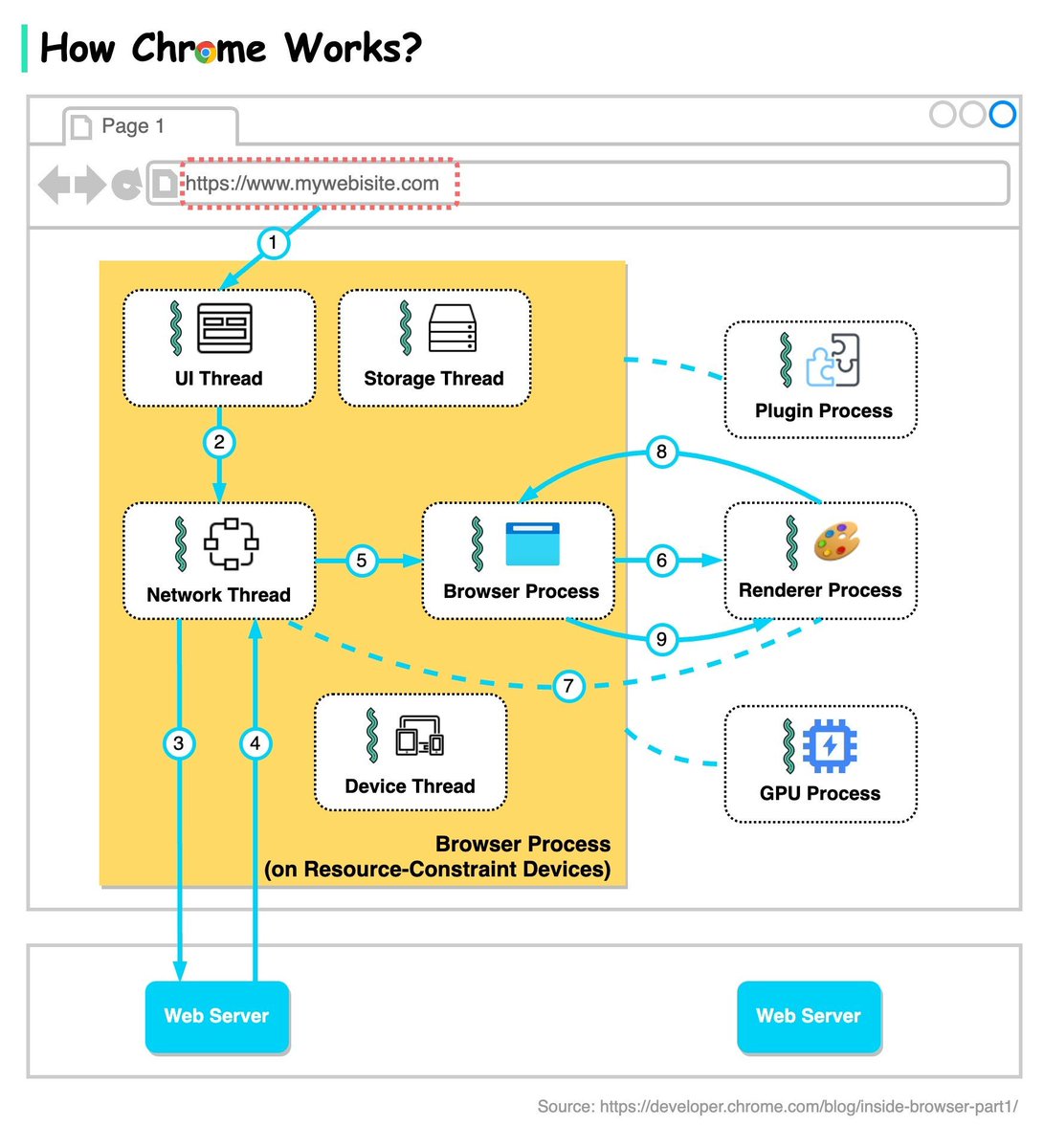
How does Chrome work?
Chrome utilizes a multi-process model to improve security and stability. Each tab runs in its own renderer process, isolating it from other tabs. If one tab crashes, the rest are unaffected.
There are several key process types in Chrome:
🔹 Browser process: Controls the UI, handles network requests, coordinates other processes.
🔹 Renderer process: Responsible for rendering content inside a tab.
🔹 GPU process: Handles graphics and GPU-related tasks.
🔹 Plugin process: Manages browser plugins.
Now let’s see what happens when we enter a URL in Chrome.
Step 1: The user enters a URL into the browser. This is handled by the UI thread of the browser process.
Step 2: When the user hits enter, the UI thread initiates a network call to get the site content.
Steps 3-4: The network thread retrieves the content over the network
Step 5: When the network thread receives responses, it inspects the response headers. If it is an HTML file, the browser locates a renderer process to render it.
Steps 6-9: An IPC is sent from the browser process to the renderer process. A data pipe is established between the network thread and the renderer process so that the renderer can receive the rest of the data and start rendering the page.
Chrome now utilizes Site Isolation, where cross-site iframes run in separate renderer processes, further isolating sites from each other. This prevents malicious code on one site from impacting another.
While the multi-process model has security benefits, it also increases memory and resource usage since each process needs its own copy of components like the JavaScript engine. Chrome limits processes and runs multiple tabs from the same site in one process when memory pressure increases.
There are more technical details in Chrome’s 4-part blog series. Link in comment below.
–
Subscribe to our weekly newsletter to get a Free System Design PDF (158 pages): https://t.co/kNfv0DVDdf
[VIDEO] The Humane AI pin just launched for $699.
Is this pin going to be the new Apple iPhone?
Idk, but here are 3 big takeaways from the launch:
1. OpenAI/Microsoft will eventually become infra for all tech
Hard to beat them at this rate, they will become AWS for AI
2. AI is gonna make apps (as we know them) a lot less important
Screenless interfaces powered by AI will be connected to apps on the back end and bundled into a subscription service
My Humane subscription will come with Tidal and I will rarely/never need to interface with tidal again
Many consumer products will go from B2C -> B2B
3. Product design is going to look a lot different in 5-10 years
Maybe unrecognizable.
The bottom line is how we are interacting with these devices are changing.
This week we had the GPT store. Agents are the new apps.
Now we have AI pins.
The palm of your hand is your new screen.
Wild times.
--
Follow me @gregisenberg for more takes on where the world is going. Link in bio for more insights. Email going out today on how to find proven startup ideas.