A developer in China named tw93 got tired of his laptop dying.
He would open Slack and watch 524 megabytes of disk space disappear. He would open Discord and watch another 265. He would open Notion and watch 800 megabytes of RAM evaporate before he had typed a single word.
He looked into why.
Every "desktop app" on his computer was the same thing. A website wrapped in a full copy of the Chrome browser engine. The framework is called Electron. An empty Electron app starts at 150 megabytes of RAM before you click anything. With twelve of them open, his laptop was running twelve copies of the same browser.
He thought there had to be a better way.
So in 2022, he started building one.
He called it Pake. Two characters in Chinese mean "packaging." He wrote it in Rust on top of a framework called Tauri. The idea was simple. Point Pake at any webpage. Get a desktop app. Without dragging an entire browser engine into the binary.
The first version of Slack he wrapped with it was 8 megabytes.
Not 524. Eight.
That is what 20 times smaller looks like.
Four years later, his repo has 50,594 stars. 6,144 forks. The license is MIT. The last commit was yesterday.
The bio on his GitHub reads: "Anything added dilutes everything else."
Today the Pake releases page contains pre-built apps for ChatGPT, Discord, Gemini, Grok, DeepSeek, Twitter, YouTube, Excalidraw, Flomo, WeChat, and twelve more. All under 10 megabytes. All native. All free.
Or you point Pake at any URL you want and it builds one for you in one command.
Slack's desktop app: 524 megabytes.
Pake-built Slack: 8 megabytes.
Discord's desktop app: 265 megabytes.
Pake-built Discord: 9 megabytes.
ChatGPT for Windows: 260 megabytes.
Pake-built ChatGPT: 9 megabytes.
tw93 is one person. He has 11,305 followers on GitHub. He runs a blog at https://t.co/m9TcLveecV. He has shipped 39 public repos. He still pushes commits to Pake every week.
He did not start a company. He did not raise money. He did not write a Medium post about how Electron is dead.
He just shipped the thing that made it true.
(Link in the comments)
10/ The Full Investment Thesis Writer
I want to build a long-term position in COMPANY / TICKER.
Industry:
INDUSTRY
Holding period:
YEARS
Position size:
$AMOUNT
Sentiment:
BULLISH / CAUTIOUS
Write a complete investment thesis:
— Bull case summary
— Market opportunity
— Key growth catalysts
— Management quality analysis
— Financial health check
— Biggest risks to the thesis
— 1-year, 3-year, and 5-year targets
— Metrics I should track every quarter
Format it like a professional research note.
CLAUDE + STOCKS = $$$$
CLAUDE + STOCKS = $$$$
CLAUDE + STOCKS = $$$$
Wall Street analysts charge $500/hour for this research.
Claude does it in 30 seconds.
10 prompts that make Claude your personal stock market analyst 👇
9/ The Market Crash Playbook
I’m worried about a market correction in the next 3 / 6 / 12 months.
Reason:
RATE HIKES / RECESSION / OVERVALUATION / GEOPOLITICAL RISK
Portfolio size:
$AMOUNT
Build me:
— Crash warning indicators
— Which positions to trim first
— Defensive stocks/ETFs
— Ideal cash allocation
— Hedge ideas
— Dip-buying strategy
— Historical recovery timelines
— Biggest investor mistakes during crashes
I want a plan I can follow without panicking.
🎯THE COMPLETE CLAUDE COMMAND
THE ULTIMATE CHEAT SHEET | 90 COMMANDS
1. START & CREATE
/new → Start a fresh conversation
/project → Create a new project
/upload → Attach files for Claude to read
/paste → Paste from clipboard
/template → Use a pre-built prompt structure
/import → Import from a file
/scan → Scan documents
/voice → Use voice input
2. FOCUS & CONTEXT
/focus → Tell Claude exactly what you want
/context → Add background so answers are sharper
/details → Provide more details
/examples → Give examples
/clarify → Let Claude ask the right questions first
/define → Define terms
/assumptions → List assumptions
/priorities → Set priorities
/constraints → Set constraints
3. THINK & SOLVE
/analyze → Break any problem into parts
/compare → Put two options head to head
/pros-cons → List pros & cons
/evaluate → Evaluate ideas
/recommend → Get recommendations
/brainstorm → Generate ideas fast, no filter
/solve → Solve the problem
/challenge → Challenge assumptions
4. WRITE & EDIT
/write → Generate content from scratch
/edit → Clean up what you already have
/rewrite → Same message, better delivery
/shorten → Cut the fluff, keep the punch
/expand → Add more detail
/improve → Improve writing
/summarize → Summarize text
/paraphrase → Paraphrase text
/proofread → Proofread text
5. ORGANIZE & STRUCTURE
/outline → Build a skeleton before writing
/structure → Organize content
/bullet → Turn text into scannable points
/numbered → Make numbered list
/table → Organize comparisons visually
/summary → Summarize content
/key-points → Extract key points
/mindmap → Map out connected ideas
/flowchart → Create flowchart
6. CODE & TECH
/code → Write code in any language
/debug → Find and fix issues
/explain → Explain code
/optimize → Make code faster and cleaner
/refactor → Improve code structure
/test → Write tests
/convert → Convert formats
/documentation → Write docs
/review → Review code
7. DATA & ANALYSIS
/analyze-data → Find patterns in raw data
/visualize → Turn numbers into charts
/insights → Extract key insights
/forecast → Make predictions
/report → Generate report
/stats → Calculate statistics
/clean → Clean data
8. AUTOMATE & INTEGRATE
/workflow → Design repeatable process
/automate → Remove manual steps
/api → Connect tools via API
/integrate → Integrate systems
/schedule → Schedule tasks
/trigger → Set triggers
/tasklist → Create task list
/checklist → Create checklist
9. PERSONALIZE & CONTROL
/preferences → Set preferences
/memory → Save what to remember
/tone → Set tone (formal, casual, bold)
/style → Match writing style/persona
/length → Control response length
/format → Change format
/reset → Reset conversation
/clear → Clear context
10. LEARN & RESEARCH
/search → Get current info from web
/research → Deep dive into topic
/learn → Beginner explanation
/tldr → Summary of key points
/sources → Find sources
/fact-check → Verify information
/explore → Explore related topics
11. COLLABORATE & SHARE
/share → Share conversation
/export → Save output
/download → Get file instantly
/copy → Copy to clipboard
/email → Draft and send
/publish → Publish content
/feedback → Send feedbacks
BONUS: POWER SHORTCUTS
Use “/” commands for quick access
Combine commands for better results
Add context early for better answers
Be specific and clear
Iterate and refine
Save and reuse what works
❤️ Like
🔁 Retweet
🔖 Bookmark
Follow
@HeyAnjula
for more such posts
Most people spend hours prompting Claude...
But never learn how Claude was designed to be used.
Anthropic just released a FREE workshop taught by the people who built it.
No paywall.
No signup.
Just real prompting techniques that actually work.
🔖 Bookmark this.
The smartest people I know have quietly stopped talking about prompts.
They're talking about context engineering.
And most people haven't noticed the shift yet.
For the last 2 years, everyone was obsessed with writing the perfect prompt.
"Give me the best prompt."
"Share your secret prompt."
"Copy this prompt framework."
But the people getting the best results from Claude today aren't relying on clever prompts.
They're building systems.
They give Claude:
• Context before instructions
• Examples before requests
• Constraints before outputs
• Structure before execution
That's why one person gets a generic answer.
And another gets work that feels like it came from a $300/hr consultant.
Same model.
Different inputs.
One of Claude's biggest advantages is that it handles large amounts of context exceptionally well.
Which means the game is no longer:
"How good is your prompt?"
It's:
"How well can you transfer your thinking into the model?"
That's a completely different skill.
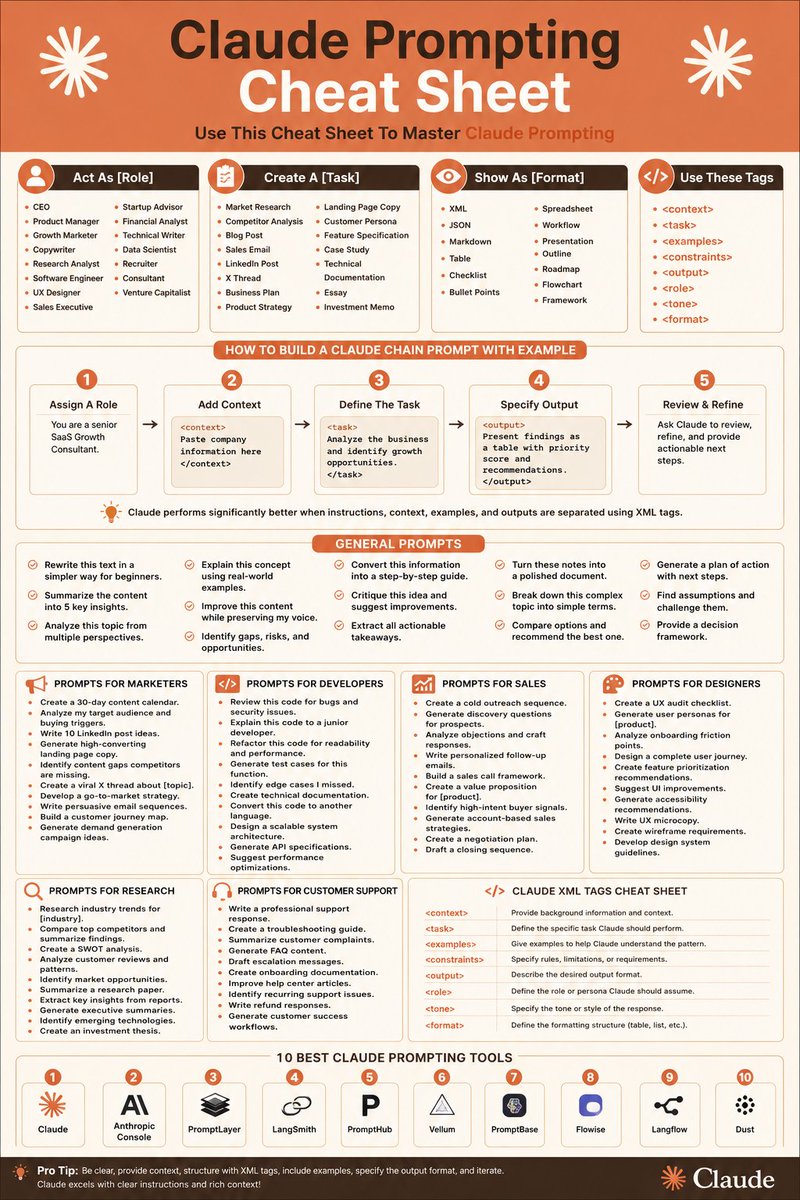
I put together a Claude Prompting Cheat Sheet covering:
• The XML framework power users rely on
• Claude chain prompting workflows
• Context engineering fundamentals
• High-performance prompt structures
• Practical prompts for marketers, developers, researchers, designers, and founders
• The Claude tools worth knowing
Most people are still treating AI like Google.
The people pulling ahead are treating it like a highly capable teammate.
That gap is getting wider every month.
If you're serious about AI, learn this now.
Because a year from today, "prompt engineering" will sound as outdated as "keyword stuffing."
And most people won't realize it happened until they're already behind.
10. Final Logo Decision Prompt
Act like a creative director. Help me choose the best logo concept.
My concepts:
[Concept 1]
[Concept 2]
[Concept 3]
[Concept 4]
[Concept 5]
Brand details:
Brand name: [Brand Name]
Industry: [Industry]
Audience: [Audience]
Personality: [Personality]
Goal: [Business goal]
Rank the concepts from strongest to weakest based on memorability, simplicity, professionalism, uniqueness, audience fit, scalability, social media use, and long-term potential.
Recommend the best one and explain how to improve it before finalizing.
9. Brand Guideline Prompt
Act like a brand guideline designer. Create a simple brand guideline for [Brand Name].
Details:
Industry: [Industry]
Audience: [Audience]
Personality: [Personality]
Logo concept: [Logo idea]
Colors: [Colors or ask Claude to suggest]
Include brand overview, logo usage rules, spacing rules, colors, typography, icon style, image style, social media style, correct usage examples, incorrect usage examples, and 10 brand words.
Make it beginner-friendly.