Become a Seesaw pro in 5 steps!
From activities to remote learning to folders, you'll learn all the skills you need to provide engaging learning experiences for students this school year.
View the on-demand training here: https://t.co/wFPD8yzzWw
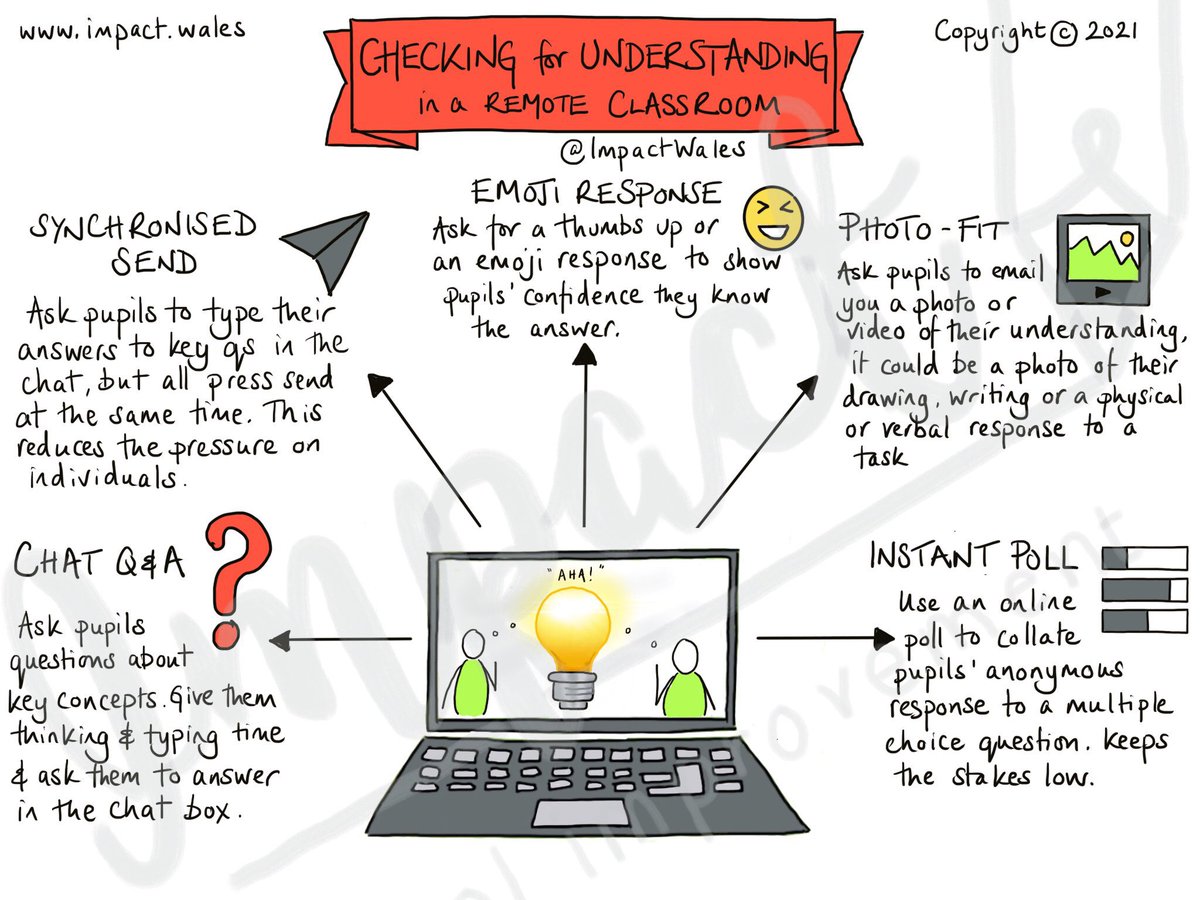
If you find engaging your students online challenging, try one-on-one “interviews” with them. Your questions can show them that their input informs how you teach.
https://t.co/BVk1Iqcsh1
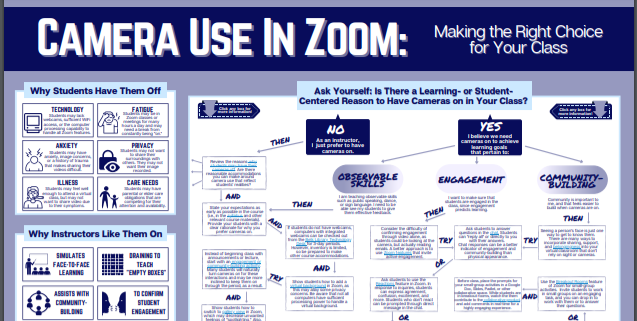
Just learned about @LindsayMasland's sweet infograph to support better understanding cameras in Zoom. So good for #DigitalEquity. This is my #OnlineTeachingLove 2day. Thank U @EveryLearnerNet for another great webinar - and Lindsay for your brilliant work! https://t.co/gASeapJKaQ
Would You Want to Be a Student in Your Own Class?
A question we should all be asking ourselves on the daily! This question helps keep me motivated and to keep learning engaging and fun.
If you find engaging your students online challenging, try one-on-one “interviews” with them. Your questions can show them that their input informs how you teach.
https://t.co/BVk1Iqcsh1
A5: Adding student images into video projects to give them more ways to show their creativity and uniqueness, Elementary School Yearbooks, Staff/Student videos from recent school shut downs #AppleEduChat@lfuinihetten
A3: Talk about how everthing is all in the eye of the beholder. We can view things differently based on the angle - and that's ever so clear in a photo.
#AppleEDUchat
ICYMI: We shared strategies + resources for transitioning to hybrid/in-person learning.
✓ Integrate Seesaw into common instructional strategies
✓ Close gaps in mastery
✓ Build on relationships with families.
Watch now: https://t.co/aaiLrERqGN
Slides: https://t.co/SxG4q0IONg
For the latest solves to #GoogleClassroom teaching and learning challenges—our global educator community has got you covered! 🤜 🤛
Follow the link below to a library of #EdTech resources, curated with YOU in mind ➡️ https://t.co/CKvC6GM3fS
Kind of 😳embarrassed to say but...
😱I was today years old when I learned you can 🖱️drag and drop your classes in #GoogleClassroom to 🥳reorder and 🧹organize!
#FMSDTechChat
Keeping instructional materials organized is SUPER important when it comes to creating an effective online learning environment. We encourage our teachers to use the following strategies in #GoogleClassroom:
👉 Add topics
👉 Insert emojis
👉 Use a numbering system
#WESDTech
A strategy to give students agency over their experience & create time and space to support individual learners!
Design a Choose Your Own Adventure Learning Experience
https://t.co/nLuDoPSYWQ #onlinelearning#blendedlearning#edchat#satchat#edtech#education