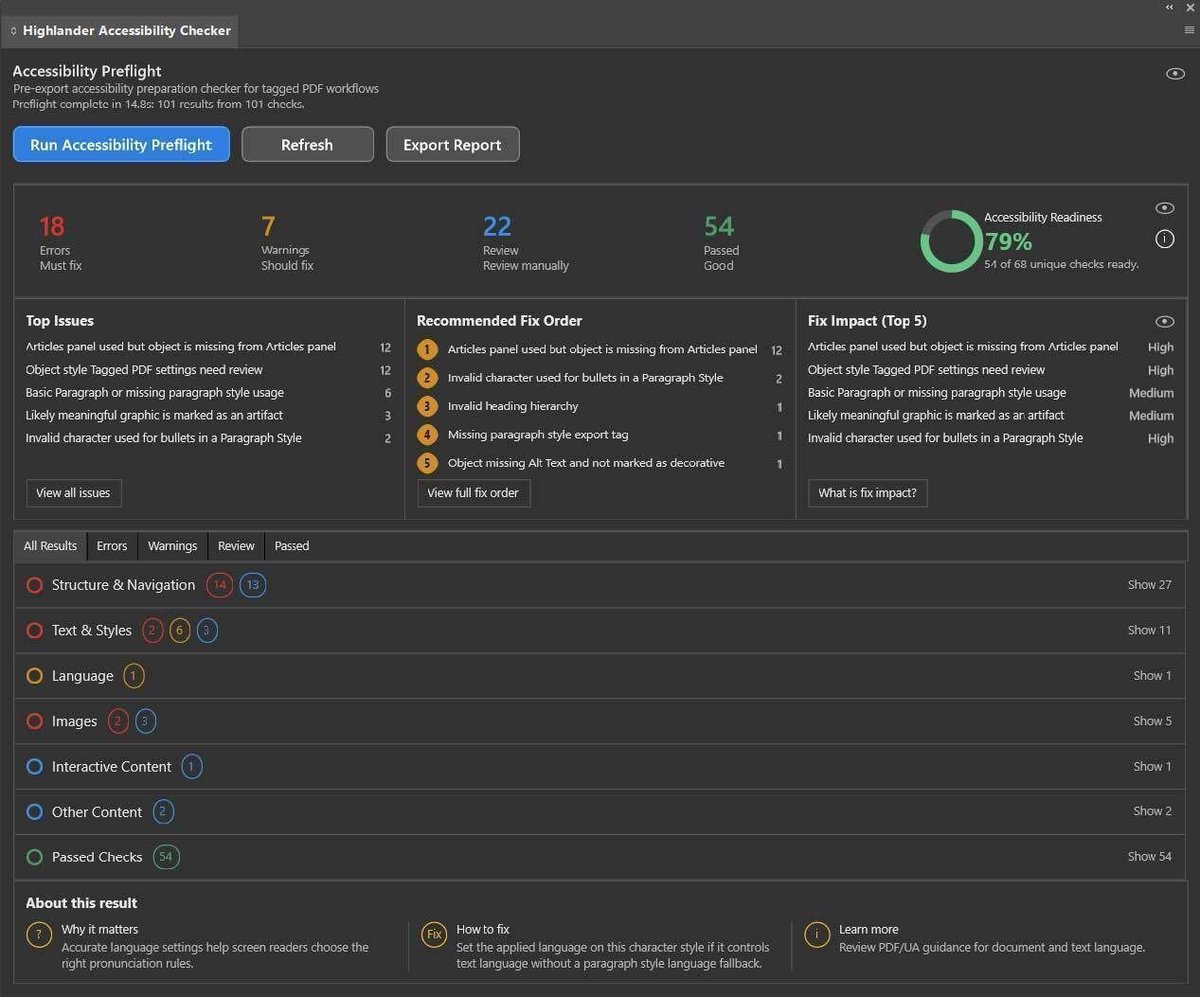
Highlander Accessibility Checker, a new plugin for Adobe InDesign is now available for download.
The plugin helps InDesign users identify a wide range of common PDF/UA accessibility issues while the document is still in InDesign.
Find out more: https://t.co/9q2NDxSHln
Are your PDFs accessible to everybody? Do they comply with the PDF/UA and WCAG standards?
Creating Accessible PDFs in InDesign is a 1 day live online course for InDesign users who want to create fully accessible PDFs.
Next running - 17th November
https://t.co/fSxDIK0TPm
Ever wanted to create calendars in InDesign more quickly? In our latest blog post we show you how to use AI to write a script that can be used in InDesign to do just that.
(we even give you the finished script for those in a rush 🙂)
https://t.co/sgBHYZK9dF
#indesign
Designing forms in InDesign? With the Type tool drag out a text frame and use the up arrow on the keyboard to create multiple text frames. Just don't forget to hold down Alt / Option before letting go of the mouse, otherwise the frames will all be threaded together.
#indesign
Your team’s Adobe CC “frustration” isn’t a software problem. It’s a training gap.
Surface-level knowledge slows projects & causes frustration for users, we fix that by going deeper and teaching you all the important tools, tips and tricks
#AdobeCC
https://t.co/6YnszHHeme
The learners seem engaged, the content is flowing, but suddenly nothing’s being retained. The class gets quieter & questions dry up. They’ve stopped experimenting & are now just watching passively. That’s cognitive overload & an experienced trainer will anticipate it.
#training
The [Registration] swatch prints on all plates, great for printers marks but not for page content! To avoid using it by accident drag it to the bottom of the swatch list with no documents open, it’ll stay there now for all new documents going forward #InDesign
Ever wanted to simulate the colour of the paper you intend to print on in InDesign without having it print? Simply open the swatches panel, double click the paper swatch & change the colour to the paper colour. Now every page shows the paper colour, but it won't output. #indesign
Want to get an idea of how your design look for somebody colour blind, try proofing it for Protanopia or Deuteranopia in the Photoshop View menu #photoshop
Looking to customise your bullet points in InDesign, just apply the bullets from the control panel, then Alt click on the bullet icon in the control panel which will bring up the bullets and numbering settings allowing you to quickly change your bullet type. #InDesign
The InDesign Links panel is a great tool to manage all the links in your document. Useful tip: Hover over the link count at the bottom left of the panel to get a pop-up showing how many unique links there are, including a counts of missing, modified & embedded links. #indesign
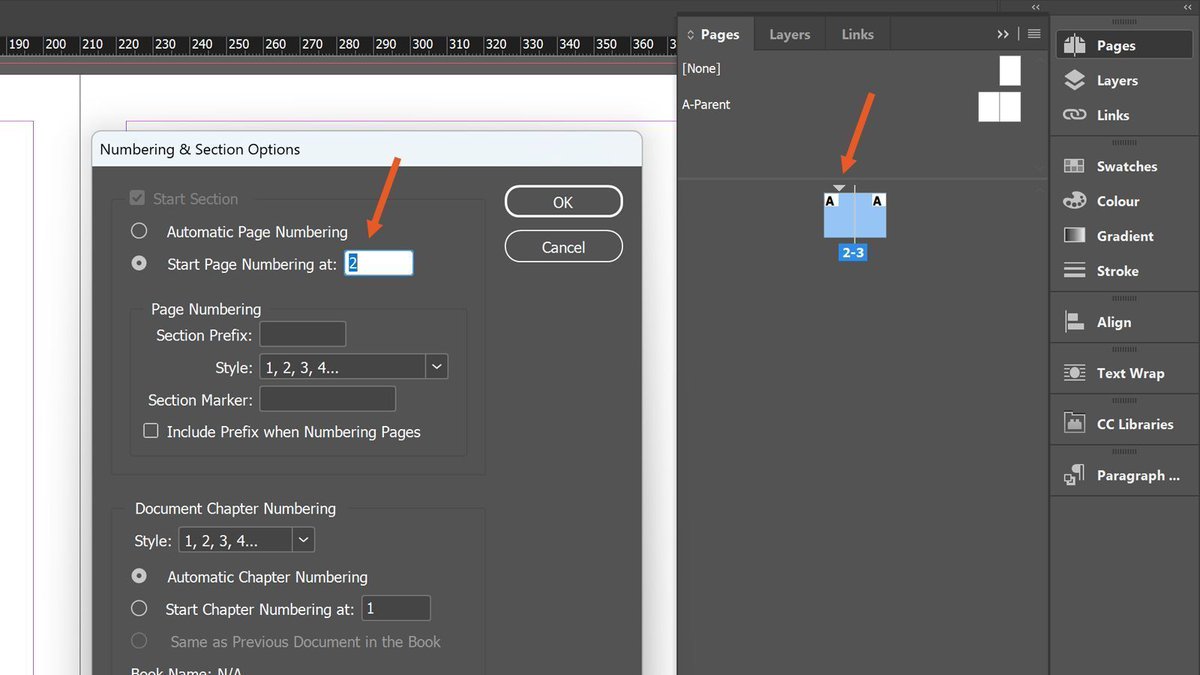
Want your InDesign document to start on a left page for a two-page spread? Simply double-click the small triangle above page 1 in the Pages panel & set "start page numbering at" to 2. Job done. #InDesign
Ready to master Adobe Creative Cloud? Whether you're a beginner or looking to refine your skills, our expert-led courses will get you up to speed in no time! With over 30 years of experience teaching Adobe tools to some of the world's leading companies, we’re here to help you.
Learn how to use Adobe Photoshop from an expert instructor with over 20 years experience. From core concepts to the latest ai tools, you'll learn best practice throughout.
If you are looking for something more advanced? Check out our Advanced Photoshop classes.
Have you ever wanted to replicate multiple copies of an item you've created in Illustrator?
Select the item, then from the "Object" menu select "Repeat" and just choose from the "Radial", "Grid" or "Mirror" options, depending on the recurring sequence you want to create.
Master Photoshop in just 2 days with our live online course, perfect for complete beginners!
Gain the essential skills you need to start creating with confidence. Sign up now!
https://t.co/FqoLQFHVaD









![HighlanderTrltd's tweet photo. The [Registration] swatch prints on all plates, great for printers marks but not for page content! To avoid using it by accident drag it to the bottom of the swatch list with no documents open, it’ll stay there now for all new documents going forward #InDesign https://t.co/HHlSWCG6mS](https://pbs.twimg.com/media/Gm-mkGDWUAAm7Za.jpg)