Day 1/30 of Inference Engineering
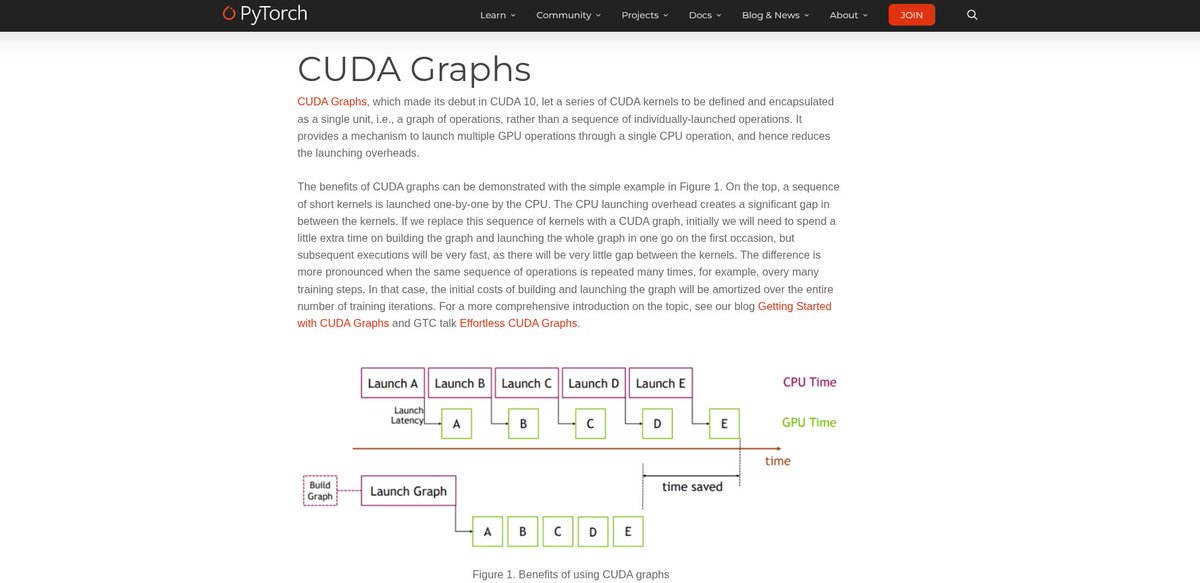
- starting with CUDA Graphs. i have used them and know the basics, but going back through the fundamentals properly once before getting into the deeper stuff and for me to explain it better when i record explanation videos
- reading NVIDIA’s intro to CUDA Graphs and PyTorch’s CUDA Graphs overview, both links shared below
- starting simple for day 1, the topics will get much better as the days go on and ill try to post a video explanation of topics i cover every few days
In a recent article, I wrote about using skills to encode judgement and understanding into agents.
I put together a set of skills that each focus on a different part of a product and help make it better.
/better-ui
/better-typography
/better-colors
More skills are coming soon.
npx skills add jakubkrehel/skills
Created a new skill Transition polish
The skill is focused on transition refinement by adjusting motion tokens instead of replacing the whole transition.
npx skills add Jakubantalik/transitions.dev -s transitions-polish
Or use it with Refine tool (visual layer for the skill)
npx transitions-refine live
introducing dither-kit
a library of gorgeous dithered charts built from the ground up,
no dependencies, they're built on top of a tiny <canvas> engine
install it today at https://t.co/VDuqFXY4jX
New skill: /improve-animations
Inspired by @shadcn’s improve skill I made one specifically for animations.
Use your most capable model to audit animations in your project and hand the execution to cheaper models.
Fable is available through July 12, so make good use out of it!
@jietang not neccessary a feature, but improve token efficiency is a must. Been using for a while and notice the API cost equivalent didn't change too much switching from claude to glm
Say hello to open source deep research for your favorite agent harness.
Our AI-Q agent skill packages the work of building a research pipeline into a portable skill. Drop it into your harness, and the agent delegates a research task to a local or hosted AI-Q server and gets back a detailed report with citations. See it in Codex below 👇
Here's a more functional demo of how I try to optimize my Omarchy setup using Quickshell.
This includes custom
- Navbar
- Omni menu
- Calendar
- Recent screenshots
- Weather
- Display settings
All out there on Github