Tim's Tip IT Tip:
You can right-click twice on a YouTube video to get a picture-in-picture option.
This will pop out the video into a mini window so you can continue watching it while you do other things 👍
Due to internal opportunities and promotion, a rare opportunity to join the team @HavelockAcademy as our next Academy IT Manager.
Great opportunity in Great Grimsby.
#opportunities#career#edtech https://t.co/JIRP2sQK5U
Our next voluntary Staff IT Workshops, available to all @DRETnews colleagues.
📅 Wednesday 19th January
💡 ' Microsoft Forms and Surveys '
💡 ‘ Microsoft Forms for Class Quizzing ‘
🎟 https://t.co/ctUuYUVP7V
#CPD#MicrosoftEDU
Tim's Top IT Tip:
Your mouse/trackpad doesn't actually 'click' until you release the button.
If you accidentally click on something, chances are you can move your cursor away and release the button without it 'clicking'.
Brilliant Strategy and CPD Day with all @ITTeamDRET today.
Absolute passion from all to keep rowing forward. New technologies, new ideas, constant drive to improve children outcomes.
⭐️ #TeamSpirit ⭐️
@dave_spice I don't suppose you've got the instructions for the Pi Weather Station for schools, do you? Found one that needs assembling and all the links I've found redirect me to the generic projects page
Tim's Top IT Tip:
To take a screenshot of the whole screen on a Chromebook press: CTRL + Show windows
To take a partial screenshot on a Chromebook press: CTRL + Shift + Show windows and drag to select
👍
Tim's Top IT Tip:
If you have a frequently used folder you can pin it to the Quick Access area at the top of each file explorer window.
Navigate to the folder then right-click on Quick Access. From there click Pin current Folder to Quick Access.
Tim's Top IT Tip:
To switch between text fields (username, password, name, address, etc) press Tab (above Caps Lock) to cycle down the fields and Shift + Tab to cycle up the fields.
Username -> Tab -> Password -> Enter
You don't even need the mouse.
Tims Top IT Tip:
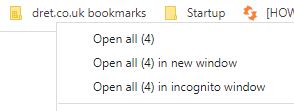
In Google Chrome you can create a folder of bookmarks. Right clicking on the folder will allow you to open all of the bookmarks inside with one click. Great for sites you use all the time or groups of sites: