Grok summarize the thread into this list
Nix: Package manager for creating reproducible environments and dependencies.
Emacs: Extensible text editor with powerful customization for coding and more.
Ghostty: GPU-accelerated terminal emulator focused on speed and modern features.
Dia: Open-source diagram creation program for flowcharts and visuals.
1Password: Secure password manager for storing and autofilling credentials.
Dropbox: Cloud storage service for file synchronization and sharing across devices.
Raycast: Productivity launcher that replaces Spotlight with quick commands and integrations.
Oh My Zsh: Framework for managing Zsh shell configurations with themes and plugins.
Things 3: Elegant task management app for organizing to-dos and projects.
Windsurf: AI-native integrated development environment (IDE) for optimizing coding workflows.
iA Writer: Minimalist writing app emphasizing focus and markdown support.
Maccy: Lightweight clipboard manager for easy access to copy history.
Aerospace: Tiling window manager inspired by i3, for efficient screen organization on macOS.
SketchyBar: Highly customizable status bar replacement for macOS menu bar.
Better Display: App for managing multiple displays, including virtual monitors and resolutions.
Sublime Text: Sophisticated text editor for code, with fast performance and plugins.
Warp: Modern, Rust-based terminal with built-in AI and collaboration features.
Homebrew (Brew): Package manager for installing software on macOS via the command line.
eza: Modern, colorful replacement for the ‘ls’ command in terminals.
fd: Fast, user-friendly alternative to the ‘find’ command for searching files.
z: Tool for quickly navigating to frequently visited directories.
Node.js: JavaScript runtime environment for building server-side applications.
npx: Utility for executing Node.js packages without global installation.
uv: Fast Python package installer and dependency resolver.
LM Studio: Application for running large language models locally on your machine.
GPT-OSS-20B: Open-source 20B parameter language model for use in tools like LM Studio.
Claude Code: AI coding assistant from Anthropic for mapping codebases and accelerating development.
The Biggest Career Mistake People Make in Their 20s & 30s is this.
When you start working and earning, it’s easy to get carried away.
Your goal is to make more money as fast as possible.
So, you jump at every salary increase, change jobs every few months, and chase titles that sound nice.
Before you know it, 5–10 years have passed, and you’re still struggling to level up.
I’ve seen it happen too many times.
The common mistake among these set of people is focusing on quick wins instead of long-term growth.
If you want to actually build a solid career, here’s what you should do instead:
1. Stop Chasing Money Blindly
It’s tempting to move anywhere that pays you more, but think long-term.
Will this role teach you something valuable?
Will it give you skills that make you more marketable?
Or are you just collecting salaries with no real progress?
A 50K salary increase today won’t matter if you stay at the same level for years.
2. Your Network is More Important Than Your CV
In many countries, you can be the best at what you do, but if the right people don’t know you, you’ll struggle.
Build real relationships in your industry.
Be active on LinkedIn. talk about your work.
Connect with mentors and people ahead of you.
The biggest opportunities don’t always come from job applications. They come from conversations.
3. Stay Long Enough to Grow
Jumping from job to job every 6 months makes your CV look unserious.
If a job is bad, leave. But if it’s helping you grow, stay long enough to maximize it.
Mastery takes time. Don’t expect to blow in one year.
The best roles go to people who have shown consistency and depth.
4. Learn How to Sell Yourself
It’s not enough to be good at your job, people need to know.
Speak up in meetings. Be loud
Keep track of your wins and achievements.
Learn how to confidently talk about what you do.
The most visible people often get the best opportunities, even when they’re not the smartest.
5. Salary Alone Won’t Make You Wealthy
No matter how much you earn, if salary is your only source of income, you’ll always be at risk.
Learn about investments, real estate, stocks, even side businesses.
Find ways to make money outside your 9-5.
Don’t wait until you’re desperate to start thinking about financial security.
Your boss can wake up tomorrow and change your life with one decision. Don’t let that be your reality.
Your 20s and 30s set the foundation for the rest of your life.
Don’t just chase money, chase growth. The money will follow.
One day, you’ll look back and be grateful you played the long game.
Interesting:
Meta created React Native. It’s used (with components at least) in their flagship apps: Facebook (iOS, Android), Instagram (Meta Quest), Messenger (desktop).
Google created Flutter. And yet none of their flagship apps use it (Gmail, YouTube, Maps, Calendar).
If you have money, rules can be flexible for you.
If you have power, rules will serve you.
However, if you have neither money nor power, the rules are made to bind you and bend you
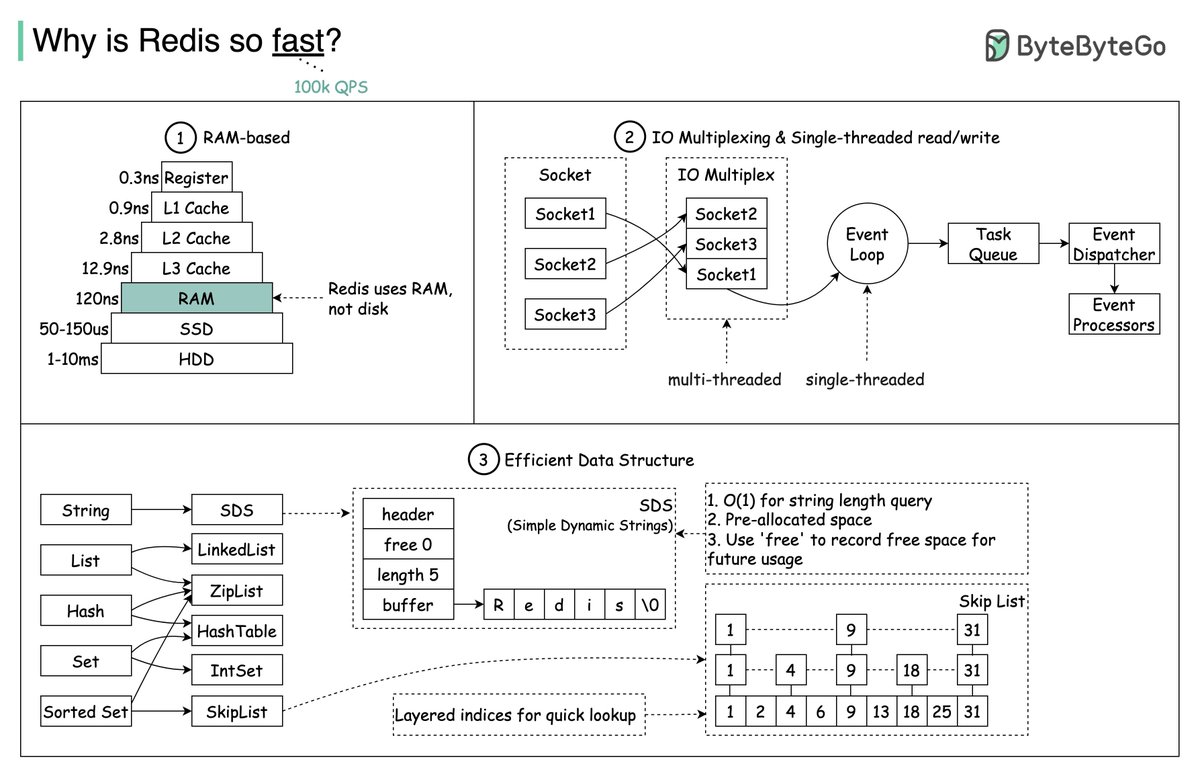
Why is Redis Fast?
Redis is fast for in-memory data storage. Its speed has made it popular for caching, session storage, and real-time analytics. But what gives Redis its blazing speed? Let's explore:
𝗥𝗔𝗠-𝗕𝗮𝘀𝗲𝗱 𝗦𝘁𝗼𝗿𝗮𝗴𝗲
At its core, Redis primarily uses main memory for storing data. Accessing data from RAM is orders of magnitude faster than from disk. This is a major reason for Redis's speed.
However, RAM is volatile. To persist data, Redis supports disk snapshots and append-only file logging. This combines RAM's performance with disk's permanence.
There is a tradeoff though - recovery from disk is slow. If a Redis instance fails, restarting from disk can be slow compared to failing over to a replica instance fully in memory. So while Redis offers durability via disk, it comes at the cost of slower recovery.
A better solution is Redis replication. With a synchronized replica kept in memory, failover is instant with no rehydration. This maintains speed and near-instant recovery.
𝗜𝗢 𝗠𝘂𝗹𝘁𝗶𝗽𝗹𝗲𝘅𝗶𝗻𝗴 & 𝗦𝗶𝗻𝗴𝗹𝗲-𝘁𝗵𝗿𝗲𝗮𝗱𝗲𝗱 𝗥𝗲𝗮𝗱/𝗪𝗿𝗶𝘁𝗲
Redis uses an event-driven, single-threaded model for its core operations. A main event loop handles all client requests and data operations sequentially. This single-threaded execution avoids context switching and synchronization overhead typical of multi-threaded systems.
Redis uses non-blocking I/O to handle multiple connections asynchronously. This allows it to support many client connections with very low overhead,
Redis does leverage threading in certain areas:
- Background tasks like taking snapshots.
- I/O threads are used for certain operations.
- Modules can use threads.
- Since Redis 6.0, it supports multi-threaded I/O for network communication, improving performance on multi-core systems.
Redis also uses pipelining for high throughput. Clients pipeline commands without waiting for each response. This allows more efficient network round trips, boosting overall performance.
𝗘𝗳𝗳𝗶𝗰𝗶𝗲𝗻𝘁 𝗗𝗮𝘁𝗮 𝗦𝘁𝗿𝘂𝗰𝘁𝘂𝗿𝗲𝘀
Redis supports various optimized data structures, from linked lists, zip lists, and skip lists to sets, hashes, and sorted sets, among others. Each is carefully designed for specific use cases for quick and efficient data access.
Over to you: With Redis now supporting some multi-threading, how should we configure it to fully utilize all the CPU cores of modern hardware when deploying in production?
–
Subscribe to our weekly newsletter to get a Free System Design PDF (158 pages): https://t.co/kNfv0DV5nH
Nobody likes making 20 calls to render a page.
3 Aggregation Patterns your consumers will love.
1. Central Aggregating Gateway
It is middleware between user interfaces and microservices, performing call filtering and aggregation.
Reduces many calls from the UI by consolidating them into a single call to the gateway.
Pros
- Simplifies client-side logic by reducing the number of API calls.
- A centralized place for common things like authentication and rate limiting.
Cons
- It can become a bottleneck if many teams need to make changes.
- Requires significant coordination between teams, slowing down development.
- Risks becoming a single point of failure or bottleneck.
2. Backend for Frontend (BFF)
Provides a dedicated backend for each frontend, tailored to the specific needs of that frontend.
It separates the concerns of different UIs (e.g., mobile and desktop), each with its own BFF.
It solves the bottleneck issues in the previous pattern by decentralizing the aggregation logic.
Pros
- Reduce unnecessary data fetching and optimize performance.
- It is easier to manage and evolve; the same team can maintain the UI and the BFF.
- Reduces the need for cross-team coordination.
Cons
- Increases duplication across BFFs.
- It can lead to maintenance overhead if the number of BFFs grows.
3. GraphQL
A query language for APIs that allows clients to request only the data they need.
It reduces over-fetching and under-fetching issues by enabling precise data queries.
Offers flexibility to clients to adjust their queries without needing backend changes.
Pros
- Reduces the number of API calls and the volume of data transferred, as clients fetch only what they need.
- Flexibility in query construction without requiring backend changes.
-It can serve as an effective aggregating layer like a BFF but with more flexibility.
Cons
- It's complex and requires a serious investment.
- Potential for complex query structures leading to performance issues.
- If you don't design it right, it might become a bottleneck like a central aggregating gateway.
Have you used one of these? Share your thoughts!
End-to-end encryption explained:
End-to-end encryption (E2EE) protects your messages and files from being accessed and manipulated by anyone other than the intended recipients.
How it works:
1) Keys generated
Each account in an E2EE-enabled app has two keys: a public key that can be shared with anyone, and a private key that must be kept secret. Although these keys are mathematically related, it's practically impossible to determine the private key from the public key.
2) Public key exchange
When two people begin a conversation, they exchange their public keys. Since public keys don't have to be kept secret, this exchange can occur through any communication channel.
3) Encryption
When a user wants to send a message, it is protected using both symmetric and asymmetric encryption. In asymmetric encryption, the public key is used for encryption, and the private key for decryption. Symmetric encryption uses a single session key for both encryption and decryption. In E2EE, the sender generates a unique session key and encrypts the data with it. Then, they encrypt the session key itself with the recipient's public key.
4) Data transmission
The encrypted message and the encrypted session key are then sent over the internet. Encryption ensures that only the sender and receiver can read the data, even if someone intercepts it during transmission.
5) Decryption
When an encrypted message is received, the receiver uses their private key to decrypt the session key, which is then used to decrypt the message.
End-to-end encryption is only as powerful as the cryptographic algorithms used and how well they are implemented. When done right, E2EE significantly enhances the security of digital communications, protecting them from eavesdropping and tampering.
~~
A big thank you to our partner Postman who keeps our content free to the community.
A whole bunch of awesome new features just got released in the new Postman v11 update. Check it out: https://t.co/zejco4eNC7
📩 If you found this helpful, I write an email every Thursday to help you level up your engineering and system design skills. Sign up here: https://t.co/T4o0O5mWsA
Explaining 8 Popular Network Protocols in 1 Diagram.
Network protocols are standard methods of transferring data between two computers in a network.
1. HTTP (HyperText Transfer Protocol)
HTTP is a protocol for fetching resources such as HTML documents. It is the foundation of any data exchange on the Web and it is a client-server protocol.
2. HTTP/3
HTTP/3 is the next major revision of the HTTP. It runs on QUIC, a new transport protocol designed for mobile-heavy internet usage. It relies on UDP instead of TCP, which enables faster web page responsiveness. VR applications demand more bandwidth to render intricate details of a virtual scene and will likely benefit from migrating to HTTP/3 powered by QUIC.
3. HTTPS (HyperText Transfer Protocol Secure)
HTTPS extends HTTP and uses encryption for secure communications.
4. WebSocket
WebSocket is a protocol that provides full-duplex communications over TCP. Clients establish WebSockets to receive real-time updates from the back-end services. Unlike REST, which always “pulls” data, WebSocket enables data to be “pushed”. Applications, like online gaming, stock trading, and messaging apps leverage WebSocket for real-time communication.
5. TCP (Transmission Control Protocol)
TCP is is designed to send packets across the internet and ensure the successful delivery of data and messages over networks. Many application-layer protocols build on top of TCP.
6. UDP (User Datagram Protocol)
UDP sends packets directly to a target computer, without establishing a connection first. UDP is commonly used in time-sensitive communications where occasionally dropping packets is better than waiting. Voice and video traffic are often sent using this protocol.
7. SMTP (Simple Mail Transfer Protocol)
SMTP is a standard protocol to transfer electronic mail from one user to another.
8. FTP (File Transfer Protocol)
FTP is used to transfer computer files between client and server. It has separate connections for the control channel and data channel.
--
Subscribe to our weekly newsletter to get a Free System Design PDF (158 pages): https://t.co/FIzCeaWsZV
If you want to become a better software engineer, read these famous posts from top companies (OpenAI, Airbnb, Stripe, Figma, Netflix, Meta)
I spent hours curating top posts so you don't have to:
Common Node.js interview questions (grouped by beginner, intermediate, advanced and expert level)
Beginner Level:
What is Node.js?
What is npm?
Explain the basic principles of Node.js.
How does Node.js handle asynchronous operations?
What is the role of the package.json file in a Node.js project?
Intermediate Level:
Describe the event-driven architecture of Node.js.
What are callbacks in Node.js? How do they work?
What is the purpose of the module.exports object?
Explain the difference between process.nextTick() and setImmediate() in Node.js.
How can you handle errors in Node.js?
Advanced Level:
What is the role of the Express.js framework in Node.js development?
Describe the purpose and use of middleware in Express.js.
Explain the concept of streams in Node.js.
What is clustering in Node.js, and how does it work?
How can you improve the performance of a Node.js application?
Expert Level:
Discuss the use of Promises in Node.js. How are they different from callbacks?
Explain the concept of the event loop in Node.js.
Discuss the role of the V8 engine in Node.js.
How does garbage collection work in Node.js?
Can you explain the concept of microservices and how Node.js can be used in a microservices architecture?