🚨BREAKING NEWS: Claude has dropped a new feature called Council.
It turns Claude into something like 5 AI advisors debating among themselves before giving you a single final answer.
Here's how to set it up, along with 5 prompts you can try👇
GOODBYE POWERPOINT.
Claude 4.7 can create a complete presentation in 60 seconds.
Use these 6 prompts and watch the magic happen.
📌 Save this — it’ll come in handy later.
You're using AGI level Claude on default settings.
That's like driving a Ferrari like a golf cart:
Setting 1: Model
Pick the Opus 4.8 model (the best model right now).
You only access it with a $20/month plan.
Setting 2: Effort
Same box. Set Effort to High (for complex tasks).
Claude reasons before it answers instead of blurting the first thing. Single biggest quality jump.
Setting 3: Tools
Hit the "+" in the chat box.
Turn on Web search. Turn on Research for .
Without it Claude guesses from memory.
With it, it checks live sources before answering.
Setting 4: Connectors
Settings > Connectors.
Link Gmail, Slack, Drive, Notion.
Claude now reads your actual workspace.
Tip: turn them on per-chat. Saves tokens.
Setting 5: Skills
Settings > Skills.
Type /skill-creator. Teach Claude how YOU work.
Build your process once, and Claude runs it on its own every time after. Like training an employee.
Setting 6: Projects
Go to claude .ai > Projects > Create one.
Upload your files & add instructions.
Every chat inside the project remembers your context, so you set it up.
Setting 7: Workspace mode
Top of the app: Chat / Cowork / Code.
Chat answers you. Cowork builds files on computer.
The real PDF. The real spreadsheet. In your folder.
Setting 8: Instructions
Settings > Global instructions.
No more repeating "keep it short" in every chat.
Set the rules once, they stick forever.
Setting 9: Memory
Settings > turn on "Search and reference chats."
Claude remembers what you told it last week.
No more re-explaining yourself every morning.
Honest take:
You don't need all 9 on day one.
Model + Thinking + Tools gets you 80% there.
Where Claude falls short:
No image generation. Use ChatGPT.
Not the best at real-time search. Use Grok.
Not the best at everything. No tool is.
But for writing, thinking, analyzing, working with your files? Nothing's close.
Set up all 9. It takes a day.
Then you'll understand why everyone switched.
To download my (personally created) Claude skills:
1. Go to https://t.co/psB7XxAv8w.
2. Subscribe for free. Don't pay anything.
3. Open my welcome email (most skip this).
4. Hit the automatic reply button inside.
5. Click on Notion link. Go to 'Claude Cowork' folder.
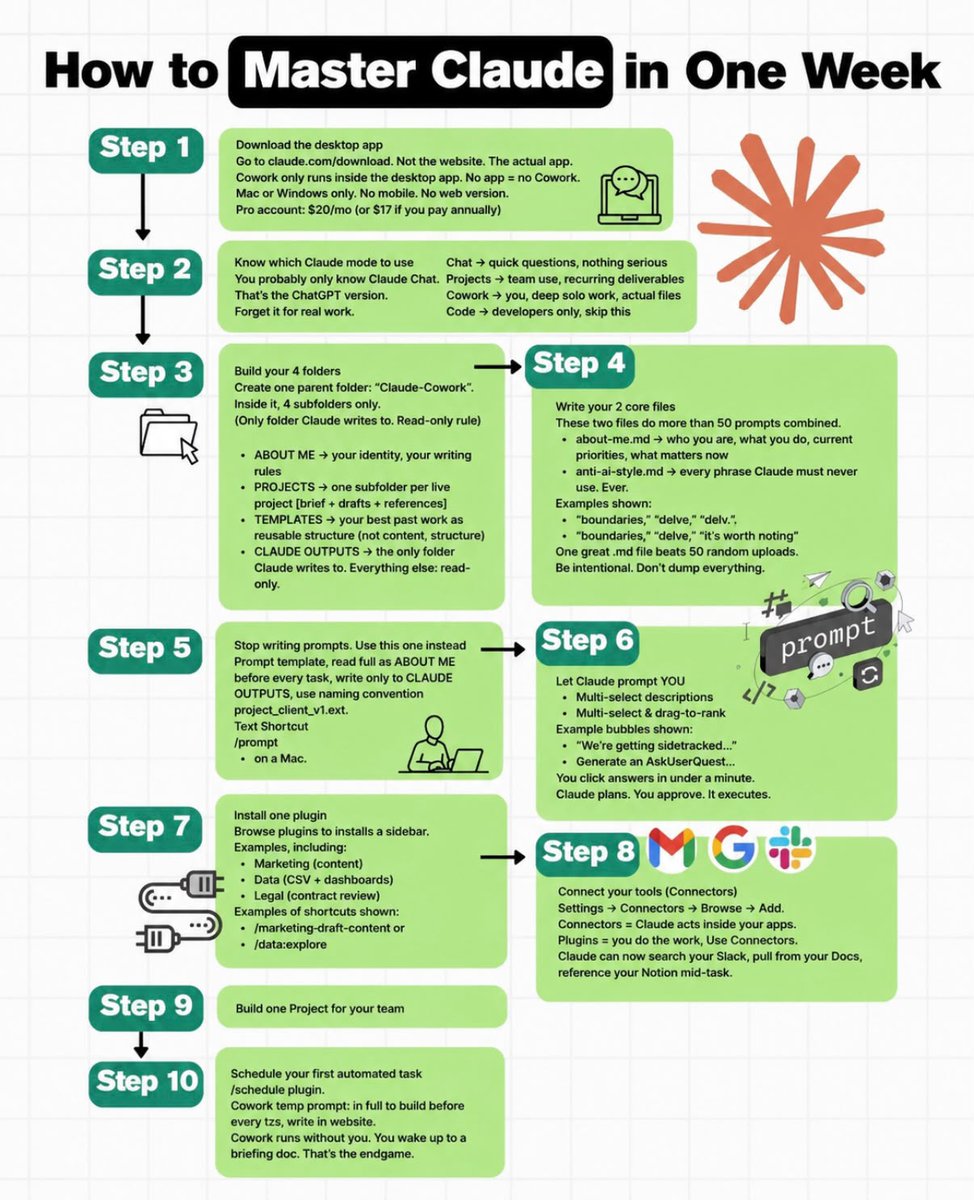
How to master Claude in just 5 days(and save yourself hours every week)
☀️ DAY 1: Train Claude about you
☀️ DAY 2: Create your first workspace
☀️ DAY 3: Set up a reusable Skill
☀️ DAY 4: Link your everyday apps
☀️ DAY 5: Automate recurring work
Small setup.
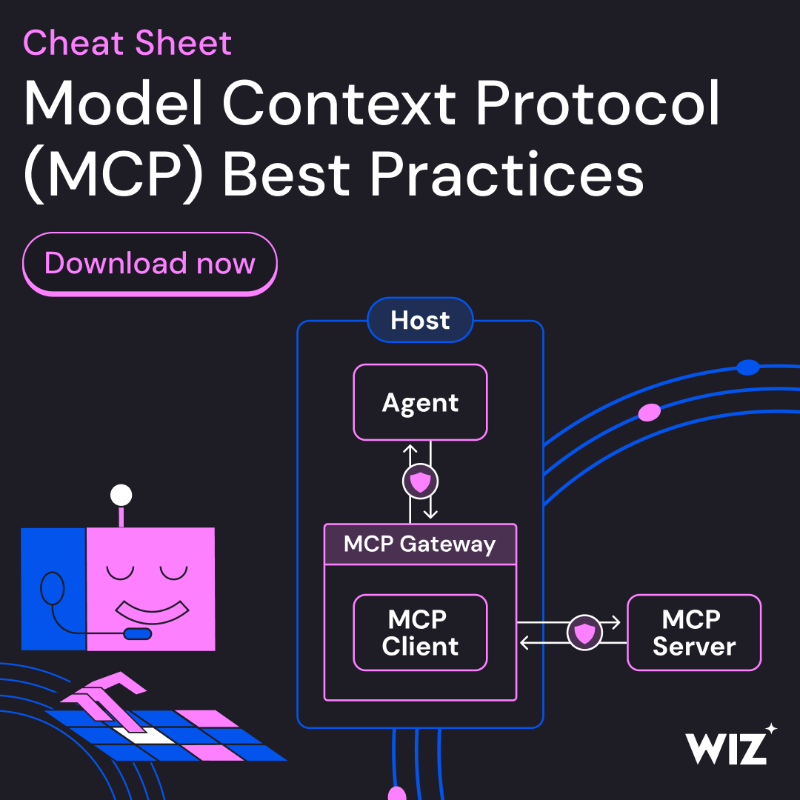
As MCP adoption grows, teams are moving quickly to secure how LLMs connect to tools and data. We put together 7 best practices to help you:
- Lock down supply chains
- Enforce least privilege
- Add human oversight
AI is not the future anymore. It’s the skill gap of today. 🤖
The problem?
Most people want to learn AI… but don’t know where to start.
Good news:
Some of the world’s top universities and companies are offering free AI courses.
No expensive degree.
No complicated setup.
Just curiosity and internet.
Here are 10 Free AI Courses you can start today:
1️⃣ Harvard – Introduction to AI with Python
https://t.co/4OjvEyjUad
2️⃣ Microsoft – AI for Beginners
https://t.co/Iej7bWhLuZ
3️⃣ Google – Introduction to Generative AI
https://t.co/WiTAKsn6I4
4️⃣ https://t.co/G9hD795fvr – Generative AI for Everyone
https://t.co/ojf99oshlh
5️⃣ LinkedIn – Generative AI Courses
https://t.co/DW60knA15t
6️⃣ Vanderbilt – Prompt Engineering for ChatGPT
https://t.co/k8kyXmkJlt
7️⃣ OpenAI – ChatGPT Prompt Engineering for Developers
https://t.co/UvtHTQ4XTf
8️⃣ edX – AI Applications and Prompt Engineering
https://t.co/6yILcMT6Cf
9️⃣ AWS – Foundations of Prompt Engineering
https://t.co/HhGVEMOnLG
🔟 UC Davis – Big Data, AI, and Ethics
https://t.co/fZNDnwX17r
Whether you're a student, founder, HR professional, or working professional, understanding AI is becoming a career superpower.
Save this post. Start one course this week. Your future self will thank you.
❤️ Like
🔁 Retweet
🔖 Bookmark
Follow @MeenakshiYACS for more such posts
Which one will you start first? 👇
#AI #ArtificialIntelligence #GenerativeAI #CareerGrowth #Upskilling
MCP is becoming the default “socket” between AI agents and everything else.
When someone says “build an MCP server,” they’re often talking about one of seven very different roles.
Here’s what they are, when to use them, and how to start:
Tool Lean‑in (One‑to‑One Transport)
- Wrap a single service (GitHub, Slack, Stripe) into one MCP server, with each API endpoint as a clean tool.
- Use this when you want the agent to hold a well‑defined handle on one system.
- How to do it: expose each endpoint as a tool def; keep stateless and versioned.
Context Provider (Resource‑First)
- Turn data into MCP resources, not tools. Agents read context instead of taking actions.
- Use when models need to pull files, docs, or DB rows into context on demand.
- How to do it: expose data as resources with clear scopes; keep mutations out.
Gateway Connector (Multi‑Service Hub)
- Build one MCP server that fronts many internal APIs. It consolidates auth, rate‑limiting, and observability.
- Use when you have a dozen services and don’t want every agent talking to a dozen endpoints.
- How to do it: route, log, and enforce policies in one place.
Stateful Session Manager
- Design a server that holds live state across calls: browser sessions, DB transactions, file handles.
- Use when agents need continuity (browser automation, long‑running workflows).
- How to do it: attach state to session IDs; enforce expiry and cleanup.
Sandboxed Executor
- Create an isolated environment where code, shell commands, or filesystem ops run safely.
- Use when agents execute untrusted workloads (code interpreters, ephemeral containers).
- How to do it: run in isolated containers; enforce strict boundaries.
Workflow Packager (Runbook‑as‑a‑Tool)
- Wrap multi‑step workflows into single tools. The server orchestrates; the agent just calls.
- Use when steps are predictable and you don’t want to burn tokens on reinventing logic.
- How to do it: encode runbooks behind one tool; keep the agent simple.
Delegated Reasoner (Agent‑Inside‑Agent)
- Make the MCP server itself an agent. The main model calls a specialized sub‑agent for a scoped task.
- Use for deep research, code review, or complex analysis.
- How to do it: design clean input–output contracts; isolate context.
If you’re planning your first MCP server: start with Tool Lean‑in, add a Context Provider, and design a Gateway Connector before you scale.
👇 comment What’s the first MCP pattern you’re building?
💾 save it
♻️ share to your team.
Google AI tools you’re probably not using… 😳
Most people have no idea how powerful Google’s AI ecosystem really is.
From writing content → automating workflows → even building apps…
It’s all sitting there. And yes — most of it is FREE 🤯
You don’t need expensive tools.
You just need the right stack.
Once you see it, you can’t unsee it.
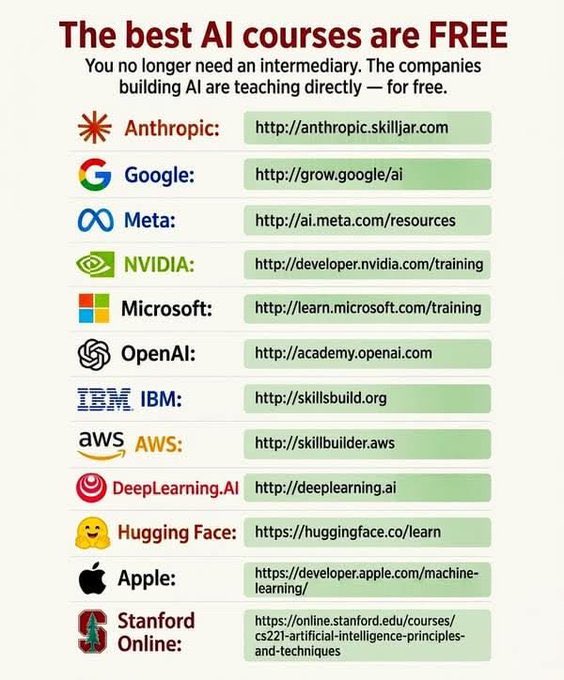
Stop paying for AI courses.
Here you can find any AI courses for free.
It's like learning directly from those who built the world's best AI models: (bookmark)
1. Anthropic → https://t.co/STclyO7IKe
2. OpenAI → https://t.co/mdX98EFCCX
3. Google → https://t.co/yky3A82VQn
4. Google Cloud → https://t.co/8hxiBXV5BY
5. Microsoft → https://t.co/tX42V9Z1Wj
6. IBM → https://t.co/IWhLABDQ29
7. AWS → https://t.co/ch5GGYIPTd
8. Meta AI → https://t.co/roFr0yO5tc
9. NVIDIA → https://t.co/fJMKmNdLcu
10. DeepLearning AI → https://t.co/IVNfq4gk5p
11. Hugging Face → https://t.co/QGQIL47N2k
12. Stanford Online → https://t.co/WoA9acUu1o
13. MIT OpenCourseWare → https://t.co/KAe2fDoO7n
14. Harvard CS50 AI → https://t.co/oAxOoGyDvT
15. Fast ai → https://t.co/aoF9pvqWOl
16. Kaggle Learn → https://t.co/aLYf2JEUBT
17. MongoDB AI Academy → https://t.co/aAyyttVaSd
18. Databricks Academy → https://t.co/7PqR41PXJN
19. Snowflake University → https://t.co/01EwlDa3P8
20. Redis University → https://t.co/Lhjgt9zKTv
This is worth thousands of dollars in AI education.
BREAKING: AI can now build dividend portfolios targeting long-term passive income — without expensive advisors.
These 12 Perplexity prompts help uncover strong dividend stocks.
Save this thread. 📌
Follow: @NirbhayS0