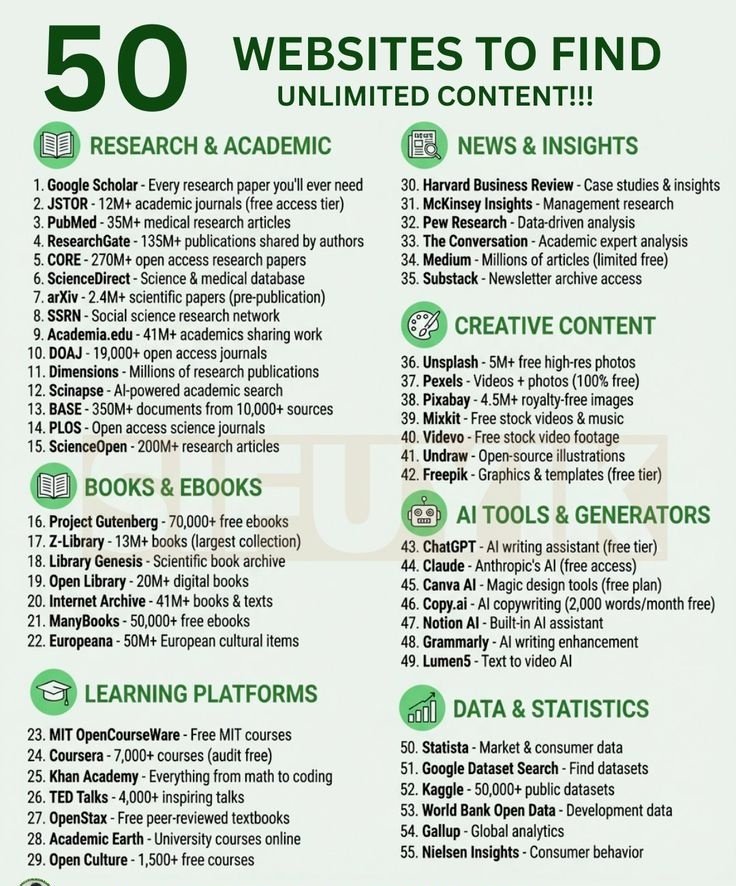
9 Free AI Courses You Can Take Online
• AI for Everyone
https://t.co/a6tVFLCWDH
• Introduction to Generative AI (Google Cloud)
https://t.co/xuHNtNAwow
• Prompt Engineering (Vanderbilt University)
https://t.co/vXCweZ53pG
• Google AI Essentials
https://t.co/eXbJU46AH0
• IBM AI Foundations
https://t.co/uSpx2vFc4E
• Generative AI for Everyone
https://t.co/oGCVeCI9RT
• CS50's Introduction to AI with Python (Harvard)
https://t.co/wpqd5zExej
• Artificial Intelligence (MIT OpenCourseWare)
https://t.co/tk9pfzE7Qt
• Career Essentials in Generative AI (Microsoft & LinkedIn)
https://t.co/LO95A3qNjP
📌 Save this post and share it with someone who wants to learn AI for free.
🚨Stop wasting hours figuring out Claude on your own.
Most people open Claude...
Ask a few random prompts...
Get average answers...
Then conclude:
> "Claude isn't that good."
The truth?
They never learned how to use it.
Here's a FREE Claude Learning Library with 17 resources that can take you from beginner to power user.
👇
1. Claude 101
https://t.co/RWcj4yrAfH
2. Claude Code
https://t.co/QZBlShwzgB
3. Claude Skills
https://t.co/ORi2sf8buq
4. Claude Design
https://t.co/m8cNIxmASS
5. Claude for Excel
https://t.co/yntV2KPPBF
6. How to Prompt
https://t.co/udxfGYhJbR
7. Claude + LinkedIn
https://t.co/ph9BFI31kg
8. Be Good at Claude
https://t.co/DkkMUqONb4
9. Stop Writing Like AI
https://t.co/dcMdhVHYOL
10. Claude Certificates
https://t.co/7IkNRDEA1U
11. Claude for Your Team
https://t.co/1g2ZB15t8T
12. Claude Connectors
https://t.co/vOqX1YyPLg
13. Set Up Claude Cowork
https://t.co/gH1dHI1qAZ
14. Stop Prompting Claude
https://t.co/gH1dHI1qAZ
15. Make Claude Sound Like You
https://t.co/7IkNRDEA1U
16. Stop Hitting Claude Limits
https://t.co/m5Awf6s0kY
17. Stop Using Claude at Work
https://t.co/FINuGtr8fp
The AI gap is getting bigger every month.
People who know how to use AI will replace people who don't.
Not because AI is smarter.
Because they know how to work smarter.
📌 Bookmark this.
You'll keep coming back to it.
♻️ Repost to help someone master Claude for free before everyone else.
Ex-Google engineer just dropped 1-hour course: loops, self-improving AI, memory systems - from scratch:
00:00 - the self-building agent
03:01 - soul.md runs everything
30:16 - RAG memory: pull 20 messages, not 2,000
31:48 - the loop that knows when to stop
35:14 - find the bug, fix the prompt
50:22 - how Claude compresses your memory
1 hour of his guide beats any paid agent course
watch & bookmark - then read Karpathy's loop method below
Skip transformer math to build AI agents in 2026.
You just need these 6 (+1) core architectural pillars.
𝟭. 𝗠𝗼𝗱𝗲𝗹 𝗖𝗼𝗻𝘁𝗲𝘅𝘁 𝗣𝗿𝗼𝘁𝗼𝗰𝗼𝗹 (𝗠𝗖𝗣)
Think "USB-C for AI." One universal standard that lets any agent plug into external tools and data — instead of hand-building an integration for every tool. Anthropic introduced it; the industry adopted it fast.
𝟮. 𝗔𝗴𝗲𝗻𝘁 𝗟𝗼𝗼𝗽𝘀
The engine behind every agent. A cycle of: perceive → think → act → observe → repeat. The agent keeps looping until the task is done, or it decides it's stuck. No loop, no autonomy.
𝟯. 𝗦𝗸𝗶𝗹𝗹𝘀
The agent's job description. MCP handles the connection and tools expose the API, a Skill is the higher-level logic that orchestrates them into a finished outcome.
𝟰. 𝗦𝗶𝗻𝗴𝗹𝗲 𝘃𝘀 𝗠𝘂𝗹𝘁𝗶-𝗔𝗴𝗲𝗻𝘁 𝗔𝗿𝗰����𝗶𝘁𝗲𝗰𝘁𝘂𝗿𝗲
Two ends of one spectrum. Single-agent: one LLM runs the whole pipeline. Multi-agent: specialized agents split the work, one retrieves, one validates, one writes, trading simplicity for scale.
𝟱. 𝗔𝗴𝗲𝗻𝘁𝗶𝗰 𝗥𝗔𝗚
RAG with a brain. The agent can route queries to specialized knowledge sources, validate retrieved context, and make dynamic decisions about what information to use.
𝟲. 𝗔𝗴𝗲𝗻𝘁 𝗠𝗲𝗺𝗼𝗿𝘆
Short-term lives in the context window; long-term is pulled on demand from external stores (knowledge bases or vector databases). It's what keeps agents coherent across interactions, and lets them learn from past ones.
𝟳. 𝗛𝘂𝗺𝗮𝗻-𝗶𝗻-𝘁𝗵𝗲-𝗟𝗼𝗼𝗽 (𝗛𝗜𝗧𝗟)
The ultimate guardrail. Autonomous loops are powerful, but pure autonomy is dangerous for high-stakes tasks. HITL inserts human checkpoints for approval or correction before critical actions run.
Which term would you add? 🤔
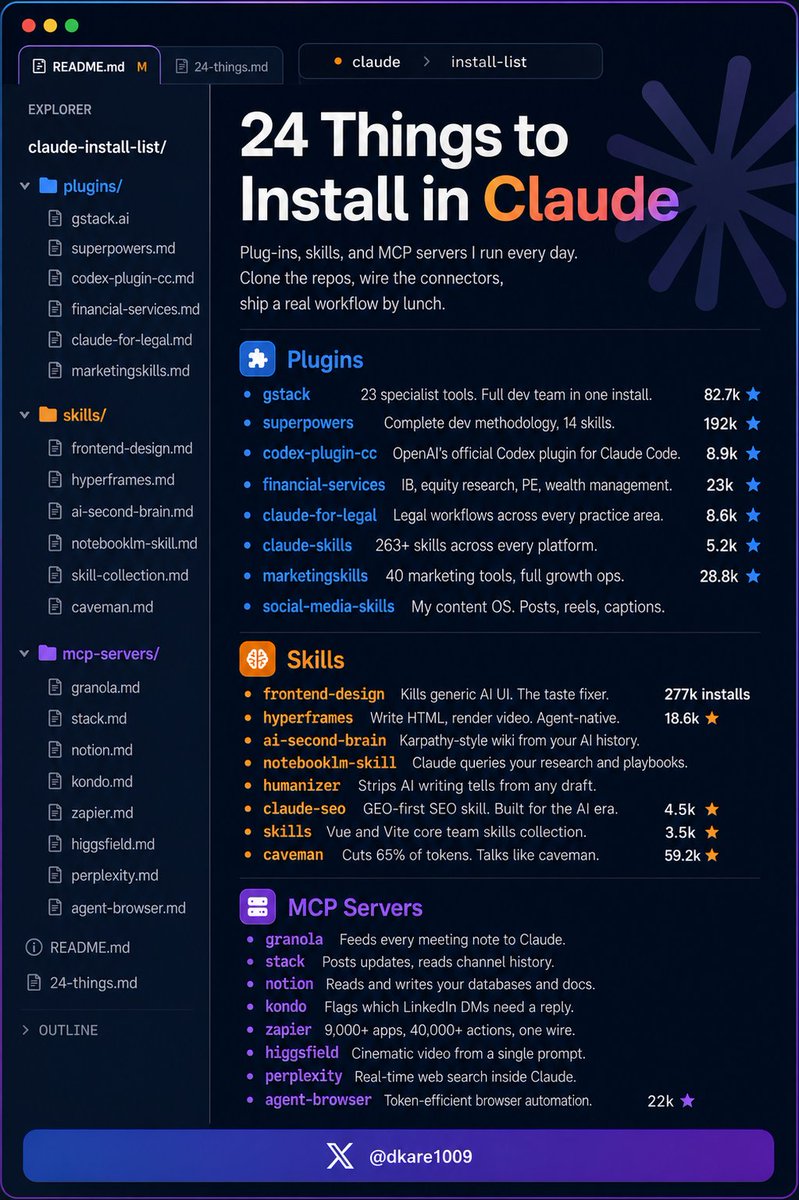
You install Claude Code and stop there.
Here are 24 things (actually) worth adding:
If you're totally new to Claude Code:
Start here: https://t.co/anqXrH7023
Then read: https://t.co/rLIC8yh90e
Plug-Ins (bundled tools, agents, and commands)
gstack — 23 specialist dev tools in one install
Install → https://t.co/vuqqtNf2tr (82.7k★)
superpowers — complete dev methodology, 14 skills
Install → https://t.co/x2Jz14cYY8 (192k★)
codex-plugin-cc — OpenAI's official Codex plugin
Install → https://t.co/iCSxJ0glm5 (8.9k★)
financial-services — IB, PE, equity, wealth
Install → https://t.co/jPb9r63pMN (23k★)
claude-for-legal — legal workflows, every practice area
Install → https://t.co/bCzJdc8WzM (6.6k★)
claude-skills — 263+ skills across every platform
Install → https://t.co/62p22Wd18G (5.2k★)
marketingskills — 40 marketing tools, full growth ops
Install → https://t.co/FPY9dXG929 (28.8k★)
social-media-skills — my content OS. Posts, reels
Install → https://t.co/DOc68CfxJa
Skills (specialist instruction Claude loads on demand)
frontend-design — kills generic AI UI
Install → https://t.co/fRegzmoq96 (277k installs)
hyperframes — write HTML, render video, agent-native
Install → https://t.co/tvY90QlFJL (18.6k★)
ai-second-brain — Karpathy-style wiki, AI history
Install → https://t.co/mebUAilN9u
notebooklm-skill — Claude queries your research
Install → https://t.co/sAxeEGpzyy
humanizer — strips AI writing tells from any draft
Install → https://t.co/zadJrx1BVe (2.9k★)
claude-seo — GEO-first SEO skill, built for the AI era
Install → https://t.co/8mhcDiM7uq (4.5k★)
antfu-skills — Vue and Vite core team skills
Install → https://t.co/mmdjG21aJ5 (3.5k★)
caveman — cuts 65% of tokens, talks like caveman
Install → https://t.co/WruteJgNW4 (59.2k★)
MCP Servers (live connections to your apps)
granola — meeting notes fed to Claude
Install → https://t.co/P6nWgUShBA
slack — reads channels, posts updates
Install → https://t.co/USdCGuACdH
notion — reads and writes your docs
Install → https://t.co/4z1XL34D3c
kondo — triages your LinkedIn DMs
Install → https://t.co/CjPiBbvdmX
zapier — 9,000+ apps, one connection
Install → https://t.co/pyxD0brsoi
higgsfield — cinematic video from a prompt
Install → https://t.co/X0y90vVW4B
perplexity — live web search for Claude
Install → https://t.co/hpDE0w2rR0
agent-browser — browser automation, fewer tokens
Install → https://t.co/AKqEWoENFX (22k★)
Save this. Come back when you set up Claude Code properly.
Repost ♻️ to help someone in your network.
P.S. Which one are you installing first?
Anthropic just launched 13 FREE AI courses (with certificates).
No paywall. No subscription.
Self-paced. Official certs.
Just sign up → https://t.co/33ebxYgBBp
Here are all 13 👇
🟦 FOR EVERYONE — AI Fluency Track
1. Claude 101
https://t.co/W3uXjNqTon
2. AI Fluency: Frameworks & Foundations
https://t.co/ljDffwT1Hb
3. AI Fluency for Students
https://t.co/aDVvFVvynL
4. AI Fluency for Educators
https://t.co/gqO47kw6EE
5. Teaching AI Fluency
https://t.co/ob2983tMnV
6. AI Fluency for Nonprofits
https://t.co/jkQkkAqXSz
🟧 FOR DEVELOPERS — Technical Track
7. Introduction to Agent Skills
https://t.co/2nr6IAanqR
8. Building with the Claude API
https://t.co/FZ101QF0kc
9. Claude Code in Action
https://t.co/hWqYRvRdEW
10. Intro to Model Context Protocol
https://t.co/JPNmqqH56u
11. MCP: Advanced Topics
https://t.co/1W4oaypiRK
🟩 FOR ENTERPRISE — Cloud Deployment Track
12. Claude with Amazon Bedrock
https://t.co/CT1SxZsclM
13. Claude with Google Cloud Vertex AI
https://t.co/7xZkb5F87X
📍 Where to start:
• Beginner → 2 → 1
• Developer → 9 → 8
• Agents → 7 → 10
• Educator → 4 / 5 / 6
All self-paced.
All free.
All include certificates.
Bookmark this. You'll use it later. 🔖
Claude vs. Claude Code vs. Cowork.
If you've been confused about which one to use and when, this post will clear that up in under two minutes.
Anthropic now offers three distinct ways to interact with Claude, and each one targets a fundamentally different workflow. Think of it as: Chat for thinking, Code for building, and Cowork for doing.
Here's a quick breakdown:
1️⃣ Claude Chat
This is the conversational AI assistant most people already know. You type a prompt, Claude responds, and you iterate together.
- Turn rough ideas into structured plans through conversation
- Write emails, reports, essays, and long-form content
- Research and summarize complex topics in minutes
- Analyze documents, PDFs, and images
- Build interactive prototypes through Artifacts
The key here is that everything happens through conversation. You're thinking with Claude, not delegating work to it.
It's available on every device, has a free tier, and supports persistent memory across sessions.
The tradeoff is that it has no direct access to your local files (upload only), and it can't generate raster images natively.
2️⃣ Claude Code
This is a terminal-native coding agent. You describe what you want in plain English, and Claude reads your codebase, writes code, runs tests, fixes errors, and ships the result.
- Build and debug entire features across the full codebase
- Write, run, and fix tests automatically
- Manage git workflows and create pull requests
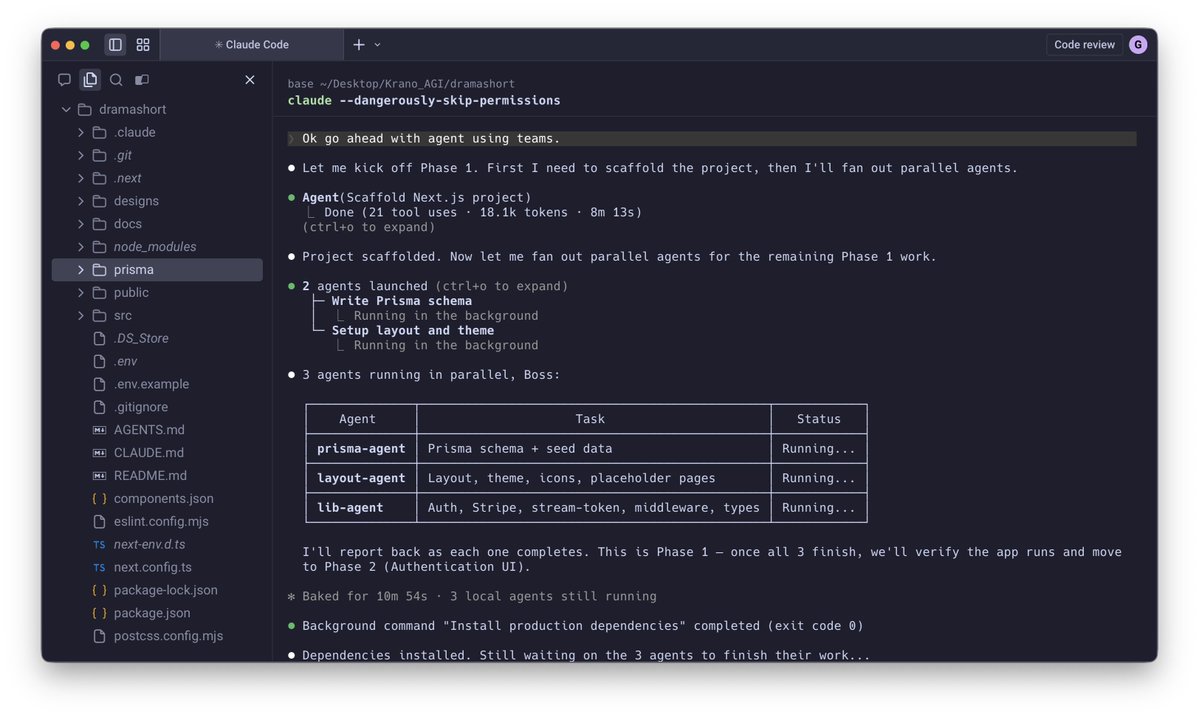
- Spawn multiple parallel agents working on different parts of a task simultaneously
It handles the full development cycle end to end, from planning to execution to testing. With the CLAUDE(.)md configuration file, you can teach it your project's conventions, patterns, and constraints so it writes code the way your team expects.
The tradeoff is a steeper learning curve compared to Chat, and token costs can add up during heavy sessions.
3️⃣ Claude Cowork
This is the newest addition. Anthropic describes it as Claude Code for the rest of your work.
It's an agentic desktop assistant that automates file management and repetitive tasks through a GUI. You describe an outcome, and Claude plans, executes, and delivers finished work: formatted documents, organized file systems, spreadsheets with working formulas, and synthesized research.
- Direct local file access and editing (no upload/download cycle)
- Schedule recurring tasks automatically
- Assign tasks remotely via Dispatch from your phone
- Computer Use lets Claude control your screen directly
It runs inside a sandboxed virtual machine on your computer, so Claude can only access folders you explicitly grant. You don't need to know how to code to use it.
The tradeoff is that your computer must stay awake for tasks to run, and it's still in research preview.
Here's how to think about choosing between them:
→ If you need to think through a problem or get writing/research help, use Chat
→ If you're building software and want an autonomous coding partner, use Code
→ If you have a clearly defined deliverable that involves local files and desktop workflows, use Cowork
All three are included in the same subscription starting at $20/month, which makes it one of the highest-leverage subscriptions in productivity software right now.
I've put together a visual below that maps the workflow of each product side by side.
If you want to go deeper into Claude Code specifically, I wrote a detailed article covering the anatomy of the .claude/ folder, a complete guide to CLAUDE(.)md, custom commands, skills, agents, and permissions, and how to set them all up properly. Link in the next tweet.
Stop wasting hours trying to learn AI.
One list.
Zero confusion.
No fluff.
I’ve already done the hard work for you 👇
📄 Complete AI Learning Document
https://t.co/2BPRsBq4zx
What’s inside:
📹 Videos
LLMs, Agentic AI, real-world breakdowns (Stanford + more)
🗂️ GitHub Repos
GenAI agents, prompt engineering, hands-on LLMs, beginner → advanced
🗺️ Guides & Whitepapers
Google, Anthropic, practical agent design
🧑🏫 Courses
Hugging Face, MCP, Vector DBs, end-to-end agent systems
📚 Books
From fundamentals to LLM engineering
📜 Research Papers
ReAct, Generative Agents, Toolformer, and more
📩 Newsletters
Stay updated without doomscrolling
Everything is curated, sequenced, and practical.
No random bookmarks. No hype.
♻️ Repost for your network
❤️ Like · 🔖 Save
Get All These Courses—100% FREE
We're giving you access to 7+ free courses. 👌👇
1. Building Notion Template Empire
2. $1M Notion Template Case Study
3. How To Build & Sell Canva Templates
4. How To Create And Sell E-Books
5. Passive Income Ideas for 2026
6. Profitable Digital Products to Sell in 2026
7. How To Get Killer Testimonials On Repeat
To get, just:
- Comment "SEND"
- Like & Retweet
- Follow Us (so we can DM you)
🚨 LEAKED: 1000+ AI-Powered Excel Templates
Valued at $2.7K+ per build — now FREE for the first 9000 users 🔥
🔴 What’s inside? 👇
✔️ AI Copywriting Tools
✔️ Marketing & Social Media Reports
✔️ Business Finance & Accounting
✔️ Project Management Systems
✔️ HR, Payroll & Employee Tracking
✔️ Data Analysis & Dashboards
✔️ Inventory & Stock Control
✔️ Budgeting & Personal Finance
✔️ Sales Tracking & CRM Sheets
✔️ Academic & Research Templates
✔️ Productivity & To-Do Planners
✔️ Performance & Time Tracking
✔️ Financial Modeling
✔️ Customer Feedback Systems
✔️ Expense & Tax Tracking
✔️ Logistics & Event Planning
✔️ Education & Student Gradebooks
🎁 How to get it FAST:
👉 Comment “File”
👉 Like & Retweet
👉 Follow @ElsaSofia__AI for instant DM
⚠️ No comment = No DM.
Hurry up before spots fill 🚀







![invxsecurities's tweet photo. 🚀 แจกฟรี! Skill ลับบน Claude สำหรับสายการเงิน ยกระดับการลงทุน เสมือนมีนักวิเคราะห์จากสถาบันการเงินระดับโลกมาช่วยสรุปงบให้แบบส่วนตัว!
==============================
ยุคนี้ลงทุนทั้งทีต้องมี AI เป็นผู้ช่วย! 💡 สำหรับนักลงทุนท่านไหนที่ต้องคอยติดตามอ่านงบการเ���ิน หรืออยากได้บทวิเคราะห์ผลประกอบการแบบเจาะลึก แต่ไม่อยากเสียเวลามานั่งสรุปข้อมูลเอง วันนี้ InnovestX ขอแนะนำเครื่องมือเด็ดที่จะช่วยประหยัดเวลาให้คุณแบบสุดๆ ครับ
ขอแนะนำฟีเจอร์ "Earnings Analysis Skill" ปลั๊กอินส่วนเสริมที่จะเปลี่ยน Claude ธรรมดาให้กลายเป็นผู้ช่วยนักวิเคราะห์ทางการเงินระดับโปร 💼
ความเจ๋งคือ AI ตัวนี้จะไปรวบรวมข้อมูลงบการเงินล่าสุดที่���พิ่งประกาศออกมา นำมาวิเคราะห์ และสรุปจัดรูปแบบออกมาเป็นรายงานในไฟล์ Microsoft Word ให้เราพร้อมใช้งานทันที! ที่สำคัญคือ ใช้งานได้ฟรี! ไม่มีค่าใช้จ่ายรายเดือนแถมเมื่อติดตั้งเสร็จแล้ว ยังสามารถเรียกใช้ได้ตลอดเวลาผ่านทั้งเว็บไซต์และแอปพลิเคชันบนมือถือเลย
==============================
💻 วิธีติดตั้ง Earnings Analysis Skill ทำตามขั้นตอนนี้ได้เลย
(1) เข้าไปที่ลิงก์ https://t.co/8CcgY3IORk เพื่อดาวน์โหลดไฟล์
(2) กดดาวน���โหลดไฟล์แบบ Zip ลงมาที่คอมพิวเตอร์ แล้วทำการ แตกไฟล์ (Extract) ให้เรียบร้อย
(3) เข้าไปตามพาทโฟลเดอร์นี้: equity-research > skills > earnings-analysis
(4) เลือกโฟลเดอร์ที่ชื่อ "references" และไฟล์ "SKILL.md" แล้วจับ 2 อย่างนี้มาสร้างเป็นไฟล์ Zip ไฟล์ใหม่
(5) ตั้งชื่อไฟล์ Zip นี้��ามต้องการ (ชื่อนี้จะแสดงเป็นชื่อ Skill ใน Claude ครับ)
(6) เปิดเว็บเบราว์เซอร์เข้าไปที่ https://t.co/RONUgKEwcZ (อย่าลืมล็อกอินบัญชี Claude ให้เรียบร้อย)
(7) กดที่เครื่องหมาย “+” เพื่ออัปโหลดไฟล์ Zip ที่เราเพิ่งสร้างเมื่อสักครู่
😎 เสร็จเรียบร้อย! กลับไปที่หน้า Chat เพื่อทดลองเรียกใช้งาน Skill นี้ได้เลยครับ
==============================
💬 ตัวอย่างคำสั่ง (Prompt) สำหรับเรียกใช้งาน
เมื่อติดตั้งเสร็จแล้ว ลองพิมพ์คำสั่งง่ายๆ ตามนี้เพื่อวิเคราะห์หุ้นตัวที่สนใจได้เลยครับ
- "Create an earnings update for [ใส่ชื่อบริษัท] Q3 2024"
- "Analyze [ใส่ชื่อบริษัท]'s quarterly results"
- "Post-earnings report for [ใส่ชื่อบริษัท]"
- "Q1/Q2/Q3/Q4 update for [ใส่ชื่อบริษัท]"
เพียงเท่านี้ Claude ก็จะจัดทำรายงานฉบับโปรมาให้เราวิเคราะห์ต่อยอดได้ทันที 📊
==============================
⚠️ ข้อควรระวังในการใช้งาน:
(1) ตรวจสอบข้อมูลเสมอ: แม้ AI จะเก่งและช่วยย่นระยะเวลาได้มาก แต่ในการลงทุน "ความแม่นยำของข้อมูล" คือสิ่งสำคัญที่สุด นักลงทุนควรตรวจสอบความถูกต้องของตัวเลข และใช้ดุลยพินิจของตนเองประกอบการตัดสินใจลงทุนเสมอครับ
(2) ภาษาของรายงาน: เนื่องจากชุดคำสั่งและต้นฉบับ Skill ถูกออกแบบมาเป็นภาษาอังกฤษ ผลลัพธ์ในไฟล์ Word จึงจะเป็นภาษาอังกฤษ ซึ่งจะได้คำศัพท์เฉพาะทางทางการเงินที่เป็นมาตรฐานสากลครับ
นักลงทุนท่านไหนที่ลองต��ดตั้งและนำไปใช้วิเคราะห์ผลประกอบการหุ้นตัวไหนแล้วได้ผลลัพธ์น่าสนใจ มาคอมเมนต์แชร์กันได้เลยนะครับ! หรือถ้าติดปัญหาการติดตั้งตรงไหน พิมพ์ถามไว้ใต้โพสต์นี้ได้เลย
อ้างอิง:
1. Anthropics: https://t.co/8CcgY3IORk
2. ขอขอบคุณข้อมูลจาก อาจารย์ Kanis Saengchote: https://t.co/x0QHuWyV0z
#INVXAI #InnovestX #ClaudeAI #Investment #AIช่วยลงทุน](https://pbs.twimg.com/media/HD_twH1bEAAMzXp.jpg)