Oauth 2.0 Explained With Simple Terms.
OAuth 2.0 is a powerful and secure framework that allows different applications to securely interact with each other on behalf of users without sharing sensitive credentials.
The entities involved in OAuth are the User, the Server, and the Identity Provider (IDP).
What Can an OAuth Token Do?
When you use OAuth, you get an OAuth token that represents your identity and permissions. This token can do a few important things:
Single Sign-On (SSO): With an OAuth token, you can log into multiple services or apps using just one login, making life easier and safer.
Authorization Across Systems: The OAuth token allows you to share your authorization or access rights across various systems, so you don't have to log in separately everywhere.
Accessing User Profile: Apps with an OAuth token can access certain parts of your user profile that you allow, but they won't see everything.
Remember, OAuth 2.0 is all about keeping you and your data safe while making your online experiences seamless and hassle-free across different applications and services.
Over to you: Imagine you have a magical power to grant one wish to OAuth 2.0. What would that be? Maybe your suggestions actually lead to OAuth 3.
--
Subscribe to our weekly newsletter to get a Free System Design PDF (158 pages): https://t.co/FIzCeaWsZV
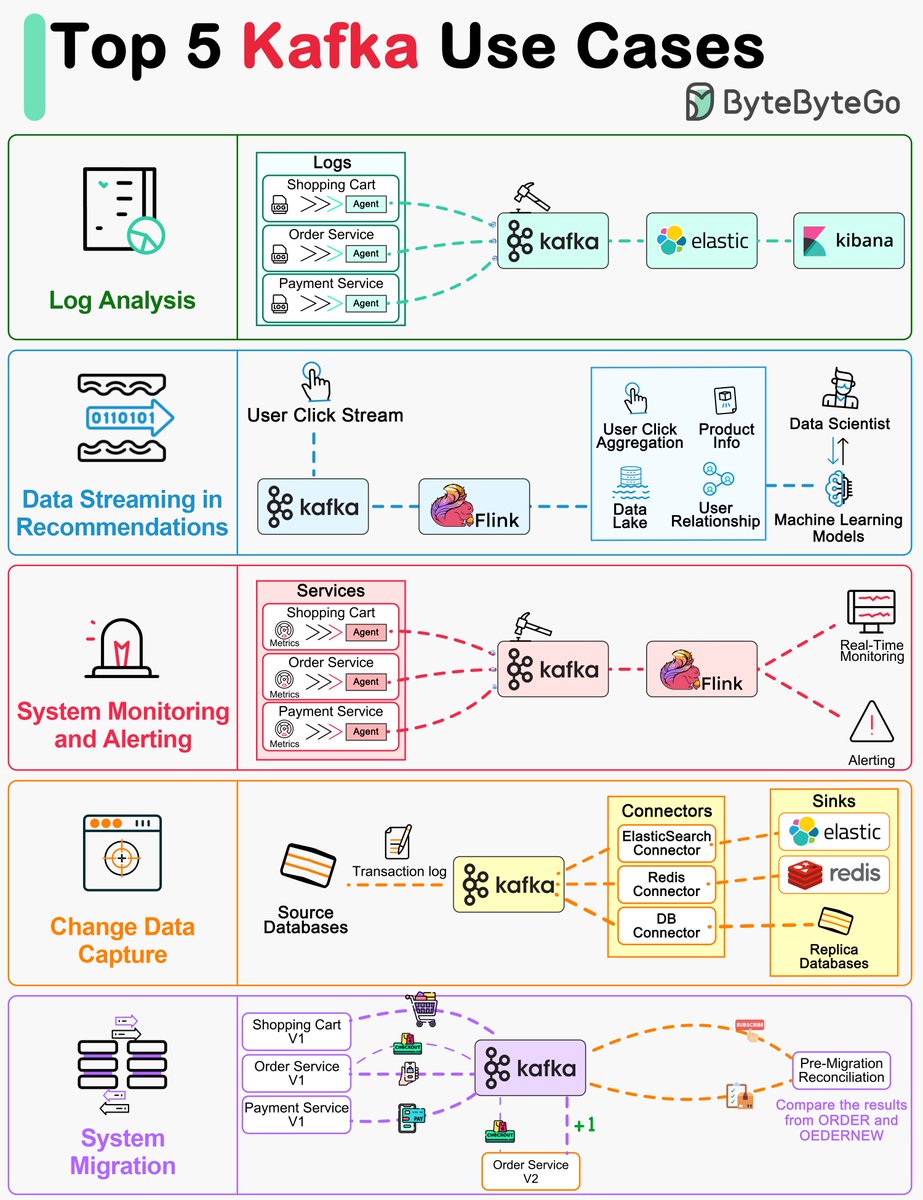
Top 5 Kafka Use Cases
Originally built for log processing, Kafka now powers a wide range of applications. Its durable message storage and flexible data access enables consumers to pull records at their convenience.
Here are some popular Kafka use cases:
- 𝗟𝗼𝗴 𝗣𝗿𝗼𝗰𝗲𝘀𝘀𝗶𝗻𝗴 𝗮𝗻𝗱 𝗔𝗻𝗮𝗹𝘆𝘀𝗶𝘀: Efficiently handles massive volumes of log data for analysis and insight generation.
- 𝗗𝗮𝘁𝗮 𝗦𝘁𝗿𝗲𝗮𝗺𝗶𝗻𝗴 𝗳𝗼𝗿 𝗥𝗲𝗰𝗼𝗺𝗺𝗲𝗻𝗱𝗮𝘁𝗶𝗼𝗻𝘀: Powers real-time data streaming to deliver personalized recommendations.
- 𝗦𝘆𝘀𝘁𝗲𝗺 𝗠𝗼𝗻𝗶𝘁𝗼𝗿𝗶𝗻𝗴 𝗮𝗻𝗱 𝗔𝗹𝗲𝗿𝘁𝗶𝗻𝗴: Facilitates real-time monitoring and alerting systems for timely responses to system metrics.
- 𝗖𝗵𝗮𝗻𝗴𝗲 𝗗𝗮𝘁𝗮 𝗖𝗮𝗽𝘁𝘂𝗿𝗲 (CDC): Captures and processes database changes to keep data in sync across systems.
- 𝗦𝘆𝘀𝘁𝗲𝗺 𝗠𝗶𝗴𝗿𝗮𝘁𝗶𝗼𝗻: Supports the seamless migration of systems by ensuring data consistency and availability.
Do you have any Kafka use cases to add to this list?
–
Subscribe to our weekly newsletter to get a Free System Design PDF (158 pages): https://t.co/kNfv0DVDdf
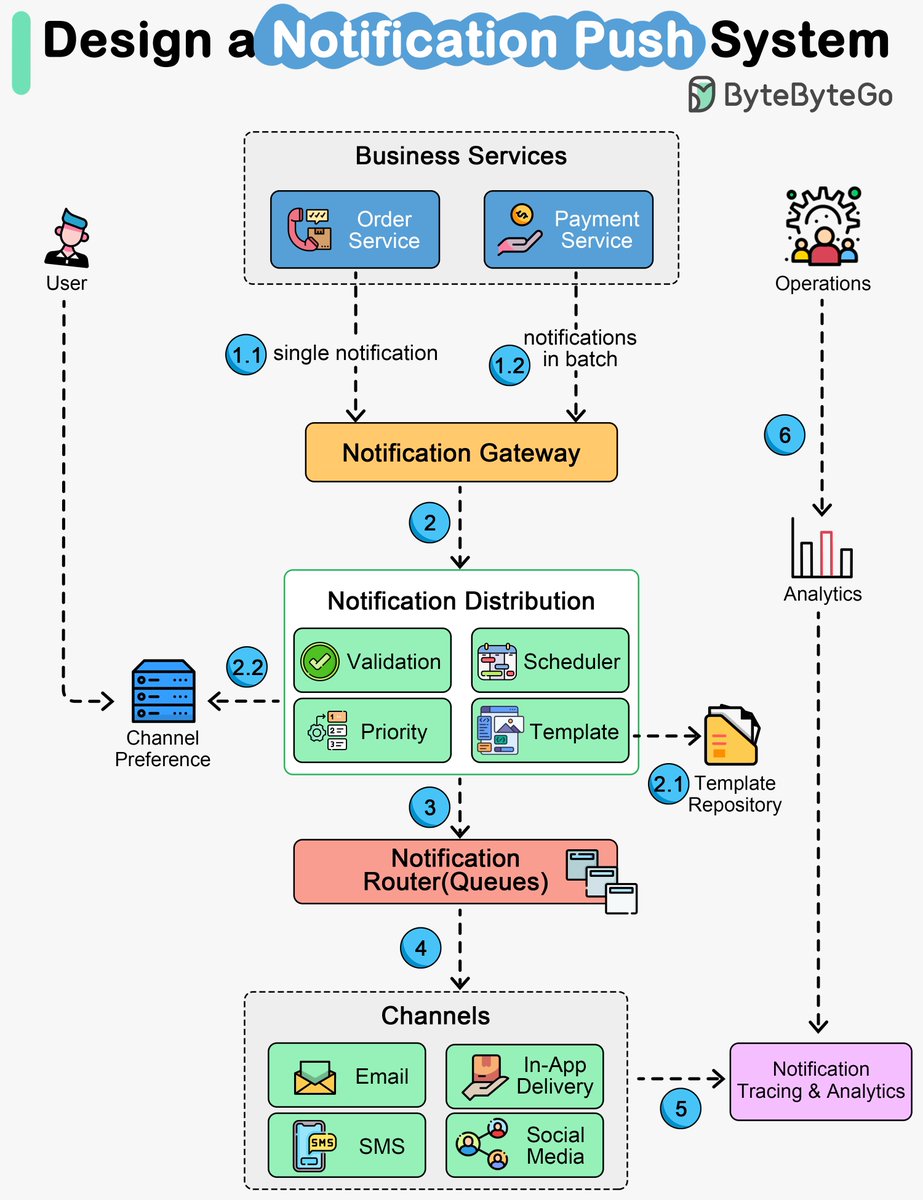
Push Notification System: The Basics
Push notifications keep users engaged, but setting up a solid system can be quite the challenge. We're talking in-app notifications, emails, SMS, and even social media pushes – it's a lot to handle!
So, how does it all work?
🔹 First off, the business services send notifications to the gateway. It can handle them one by one or in batches.
🔹 Next, the distribution service takes over. It validates, formats, and schedules the messages based on user preferences and templates.
🔹 Then, the notifications head to the routers (usually message queues) for smooth delivery.
🔹 The channel services take it from there, making sure the notifications reach users through various channels – in-app, email, SMS, social media, you name it!
🔹 Finally, the tracking and analytics service keeps an eye on the delivery metrics. This way, the operations team can check out the reports and make the user experience even better.
It's a complex process that we often take for granted.
–
Subscribe to our weekly newsletter to get a Free System Design PDF (158 pages): https://t.co/kNfv0DVDdf
7 must-know strategies to scale your database.
1 - Indexing:
Check the query patterns of your application and create the right indexes.
2 - Materialized Views:
Pre-compute complex query results and store them for faster access.
3 - Denormalization:
Reduce complex joins to improve query performance.
4 - Vertical Scaling
Boost your database server by adding more CPU, RAM, or storage.
5 - Caching
Store frequently accessed data in a faster storage layer to reduce database load.
6 - Replication
Create replicas of your primary database on different servers for scaling the reads.
7 - Sharding
Split your database tables into smaller pieces and spread them across servers. Used for scaling the writes as well as the reads.
Over to you: What other strategies do you use for scaling your databases?
–
Subscribe to our weekly newsletter to get a Free System Design PDF (158 pages): https://t.co/FIzCeaWsZV