The #1 destination for all things Jetpack Compose. Keeping up with Android Development is hard. We make it easy, entertaining and rewarding.
Made by @VinayGaba
Folks, we have finally landed on Twitter 🚀 Give us a follow for the latest and greatest about Jetpack Compose - the best way to build Android apps. Help us spread the word if you want to avoid 5 years of bad luck 😂
https://t.co/fsmO0qmuRP
#AndroidDev#JetpackCompose
android input docs https://t.co/HH6JCW4PRM
Dispatch: Context is my series on how Android engineers work with agents day to day. Free https://t.co/j1bBpTBoHu
Before you let an agent fix an Android UI bug, have it reproduce the bug first. It can drive the emulator itself now.
android layout lists what's on screen. android input acts on it:
android input tap 'text=Login'
android input text '[email protected]' 'id=email_input'
Once it can reproduce the bug, it has its own check. Same steps after the fix, and the bug should be gone.
Google's Journeys take this further. You write a user flow in plain English and an agent runs it on a device, from the terminal or in CI.
It can't judge whether a label makes sense, or the focus order. That's still someone with TalkBack on.
What check would you hand an agent first?
https://t.co/QjJIJkrggF
The first accessibility job I'd hand a coding agent: find every tap target under 48dp on the screen it just changed, and fix it.
Callstack's agent-device reads the screen, changes nothing, and flags each small target with a ref the agent can act on.
There's a right answer, so the agent can check its own work: audit, fix, audit again. The finding is gone or it isn't. It also flags missing names and covered controls.
Checks an agent can run on its own work are what I write about in Dispatch. Free: https://t.co/vv77lRS6EO
Which skills exist https://t.co/To8tXLqiHH
More on handing off Android work in Dispatch: Context, my series on AI for Android engineers. Free https://t.co/XWrhf9HFlx
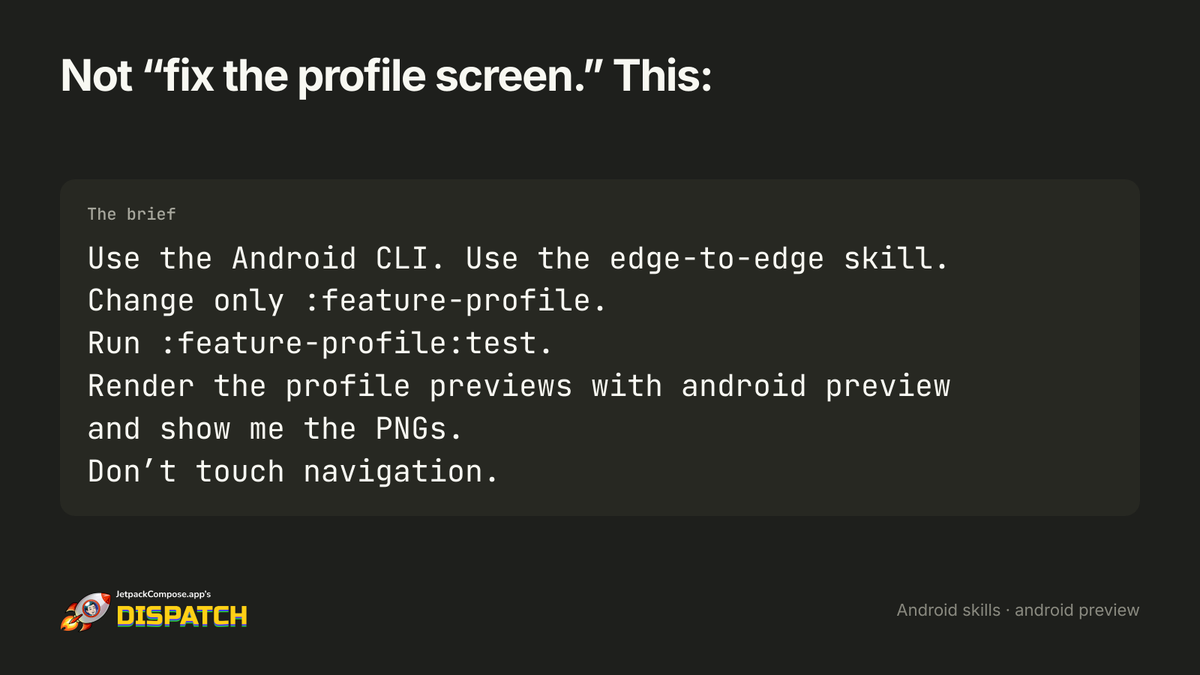
"Fix the profile screen" is a bad prompt for an Android agent. It doesn't say where to work or how the agent knows it's done.
Here's the version I'd hand off:
Every line there is something the agent can check itself against. The PNGs are my favorite part, since you end up reviewing pixels instead of the agent's description of them.
android skills add edge-to-edge grabs that skill.
Launched comes last because LaunchedEffect only starts its coroutine at that point. The body gets dispatched, so here it runs after layout and draw.
This was the Pop Quiz in Dispatch #23, originally a brainteaser from Nicklas Ansman https://t.co/J5hSY3kR2r
First, Last, Disposable, SideEffect, Layout, Draw, Launched.
The one that gets people is SideEffect. It's written above DisposableEffect and still runs after it, because Compose dispatches remembered effects first and side effects after them when it applies the composition.
Docs https://t.co/4m93655kpm
This was in Dispatch #24. Stuff that saves you a day of crash archaeology is the kind of thing I write about there https://t.co/fWtpMWBxIt
If your Compose crash reports are all ComposerImpl and SubcomposeLayout frames with none of your code in them, add this to Application.onCreate():
Composer.setDiagnosticStackTraceMode(https://t.co/it7da0oT9Y)
Do it before any composition gets created.
The catch is release builds need Kotlin 2.3+ with R8 on, and group key traces only point at the first line of each composable. Still a lot better than guessing which screen blew up.
What's the worst Compose stack trace you've had to decode?
A rule that only lives in your AGENTS.md will get broken eventually. Long agent sessions are where it slips.
The rules agents keep breaking should be tests. On Android, Konsist lets you write "the domain layer depends on nothing" as a plain unit test.
Google's migration guide: https://t.co/3GBzkDCx94
I flagged this in Dispatch #27 when Compose 1.11 came out. If you'd rather hear about the next one before your CI does: https://t.co/DnSRr807Ad
Moving your Compose UI tests to the new v2 test rule can turn a green test red, even though your app didn't change.
The old createComposeRule() ran a launched coroutine right away. The v2 one puts it in a queue, and it only runs when the test lets it.
Tbh those failures are useful. Your app never ran coroutines instantly, so some of those green tests were hiding real races.
One more: if you use createComposeRule together with runTest, you get two separate test clocks. runComposeUiTest gives you one.