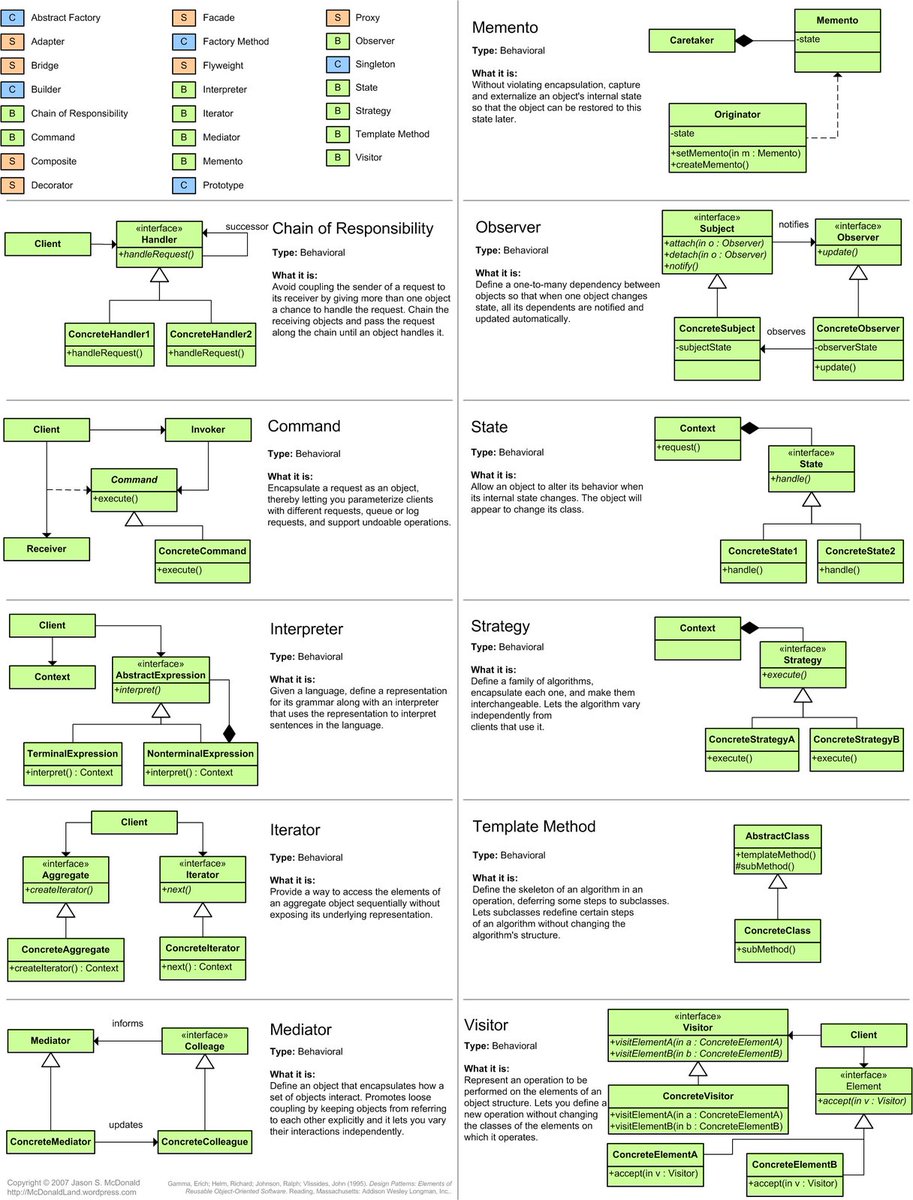
Today was our first workshop about TDD with my colleague Anthony after our training with @sandromancuso! We tried to share what the master teach us with our coworkers. Sharing is also part of the long road to mastery! Thanks for the good feedbacks!
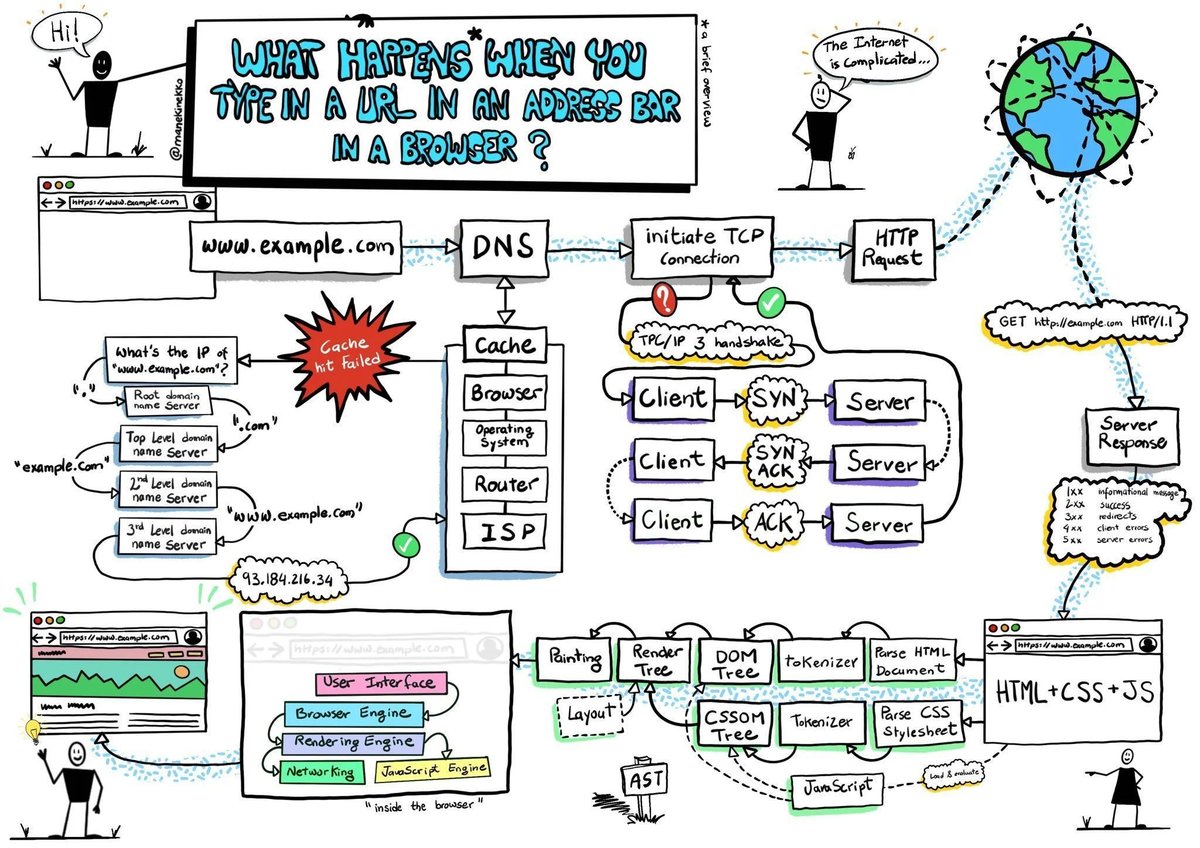
𝗪𝗵𝗮𝘁 𝗵𝗮𝗽𝗽𝗲𝗻𝘀 𝘄𝗵𝗲𝗻 𝘆𝗼𝘂 𝘁𝘆𝗽𝗲 𝗮 𝗨𝗥𝗟 𝗶𝗻𝘁𝗼 𝘆𝗼𝘂𝗿 𝗯𝗿𝗼𝘄𝘀𝗲𝗿?
The process involves the browser, your computer’s operating system, your internet service provider, the server where you host the site, and the services running on that server.
𝟭. 𝗬𝗼𝘂 𝘁𝘆𝗽𝗲 𝗵𝘁𝘁𝗽𝘀://𝘀𝗼𝗺𝗲𝘄𝗲𝗯𝘀𝗶𝘁𝗲.𝗰𝗼𝗺/𝗽𝗮𝗴𝗲 𝗶𝗻 𝘆𝗼𝘂𝗿 𝗯𝗿𝗼𝘄𝘀𝗲𝗿 𝗮𝗻𝗱 𝗽𝗿𝗲𝘀𝘀 𝗘𝗻𝘁𝗲𝗿
Here, https:// is a scheme that tells the browser to connect to the server using TLS. https://t.co/hk53ieKESa is the site's domain name, and it points to a specific IP address of a server. And /page is a path to the resource you need.
𝟮. 𝗕𝗿𝗼𝘄𝘀𝗲𝗿 𝗹𝗼𝗼𝗸𝘀 𝘂𝗽 𝗜𝗣 𝗮𝗱𝗱𝗿𝗲𝘀𝘀 𝗳𝗼𝗿 𝘁𝗵𝗲 𝗱𝗼𝗺𝗮𝗶𝗻
After you’ve typed the URL into your browser and pressed enter, the browser needs to figure out which server on the Internet to connect to. It must look for the IP address of the server hosting the website using the domain you typed to accomplish that. DNS lookup is used to do this. Here, it determines whether we can locate it in the cache; if not, DNS must search domain name servers from the root to the third level.
𝟯. 𝗕𝗿𝗼𝘄𝘀𝗲𝗿 𝗶𝗻𝗶𝘁𝗶𝗮𝘁𝗲𝘀 𝗧𝗖𝗣 𝗰𝗼𝗻𝗻𝗲𝗰𝘁𝗶𝗼𝗻 𝘄𝗶𝘁𝗵 𝘁𝗵𝗲 𝘀𝗲𝗿𝘃𝗲𝗿
Transmission control protocol, more formally known as TCP, is used throughout the public Internet routing infrastructure to route packets from a client browser request through the router, the Internet service provider, through an Internet exchange to switch ISPs or networks, and finally to find the server with the IP address to connect to. This is an inefficient route to take to get there. Instead, many websites employ a CDN to cache static and dynamic material closer to the browser.
𝟰. 𝗕𝗿𝗼𝘄𝘀𝗲𝗿 𝘀𝗲𝗻𝗱𝘀 𝘁𝗵𝗲 𝗛𝗧𝗧𝗣 𝗿𝗲𝗾𝘂𝗲𝘀𝘁 𝘁𝗼 𝘁𝗵𝗲 𝘀𝗲𝗿𝘃𝗲𝗿
Now that the browser is connected to the server, it complies with the HTTP(s) protocol's requirements for communication. The browser sends an HTTP request to the server to request the page's contents. The body, headers, and request line of an HTTP request are all present. The server can determine what the client wants to do using the information in the request line.
𝟱. 𝗦𝗲𝗿𝘃𝗲𝗿 𝗽𝗿𝗼𝗰𝗲𝘀𝘀𝗲𝘀 𝗿𝗲𝗾𝘂𝗲𝘀𝘁 𝗮𝗻𝗱 𝘀𝗲𝗻𝗱𝘀 𝗯𝗮𝗰𝗸 𝗮 𝗿𝗲𝘀𝗽𝗼𝗻𝘀𝗲
The server accepts the request and determines how to handle it depending on the data in the request line, headers, and body. The server receives the material at this URL for the GET /page/ HTTP/1.1 requests, builds the response, and then delivers it back to the client with an HTTP status code.
𝟲. 𝗕𝗿𝗼𝘄𝘀𝗲𝗿 𝗿𝗲𝗻𝗱𝗲𝗿𝘀 𝘁𝗵𝗲 𝗰𝗼𝗻𝘁𝗲𝗻𝘁
After receiving the server's response, the browser examines the response headers for instructions on how to render the resource. The Content-Type header informs the browser that an HTML resource was received in the response body.
Image credits: @manekinekko.
#technology #softwareengineering #programming #techworldwithmilan #web
𝗦𝗼𝗺𝗲 𝗶𝗺𝗽𝗼𝗿𝘁𝗮𝗻𝘁 𝗹𝗲𝗮𝗿𝗻𝗶𝗻𝗴𝘀 𝗳𝗿𝗼𝗺 𝗺𝘆 𝟮𝟬 𝘆𝗲𝗮𝗿𝘀 𝗼𝗳 𝗲𝗻𝗴𝗶𝗻𝗲𝗲𝗿𝗶𝗻𝗴 𝗹𝗶𝗳𝗲
𝟭. 𝗗𝗼𝗻'𝘁 𝗱𝗼 𝗽𝗿𝗲𝗺𝗮𝘁𝘂𝗿𝗲 𝗼𝗽𝘁𝗶𝗺𝗶𝘇𝗮𝘁𝗶𝗼𝗻
You will not replace that component with another one in the future, so that you won't need an abstraction now.
𝟮. 𝗧𝗵𝗶𝗻𝗸 𝘁𝘄𝗶𝗰𝗲 𝗯𝗲𝗳𝗼𝗿𝗲 𝘄𝗿𝗶𝘁𝗶𝗻𝗴 𝗰𝗼𝗱𝗲
Only write if you're sure you need that code line. The best code is no code.
𝟯. 𝗟𝗲𝗮𝗿𝗻 𝗴𝗼𝗼𝗱 𝗽𝗿𝗮𝗰𝘁𝗶𝗰𝗲𝘀
- Clean Code.
- Design patterns.
- SOLID Principles.
- Different software architectures.
- Algorithms.
𝟰. 𝗠𝗮𝗸𝗲 𝘁𝗵𝗶𝗻𝗴𝘀 𝘀𝗶𝗺𝗽𝗹𝗲, 𝗮𝗻𝗱 𝗲𝘃𝗲𝗻 𝘀𝗶𝗺𝗽𝗹𝗲𝗿 𝘁𝗵𝗮𝗻 𝘁𝗵𝗮𝘁
Make sure to complete everything correctly. Go with simple and easy-to-understand solutions. We are anyway in a very complex space here.
𝟱. 𝗡𝗮𝗺𝗲 𝘁𝗵𝗶𝗻𝗴𝘀 𝗽𝗿𝗼𝗽𝗲𝗿𝗹𝘆
One of the hardest things. Try to look at it from the reader's perspective.
𝟲. 𝗧𝗲𝘀𝘁 𝘆𝗼𝘂𝗿 𝗰𝗼𝗱𝗲
Unit, integration, e2e, and all others which are needed. You cannot afford a non-tested code. Try to design things by writing tests, TDD, for example.
𝟳. 𝗞𝗲𝗲𝗽 𝘆𝗼𝘂𝗿 𝘁𝗶𝗺𝗲 𝘄𝗶𝘀𝗲𝗹𝘆. 𝗜𝘁 𝗶𝘀 𝘁𝗵𝗲 𝗺𝗼𝘀𝘁 𝗲𝘅𝗽𝗲𝗻𝘀𝗶𝘃𝗲 𝘁𝗵𝗶𝗻𝗴 𝘆𝗼𝘂 𝗵𝗮𝘃𝗲.
Try to avoid being interrupted for deep focus. Hide your notifications. Made one day in a week a non-meeting day. Prioritize tasks (learn Eisenhower matrix)
𝟴. 𝗖𝗼𝗺𝗺𝘂𝗻𝗶𝗰𝗮𝘁𝗲, 𝗰𝗼𝗺𝗺𝘂𝗻𝗶𝗰𝗮𝘁𝗲, 𝗰𝗼𝗺𝗺𝘂𝗻𝗶𝗰𝗮𝘁𝗲
Try pair and mob programming. Then you don't need code reviews; you're collaboratively writing code with the same goal.
𝟵. 𝗗𝗼𝗻'𝘁 𝗷𝘂𝘀𝘁 𝗹𝗲𝗮𝗿𝗻, 𝗱𝗼
When you learn something, try to understand it when you need it or a bit before (be intentional). You will forget most of it if you don't do it.
And, of course, remember to enjoy coding!
_______
If you like my posts, please follow me, @milan_milanovic, and hit the 🔔 on my profile to get a notification for all my new posts.
Grow with me 🚀!
#technology #softwareengineering #programming #techworldwithmilan #careers
Refactoring TypeScript Code🔥 - live stream starting in 10 minutes at https://t.co/8lalnTZ5ZX
Join and share your thoughts with the world's largest developer community on crafting quality code.
𝗛𝗼𝘄 𝗧𝗼 𝗘𝗻𝗮𝗯𝗹𝗲 𝗖𝗼𝗻𝘁𝗶𝗻𝘂𝗼𝘂𝘀 𝗜𝗻𝘁𝗲𝗴𝗿𝗮𝘁𝗶𝗼𝗻 𝘄𝗶𝘁𝗵 𝗣𝘂𝗹𝗹 𝗥𝗲𝗾𝘂𝗲𝘀𝘁𝘀?
With Pull Requests, we lost the ability to have a proper Continuous integration process, in a way that we delayed integration due to code reviews. So here comes a “Ship/Show/Ask” branching strategy. The thing is that not all pull requests need code reviews.
So, whenever we make a change, we have three options:
🔹 𝗦𝗵𝗶𝗽 - Small changes that don’t need people’s review can be pushed directly to the main branch. We have some build pipelines running on the main brunch, which run tests and other checks, so it is a safety net for our changes. Some examples are: fixing a typo, increasing the minor dependency version, updated documentation.
🔹 𝗦𝗵𝗼𝘄 - Here, we want to show what has been done. When you have a branch, you open a Pull Request and merge it without a review. Yet, you still want people to be notified of the change (to review it later), but don’t expect essential discussions. Some examples are: a local refactoring, fixing a bug, added a test case.
🔹 𝗔𝘀𝗸 - Here, we make our changes and open a Pull Request while waiting for feedback. We do this because we want a proper review in case we need clarification on our approach. This is a classical way of making Pull Requests. Some examples are: Adding a new feature, major refactoring, and proof of concept.
Back to you, have you already tried this strategy ?
_______
If you like my posts, please follow me, @milan_milanovic, and hit the 🔔 on my profile to get a notification for all my new posts.
Grow with me 🚀!
#technology #softwareengineering #programming #techworldwithmilan #coding
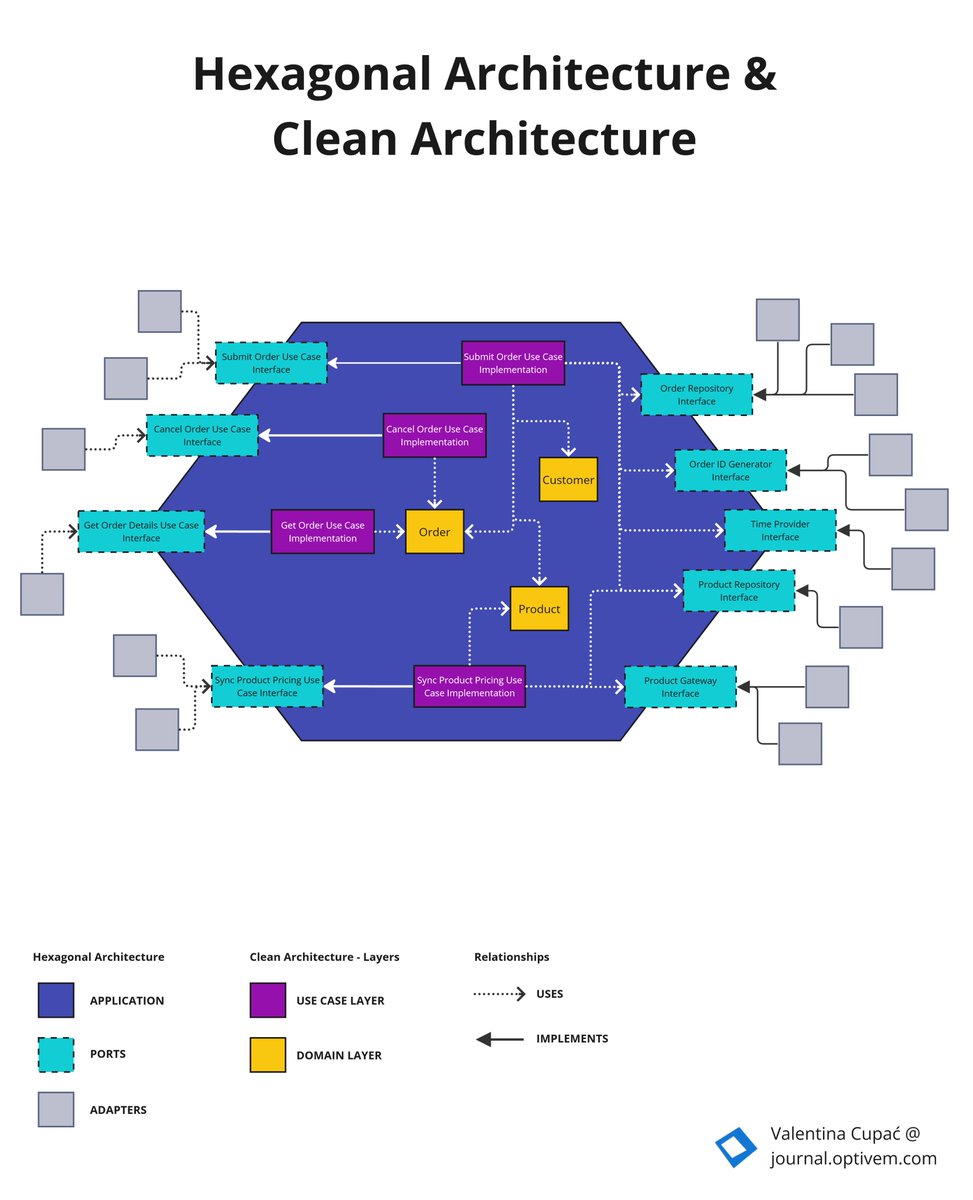
Hexagonal Architecture does NOT prescribe layers. It ONLY prescribes dependency inversion.
Since the layering inside the hexagon is NOT prescribed, so we could have: Transaction Script, DDD, Clean Architecture, etc...
YouTube: https://t.co/tDqxcftuiN
#hexagonalarchitecture
#Java performance Tip: When need to copy items from one array to anoyther one, don't use loops. Use the more efficient Arrays.copyOf or System.arraycopy method instead.
Performance test details in 🧵👇
ChatGPT will be the most powerful AI tool in 2023.
But most people don’t know the best ways to use it.
Here are 8 ways ChatGPT can 10x your productivity:
Best Linux tutorials and courses
1. Linux for Beginners - https://t.co/U1p5ADB7nt
2. Linux Command Line Basics - https://t.co/reF8uDd6hZ
3. Learn Linux in 5 Days and Level Up Your Career - https://t.co/NEJA3jy8Bi
4. Linux Administration Bootcamp - https://t.co/ImI5CuEvKb
Here's a nice article about Software Architecture overviewing and comparing the mainstream architectural styles today:
https://t.co/ocOqFdTJFc
Fits *very* close with my current perspective, too.
Thanks @hgraca !