🌲Free download🌲 - Currency icon set
https://t.co/gJnekaCtak
The icon set can also be downloaded directly from Jorte Store!
Open the Jorte app → Select [Store] → Select Currency icons → Tap [Free].
Thank you for using Jorte!
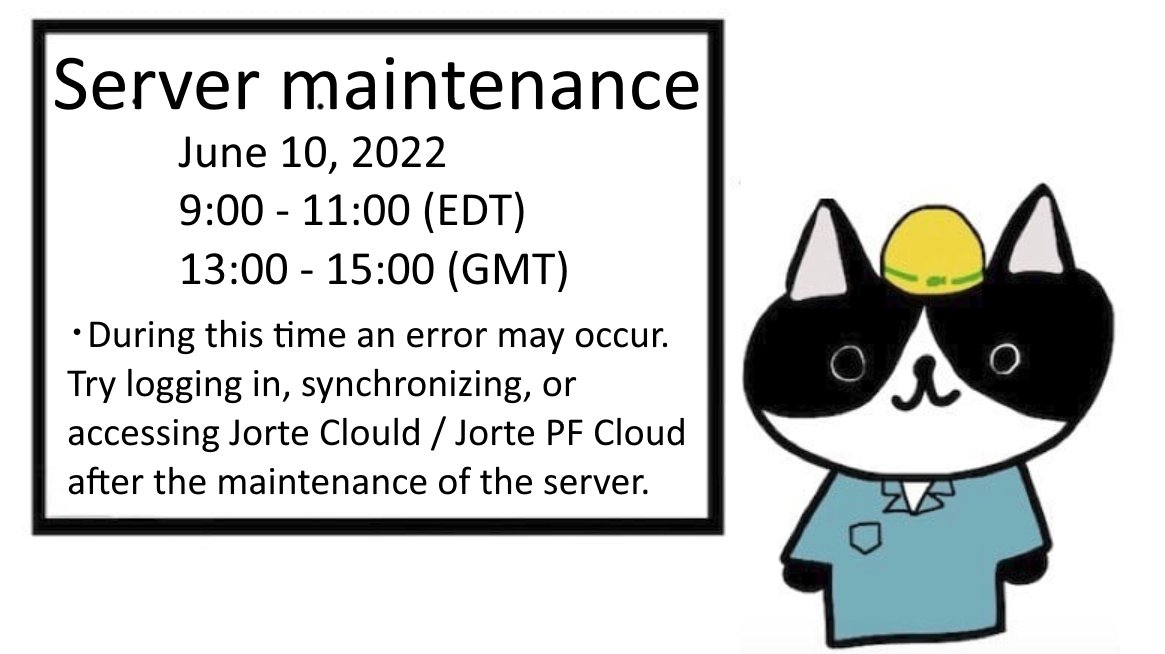
Jorte will undergo Server Maintenance on June 9, 2023, at 11:00 am (EDT), 3:00 pm (GMT) for approx. 1 hour.
・You may not be able to access the Jorte Store.
・Content downloads may fail.
If the above occurs wait a while before accessing the Jorte Store content, please.
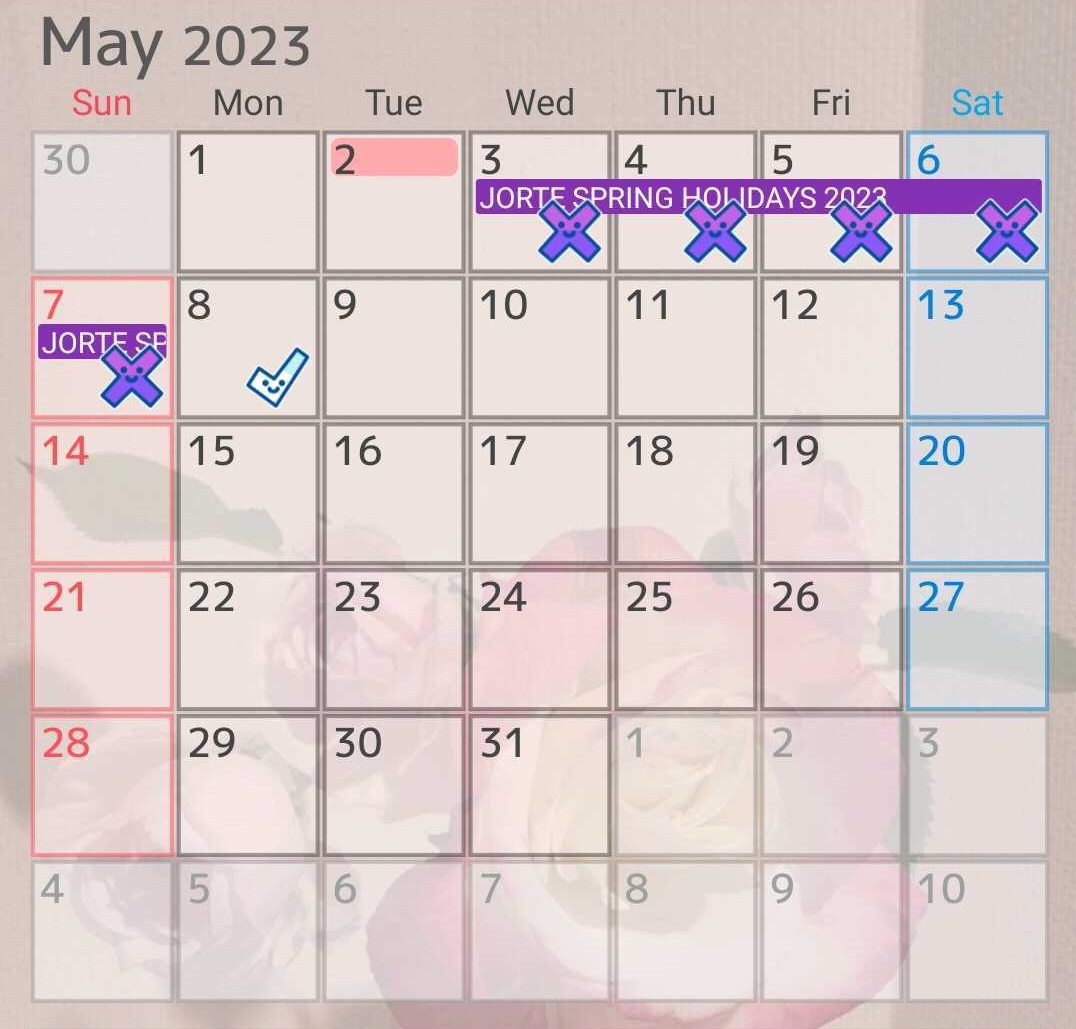
Jorte Spring Holidays
(Wed.) May 3 - (Sun.) May 7, 2023
During this period, Jorte Support Team will not respond to any inquiry (such as Web support, E-mails).
Jorte Support Team will resume support from Monday, May 8, 2023.
📣Server maintenance(January 24, 2023)📣
Thank you for using Jorte.
Jorte will undergo scheduled system maintenance of a server on the following schedule.
■ Date and time:
January 24, 2023, 9:00 - 12:00 (EDT), 13:00 - 16:00 (GMT).
We apologize for any inconvenience.
📣2022-2023 Winter Holiday Support Hours📣
Jorte will be on holiday from Friday, December 30, 2022, until Tuesday, January 5, 2023.
If you have any problems with how to use Jorte features, please refer to Jorte Help.
✨Jorte help site URL: https://t.co/1CjLf1pgs4
#Jorte
☆Server maintenance (August 17, 2022)
Thank you for using Jorte.
Jorte will undergo scheduled system maintenance of a server on the following schedule.
■ Date and time:
August 17, 2022, 9:00 - 11:00 (EDT), 13:00 - 15:00 (GMT).
We apologize for any inconvenience.
🌼Free useful mark icons download🌼
Organize your events with these useful mark icons.💜
▶Download icons: https://t.co/u7nLgF8tdF
You can also download icon set from the Jorte store!
【Jorte Instagram acount】
▶ https://t.co/xSvC76xUfU
#ThankYouForUsingJorte
✨The iOS version of widget function released✨
Please update Jorte to the latest version 1.4.66 & iOS14 or above.
▶️Press the phone desktop, a "+" will appear in the upper left corner, just add the Jorte widget.
#widget#iPhone#Jorte#calendar
📣Regarding Jorte 2021 Golden Week Holidays📣
Please note that Jorte will be on holiday from April 29, 2021 (Thursday) - May 5, 2021 (Wednesday).
For inquiries such as the E-mails and others received during the holiday period, we will respond sequentially from Thursday, May 6.
❄️Winter Holiday Support Hours❄️
Jorte will be on Holidays from Dec 26 2020 until Jan 3 2021.
During this period, we cannot respond to any inquiry such as the Web support(support forum, E-mails)and others.
Thank you for choosing Jorte to help you stay organized and Happy 2021✨
☀️Change current date background color ☀️
One of Jorte's popular customization features.
Set up your favorite color🎨
🥁Jorte Youtube: https://t.co/zv1kkuKhHA
#simplesetting#KeepIntroduceJorteFeature
@HecatesChilde I'm so sorry for the late reply😢
Settings→App→Select Jorte →Battery→Allow background activity
Please try this way.
or
Send us your Jorte information.
Open Jorte→[settings]→[Advanced Settings]→[Information]→Send by Email and write down your questions
Thanks
@HecatesChilde Sorry to return to your meaagae late.🥺
(1) Open the phone's [Settings] → [Battery]→ Do not set [Power saving mode]
(2) The same screen → Tap [Battery usage]→ turn off the [manage automatically...]→turn on the[Run in backgorund]Please try this method, thanks


![Jorte_en's tweet photo. @HecatesChilde I'm so sorry for the late reply😢
Settings→App→Select Jorte →Battery→Allow background activity
Please try this way.
or
Send us your Jorte information.
Open Jorte→[settings]→[Advanced Settings]→[Information]→Send by Email and write down your questions
Thanks https://t.co/NEPatm7NTf](https://pbs.twimg.com/media/EjtJ9e7VkAEdZp8.png)








![Jorte_en's tweet photo. 🌲Free download🌲 - Currency icon set
https://t.co/gJnekaCtak
The icon set can also be downloaded directly from Jorte Store!
Open the Jorte app → Select [Store] → Select Currency icons → Tap [Free].
Thank you for using Jorte! https://t.co/zfaKGO0EGn](https://pbs.twimg.com/media/GBwCZRDbkAAvejF.png)








![Jorte_en's tweet photo. @HecatesChilde I'm so sorry for the late reply😢
Settings→App→Select Jorte →Battery→Allow background activity
Please try this way.
or
Send us your Jorte information.
Open Jorte→[settings]→[Advanced Settings]→[Information]→Send by Email and write down your questions
Thanks https://t.co/NEPatm7NTf](https://pbs.twimg.com/media/EjtKaP0UwAEN5sH.jpg)
![Jorte_en's tweet photo. @HecatesChilde Sorry to return to your meaagae late.🥺
(1) Open the phone's [Settings] → [Battery]→ Do not set [Power saving mode]
(2) The same screen → Tap [Battery usage]→ turn off the [manage automatically...]→turn on the[Run in backgorund]Please try this method, thanks https://t.co/17kblGUVFA](https://pbs.twimg.com/media/EjTPjDHUcAAaTKZ.jpg)


