Joshua Gideon, a Business Analyst, shared valuable insights on why communication skills are essential for anyone starting a career.
He also explored how AI is transforming the way we work and why learning to use it effectively is becoming a key advantage.
Missed the seminar? Don't worry—we've got you covered. Watch the highlights and catch the key takeaways :
#TechCrush #CareerGrowth
Joshua Gideon, a Business Analyst, shared valuable insights on why communication skills are essential for anyone starting a career.
He also explored how AI is transforming the way we work and why learning to use it effectively is becoming a key advantage.
Missed the seminar? Don't worry—we've got you covered. Watch the highlights and catch the key takeaways :
#TechCrush #CareerGrowth
Erling Haaland’s World Cup has been insane so far.
First time ever playing the best competition in sport and delivering 3 braces plus one more goal in 4 games, scoring in every single game.
Monster. 👽
Nathan Ake has joined Turkish side Fenerbahce, subject to international clearance, bringing an end to a hugely successful six-year stay with Manchester City.
A defining moment for development finance and strategic partnership.
We are proud to have played a key advisory role in the successful signing of the USD 268 million financing agreements between the Taraba State Government and ECOWAS Bank for Investment and Development in Lomé, Togo.
This landmark transaction will support three transformational projects:
50MW Solar Photovoltaic Power Plant
Integrated Industrial Park (Phase I)
Irrigated Rice Development & Processing Infrastructure
These projects are expected to accelerate industrial growth, strengthen food security, expand clean energy access, and create sustainable economic opportunities for millions.
At Deutsche Partners Holding Limited (DPH), we remain committed to structuring innovative financial solutions that unlock growth, catalyze investment, and drive long-term development across Africa.
Strategic partnerships. Sustainable growth. Transformational impact.
Every dataset tells a story. The real skill is knowing how to find it, understand it, and use it to make better decisions.
If you’ve been curious about **Data Analysis, Business Analysis, or Data Science**, this mentorship session is for you. Learn from professionals already working in the field as they share their career journeys, practical insights, and what it really takes to succeed.
Whether you’re just exploring or ready to start your tech journey, this conversation could be the clarity you’ve been looking for.
Tonight by 7:00 PM WAT. X (Twitter) Space: https://t.co/nItKD9JZe0
Set a reminder and come with your questions. See you there!
#techcrush
Honored to speak at Exploring Careers in Data, Insight & Business Decisions. As a Business Analyst, I will be sharing insights on turning data into business impact and how data drives smarter decisions. #DataAnalytics#Business#Tech#Techcrush#BusinessAnalysis#Data
One of the biggest misconceptions about Excel is that automation starts with VBA.
It doesn't.
It starts with Macros.
Most people perform the same tasks repeatedly every day.
Format reports.
Clean imported data.
Apply filters.
Adjust column widths.
Remove blank rows.
Change fonts and colors.
Create the same reports every week.
The problem isn't that these tasks are difficult.
The problem is that they're repetitive.
And repetition is exactly what computers are designed to handle.
That's where Macros come in.
So, what is a Macro?
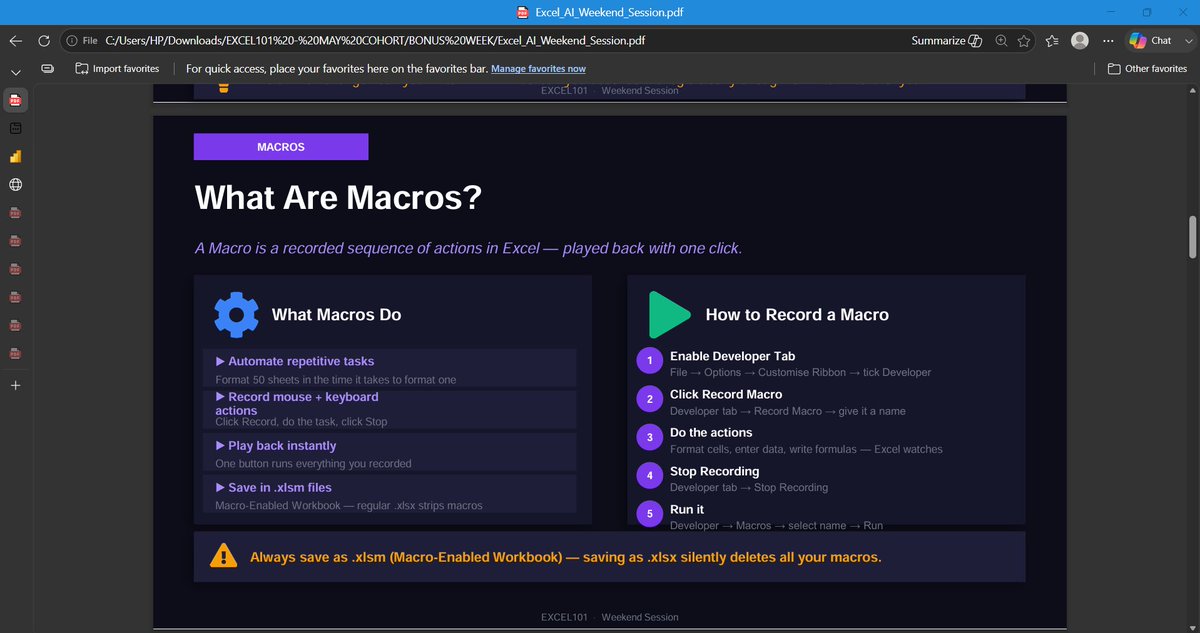
A Macro is simply a recording of your actions inside Excel.
When you click Record Macro, Excel begins watching every step you take.
Every click.
Every format change.
Every sort.
Every filter.
Every copy and paste.
When you click Stop Recording, Excel saves those actions as instructions.
The next time you need to perform the same task, Excel simply plays those instructions back.
Instead of repeating twenty clicks...
You click one button.
Think of it like this...
Imagine you prepare the same weekly sales report every Friday.
The process looks something like this:
Remove blank rows
Convert names to Proper Case
Apply currency formatting
Sort by sales value
Highlight top performers
Freeze the header row
Adjust column widths
Maybe it takes ten minutes.
Not terrible.
Until you realize you do it every single week.
A Macro allows you to perform that process once, record it, and replay it whenever a new report arrives.
Ten minutes becomes ten seconds.
What Can Macros Do?
Almost anything you can do manually inside Excel can be recorded.
Examples include:
Formatting reports
Cleaning datasets
Sorting and filtering
Creating templates
Printing reports
Generating recurring summaries
Running repetitive calculations
If the process is repetitive, there's a good chance a Macro can automate it.
Why Macros Matter
The biggest benefit isn't speed.
It's consistency.
Humans get tired.
Humans forget steps.
Humans make mistakes.
A Macro performs the same sequence exactly the same way every time.
That consistency is incredibly valuable in reporting and data preparation.
Are Macros the Same as VBA?
Not quite.
This is where many people get confused.
A Macro is the automation.
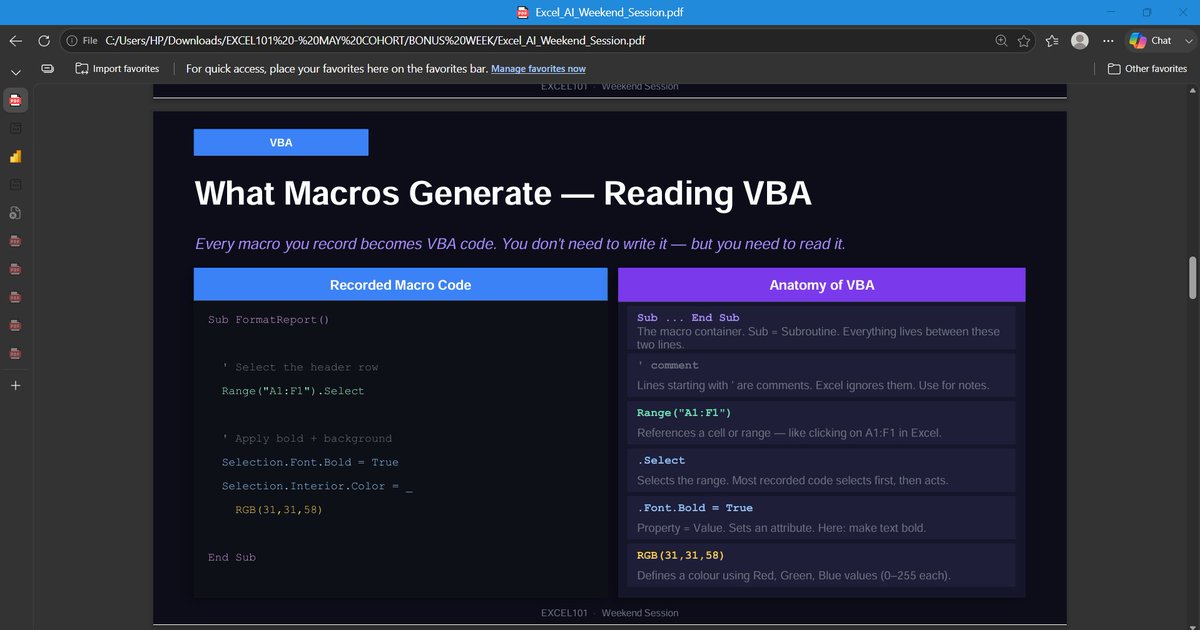
VBA (Visual Basic for Applications) is the programming language behind that automation.
When you record a Macro, Excel quietly writes VBA code in the background.
You don't see it while recording.
But it's there.
That's why every recorded Macro can be opened and edited inside the VBA Editor.
Think of it this way:
Macro = The finished recipe.
VBA = The language the recipe is written in.
You can use Macros for years without writing a single line of VBA.
The Limitations of Recorded Macros
Recorded Macros are powerful, but they're not intelligent.
They repeat exactly what you did.
Nothing more.
If your recorded Macro formats cells A1 to A20, it will always format A1 to A20.
Even if tomorrow's report has 500 rows.
That's where VBA becomes valuable.
Instead of repeating fixed actions, VBA can make decisions.
It can detect the last row.
Loop through records.
Skip blank cells.
Validate data.
Generate reports.
Respond to user input.
Macros automate repetition.
VBA automates logic.
Why Every Excel User Should Learn Macros
You don't need to become a programmer.
You don't need to memorize code.
You simply need to recognize repetitive work.
If you catch yourself saying:
"I do this every day."
or
"I wish Excel could do this for me."
That's usually your sign that a Macro should exist.
Because productivity isn't about working faster.
It's about eliminating work that never needed to be manual in the first place.
That's why Macros are often the first step into automation—and one of the most valuable skills any Excel user can learn.
AI agents do not just need more tools.
They need to know which tool to use, when to use it, and how to combine them.
A new paper introduces SkillWeaver, a framework that helps LLM agents break complex tasks into smaller steps, retrieve the right skills, and compose them into a working plan.
The study shows that task decomposition remains a major bottleneck for AI agents.
This is important because real world work is rarely one simple task.
It often requires planning, tool selection, and execution across multiple steps.
Paper:
https://t.co/0mrK5q0qtu
#DataScienceNigeria #AIResearch #AIAgents #LLMs
Business Analysts don't build products. We stop bad products from being built, one of the hardest parts of being a business analyst isn't the data... it's getting 5 people in a room to agree on what "done" means.