🚨 VTUBERS! 🚨
Struggling to play certain games on stream? Have to swap to your PNG model? Here are some tips if your Live2D model is lagging/not co-operating that well with a high demanding game.
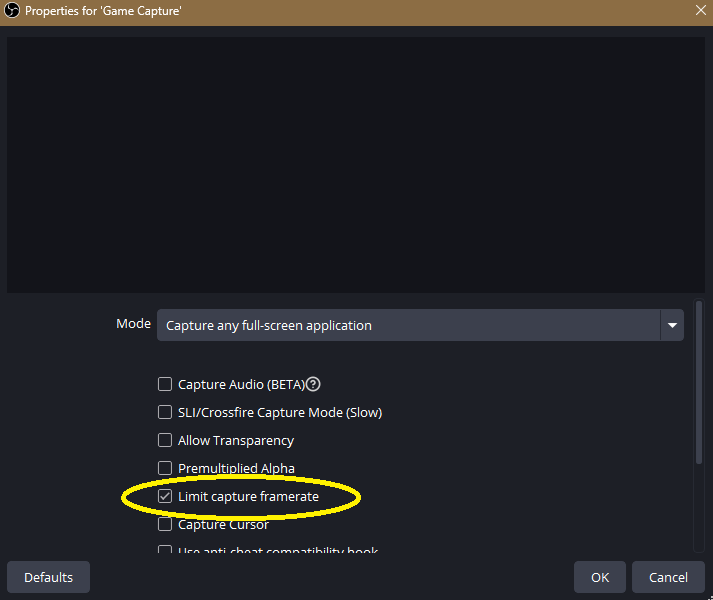
Make sure your Game Capture in your OBS has 'Limit Capture Framerate' checked!
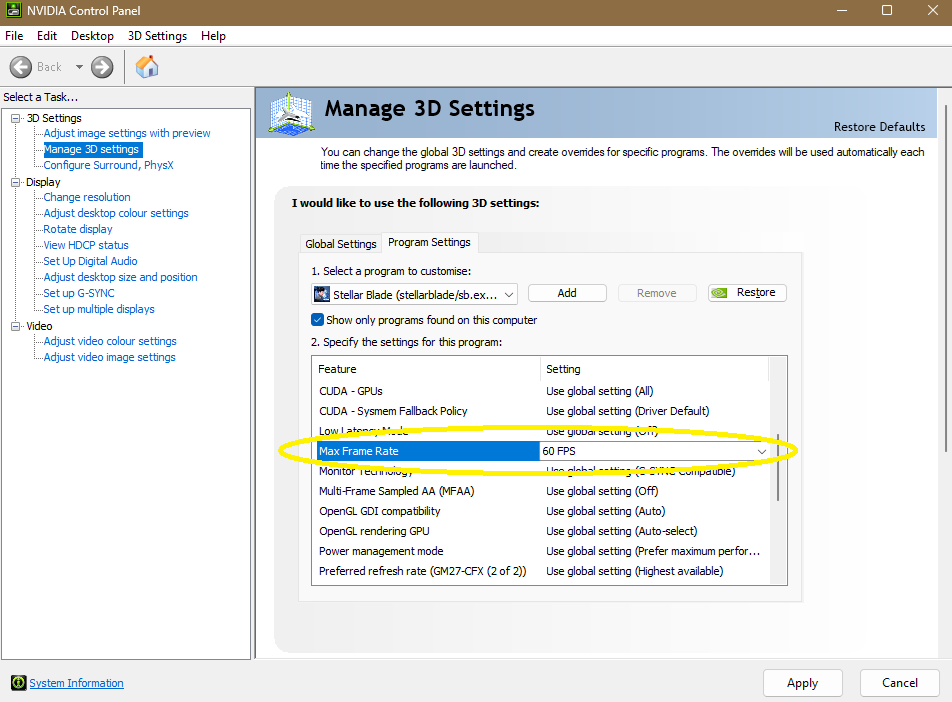
Go into your NVIDIA Control Panel/App > Manage 3D Settings > Program Settings > Add/Select the game > Max Frame Rate set to 60fps!
Sometimes changing the FPS in-game is more practical but with some games that dont have an FPS limiter, this is helpful for those with struggling PC's and good to ensure its being forced to run on 60fps the whole time!
HOPE IT MAKES A DIFFERENCE 💛
📺 the YouTube algorithm for vtubers in 2026, what ACTUALLY matters:
i spent a long time optimizing for the wrong things. here's what i know now.
_____
→ click-through rate and average view duration control everything. YouTube shows your video to a test group. if that group clicks AND watches a significant portion, YouTube expands the audience. optimize here first.
→ tags are mostly irrelevant now. YouTube uses semantic understanding to classify content. stop spending 20 minutes on tags. spend those 20 minutes on your title instead.
→ your description's first two sentences are SEO real estate. YouTube scans it to understand who should see your video. write a natural sentence with your main topic in it. don't start with "hi welcome to my channel."
→ reply to comments in the first hour. early engagement velocity is one of the strongest signals YouTube uses to decide how far to push a video. reply to every comment for the first 60 minutes after upload.
what's one thing about YouTube analytics you've never fully understood?
🔖 bookmark this, i make videos about this stuff regularly!!
Another round of updates for the Stream Schedule Maker!
✨New export aspect ratios (16:9 4:3 9:16)
🖼️PNGs now export edge-to-edge
📅Support for 2 streams in a day
🌟Highlight important days with custom colours/borders
✏️Customisable schedule eyebrow text
📱Fixed PC/mobile export inconsistencies
🛠️Fixed the weird day shadow bug
Thank you everyone for all the feedback so far 🥹💜
https://t.co/8KVa7A2nys
Mic Filter Order Matters✅
Set gain first, aim for peaks between -12 to -6 dB (normal speaking is a bit lower).
1. Signal Cleanup (Early in the chain)
- a. Low-Cut/High-Pass
- b. Noise Suppression
- c. Noise Gate or Expander
2. Dynamics and Shaping (Middle of the chain)
- d. EQ
- e. Compressor
- f. De-esser
3. Protection (Last in the chain)
- g. Limiter
OBS Example:
🚨Twitch Streamers
Your OBS stream settings might be COSTING you FPS
If you game + stream, use these as a guide⬇️
Encoder: NVIDIA NVENC H.264
Rate Control: CBR
Bitrate: 6000 Kbps
Keyframe Interval: 2s
Preset: P5-P7
Tuning: High Quality
Multipass: Two Passes Quarter Resolution
Profile: High
Look-ahead: OFF
Psycho Visual Tuning: ON
Max B-frames: 2
If you’re partnered:
Bitrate: 7000-8000 Kbps
Do NOT use x264 if you care about in-game performance.
🎤 Microphone Basics for Streamers 🎤
condenser vs. dynamic and omnidirectional vs. unidirectional
• Condenser microphones are typically more sensitive and capture a lot of detail, including room noise, keyboard clicks, reverb, and other sounds around you. That's why untreated rooms can sound "echoey" on stream.
• Dynamic microphones are generally less sensitive to background noise and are preferred by many streamers and podcasters because they focus more on the voice and give that rich, close-up "broadcast" voice.
• Omnidirectional = picks up sound from all directions.
• Cardioid (unidirectional) = primarily picks up what's in front of the mic and rejects more noise from the sides and back.
For creators who move around a lot, a condenser mic can sometimes be more practical, while seated streamers often benefit from a dynamic mic placed close to their mouth.
Can software fix everything? Not quite.
Tools like:
✅ EQ
✅ Compression
✅ Limiters
✅ Noise suppression
✅ Noise gates
can reduce background noise, prevent clipping when you get loud, and improve overall clarity, but they can't completely change the fundamental character of the microphone itself.
Also: PLEASE test your audio offline!
You can:
1. Record locally in OBS.
2. Stream to a private/test account.
3. Learn to read your audio meters.
Good audio is about about understanding how your equipment works and setting it up correctly. 🎙️✨ And remember, don't take advice from a streamer, go do research from an actual audio engineer!
✉️ STAMP STUDIO is now live !!
https://t.co/W5qUFneV4s
⤷ make ur own webstamps easily
⤷ 100+ credited borders
⤷ gif / image cropping & resizing
⤷ overlays, custom fonts, text
Customisable Subathon Template: Notebook style!
With cute post-it and sticker style decoration, feel free to customise it as you like! 💖💖
#VTuberAssets
✦ Check in Redeem Tutorial ✦
Here's a step-by-step tutorial on how to make a check in redeem that pops up on stream with Streamerbot & OBS! This redeem tracks the amount of times someone has checked in and sends a little message in chat.
Written tutorial + download links!🧵⬇️
I can’t stress this enough https://t.co/6zdQ3ZPsaZ
Streamerbot is easier on the computer, super easy to use, has a VERY EASY import process with tons of creators making free extensions.
It’s also way more powerful with loads of integration built in
I’ve used many other programs and web extensions including mix it up and they don’t come close.
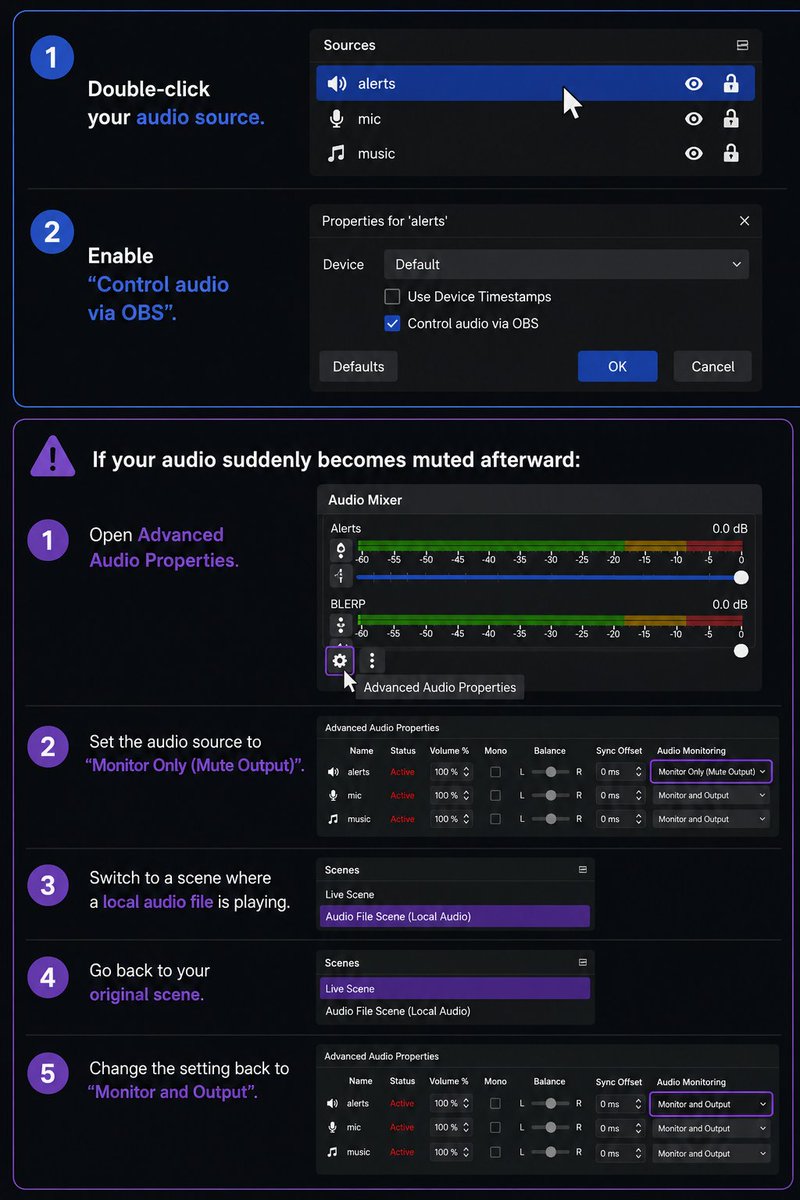
Easiest Way to Fix Your Audio Mixing in OBS:
If all of your alerts/sounds are coming through Desktop Audio and you want separate volume control for them, do this:
1. Double-click your audio source
2. Enable “Control audio via OBS”
This will separate the audio so you can mix it independently.
If your audio suddenly becomes muted afterward:
1. Open Advanced Audio Properties
2. Set the audio source to “Monitor Only (Mute Output)”
3. Switch to a scene where a local audio file is playing
4. Go back to your original scene
5. Change the setting back to “Monitor and Output”
You should now hear everything normally again, and your audio sources should be much easier to balance and mix. Hope this helps!
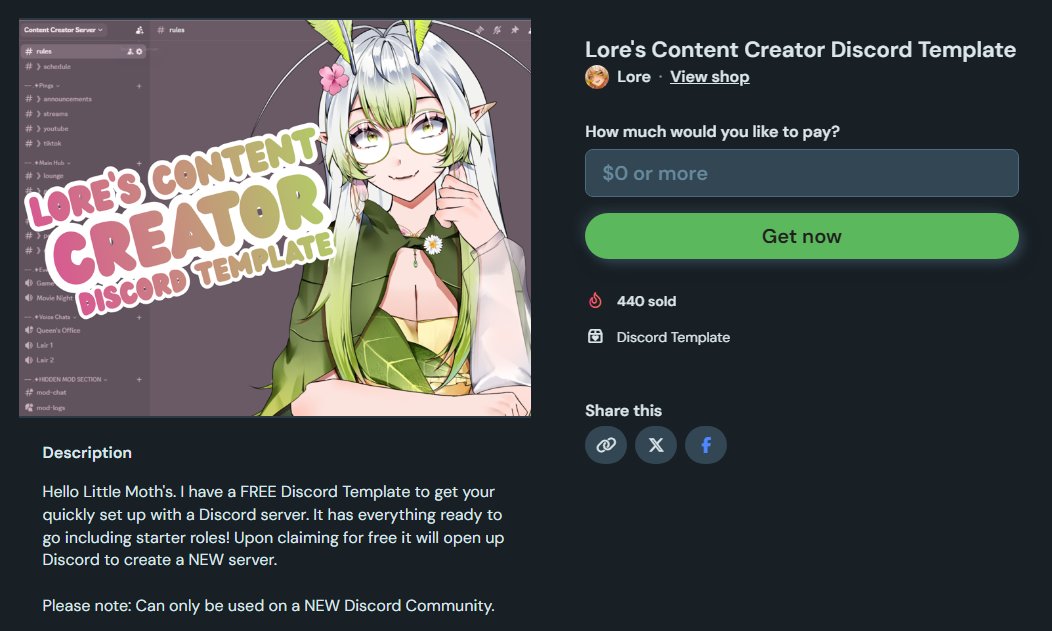
Lore's FREE Content Creator Discord Template
It has everything ready to go including starter roles! Upon claiming for free it will open up Discord to create a NEW server.
Grab it Below⬇️