Helping people over 50 understand and use AI with confidence—without jargon, hype, or intimidation. Practical AI for work and everyday life, with Keith Greyson.
Lock up Elon Musk for an indefinite period of time for election interference. Then denaturalize and deport him back to South Africa.
It would send a message to republicans that cheating or attempting to manipulate our cherished electoral process will not be tolerated.
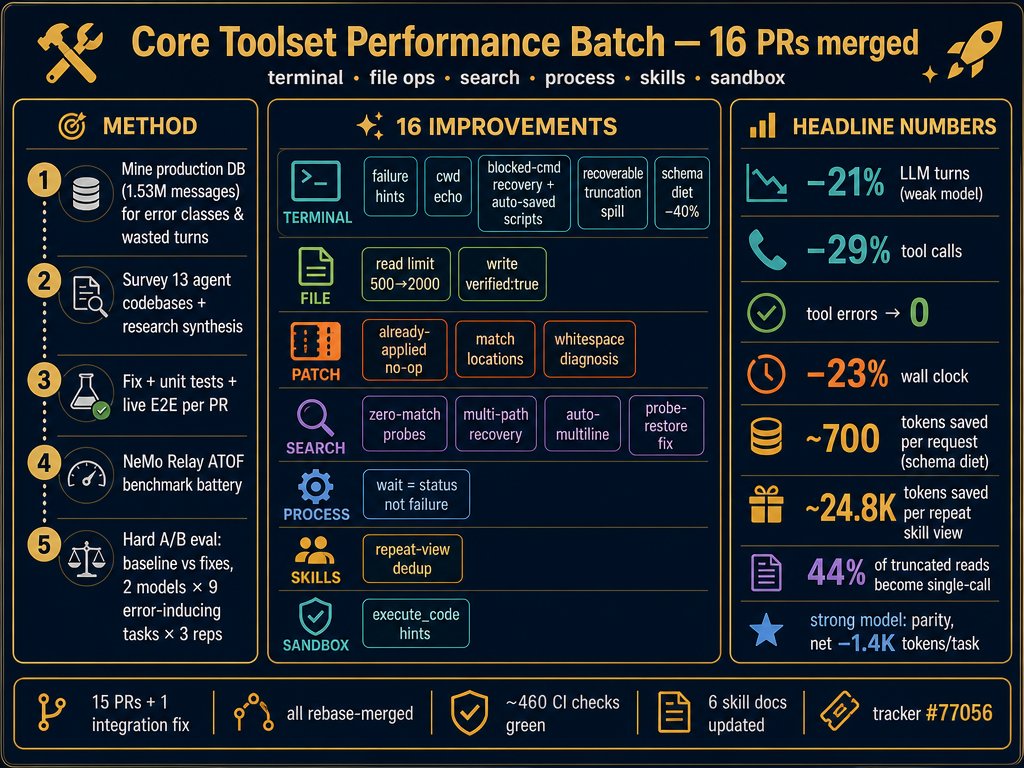
Hermes Agent is now dramatically more efficient, especially for smaller/weaker/local models!
With the help of @nvidia's Nemo Relay and several other strategies Hermes was able to identify a ton of optimizations beyond just saving tool execution time or memory - but also turns needed to complete tasks, schema improvements to reduce context load, and token efficiency gains by tracing through wasted turns and tool errors across all 250,000 conversations I've had with my Hermes.
All of the below are now in Hermes Agent, update to start saving now or wait until tomorrow for the full version update release.
Kanban is not the real announcement
The real announcement is that Hermes Desktop can now be extended like VS Code.
Plugins use the same contribution system as Hermes core, not a separate layer added afterward. A plugin can add:
• Full pages and panes
• Sidebar navigation
• Command palette actions
• Rebindable shortcuts
• Themes
• Composer controls
• Status bar actions
• Live Gateway events
• Its own backend endpoints
And the wild part?
Drop one ESM file into the plugins folder, save it, and Hermes hot reloads it within seconds.
No repo clone.
No rebuilding Desktop.
No patching the app.
Kanban is just the first proof of what this SDK can do.
What plugin should someone build next? 👀
The first official Hermes Desktop plugin is Kanban, now desktop native by popular request and significantly upgraded.
A plugin can add its own page, sidebar row, hotkeys, status bar actions, and backend endpoints. You can write your own plugin or import one using the SDK.
Reading a clear AI answer can feel like learning. Test it instead: ask for a simple explanation, try one example yourself, then explain it back. If AI finds a gap, repair it and try again. Understanding is what you can use—not what you recognize. #AIConfidenceAfter50
My new app Circle Take is Available Now:
Free and open source dailies room for AI film.
Organizes every take by shot, run quality gates, compare + circle the best, + export a reshoot list carrying the exact prompt and seed for everything that failed. MCP built in. Link Below https://t.co/NgnGmrNM67
Elon is back to rig the midterms. He just revived his PAC to pour in hundreds of millions to elect republicans. If democrats win, he’ll end up in jail. So yes, just like he did on July of 2024, he’s doing it again. Watch him bring all his tools, money, starlink, voter lists, AI.
HERMES AGENT HAS 3 QUICKSILVER FEATURES
THAT MOST USERS HAVEN'T CONFIGURED YET.
SMART APPROVALS. ONE-TURN MODELS. SELF-IMPROVEMENT CRON.
ALL THREE MAKE YOUR AGENT WORK AND SELF EVOLVE WHILE YOU SLEEP.
1. SMART APPROVALS (no more babysitting)
without smart approvals:
you set a cron job: "morning brief at 7am."
the agent hits a command that needs approval.
you're asleep. the agent stops. waits.
you wake up. it's been stuck for 4 hours.
with smart approvals:
smart approvals are the DEFAULT mode since v0.19.0.
an auxiliary LLM reads each flagged command.
obviously safe = auto-approved.
genuinely dangerous = auto-denied.
uncertain = escalates to you.
"read my calendar" → approved. no ping needed.
"delete this directory" → denied. you never see it.
"send this email draft" → uncertain. asks you.
the difference between an assistant you babysit
and one that works through the night.
if you want manual control back:
Desktop app / Dashboard: Security → Mode → ask
CLI: hermes config set approvals.mode ask
also available:
/deny [reason]
tells the agent WHY you refused.
it learns from the explanation.
stops repeating the same flagged action.
2. /MODEL --ONCE (expensive model for one turn only)
you're on GPT-5.6 Terra as your daily driver.
you need one beautiful HTML page.
Kimi K3 does that best but costs 3x more.
manual way: /model kimi-k3 → do the task → /model gpt-5.6-terra.
two switches. easy to forget the second one.
you stay on the expensive model by accident.
better:
/model kimi-k3 --once
Kimi K3 handles the next turn.
then automatically reverts to your daily driver.
one command. no manual switch back.
no accidental expensive model running for 20 turns.
use cases:
daily driver: GPT-5.6 Terra or Sonnet 4.6 (cheap)
one-turn tag-ins:
→ /model kimi-k3 --once (design task)
→ /model claude-opus-5 --once (complex reasoning)
→ /model grok-4.5 --once (X search)
expensive models do the one turn that needs firepower.
cheap model handles everything else.
pair with per-task effort control:
reasoning_effort goes up to "max" and "ultra."
set per-model overrides in config:
reasoning:
overrides:
claude-opus-5: high
gpt-5.6-terra: medium
deepseek-v4-flash: low
MoA presets can set different effort per slot:
advisors think hard. synthesizer stays fast.
thinking depth is a dial, not a global switch.
3. SELF-IMPROVEMENT CRON (agent fixes itself overnight)
tell your agent:
"create a cron job that runs daily at 3am.
review all cron jobs that failed in the last 24 hours.
for each failure: analyze what went wrong,
check if a skill needs updating,
and either fix the skill or create a new one.
then review all skills.
which ones haven't been used in 30 days?
which ones failed more than they succeeded?
suggest improvements or archive them.
compile a report of everything you changed.
include it in tomorrow's morning brief
under a section called OVERNIGHT SELF-IMPROVEMENT.
use the cheapest available model for this audit."
what this does:
3am: agent wakes on cheap model.
reads its own failure logs.
finds: "cron job X failed because skill Y
doesn't handle edge case Z."
fixes skill Y. tests the fix.
archives unused skills. cleans up bloat.
8am: your morning brief includes:
"OVERNIGHT SELF-IMPROVEMENT:
→ fixed email-parser skill: now handles
forwarded emails with nested attachments
→ archived 3 unused skills (last used 45+ days ago)
→ cron job success rate: 94% → 97%"
you didn't debug anything.
the agent diagnosed its own failures
and improved its own tools.
the agent at month 3 is sharper
than the agent at month 1
because it ran 90 self-improvement cycles
while you slept.
HOW ALL THREE CONNECT:
smart approvals (1) let the agent work overnight
without getting stuck on permissions.
/model --once (2) keeps costs down
by using expensive models only when needed.
self-improvement cron (3) uses a cheap model
at 3am to fix failures from the day.
the agent runs 24/7.
it doesn't wake you for safe operations.
it doesn't waste tokens on expensive models.
it fixes its own mistakes while you sleep.
you show up in the morning.
brief is ready. failures are fixed. costs are low.
requires v0.19.0+
check your version: hermes --version
update if needed: hermes update
Did you know the Hermes Desktop app can make its own custom UI elements? Brooklyn introduced this today, and I thought this was really cool.
In this video, I asked Hermes to make me two widgets:
1. System memory monitor
2. Floating widget with live baseball score updates
Now you can really make the Desktop app your own!
Hello people of Sol! I've reset usage limits for all ChatGPT Work and Codex users. Together with that, a quick update on GPT-5.6 Sol usage limits.
Over the past few weeks, many of you have told us that Sol was using your Codex limits faster than expected. To be clear, we have not reduced usage on any subscription plans.
We’ve been digging into what was happening and have landed several improvements. As a result, we expect your usage to last around 18% longer during typical use of Sol. Some of you should already see significantly larger improvements from today. Tomorrow, we’ll also restore the five-hour limit that we temporarily paused while investigating.
Here’s what we found:
- GPT-5.6 Sol is much more willing to work for longer, make additional tool calls, and coordinate complex workflows across tools and subagents. That makes it better at solving hard problems, but some tasks were using far more than we intended.
- Sol also works harder at the same reasoning effort than previous models. High on Sol can use more tokens than High did on GPT-5.5.
- Programmatic tool calling, also referred to as code mode, gives Sol much more flexibility to run tool calls in parallel or continue working while waiting. But it also led to more responses per turn, more cached input tokens, and higher usage than expected.
- This was particularly noticeable when Sol was waiting for tool calls to finish or running many web searches. We’ve improved how we handle both cases and are continuing to make code mode more efficient.
- The impact was also very uneven. The median user actually found Sol quite token efficient, while some power users working on harder tasks saw their usage drain much faster. We were very focused on average and median usage before launch and missed some cases where the long tail could use significantly more usage.
Sol is a significant step forward in what Codex can do, but capability and efficiency do not always improve at the same pace, and some issues only become clear once people are using the model at real-world scale. We should have recognized this sooner and been more upfront about it.
You keep pushing the frontier and we’ll keep improving efficiency and sharing updates as we go.
Hermes Agent now has voice activation.
Say the wake word and Hermes opens a new session and listens for your command, hands-free in the CLI, TUI, or desktop app. Detection is local and off by default.
https://t.co/V5DwesUdod
Hey Hermes - Replace your Google Home, Alexa, whatever you got with Hermes Agent on any device that can run the GUI or CLI locally!
Voice activation is now in Hermes Agent along with many other voice chat improvements.
To toggle listening for wake word on, just click the ear icon in the prompt box in your GUI, and you can activate Hermes voice chats with "Hey Hermes" - and it can even pick up profile names to activate voice chats with them!
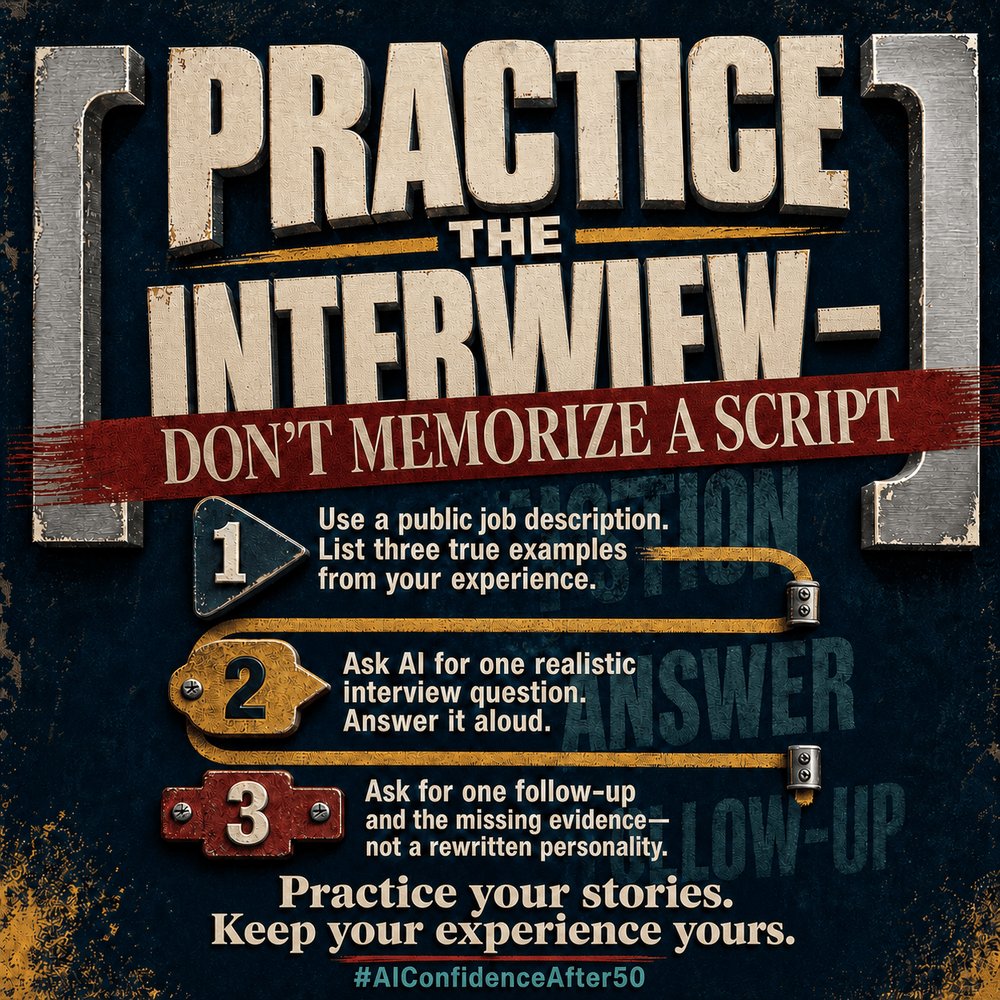
An interview is not a memory test. Give AI a public job description, answer one realistic question aloud, then ask for a follow-up and the evidence your answer is missing. Practice your real stories—not an AI-written personality. #AIConfidenceAfter50
Hidden Hermes gem: /moa
Most of the time you ask your agent a hard question and get one answer.
What if that answer is wrong… and you have no way to know?
Hermes has a feature called /moa (Mixture of Agents)
With /moa <prompt>, Hermes sends the same prompt to 2+ different models in parallel.
Each one thinks independently.
Then a third model (the aggregator) reads all their answers and synthesizes the best one.
The best part?
It still works inside the normal Hermes agent loop.
Tools
Sessions
Follow-ups
Interrupts
/goal
And when that one task is finished, Hermes switches back to the model you were already using.
Real example:
I hit a nasty TypeScript error.
One model said recursive loop.
Another said constraint issue.
The aggregator compared both perspectives, found the actual root cause, and gave me three working fixes.
Set it up with:
hermes moa configure
Pick your reference models and aggregator.
Then use:
/moa your difficult question
Or select your MoA preset like a normal model in Desktop, CLI, TUI, or the Dashboard.
Yes, it uses more model calls.
Yes, it can take longer.
But for architecture, debugging, research, or any decision where being wrong is expensive…
I would rather have a panel than trust model luck.
The HermesBench result is wild too:
MoA: 0.8202
Opus 4.8 alone: 0.7607
GPT-5.5 alone: 0.7412
Not one model to rule them all.
A team of models working together.
@EloraEloraElora And we all were getting scammed and manipulated the entire time. Most everyone has lost everything to that grift multiple times. My life is 100x better not being in that world. Buying a lottery ticket has about the same odds of success and costs less.