Creators spend hours scanning AI news and dressing it up for Twitter.
This workflow does the heavy lifting: finds the stories, writes the posts, even designs the infographics.
That leaves more time for what matters — your take. 👇
New workflow demo: AI news → viral tweets with infographics.
Pull the top 5 AI articles, auto-generate posts, design visuals, and publishf. All in minutes.
Stay current, boost reach, and save hours on research + design.
Auto-replies as a workflow change the game for creators.
It’s not just about speed.
It’s about showing up in the right conversations, consistently, in your own voice.
This demo makes it look effortless 👇
Auto-Reply & Publish on Twitter
Just describe what you want in chat:
- Fetch the latest tweets from chosen accounts;
- Generate replies in your preferred style;
- Auto-publish replies to the original tweets.
Maybe AI builds the workflow → you run it → approve drafts → replies go live.
For creators, Twitter is both stage and treadmill.
Engagement means showing up daily, but that doesn’t mean you have to do it manually.
We’ve been testing Maybe AI’s X workflows, and they turn reply-drafting + posting into a repeatable system.
Thread with demos 🧵📽️
For creators, boosting engagement on Twitter takes time:
- Checking accounts
- Drafting replies
- Logging everything for tracking
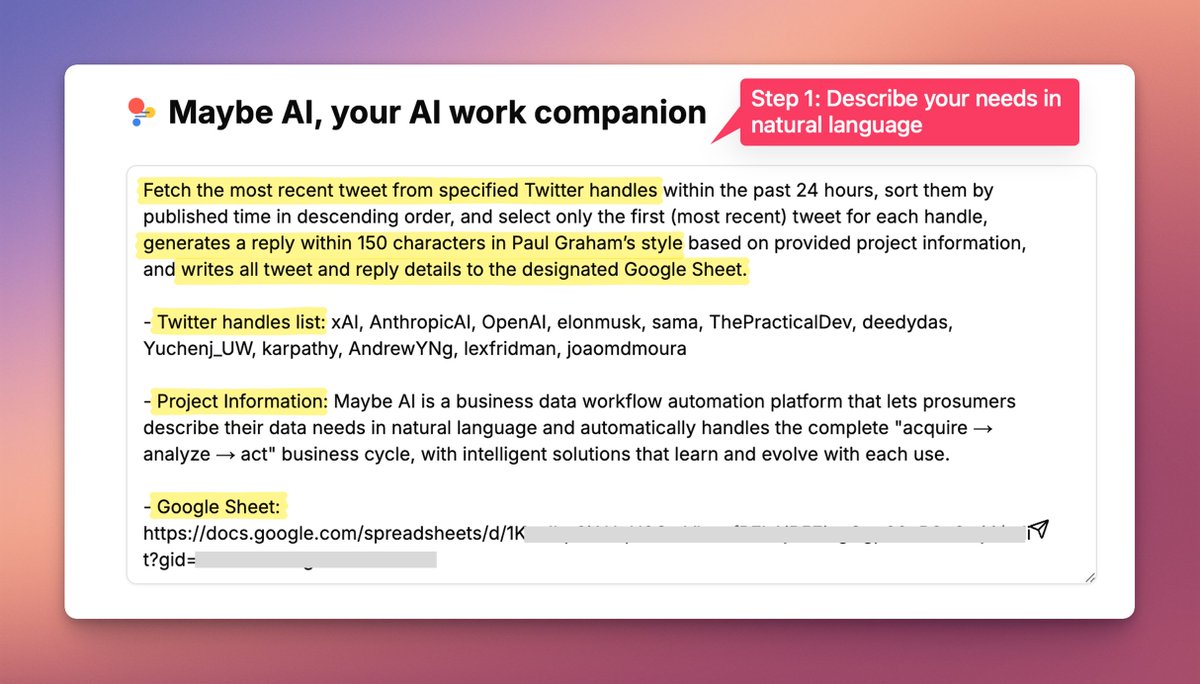
With Maybe AI, it becomes a workflow.
In this demo: fetch tweets, draft replies in your preferred style, and log both tweets + replies into Google Sheets for review.
Not sure how to play with Maybe AI yet?
We’ve got you. Subscribe to our YouTube channel for workflow tutorials, demos, and ideas to spark your next creation🔗
https://t.co/5VEIUDVuNF
https://t.co/po1gI8z6IF just leveled up.
We’re now built on @Hey_Maybe_AI, which means creators can design personalized content workflows with natural language.
All the features you knew from the old https://t.co/po1gI8z6IF are here.
The difference: flexibility.
Every creator can now shape workflows to match their own style, and even discover new ways to play.
80 Workflows That Saved Us Hundreds of Hours
We built more than 80 workflows in Maybe AI over the past month.
Not to show off, but because we were drowning in repetitive work.
Telegram groups need daily messages to stay active.
Twitter needs trending content moved and reformatted.
Resumes pile up.
Bulk emails still involve copy and paste.
1. Workflows that saved hundreds of hours
Community automation
- Scheduled posts by a Telegram digital host for group activity (already helped 10 group owners free their hands)
- Automatic group-chat summaries (24 hours of content in 3 minutes)
- Community sentiment analysis (finds investment opportunities 72 hours faster than manual work)
Social automation
- Tweet style analysis plus auto-replies (mimic any account’s tone)
- Hot content rewriting end to end (EN→ZH with image generation)
- LinkedIn autoposting (daily news summaries on autopilot)
Recruiting and marketing automation
- Resume key-info extraction (outputs structured tables from Google Drive)
- Personalized bulk email (Apollo data plus tailored copy)
2. These are real productivity tools
A friend used the Telegram activity workflow and grew their group by 40% in three months.
Another used the tweet analysis workflow and found two 10x coins.
We use the recruiting workflow to screen resumes and cut 80% of the time.
Every workflow can be reused.
Swap in your group ID, account, or sheet link and run.
YouTube is quietly filtering your Shorts. AI-smoothing faces, sharpening edges without giving creators a heads-up.
Creators feel uncanny. YouTube calls it “denoise & clarity” like your phone’s camera. But consent isn’t about clarity. It’s about trust.
https://t.co/sHIuUANZRn
For creators running Twitter, this is the dream workflow:
- hours → minutes
- replies drafted, organized in Sheets
- you only review & post
Less grind, more creative energy.
If you haven’t tried workflow automation yet, this is a perfect entry point.
Imagine cutting 90% of the time spent on Twitter ops
With Maybe AI Intern, here’s how a workflow turns hours into minutes:
Step 1: Tell Maybe AI “Get the latest tweets from these handles in the past 24h, draft replies, and write everything into a Google Sheet.”
Step 2: Generate the workflow
Step 3: Run it
Step 4: Open the Sheet — tweets, drafts, structured, ready for you to review and post
From idea → workflow → results, all in one flow.
Starting fresh on Reddit?
Here’s how to grow a new account without getting shadowbanned or ignored:
1. Lurk before you post
Spend a few days observing how top posts in your target subreddits are written.
Reddit culture is very specific.
2. Build karma the smart way
Start by commenting genuinely on rising posts in mid-sized subs.
Avoid low-effort jokes or recycled takes.
3. Post in the right subs
Don’t go straight to r/AskReddit or r/Entrepreneur.
Find niche, active subs where your content fits naturally.
4. Follow subreddit rules
Each sub is like its own country.
Read the rules. Mods are strict. One mistake = auto delete.
5. Format matters
Use line breaks, bold, and clear structure.
Redditors love skimmable content.
6. Don’t self-promote early
Reddit hates spam. Build trust first.
Once you’ve contributed, you can soft-plug with value.
7. Use tools to generate Reddit-native content
Personality-aware, topic-specific, and formatted for Reddit culture.
Reddit isn’t just another platform — it’s a conversation.
Treat it like one, and your account will grow naturally.
Adobe's PDF now a mini AI studio.
Upload 100 files to a shared workspace, query docs, create infographics, sign contracts, etc.
A glimpse of the future: content creation moving from files to AI-driven workflows.
Creators, think beyond text editing.
https://t.co/YSfeoU6Y8D
How to go from idea → published post in 30 minutes:
- Search: 5 min → use AI to scan trends, questions, keywords
- Research: 10 min → gather 3–5 solid refs, skim only what matters
- Draft: 10 min → outline + rough pass with AI help, then add your voice
- Polish: 5 min → format, headline, quick edit
And if you want to repeat this workflow faster, templates in https://t.co/po1gI8z6IF keep it ready for you.
Content has two lives:
1. Flow: short videos, quick posts, daily updates. They fade fast but keep you visible.
2. Stock: long articles, evergreen blogs, deep guides. They age well and keep working when you’re asleep.
A healthy brand needs both. Flow brings them in. Stock makes them stay.
- Plan with a 70/30 split
70% flow keeps you active in the feed.
30% stock builds your library of work that compounds over time.
- Use flow to test ideas
Treat quick posts as low-cost experiments. The winners graduate into long-form stock.
- Batch your stock
Set aside one block each week for deeper content: blog posts, guides, or long videos. Schedule them ahead.
- Let AI handle repurposing
Turn a long article into tweets, carousels, or short clips. Reverse it too: combine related tweets into a guide.
- Review quarterly
Ask: Which stock pieces still drive traffic? Which flow formats get the most engagement? Adjust the ratio.
1. Why test?
Models drift. Prompts that worked last month can go dull. Testing keeps your content sharp.
2. The 5-minute eval
Pick one real task: a blog intro, a tweet thread, or a YouTube script. Run it on 3 models. No edits. Compare.
3. The scoring rubric
Rate each on:
– Relevance
– Readability
– Latency
– Price per run
4. Keep what works
Save the best responses in a swipe file. Over time, you’ll know exactly which model to use for each type of job.
5. Repeat
Block 30 minutes every Friday to re-test. Models change. Your workflow should adapt.
The model wars are heating up.
GPT, Claude, Gemini — all shouting for your attention.
If you create for a living, don’t pick a side too fast.
Test small, test often:
- Same prompt, 3 models
- Score clarity, speed, cost
- Keep a “best outputs” folder
- Rotate weekly
Good creators explore more than they argue.
Publishing the same topic across platforms isn’t copy-paste.
Think in layers:
- Core idea → write once
- Adapt length → short for X, mid for LinkedIn, long for blog
- Change format → text, carousel, short video
- Mind the culture → what wins on IG may flop on Reddit
- Use AI tools → repurpose drafts, rephrase for tone, auto-generate visuals
One topic, many doors. Efficiency is in the prep, not the post.