Introducing /visual-plan - a skill to generate rich, visual plans for Claude Code and Codex.
Plan mode in Claude Code is incredible.
But I always find my eyes glazing over when it gives me this huge markdown essay in my terminal.
I found I can make much better visual plans with reusable components.
So I made a skill called `/visual-plan`.
It generates plans as MDX with visual, interactive components. Diagrams, interactive API specs, schema design changes, annotated code, and even pan and zoomable wireframes.
So for any UI work, you can look at a wireframe first, comment on it, iterate, and then have the agent work.
I’ve found this to be a much more intuitive interface for reasoning about what the agent is doing.
It’s somewhat inspired by that popular post about how HTML is better than Markdown.
But HTML can be slow and verbose to write. And it doesn’t look good checked into a repo.
This has really made me feel like humans and engineering are entering a new abstraction phase, where we reason about things at the plan level.
As long as the plan is good, agents are getting more and more reliable at executing on it.
Almost to the degree that we trust the C compiler to compile to assembly reliably.
Plans are the new intermediate representation.
I also made a skill for the reverse of this, called `/visual-recap`.
After the agent works, it gives you a recap of everything it did.
Same idea: wireframes, interactive API specs and diffs, schemas, annotated code, etc.
So now when you’re reviewing what the agent did for you, or looking at a pull request of somebody else’s code, you can see a visual recap instead of just reading a wall of text.
It’s all free and open source. You can find it on my GitHub.
Will link to it in the reply because we all know how dumb these algorithms are with links.
you can create a sticky navbar that morphs when you scroll with pure CSS, no JS or animation libraries required
𝚑𝚎𝚊𝚍𝚎𝚛 {
𝚌𝚘𝚗𝚝𝚊𝚒𝚗𝚎𝚛-𝚝𝚢𝚙𝚎: 𝚜𝚌𝚛𝚘𝚕𝚕-𝚜𝚝𝚊𝚝𝚎;
𝚙𝚘𝚜𝚒𝚝𝚒𝚘𝚗: 𝚜𝚝𝚒𝚌𝚔𝚢;
𝚝𝚘𝚙: 𝟶;
}
@𝚌𝚘𝚗𝚝𝚊𝚒𝚗𝚎𝚛 𝚜𝚌𝚛𝚘𝚕𝚕-𝚜𝚝𝚊𝚝𝚎(𝚜𝚝𝚞𝚌𝚔: 𝚝𝚘𝚙) {
.𝚗𝚊𝚟-𝚋𝚊𝚛 {
𝚖𝚊𝚡-𝚠𝚒𝚍𝚝𝚑: 𝟻𝟼𝚛𝚎𝚖;
𝚋𝚘𝚛𝚍𝚎𝚛-𝚛𝚊𝚍𝚒𝚞𝚜: 𝟶.𝟽𝟻𝚛𝚎𝚖;
𝚋𝚊𝚌𝚔𝚐𝚛𝚘𝚞𝚗𝚍: 𝚛𝚐𝚋(𝟸𝟻𝟻 𝟸𝟻𝟻 𝟸𝟻𝟻 / 𝟶.𝟿𝟸);
}
}
the browser now knows when a sticky element is stuck, all triggered by one container query
available only in chromium browsers only, no firefox or safari which is a shame
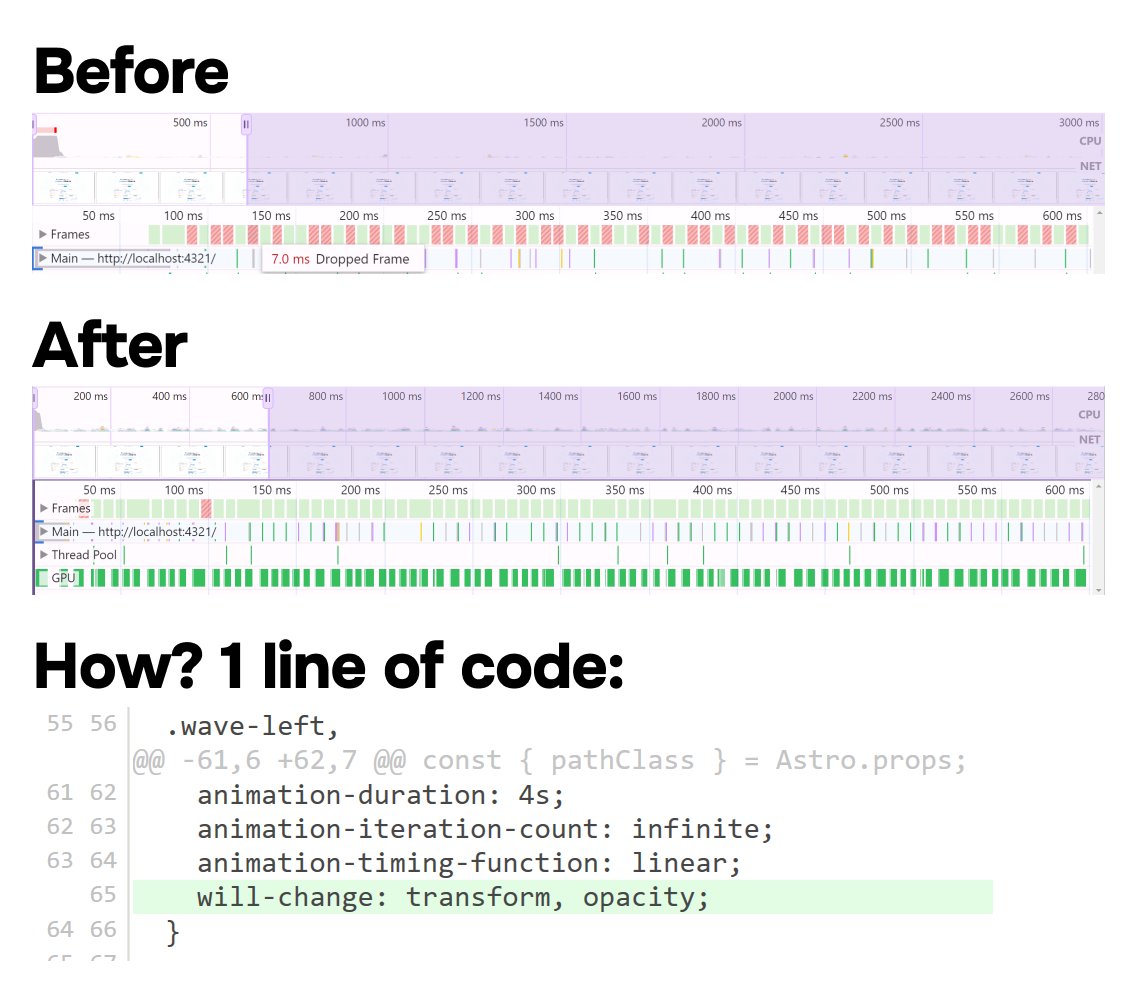
CSS "will-change" is not always the answer – sometimes it can make things worse
reach for "transform: translateZ(0)" and give that a try if you're having issues with motion 👨🍳
A codebase shouldn't feel like this, but I see it a lot.
unused imports and packages
rampant copy/paste
half-written features
unclear patterns
commented out code
frequent spelling errors
inconsistency
100s of warnings
no validation
swallowed errors
a general sense of disorder
Ok, going to vibe code again tonight.
This time, I'll try to build a zombie survival first-person shooter in blocky style with Cursor + Sonnet 3.7 + @superwhisper.
Maybe too ambitious, but we'll see.
Follow along in this thread 🧵
ChatGPT has the most features by far.
But Claude excels at two things I care about:
- Editing my writing
- Generating code
I wrote an opinionated guide on what each AI model does best, including some hidden use cases that most people miss.
📌 Read the full breakdown now (it's free): https://t.co/Xzsot1JTX8
Honest reflections from coding with AI so far as a non-engineer:
It can get you 70% of the way there, but that last 30% is frustrating. It keeps taking one step forward and two steps backward with new bugs, issues, etc.
If I knew how the code worked I could probably fix it myself. But since I don't, I question if I'm actually learning that much.
Just received our copies of the hardcover edition. They feel light, are easy to read, and look great! Really excited to see these shipping out to pre-orders soon.
Santa's now just one click away! 🎄🤖
What if Santa could talk to everyone this Christmas? Introducing AI Santa—a hyper-realistic, interactive Santa powered by Tavus 🎅✨
If you care about security for your NextJS app, stop using top level "use server" - it's way too easy to leak data
Top level "use server" creates endpoints for all exported functions, even if they are never used on the client
One accidental export can cause a ton of damage
"How can I use server components for data fetching if all my components also need hooks or onClick?"
Move the interactive part into a separate component
I don’t ask for permission to refactor.
I don’t ask for permission to optimize performance.
I don’t ask for permission to make it secure.
I don’t ask for permission to make it accessible.
I don’t ask for permission to write tests.
I don’t ask for permission to do my job well.
Today I relearned about the `will-change` CSS property.
It helped me go from dozens of dropped frames to nearly zero!
It even helps with pure-CSS animations, like this one: