Here is the Claude.md to drop into your project as it is
# Workflow Orchestration
## 1. Plan Node Default
- Enter plan mode for ANY non-trivial task (3+ steps or architectural decisions)
- If something goes sideways, STOP and re-plan immediately – don’t keep pushing
- Use plan mode for verification steps, not just building
- Write detailed specs upfront to reduce ambiguity
## 2. Subagent Strategy
- Use subagents liberally to keep main context window clean
- Offload research, exploration, and parallel analysis to subagents
- For complex problems, throw more compute at it via subagents
- One tack per subagent for focused execution
## 3. Self-Improvement Loop
- After ANY correction from the user: update `tasks/lessons.md` with the pattern
- Write rules for yourself that prevent the same mistake
- Ruthlessly iterate on these lessons until mistake rate drops
- Review lessons at session start for relevant project
## 4. Verification Before Done
- Never mark a task complete without proving it works
- Diff behavior between main and your changes when relevant
- Ask yourself: “Would a staff engineer approve this?”
- Run tests, check logs, demonstrate correctness
## 5. Demand Elegance (Balanced)
- For non-trivial changes: pause and ask “is there a more elegant way?”
- If a fix feels hacky: “Knowing everything I know now, implement the elegant solution”
- Skip this for simple, obvious fixes – don’t over-engineer
- Challenge your own work before presenting it
## 6. Autonomous Bug Fixing
- When given a bug report: just fix it. Don’t ask for hand-holding
- Point at logs, errors, failing tests – then resolve them
- Zero context switching required from the user
- Go fix failing CI tests without being told how
-----
# Task Management
1. **Plan First**: Write plan to `tasks/todo.md` with checkable items
1. **Verify Plan**: Check in before starting implementation
1. **Track Progress**: Mark items complete as you go
1. **Explain Changes**: High-level summary at each step
1. **Document Results**: Add review section to `tasks/todo.md`
1. **Capture Lessons**: Update `tasks/lessons.md` after corrections
-----
# Core Principles
- **Simplicity First**: Make every change as simple as possible. Impact minimal code.
- **No Laziness**: Find root causes. No temporary fixes. Senior developer standards.
- **Minimal Impact**: Changes should only touch what’s necessary. Avoid introducing bugs.
Jensen Huang, the CEO of Nvidia broke down all of AI in 2 minutes
the 5 layers:
energy → chips → infrastructure → models → applications.
nvidia sits at layer 2. openAI sits at layer 5. every AI company you know maps to one of these.
every product you use runs through all of them.
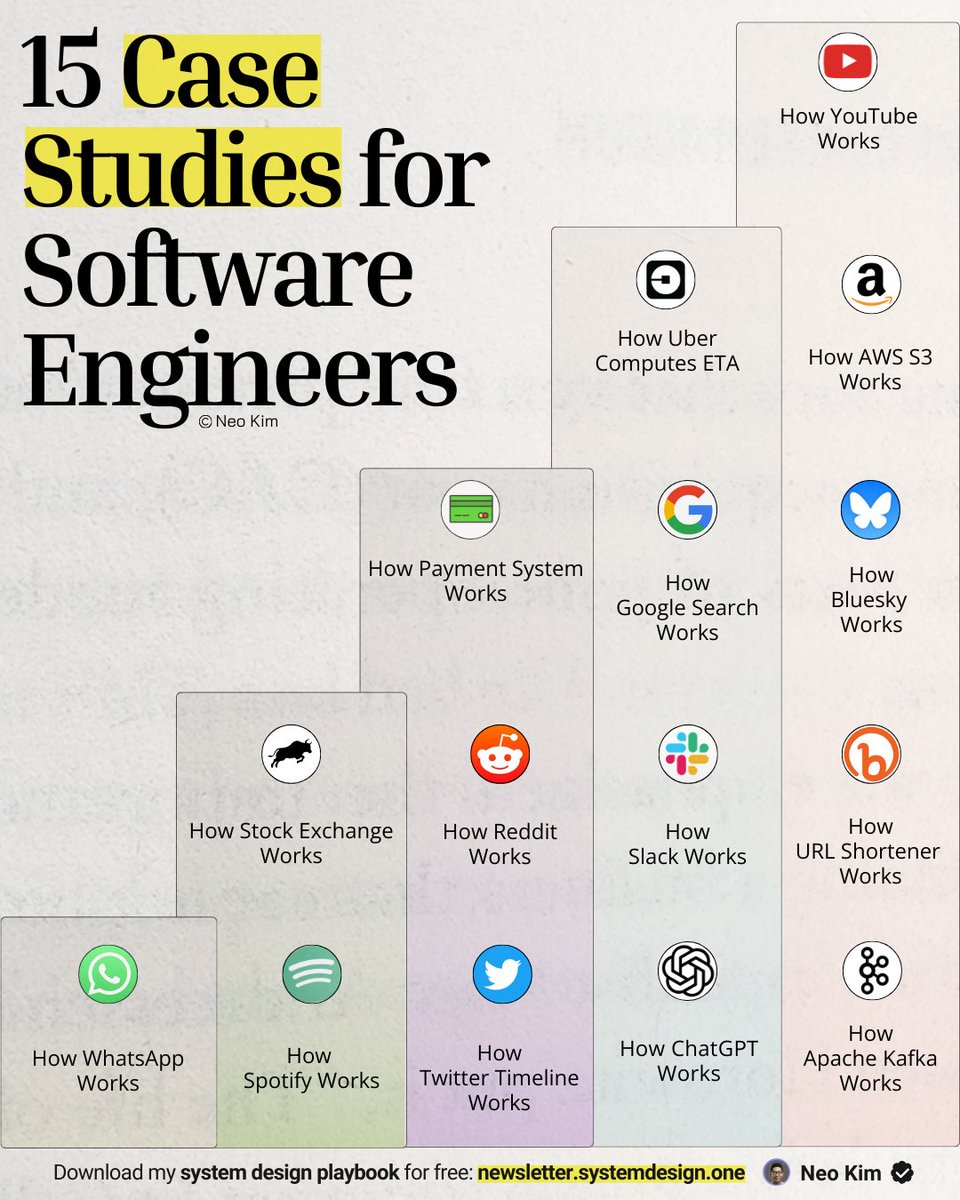
If you want to become good at system design, learn these 15 case studies (save this now):
1 How ChatGPT Works:
↳ https://t.co/TZYZ3iddYH
2 How Google Search Works:
↳ https://t.co/jwOaC4bhnv
3 How Uber Computes ETA:
↳ https://t.co/hw1hYJqQmj
4 How Amazon S3 Works:
↳ https://t.co/iReWAEHwmj
5 How YouTube Works:
↳ https://t.co/kHk3g6jz6t
6 How Kafka Works:
↳ https://t.co/8rOy9KgCMo
7 How WhatsApp Works:
↳ https://t.co/VScq8QwHMr
8 How Spotify Works:
↳ https://t.co/BxrH3oHIFS
9 How Slack Works:
↳ https://t.co/eIo29uOQOJ
10 How Reddit Works:
↳ https://t.co/o6Pw2hhj3T
11 How Bluesky Works:
↳ https://t.co/2rLYlRlky0
12 How Twitter Timeline Works:
↳ https://t.co/pF2RYmPaIG
13 How URL Shortener Works:
↳ https://t.co/tGndgdhH0V
14 How Payment System Works:
↳ https://t.co/ARiLxGR43G
15 How Stock Exchange Works:
↳ https://t.co/iFNSX9TM9O
What else should make this list?
——
👋 PS - Want my System Design Playbook for FREE?
Click the link below to join my newsletter right now:
→ https://t.co/ByOFTtOihX
(200K+ software engineers have already signed up.)
———
�� Save this for later & RT to help other software engineers ace system design.
👤 Follow @systemdesignone + turn on notifications.
full md file if anyone is interested (fixed the typeo in #6)
vvvvvvvvvvvvvvvvvvvvvvvvvvvvv
## Workflow Orchestration
### 1. Plan Node Default
- Enter plan mode for ANY non-trivial task (3+ steps or architectural decisions)
- If something goes sideways, STOP and re-plan immediately - don't keep pushing
- Use plan mode for verification steps, not just building
- Write detailed specs upfront to reduce ambiguity
### 2. Subagent Strategy
- Use subagents liberally to keep main context window clean
- Offload research, exploration, and parallel analysis to subagents
- For complex problems, throw more compute at it via subagents
- One tack per subagent for focused execution
### 3. Self-Improvement Loop
- After ANY correction from the user: update `tasks/lessons.md` with the pattern
- Write rules for yourself that prevent the same mistake
- Ruthlessly iterate on these lessons until mistake rate drops
- Review lessons at session start for relevant project
### 4. Verification Before Done
- Never mark a task complete without proving it works
- Diff behavior between main and your changes when relevant
- Ask yourself: "Would a staff engineer approve this?"
- Run tests, check logs, demonstrate correctness
### 5. Demand Elegance (Balanced)
- For non-trivial changes: pause and ask "is there a more elegant way?"
- If a fix feels hacky: "Knowing everything I know now, implement the elegant solution"
- Skip this for simple, obvious fixes - don't over-engineer
- Challenge your own work before presenting it
### 6. Autonomous Bug Fixing
- When given a bug report: just fix it. Don't ask for hand-holding
- Point at logs, errors, failing tests - then resolve them
- Zero context switching required from the user
- Go fix failing CI tests without being told how
## Task Management
1. **Plan First**: Write plan to `tasks/todo.md` with checkable items
2. **Verify Plan**: Check in before starting implementation
3. **Track Progress**: Mark items complete as you go
4. **Explain Changes**: High-level summary at each step
5. **Document Results**: Add review section to `tasks/todo.md`
6. **Capture Lessons**: Update `tasks/lessons.md` after corrections
## Core Principles
- **Simplicity First**: Make every change as simple as possible. Impact minimal code.
- **No Laziness**: Find root causes. No temporary fixes. Senior developer standards.
- **Minimat Impact**: Changes should only touch what's necessary. Avoid introducing bugs.
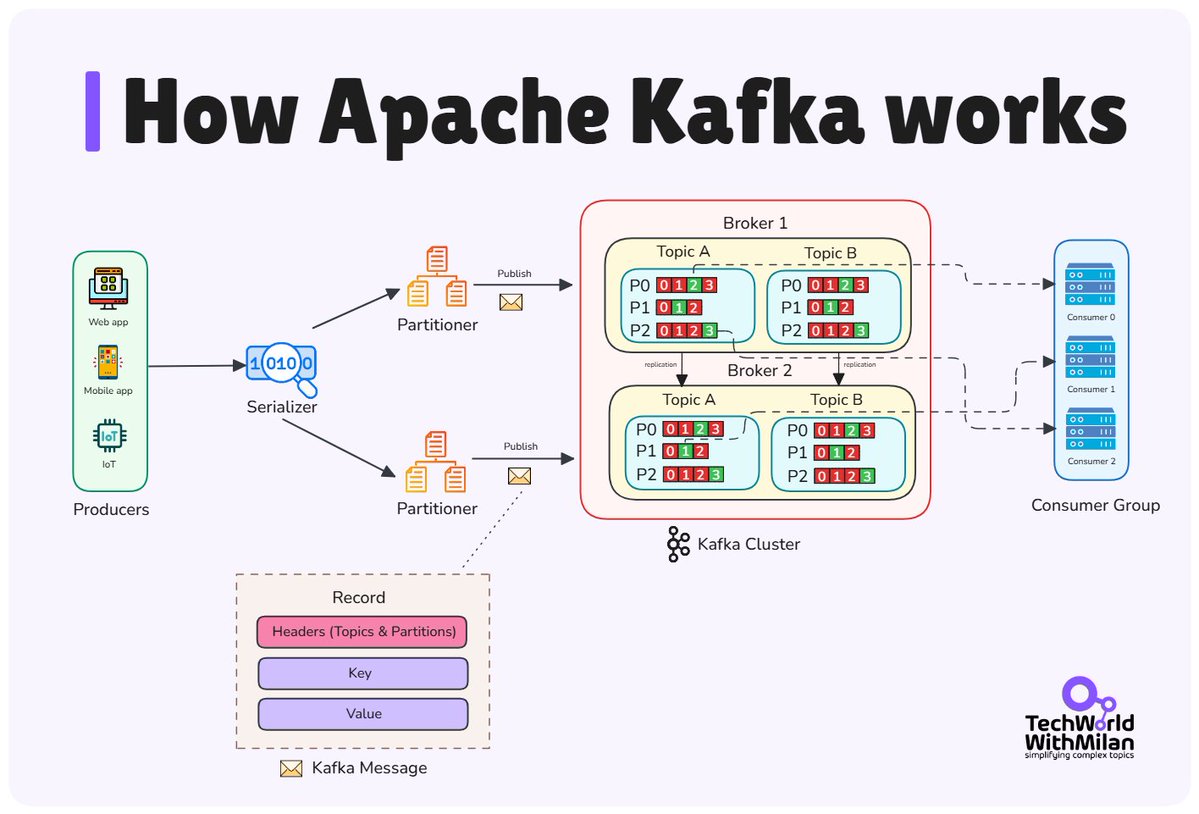
𝗛𝗼𝘄 𝗔𝗽𝗮𝗰𝗵𝗲 𝗞𝗮𝗳𝗸𝗮 𝘄𝗼𝗿𝗸𝘀?
If you're building distributed systems or working with real-time data, you need to understand Kafka. It's a streaming platform that handles millions of events per second without breaking.
Kafka moves data between applications using a distributed pub-sub model. Producers write messages to topics. Consumers read about those topics. Brokers store and serve the data.
Here's what happens under the hood when a message flows through Kafka:
𝟭. 𝗣𝗿𝗼𝗱𝘂𝗰𝗲𝗿 𝘀𝗲𝗻𝗱𝘀 𝗮 𝗺𝗲𝘀𝘀𝗮𝗴𝗲
An application writes a message to a specific topic. The producer assigns the message to a partition based on a key or round-robin distribution. Messages are batched together before sending to maximize throughput.
𝟮. 𝗕𝗿𝗼𝗸𝗲𝗿 𝘀𝘁𝗼𝗿𝗲𝘀 𝘁𝗵𝗲 𝗺𝗲𝘀𝘀𝗮𝗴𝗲
The broker receives the message and writes it to disk immediately. This makes it durable. Each partition is replicated across multiple brokers, so if one broker fails, another takes over. The broker assigns an offset to each message, which acts as a unique identifier within the partition.
𝟯. 𝗖𝗼𝗻𝘀𝘂𝗺𝗲𝗿 𝗿𝗲𝗮𝗱𝘀 𝘁𝗵𝗲 𝗺𝗲𝘀𝘀𝗮𝗴𝗲
Consumers poll the broker for new messages from their assigned partitions. In a consumer group, each consumer owns specific partitions. This prevents two consumers from processing the same message. The consumer tracks its position using offsets, so it can restart without losing its place.
𝟰. 𝗣𝗮𝗿𝘁𝗶𝘁𝗶𝗼𝗻 𝗺𝗼𝗱𝗲𝗹 𝗲𝗻𝗮𝗯𝗹𝗲𝘀 𝘀𝗰𝗮𝗹𝗲
Topics are split into partitions, which can be distributed across different brokers. This enables parallel processing. Multiple consumers can read from different partitions simultaneously. Need more capacity? Add more partitions and more consumers.
𝗪𝗵𝘆 𝗞𝗮𝗳𝗸𝗮 𝗶𝘀 𝗳𝗮𝘀𝘁?
Kafka writes everything to disk using sequential writes, which are faster than random memory access. It keeps messages for days or weeks instead of deleting after delivery. This lets consumers reprocess data or new consumers catch up from the beginning.
The system handles multiple producers and consumers independently. Each operates at its own pace without coordination. This is why Kafka can sustain millions of messages per second across distributed systems.
Some 𝗰𝗼𝗺𝗺𝗼𝗻 𝘂𝘀𝗲 𝗰𝗮𝘀𝗲𝘀 are:
🔹 Event processing systems that rely on real-time data (IoT)
🔹 Stream processing (real-time analytics)
🔹 Metrics collection & logging
You don’t need 10 years of experience to stand out in tech.
You just need to master the fundamentals that 90% of people skip.
Here are 7 fundamentals that will level up your career 👇
Networking Basics in DevOps
→ What is Networking in DevOps
Networking is the backbone of communication between systems, services, and users in DevOps environments. Understanding its fundamentals ensures reliability, scalability, and security in deployments.
→ DNS (Domain Name System)
✓ Translates human-readable domain names (like https://t.co/faSdnDFkQR) into IP addresses.
✓ Acts as the “phonebook” of the internet, directing traffic to the correct servers.
✓ DNS records (A, CNAME, MX, TXT) define how traffic is routed.
✓ In DevOps, DNS automation helps in dynamic scaling and service discovery.
→ HTTP (HyperText Transfer Protocol)
✓ The foundation of web communication between clients and servers.
✓ HTTP requests (GET, POST, PUT, DELETE) handle resource interaction.
✓ HTTPS (secure HTTP) uses TLS encryption for secure data transfer.
✓ Monitoring HTTP performance ensures fast and reliable application delivery.
→ Load Balancing Principles
✓ Distributes network traffic evenly across multiple servers.
✓ Ensures high availability, scalability, and fault tolerance.
✓ Types include:
✓ Round Robin → rotates requests among servers.
✓ Least Connections → sends new requests to servers with the fewest active connections.
✓ IP Hash → routes requests based on client IP.
✓ Used in cloud services, Kubernetes, and reverse proxy setups.
→ Benefits of Networking Knowledge in DevOps
✓ Improves system performance and uptime.
✓ Enables better troubleshooting and deployment management.
✓ Supports scalability for modern distributed applications.
✓ Strengthens security and data integrity.
→ Ebook for You
DevOps Complete Guide – Learn networking, automation, and deployment principles essential for scalable and secure DevOps systems.
Get it here: https://t.co/MfRO2BhlFG