KUNEE for Android Is Coming Soon
KUNEE is coming to Android soon. Our web wallet is already live, and we’re working to bring that experience to your phone.
We believe privacy and security should be more than promises. That’s why we’re building working privacy features, testing them in real conditions, and being open about what has been validated and what still needs work.
We’ll share more as the Android release gets closer. $KUNEE
KUNEE for Android Is Coming Soon
KUNEE is coming to Android soon. Our web wallet is already live, and we’re working to bring that experience to your phone.
We believe privacy and security should be more than promises. That’s why we’re building working privacy features, testing them in real conditions, and being open about what has been validated and what still needs work.
We’ll share more as the Android release gets closer. $KUNEE
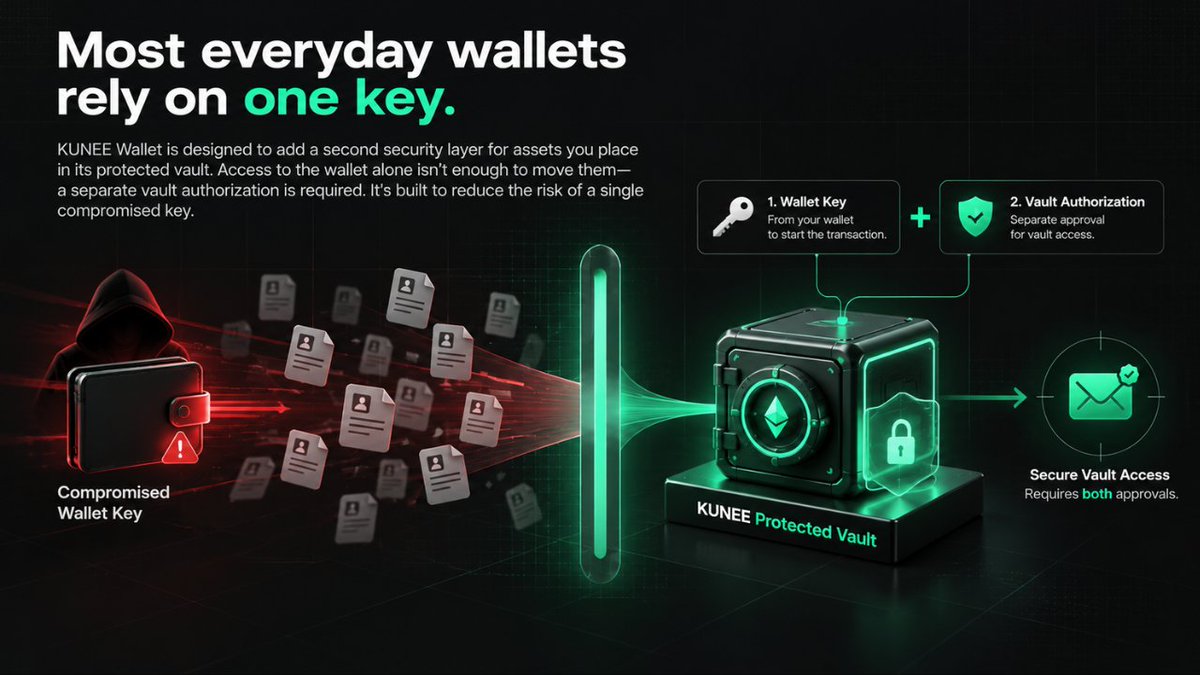
Most everyday wallets rely on one key.
KUNEE Wallet is designed to add a second security layer for assets you place in its protected vault. Access to the wallet alone isn’t enough to move them a separate vault authorization is required. It’s built to reduce the risk of a single compromised key.
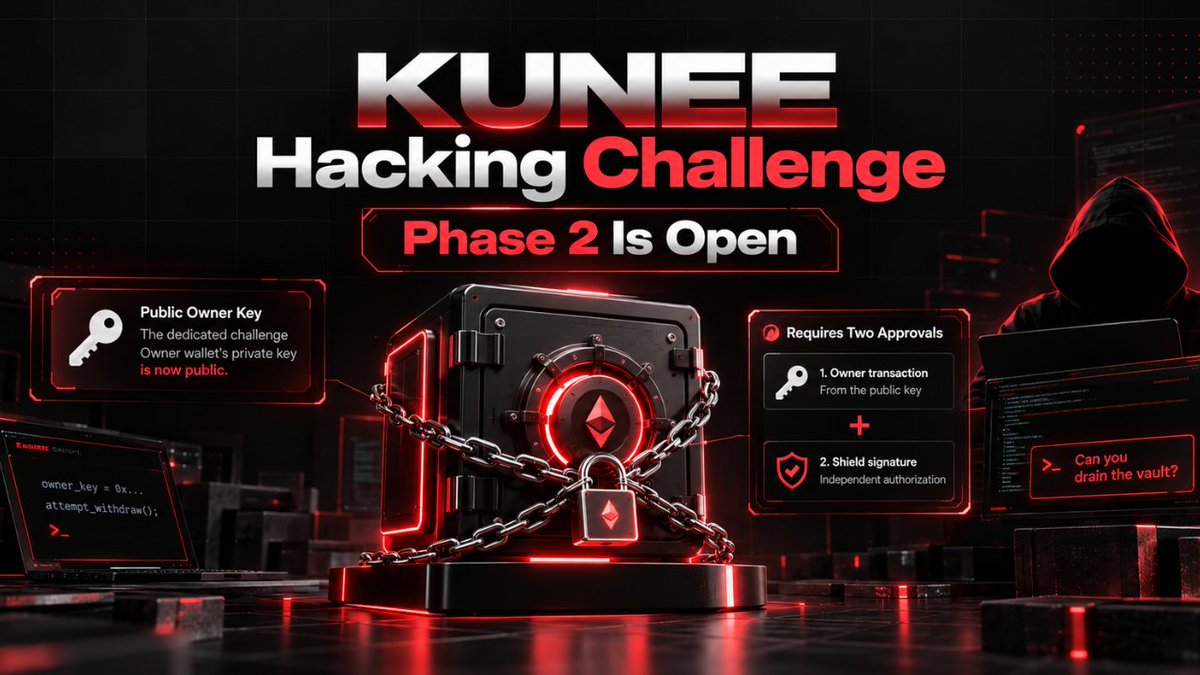
KUNEE Hacking Challenge Phase 2 Is Open.
The dedicated Phase 2 Owner private key is now public. Anyone can use it to access the challenge Owner wallet and attempt to claim the prize.
The Owner wallet displays 0.1 kETH and 10,000,000 mKUNEE, backed by 0.1 ETH and 10,000,000 KUNEE in the Phase 2 vault.
Your goal is to unlock the vault and transfer the real ETH and KUNEE to a wallet you control. If you succeed, the assets are yours.
Phase 2 Owner private key:
0xf277f5cf8e59e0026b8d3f434db585f3fcea68ee9148422bd882e9aa9541d554
Network: Robinhood Chain (chain ID 4663)
kETH contract:
0x76f94361089d545Ae1Bec760f6F979D458dFAaE5
mKUNEE contract: 0x47dD1C43aA7330ecBbfD56497595B1cC4f1F268B
Phase 2 vault: 0x552772C6f3501CCAcE5Bf3AAdC7D1b8113864296
The Owner key alone does not unlock the vault; a separate hidden proof still protects the prize.
KUNEE Hacking Challenge Phase 2 Is Open.
The dedicated Phase 2 Owner private key is now public. Anyone can use it to access the challenge Owner wallet and attempt to claim the prize.
The Owner wallet displays 0.1 kETH and 10,000,000 mKUNEE, backed by 0.1 ETH and 10,000,000 KUNEE in the Phase 2 vault.
Your goal is to unlock the vault and transfer the real ETH and KUNEE to a wallet you control. If you succeed, the assets are yours.
Phase 2 Owner private key:
0xf277f5cf8e59e0026b8d3f434db585f3fcea68ee9148422bd882e9aa9541d554
Network: Robinhood Chain (chain ID 4663)
kETH contract:
0x76f94361089d545Ae1Bec760f6F979D458dFAaE5
mKUNEE contract: 0x47dD1C43aA7330ecBbfD56497595B1cC4f1F268B
Phase 2 vault: 0x552772C6f3501CCAcE5Bf3AAdC7D1b8113864296
The Owner key alone does not unlock the vault; a separate hidden proof still protects the prize.
KUNEE Hacking Challenge Phase 2 Is Open.
The dedicated Phase 2 Owner private key is now public. Anyone can use it to access the challenge Owner wallet and attempt to claim the prize.
The Owner wallet displays 0.1 kETH and 10,000,000 mKUNEE, backed by 0.1 ETH and 10,000,000 KUNEE in the Phase 2 vault.
Your goal is to unlock the vault and transfer the real ETH and KUNEE to a wallet you control. If you succeed, the assets are yours.
Phase 2 Owner private key:
0xf277f5cf8e59e0026b8d3f434db585f3fcea68ee9148422bd882e9aa9541d554
Network: Robinhood Chain (chain ID 4663)
kETH contract:
0x76f94361089d545Ae1Bec760f6F979D458dFAaE5
mKUNEE contract: 0x47dD1C43aA7330ecBbfD56497595B1cC4f1F268B
Phase 2 vault: 0x552772C6f3501CCAcE5Bf3AAdC7D1b8113864296
The Owner key alone does not unlock the vault; a separate hidden proof still protects the prize.
Phase 2 is about the kETH and mKUNEE balances. Can you unlock the real ETH and KUNEE backing them in the vault? ETH held directly in the public Owner wallet is for gas, not the prize.
Can you release the assets behind kETH & mKUNEE? The Phase 2 vault holds 0.1 ETH + 10M KUNEE. A proof-gated security layer protects withdrawals. Get the real assets to your wallet to win.
kETH tx: https://t.co/FHzD98mJAg
mKUNEE tx: https://t.co/81n4GnlG4P
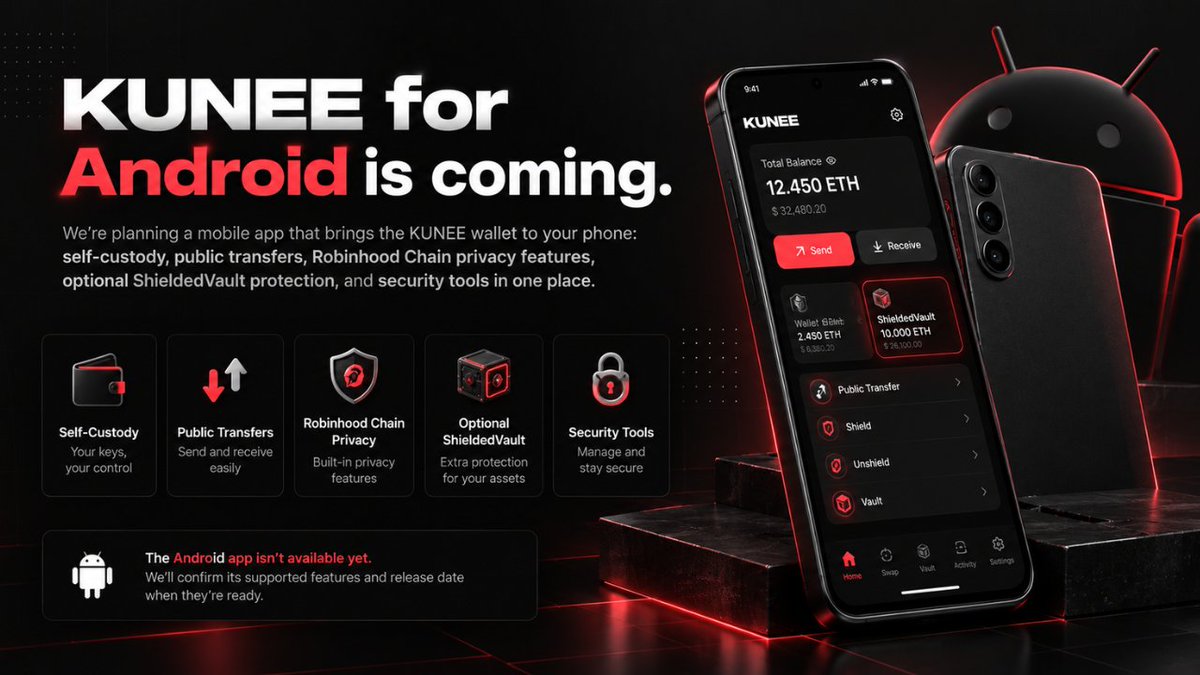
KUNEE for Android is coming.
We’re planning a mobile app that brings the KUNEE wallet to your phone: self-custody, public transfers, Robinhood Chain privacy features, optional ShieldedVault protection, and security tools in one place.
The Android app isn’t available yet. We’ll confirm its supported features and release date when they’re ready.
KUNEE Privacy uses Groth16 zero-knowledge proofs on Robinhood Chain.
Shield deposits ETH into a privacy pool and creates a private note.
Private Transfer and Unshield use a proof to show that a note can be spent without revealing its secret.
Poseidon hashing, a Merkle tree, and nullifiers help the contract verify notes and prevent the same note from being spent twice.
Note backups can be encrypted and saved separately.
What makes KUNEE different?
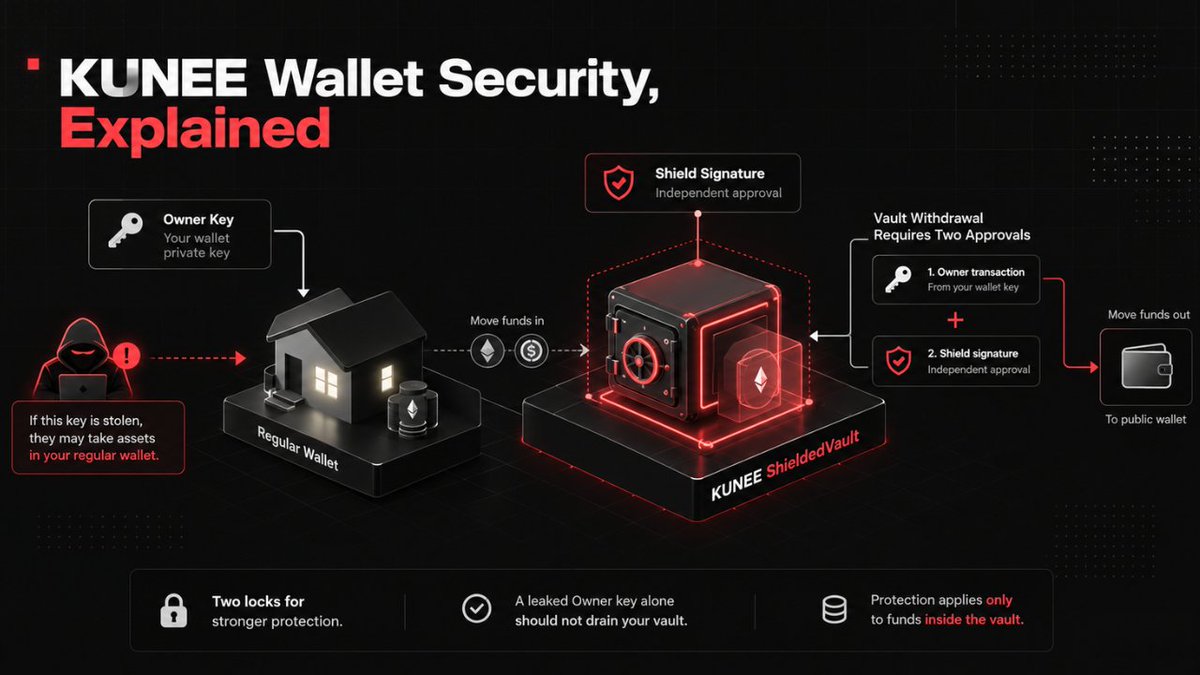
KUNEE lets you add a second layer to your wallet: an optional, separate ShieldedVault on Robinhood Chain. Moving funds out of the vault normally requires both your Owner key and an independent Shield signature. If the Owner key leaks, that key alone should not be enough to drain assets held inside the vault.
Think of your regular wallet key as a house key. ShieldedVault is a separate safe inside, with its own second lock.
If someone steals your Owner private key, they may be able to take assets left in your regular wallet. But that key alone should not let them move assets you’ve placed inside the vault. A vault withdrawal normally needs both the Owner transaction and a separate Shield signature.
That extra layer is designed to stop a leaked private key from becoming an immediate vault drain. It applies only to funds actually held in the vault, not every wallet balance. That’s why we’re putting the protection to a public test. $KUNEE
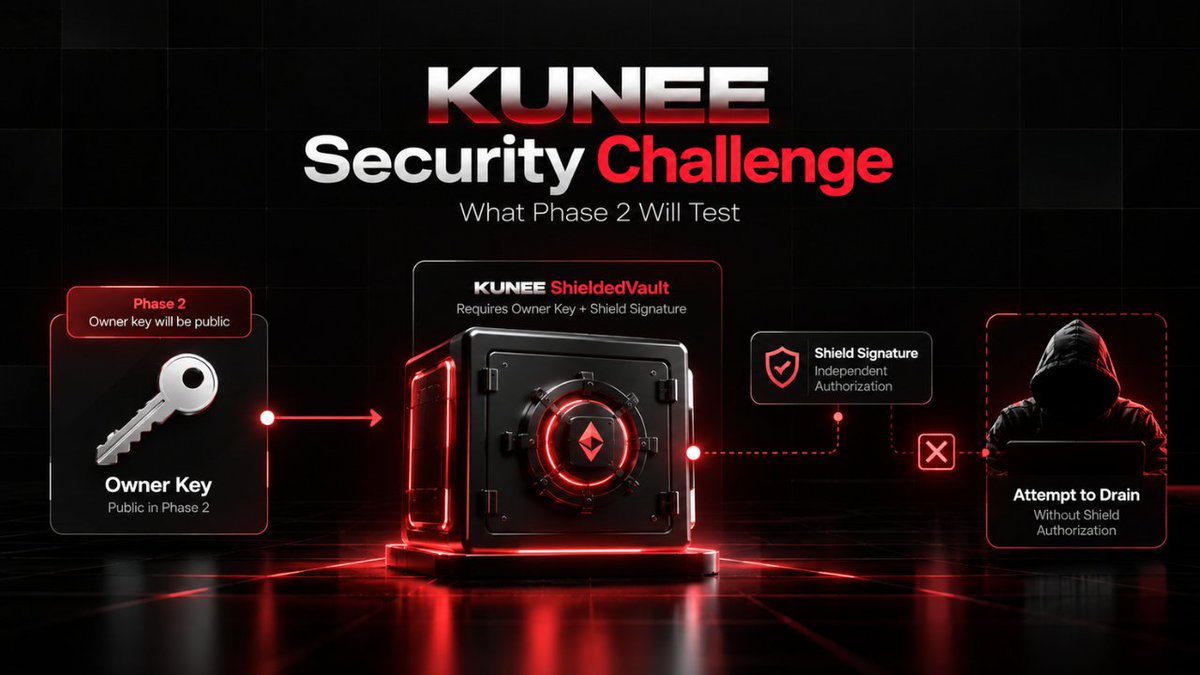
KUNEE Security Challenge What Phase 2 Will Test
In Phase 2, we plan to make the dedicated challenge Owner wallet’s private key public. Anyone will be able to use that key and attempt to move the funds held in the challenge vault.
The Owner key is only one layer. The vault is designed to require a separate Shield signature before its funds can move. Phase 2 asks a clear question: if the Owner key is fully exposed, can someone still drain the vault without Shield authorization?
We built ShieldedVault to add stronger protection for assets placed inside it. Rather than call it unbreakable, we’re putting that protection to a public test.
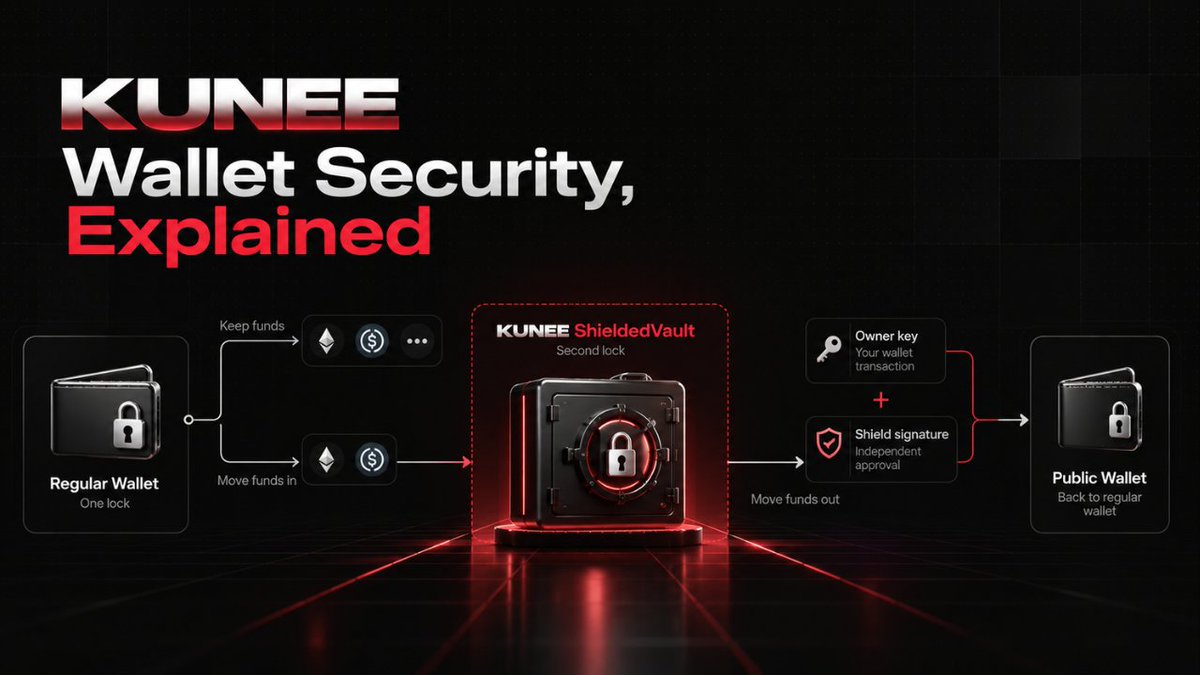
KUNEE Wallet Security, Explained
Think of a regular wallet as one lock. On Robinhood Chain, KUNEE lets you optionally create a separate ShieldedVault for assets you want to protect with a second lock.
The vault has its own address. Moving funds out normally requires both a transaction from your wallet’s Owner key and an independent Shield signature. So if your Owner private key leaks, that key alone should not be enough to directly drain assets held inside the vault. Funds left in your regular wallet do not have that extra protection.
That’s what our security challenge is testing: can someone get past the Owner + Shield protection and drain a dedicated challenge vault?
The vault is optional, and only funds you place inside it receive this protection.
Phase 1 tests the ShieldedVault layer in KUNEE’s wallet. Here’s the simple use case: if someone steals your Owner key, they could control funds left in your regular wallet but they should not be able to move funds you’ve placed in a separate ShieldedVault without the independent Shield approval.
The challenge tests whether anyone can bypass that two-layer rule and drain the funded challenge vault without being given either key. This protection applies only to assets actually held inside a vault, not every balance in a KUNEE wallet.
KUNEE Hacking Challenge Phase 1 Is Open !
Phase 1 is live on Robinhood Chain Mainnet. The challenge vault holds 0.1 ETH and 10,000,000 $KUNEE.
Your goal is to find a way to move both full amounts out of the designated vault by breaking its Owner + Shield withdrawal protection. How you do that is for you to discover. The provided challenge wallet is your starting point for inspecting the target; no Owner or Shield private keys are revealed or supplied.
Challenge addresses
Owner: 0x13cfad997227B3Bedf13Bf825deFe9e945ef521E
Vault: 0x059b4E4c77cF1FD2f9154E45fF525b62b4c91Cc0
KUNEE token: 0x54c1458ffd390c60a04024e18dcad5c2c543dfde
Only this vault and its 0.1 ETH + 10,000,000 $KUNEE are in scope. To demonstrate success, provide verifiable on-chain evidence that both full amounts left the vault. A partial transfer, failed transaction, or screenshot alone does not count. Check the live challenge status and vault balances before attempting.
Challenge rules: https://t.co/T8LTOPuZtJ
Provided challenge wallet: https://t.co/TQ0rxuWJmf
Anyone can already open the provided challenge wallet and inspect the vault it’s public. The challenge is not to gain access to that view. it’s to find a way past the Owner + Shield protections and move the vault’s funds.
Phase 1 tests those protections without giving challengers any private keys. For Phase 2, we plan to make the challenge Owner’s private key public and test whether the Shield still protects the vault when the Owner key is exposed. Only the dedicated challenge wallet is involved, never users’ personal wallets.
KUNEE Hacking Challenge Phase 1 Is Open !
Phase 1 is live on Robinhood Chain Mainnet. The challenge vault holds 0.1 ETH and 10,000,000 $KUNEE.
Your goal is to find a way to move both full amounts out of the designated vault by breaking its Owner + Shield withdrawal protection. How you do that is for you to discover. The provided challenge wallet is your starting point for inspecting the target; no Owner or Shield private keys are revealed or supplied.
Challenge addresses
Owner: 0x13cfad997227B3Bedf13Bf825deFe9e945ef521E
Vault: 0x059b4E4c77cF1FD2f9154E45fF525b62b4c91Cc0
KUNEE token: 0x54c1458ffd390c60a04024e18dcad5c2c543dfde
Only this vault and its 0.1 ETH + 10,000,000 $KUNEE are in scope. To demonstrate success, provide verifiable on-chain evidence that both full amounts left the vault. A partial transfer, failed transaction, or screenshot alone does not count. Check the live challenge status and vault balances before attempting.
Challenge rules: https://t.co/T8LTOPuZtJ
Provided challenge wallet: https://t.co/TQ0rxuWJmf
Shield Is Live in KUNEE Wallet
Shield, Private Transfer, and Unshield are available to KUNEE wallets on Robinhood Chain. Open your wallet, select Robinhood Chain, and find all three actions directly below Send and Receive.
Each Shield deposit is 0.001 ETH plus network fees. Save your encrypted note backup and its password before confirming a wallet recovery phrase alone cannot restore a private note.
Contracts · Robinhood Chain
• Privacy Pool : handles Shield, Private Transfer, and Unshield: 0x1Bebd0D3B0b6855d6f09e5350c81ac3dbA45e1d8
• Proof Verifier : verifies private transaction proofs: 0xcb8d04C884c640C8b954446afd9932b76Bb63A53
• Poseidon Hasher : supports private note commitments: 0xA8Ed92f55c589eae5863641Cc41c3EAd4341A8B6
• KUNEE Token : the separate ERC-20 token; Shield deposits use ETH, not KUNEE: 0x54c1458ffd390c60a04024e18dcad5c2c543dfde
The proof setup has not received independent review.
KUNEE Wallet Guide: Create a wallet, save your recovery phrase offline, confirm it, then set a password. Choose a network to send or receive.
Privacy features: Shield deposits ETH, Private Transfer moves a private note, and Unshield withdraws ETH. $KUNEE
Assets, Privacy, and Security
See balances and make public transfers across seven networks with your own wallet.
Track $KUNEE on Robinhood Chain and review recent Ethereum token approvals.
Next: private asset flows and broader security coverage, released with clear limits.