🍂 Wishing our LCISD family a well-deserved break!
Thank you for the heart, dedication, and energy you pour into our students every day.
You've earned it! Happy Thanksgiving! 🦃🍁
#LCISD#ThankfulForTeachers#ThanksgivingBreak
Strand 5 helps students develop the daily skills they need to work confidently a digital world.
Students learn to:
-Navigate digital tools and apps.
-Organize and manage files.
-Troubleshoot common tech problems.
-Select tools for different tasks.
#LCISDDigitalLearning#TATeks
Did you know Microsoft Edge can translate an entire webpage in just a few clicks? No copying, pasting, or switching tabs required!Open a page in Edge. Right-click on the page and select Translate.
Choose your language and click Translate!
#MicrosoftMagic#LCISDDigitalLearning
Make your videos more interactive with Canvas Studio quizzes. Add questions that appear during playback to check understanding and keep students engaged. Works with Studio recordings, uploaded videos, and YouTube links. #WeAreLamarCISD
Future Ready Studios empower students to reinforce learning while building communication, collaboration, critical thinking, and creation skills. Increased engagement, stronger classroom communities, and real world readiness make learning more meaningful. #WeAreLamarCISD
Progress Learning printable resources offer high quality, standards aligned practice in a non-digital format. Give students meaningful learning opportunities without screen time while supporting skill development and academic growth. https://t.co/w5FcRI8ndV #WeAreLamarCISD
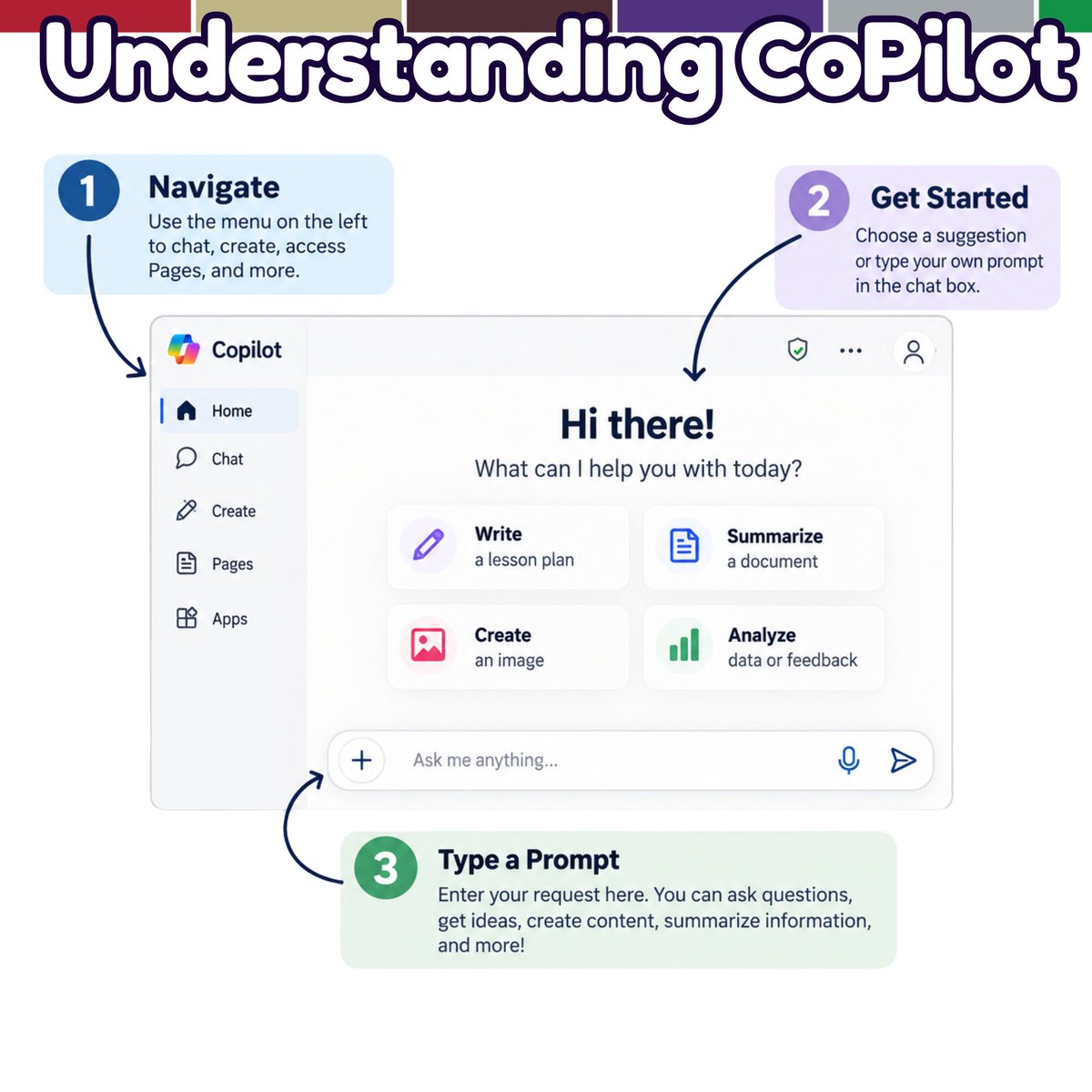
New to Microsoft Copilot? Getting started is easier than you think! 💻
Start simple: Explore the interface, type a prompt, and see what Copilot can do for you! #AIinAction#LCISDDigitalLearning
🌐 From protecting personal information and evaluating sources to understanding digital footprints and practicing respectful online communication, digital citizenship helps students become responsible participants in an increasingly connected world. #TATEKS#LCISDDigitalLearning
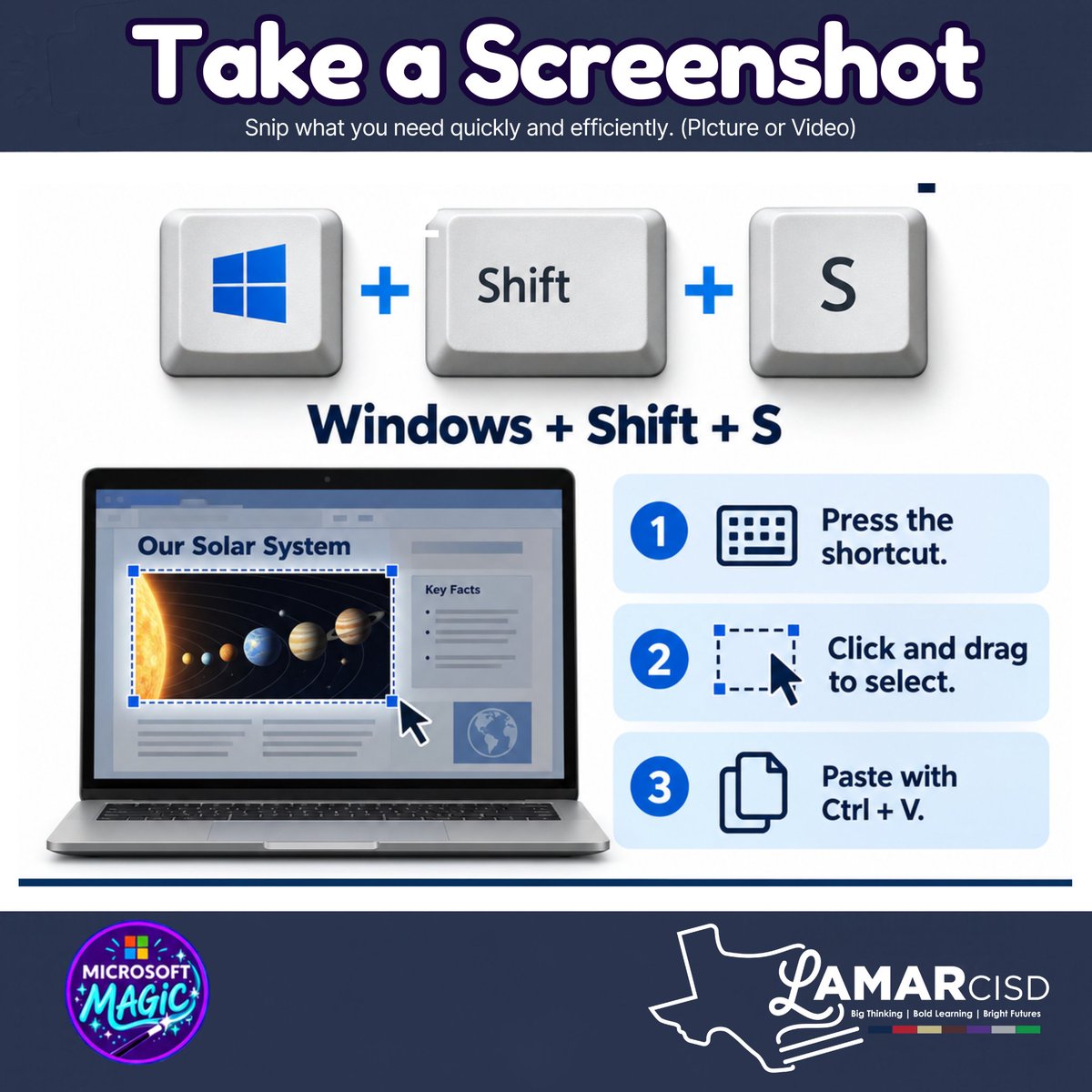
Need to capture something on your screen? There's a shortcut for that! 🪄
📸 Windows + Shift + S
✅ Capture part or all of your screen
💡 Tip: Use this shortcut to grab examples, provide visual feedback, or create step-by-step directions for students! #LCISDDigitalLearning
Create screencasts, upload instructional YouTube videos, share content with your team, and keep everything organized for future use with Canvas Studio. Plus, it removes ads from YouTube videos. Learn more in Level Up: https://t.co/ankRnIdHbU #WeAreLamarCISD
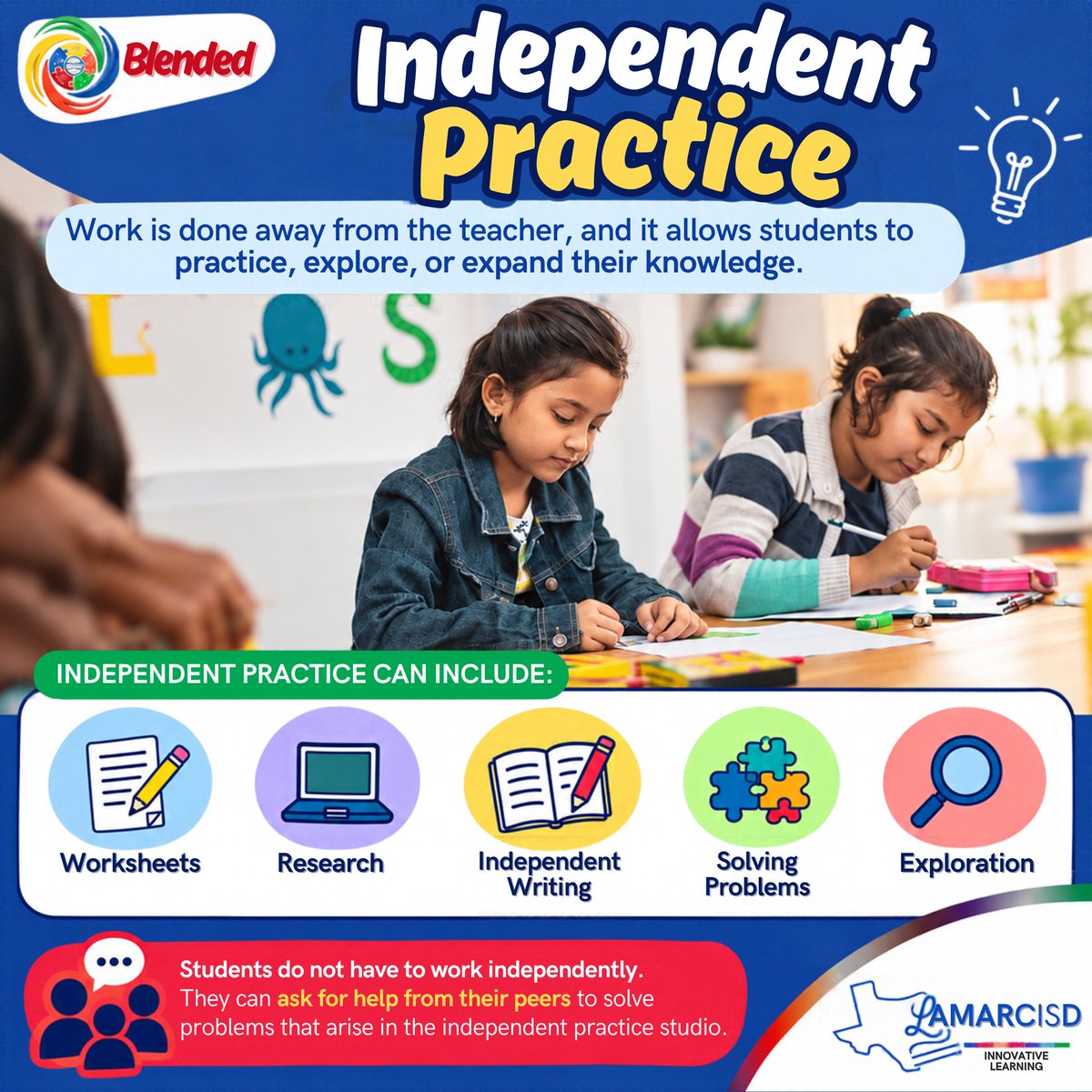
In the Independent Practice Studio, students put their learning into action beyond teacher guidance. This dedicated time empowers learners to take responsibility for their progress, develop confidence, and practice problem-solving through independent work and peer collaboration.
With Progress Learning Progress Reports, you can monitor both student and class performance instantly. Not only will you see progress at a glance, but you can also quickly assign remediation with ease. Want to learn more? Click here: https://t.co/tBSm8nKo0P #WeAreLamarCISD
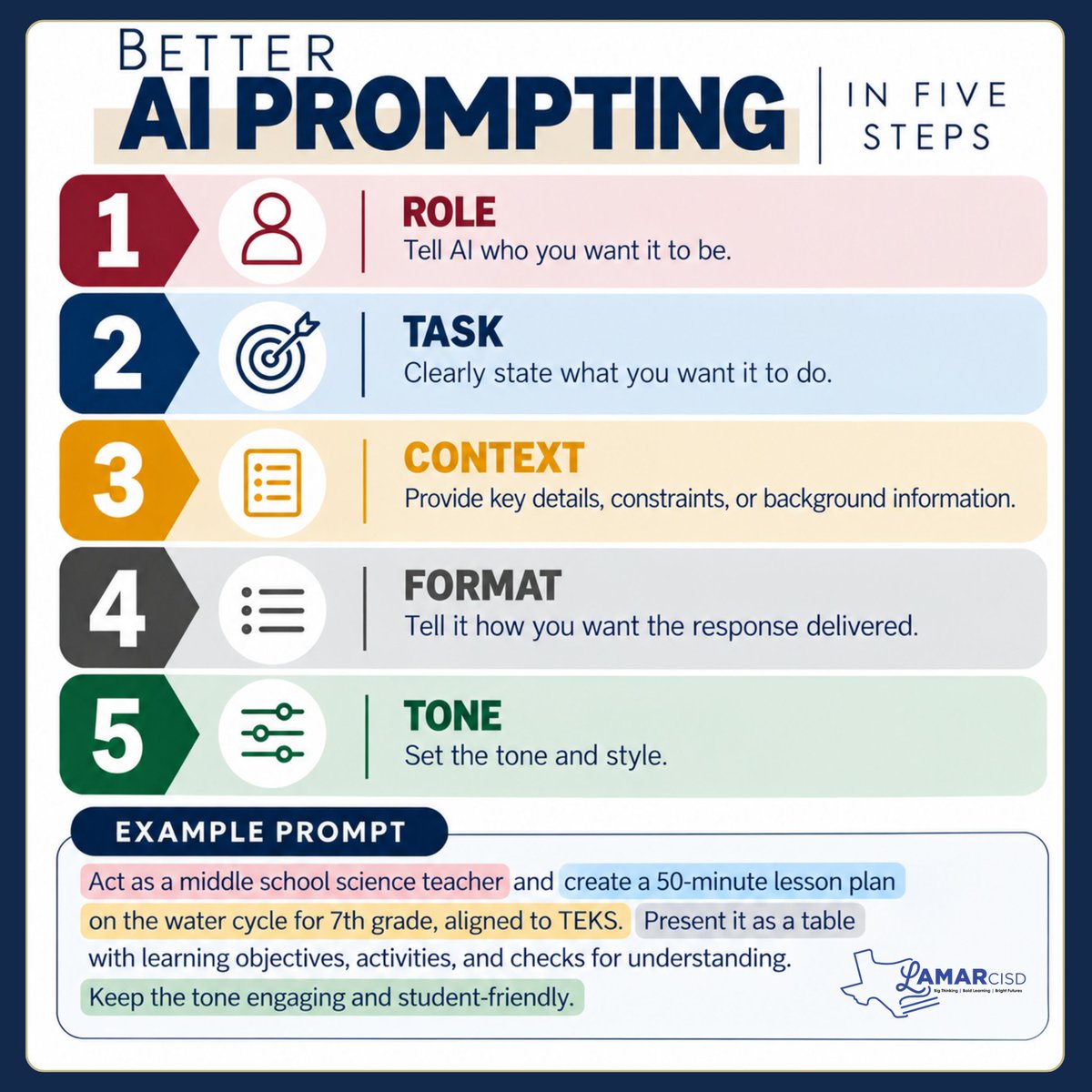
Ever ask AI for something and think, "Well, that's not quite what I had in mind. Try these five simple ingredients:
1. Role: Who should AI be?
2. Task: What should it do?
3. Context: What does it need to know?
4. Format: How should it respond?
5. Tone: How should it sound?
Data is everywhere, and students need to know what to do with it! Strand 3 challenges students to move beyond simply collecting information to organizing, analyzing, and representing data to make informed decisions. The goal? Turn data into understanding!
#LCISDDigitalLearning
Need to get organized? Think of OneNote as your digital binder, but better! Organize lessons, collect resources, take notes, and collaborate with colleagues or students, all in one place. #LCISDDigitalLearning#MicrosoftMagic
When dealing with Canvas assignments and quizzes, there is an option in the gradebook that lets you quickly message all students in your course who have not "turned it in". Check out how here: https://t.co/2vYIFL22ST. #WeAreLamarCISD
Think of a Digital Content Studio as a second teacher in the classroom. Adaptive programs, educational videos with practice, data collection, and other digital tools can help students strengthen skills and address learning gaps. #WeAreLamarCISD
Every student in Progress Learning automatically gets a Study Plan for every rostered subject. No diagnostic. No teacher assignments. As students work, Focus Areas identify standards needing support and create a customized learning path for growth. #WeAreLamarCISD
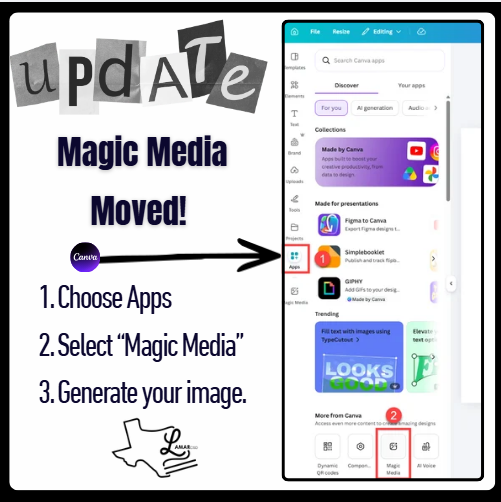
✨ Canva’s AI image generator has a new home!
Looking to turn your ideas into images? Follow this path in Canva:
👉 Apps → Magic Media → Generate
Describe the image you want to create and let your imagination lead the way!
#CanvaTips#DigitalLearning#AIinEducation
See that little Copilot button? 👀Look in the bottom-right corner of your Word document.
1. Click the Copilot icon
2. Tell it what you want to edit
3. Let Copilot work in your document
#LCISDDigitalLearning#AIinAction