Today we’re shipping Univer Office Harness — our approach to making Office work native to AI agents.
Agents can reason. But hand one a spreadsheet, a doc, and a deck, and too much of the job is still parsing formats, moving data between files, and rebuilding context.
Univer is an open-source Office engine with 30k+ GitHub stars across Univer and Luckysheet, bringing spreadsheets, docs, slides, canvases, and relational tables into one runtime.
Office Harness adds what agentic work needs on top: connected data, validation, isolated worktrees, and human review.
The Univer Office SDK is the foundation. CLI, plugins, and Workspace are experiences built on top of it.
Below: what it does, four ways to use it today, and how it performs on our benchmark 🧵
Univer is now Top 3 on GitHub Trending.🚀
We’ve spent years building an open-source Office runtime where AI agents can work with spreadsheets, docs, slides, canvas, tables, and PDFs—not just generate text around them.
Seeing the developer community respond like this means a lot.
Thank you to everyone who starred, shared, contributed, or simply gave Univer a try.
We’re just getting started.
https://t.co/jfFpUZp3NV
Thanks for sharing this, Robert.
A lot of a company’s thinking lives in spreadsheets, documents, and slides. The assumptions behind a deal, the calculations, the recommendation, the presentation to the board. They belong to the same decision, but we usually manage them as separate files. Someone has to keep the numbers and the story in sync.
That’s why I think Univer Workspace can become a System of Decision. Bring those pieces together around a decision, and keep the connections from source data through analysis to the final presentation.
Spreadsheets are central to this. A cell gives you a precise place to reference, and formulas let business experts express their own logic. People can see an assumption, change it, follow the calculation, and question the result. There’s something reassuring about being able to open a sheet and see how a number was arrived at. For many business users, that’s much more approachable than logic living somewhere behind an application.
We see the spreadsheet as the working model for a decision, with connections to the company’s underlying data. Univer’s shared runtime lets documents, slides, and the decision app work with that same model. Formulas connect them back to the cells, so the relationships can stay intact as assumptions change.
Agents can help build and update all of this. People can inspect the model and review the changes before accepting them.
That’s the direction we’re working toward: keeping the reasoning behind a decision connected, visible, and open to revision.
What if changing one assumption updated the model, the contract, and the board deck at the same time?
This is Univer Workspace, an open-source project built with the Univer SDK.
In this example, it becomes an enterprise System of Decision: the spreadsheet stays the source of truth, while docs and slides stay connected to the same cells.
Change revenue growth or a cash consideration ratio, and the whole chain recalculates. You can still trace every number back to the cell it came from.
Agents can generate the model and the decision app. Humans review the Worktree diff before anything merges.
Try it at https://t.co/3lgw02CdC0
Univer Workspace Open source Repo:https://t.co/kKosvdLQGG
@LeonUniver
Good question, Scott. I’d separate the human edits from the agent’s work here.
For two people editing the same cell, text edits can sometimes be combined. For numbers, the later write wins. We need a single numeric value for formulas to work with, rather than joining two values into text.
The agent edits the underlying spreadsheet, not the values displayed in the app directly. Those edits happen in a separate Worktree while people keep working on the main version. Right now, people can’t edit the agent’s draft directly. We added that restriction so its inputs don’t change halfway through the job.
Before merging, you can compare document changes much like a Git code diff, see the rendered result, and either accept the changes or ask the agent to revise them.
Some changes still need a person’s judgment. That’s really why we built Worktree: let the agent do the work, then let people decide what to keep.
This is a really good catch. Our worktree merging builds on Univer’s collaboration engine and its OT logic. That handles cases like an edit to C3 needing to move to C4 because another agent inserted a row above it.
But the formula case you’re describing goes further, and we don’t fully handle it yet.
Say a formula starts as =SUM(A3:A5). Agent A deletes row 5, while agent B extends the formula to =SUM(A3:A6).
If A merges first, the formula becomes =SUM(A3:A4). B’s merge then overwrites it with =SUM(A3:A6), when the intended result is =SUM(A3:A5).
If B merges first, then A’s row deletion gives the expected =SUM(A3:A5). So the merge order matters here, and our engine doesn’t correctly handle that first order yet.
Univer lets people compare results across worktrees, which helps them spot this difference. But that still leaves it to the person reviewing.
Really appreciate you raising this. It’s a gap we still need to address.
Today we’re shipping Univer Office Harness — our approach to making Office work native to AI agents.
Agents can reason. But hand one a spreadsheet, a doc, and a deck, and too much of the job is still parsing formats, moving data between files, and rebuilding context.
Univer is an open-source Office engine with 30k+ GitHub stars across Univer and Luckysheet, bringing spreadsheets, docs, slides, canvases, and relational tables into one runtime.
Office Harness adds what agentic work needs on top: connected data, validation, isolated worktrees, and human review.
The Univer Office SDK is the foundation. CLI, plugins, and Workspace are experiences built on top of it.
Below: what it does, four ways to use it today, and how it performs on our benchmark 🧵
Thanks, @doublenickk! Really appreciate you digging into Univer and explaining it so clearly.
There’s a bit more I’d love to share about the Univer Office SDK. Developers can take these capabilities and build their own products with them. That part gets me pretty excited.
People building for finance or supply chains know the day-to-day problems in those industries much better than we do. With spreadsheets, docs, and collaboration already there, they can bring their own agents and business data and start building around the workflows they know.
There’s no way we’ll think of every use case ourselves. I’m hoping someone builds something with Univer that makes us go, “Oh, I hadn’t even thought of using it that way.”
Really looking forward to that.
Most AI office demos fall apart the moment the work spans more than one file
an agent analyzes a spreadsheet, summarizes it in a document, and rebuilds the same numbers inside a presentation.
now the data exists in three different places.
change the source once, and the report, charts, and conclusions can quietly drift apart.
that’s the actual problem Univer Office Harness is trying to solve.
instead of treating spreadsheets, docs, slides, canvases, and relational tables as separate applications, it brings them into one shared runtime.
the interesting parts:
> values remain connected to their original sources
> downstream references update when the underlying data changes
> office files become structured code that agents can inspect and modify
> validation rules can catch incorrect totals, budgets, and charts before handoff
> multiple agents work in parallel inside isolated worktrees
> humans can review, edit, approve, and
Really appreciate this, Robert. Means a lot to me and the team.
I’m especially glad you picked up on the worktrees. Giving agents more freedom while still being able to see what they did and decide what to keep — that’s something we care a lot about.
There’s also a whole other side of Univer I’m excited to show more of. A spreadsheet feeding a report, a report feeding a deck… those numbers should stay connected. Nobody enjoys fixing the same number in three different places 😅
We’re building the underlying tools too, so agents can actually edit the content, check their work, and work alongside you. And developers can bring all of this into their own products.
Still a lot we want to build. But seeing people understand where we’re going is a pretty great feeling.
Thanks for helping us get the word out, @Scobleizer ❤️
Give five AI agents the same spreadsheet.
Who changed the numbers? Which changes do you keep?
This is what caught my attention about Univer’s “Office 365 for the Agent Era.”
They’re connecting spreadsheets, docs, slides, canvases and business records into an office environment for humans AND agents.
The interesting detail: Worktrees. Each agent gets its own working copy. Agents work in parallel. You review their changes and decide what gets merged.
Imagine that across a budget, the report explaining it and the presentation you take into a meeting. The data stays connected.
Let the agents work. Let me see what changed.
@LeonUniver
Start here
⭐ https://t.co/7dbo0OkZrd
📖 https://t.co/YNAWinmkst
🌐 https://t.co/N8dMQBYklh
💬 Discord:https://t.co/q8V1MDje5O
If you're building agents that have to ship real work, tell me what's breaking. I read every reply.
One more thing, for the skeptics: the engine underneath isn't new.
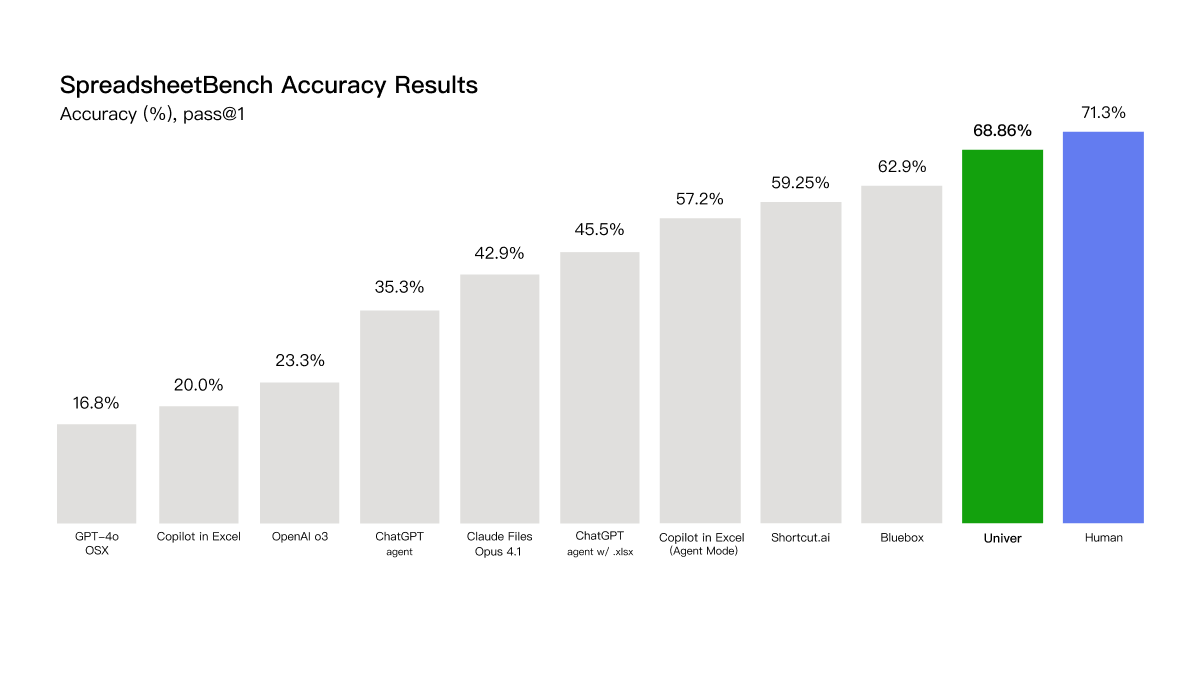
#1 on SpreadsheetBench: 68.86% pass@1 on real-world spreadsheet tasks, without relying on Excel. Human baseline is 71.3%.
Ten years of spreadsheet engineering went into this.
@thetripathi58 This is exactly why we think agents need a real Office environment, not just a chat interface.
The output should become an editable doc, sheet, or deck, with structure, formatting, and review intact.
@testingcatalog This is where we think the next layer goes beyond cross-app actions.
At Univer, we’re building one shared Office runtime where spreadsheets, docs, and slides stay connected, so agents can work across them without constantly rebuilding context.
@finmoorhouse This is exactly the gap we’re working on at Univer.
Reliable spreadsheet work needs more than a capable model — it needs a real spreadsheet runtime underneath, with structure, formulas, dependencies, and validation the agent can operate on directly.
@repkord Exactly. The model is only part of the stack.
For spreadsheets, you still need a real calculation engine, dependencies, and validation underneath, that’s a big part of how we think about Univer Office Harness.
@CharlotteCGill This is exactly the kind of problem we think about at Univer.
AI can help reason over the workbook, but the numbers themselves should still be computed and validated by a real spreadsheet engine, not trusted just because the model sounds confident.
Agent harnesses and office environments shouldn’t be competing product choices.
They should be composable layers.
Keep the agent stack you already use. Add the office layer when the workflow needs spreadsheets, docs, slides, connected data, or human review.
DeepSeek Harness is one example. We want this layer to be open to many more.
DeepSeek Harness can now build spreadsheets, docs, and slides.
Connected data, validation, and isolated worktrees — agents work in parallel, humans review what gets merged.
DeepSeek handles the agent. Univer provides the office layer, as a plugin for @deepseek_ai Harness. Open source, link below.
Orchestration tells agents who does what.
Worktrees let them do it in parallel without stepping on each other.
Isolation. History. Review. Merge.
Software engineering got this with Git.
Knowledge work needs its own collaboration layer.
Three agents. One workspace.
One updates the data.
One revises the report.
One builds the deck.
Each works in an isolated worktree.
You keep editing — and decide what gets merged.
Parallel by default. Human reviewed by design.