5 Levels of AI agent autonomy (and who owns what?):
The right level isn't set by how capable the model is.
It's set by what a wrong action would cost.
𝗟𝗲𝘃𝗲𝗹 𝟭: 𝗢𝗽𝗲𝗿𝗮𝘁𝗼𝗿
↳ The agent acts only when you ask: a query, an edit, a draft.
↳ You own: every decision and every step.
𝗟𝗲𝘃𝗲𝗹 𝟮: 𝗖𝗼𝗹𝗹𝗮𝗯𝗼𝗿𝗮𝘁𝗼𝗿
↳ You and the agent plan and execute together, passing control back and forth.
↳ You own: the plan, and when to take the wheel.
𝗟𝗲𝘃𝗲𝗹 𝟯: 𝗖𝗼𝗻𝘀𝘂𝗹𝘁𝗮𝗻𝘁
↳ The agent leads the task and checks in for your expertise or preferences.
↳ You own: the context and judgement it can't find on its own.
𝗟𝗲𝘃𝗲𝗹 𝟰: 𝗔𝗽𝗽𝗿𝗼𝘃𝗲𝗿
↳ The agent works on its own and stops for sign-off on risky actions: a migration, a deploy, a customer email.
↳ You own: the line between routine and risky, and the final yes.
𝗟𝗲𝘃𝗲𝗹 𝟱: 𝗢𝗯𝘀𝗲𝗿𝘃𝗲𝗿
↳ The agent runs end to end while you monitor.
↳ You own: the goal, the limits, and the stop button.
Before moving an agent up a level:
→ Can its actions be undone?
→ Is every action logged?
→ Would you spot a wrong one within minutes?
Those checks keep an agent safe. They don't show whether all the work, human and AI, still matches the plan.
Tempo Loop checks that continuously. It connects to the tools you already use, starting with Jira, and compares time, capacity and spend against the strategy that funded the work. When something drifts, it recommends a fix with its tradeoffs while there's still time to act.
As with your agents, the decision stays with people: your team approves the fix, and Loop orchestrates it back into those tools. Human and AI work are governed in one system.
𝗘𝘅𝗽𝗹𝗼𝗿𝗲 𝗧𝗲𝗺𝗽𝗼 𝗟𝗼𝗼𝗽 → https://t.co/7QXNxBMCcX
What else would you add?
——
💾 Save it for later.
🙏 Thanks to @TempoHQ for sponsoring this post.
➕ Follow Nikki Siapno to improve at system design and AI engineering.
𝗔𝗣𝗜 𝗚𝗮𝘁𝗲𝘄𝗮𝘆 𝘃𝘀 𝗟𝗼𝗮𝗱 𝗕𝗮𝗹𝗮𝗻𝗰𝗲𝗿.
Do you know the differences?
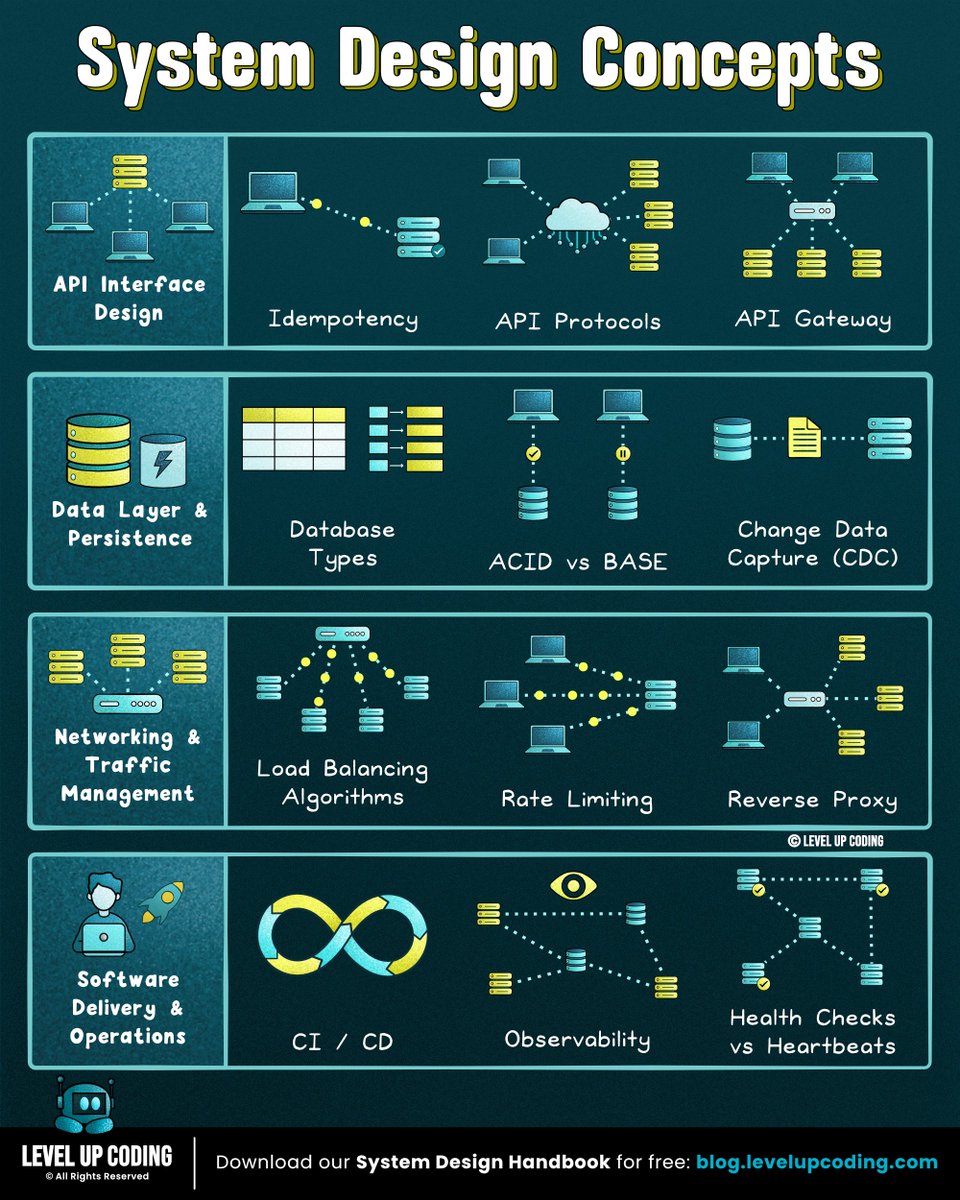
An 𝗔𝗣𝗜 𝗚𝗮𝘁𝗲𝘄𝗮𝘆 acts as a single entry point for clients, handling request routing, composition, and protocol translation. It simplifies client interactions with microservices and offers features like rate limiting, authentication, monitoring, and more.
𝗟𝗼𝗮𝗱 𝗯𝗮𝗹𝗮𝗻𝗰𝗲𝗿𝘀 are concerned with routing client requests across multiple servers to distribute load and prevent bottlenecks. This helps maximize throughput, reduce response time, and optimize resource use.
So what are the key differences?
API gateways focus on request management and microservice communication, while load balancers focus on traffic distribution and server load management.
API gateways operate at the application layer (L7), while load balancers can operate at both transport (L4) or application (L7) layers.
API gateways offer features like routing, rate limiting, authentication, service discovery, parameter validation, circuit breakers, and more. Load balancers handle traffic distribution and failover.
An 𝗔𝗣𝗜 𝗴𝗮𝘁𝗲𝘄𝗮𝘆 𝗶𝘀 𝗜𝗱𝗲𝗮𝗹 𝗳𝗼𝗿 𝗺𝗶𝗰𝗿𝗼𝘀𝗲𝗿𝘃𝗶𝗰𝗲 𝗮𝗿𝗰𝗵𝗶𝘁𝗲𝗰𝘁𝘂𝗿𝗲𝘀 needing centralized API request management.
A 𝗹𝗼𝗮𝗱 𝗯𝗮𝗹𝗮𝗻𝗰𝗲𝗿 𝗶𝘀 𝗲𝘀𝘀𝗲𝗻𝘁𝗶𝗮𝗹 𝗳𝗼𝗿 applications requiring high availability, distributing traffic across multiple servers.
But what about reverse proxy? It also operates at the same edge. Learn more about all three in my newsletter.
What else would you add?
——
👋 PS: System design is one of the 𝗺𝗼𝘀𝘁 𝗶𝗺𝗽𝗼𝗿𝘁𝗮𝗻𝘁 𝘀𝗸𝗶𝗹𝗹𝘀 for an engineer. Especially in the agent era. Download my 𝟮𝟭𝟴 𝗽𝗮𝗴𝗲 𝗦𝘆𝘀𝘁𝗲𝗺 𝗗𝗲𝘀𝗶𝗴𝗻 𝗛𝗮𝗻𝗱𝗯𝗼𝗼𝗸 for free and join 35,000+ engineers who get my free weekly newsletter → https://t.co/LybPLdor9s
——
💾 Save it for later.
➕ Follow Nikki Siapno to improve at system design and AI engineering.
𝗧𝗼𝗽 𝟱 𝗥𝗲𝗱𝗶𝘀 𝗔𝗜 𝗨𝘀𝗲 𝗖𝗮𝘀𝗲𝘀.
Redis is often introduced as a cache, but AI agents now use it for much more than caching LLM responses.
𝟭) 𝗔𝗴𝗲𝗻𝘁 𝗺𝗲𝗺𝗼𝗿𝘆
↳ Use Agent Memory to build long-term memories from user actions and docs, and forget what an agent shouldn't keep, like PII.
𝟮) 𝗦𝗲𝗺𝗮𝗻𝘁𝗶𝗰 𝗰𝗮𝗰𝗵𝗶𝗻𝗴
↳ Reuse cached answers for semantically similar questions, reducing redundant LLM calls and token costs.
𝟯) 𝗖𝗼𝗻𝘁𝗲𝘅𝘁 𝗿𝗲𝘁𝗿𝗶𝗲𝘃𝗮𝗹 (𝗠𝗖𝗣)
↳ Use Context Gateway as one entry point to every context source, including your own MCP servers.
𝟰) 𝗔𝗴𝗲𝗻𝘁 𝘀𝗸𝗶𝗹𝗹𝘀
↳ Use Agent Playbooks to reuse stable answers and skills, re-running them only when they need fresh data.
𝟱) 𝗟𝗟𝗠 𝗿𝗼𝘂𝘁𝗶𝗻𝗴
↳ Use Intent Router to direct requests to the right model, agent, skill, or human based on what they mean.
Implementing these capabilities individually is one challenge. Keeping memory, context, and routing working together as agents scale is a whole different challenge.
Redis Iris brings these capabilities and more together in a unified, real-time context engine built on Redis, with new releases designed to help agents succeed in production.
𝗚𝗿𝗲𝗮𝘁 𝘀𝗵𝗼𝗿𝘁 𝗿𝗲𝗮𝗱 𝗮𝗯𝗼𝘂𝘁 𝗶𝘁 𝗵𝗲𝗿𝗲 → https://t.co/2cnRegseJZ
𝗧𝗿𝘆 𝗥𝗲𝗱𝗶𝘀 𝗜𝗿𝗶𝘀 𝗳𝗼𝗿 𝗳𝗿𝗲𝗲 𝗵𝗲𝗿𝗲 → https://t.co/VxWEkCBwDK
What else would you add?
——
💾 Save it for later.
🙏 Thanks to @Redisinc for sponsoring this post.
➕ Follow Nikki Siapno to improve at system design and AI engineering.
𝗦𝗦𝗢 𝘃𝘀 𝗢𝗔𝘂𝘁𝗵 𝘃𝘀 𝗢𝗜𝗗𝗖 𝘃𝘀 𝗦𝗔𝗠𝗟.
Do you know the differences?
𝗦𝗦𝗢 is a user experience, not a protocol. It lets users log in once and access multiple apps without re-authenticating; providing seamless access across tools. It relies on protocols like SAML or OIDC.
𝗢𝗔𝘂𝘁𝗵 is for authorization. It lets apps access user data or services without sharing credentials. It controls what an app can access, not identity.
𝗢𝗜𝗗𝗖 is an authentication layer on top of OAuth 2.0. It verifies user identity and provides user info via ID tokens (usually JWTs). It’s the standard for login + identity in modern apps.
𝗦𝗔𝗠𝗟 is an older, XML-based standard primarily used for enterprise SSO. It’s still widely used in legacy and enterprise systems, though newer applications increasingly adopt OIDC. It’s powerful but more complex than OIDC.
OAuth = access.
OIDC = identity.
SAML = older enterprise SSO.
SSO = the experience.
But getting identity right doesn’t solve the whole access problem.
As more apps and AI agents connect to production data, managing permissions separately in every tool gets harder.
Retool centralizes that with SSO, role-based permissions, and Data Access Enforcement, giving teams shared guardrails underneath the apps and agents they build.
Build with the tools you already use. Run with Retool's enterprise controls.
𝗚𝗿𝗲𝗮𝘁 𝘀𝗵𝗼𝗿𝘁 𝗿𝗲𝗮𝗱 𝗼𝗻 𝗵𝗼𝘄 𝗶𝘁 𝘄𝗼𝗿𝗸𝘀 → https://t.co/NPyc5W8kjn
What else would you add?
——
💾 Save it for later.
🙏 Thanks to @retool for sponsoring this post.
➕ Follow me to improve at system design and AI engineering.
Most document pipelines don’t stall on accuracy.
They stall on cost and latency.
Extend just cut both:
→ Classification in under a second at $0.001/page
→ Parsing 40-50% cheaper
With both cost & latency down, it’s now practical to classify and lightly parse every document.
𝗦𝘁𝗮𝘁𝗲𝗳𝘂𝗹 𝘃𝘀 𝗦𝘁𝗮𝘁𝗲𝗹𝗲𝘀𝘀 𝗗𝗲𝘀𝗶𝗴𝗻.
Do you know the differences?
A 𝘀𝘁𝗮𝘁𝗲𝗹𝗲𝘀𝘀 service keeps nothing between requests. Each request carries what the server needs, like a token or an ID, so any instance can handle it. Scaling is simple: add instances behind a load balancer, and losing one loses nothing.
A 𝘀𝘁𝗮𝘁𝗲𝗳𝘂𝗹 service remembers. A session, an open connection or a shopping cart lives on the server between requests. Interactions get richer, but requests now have to reach the right instance, and losing it means losing that state.
If you're building AI agents that need to remember, here's a great breakdown → https://t.co/uApj7mfxpR
Most systems get both by keeping services stateless and moving state into a shared store, a database or cache every instance can reach.
Stateless = easy to scale. Stateful = continuity. Externalised state = both.
LLMs are stateless too. Every call starts fresh, and the model only knows what's in the prompt. An agent that "remembers" is doing the same trick: keeping its state outside the model and loading it back in.
But an agent's state is harder than a shopping cart.
The current conversation has to stay small enough to fit.
What a user said last month has to be found by meaning, not by key.
And one user's memories can never surface for another.
That changes how agent memory should be designed.
What else would you add?
——
💾 Save it for later.
🙏 Thanks to @OracleDevs for sponsoring this post.
➕ Follow Nikki Siapno to improve at system design and AI engineering.
𝗠𝗖𝗣 𝘃𝘀 𝗔𝗣𝗜.
An 𝗔𝗣𝗜 defines how software systems communicate through specific endpoints, requests, and responses. It gives applications a structured way to access data or trigger functionality in another system.
𝗠𝗖𝗣 gives AI applications a standardized way to discover and use external tools, data, and resources. Instead of building custom integrations for every AI client, an MCP server exposes capabilities through a common protocol.
MCP doesn't replace APIs. Most MCP servers wrap them.
APIs expose the service. MCP makes it usable by a model. Or a human. The barrier to entry for non-technical people to interact with platforms has been drastically reduced.
But once a model decides what to call, the work it does gets harder to track.
Agents finish tasks without status updates while people shift priorities. Permissions limit what an agent can touch, but they don't show whether its work still matches the strategy that funded it.
Tempo Loop connects to the tools teams already use, like Jira, to 𝘁𝗿𝗮𝗰𝗸 𝗮𝗻𝗱 𝗴𝗼𝘃𝗲𝗿𝗻 𝗵𝘂𝗺𝗮𝗻 𝗮𝗻𝗱 𝗔𝗜 𝘄𝗼𝗿𝗸, 𝗮𝗻𝗱 𝘄𝗵𝗮𝘁 𝗶𝘁 𝗰𝗼𝘀𝘁𝘀, 𝗶𝗻 𝗼𝗻𝗲 𝗹𝗶𝘃𝗲 𝘃𝗶𝗲𝘄. When work drifts, it recommends a fix while there's still time to act, then updates those tools once the change is approved.
𝗦𝗲𝗲 𝗵𝗼𝘄 𝗧𝗲𝗺𝗽𝗼 𝗟𝗼𝗼𝗽 𝘄𝗼𝗿𝗸𝘀 → https://t.co/uP3DzJ7lFc
What else would you add?
——
💾 Save it for later.
🙏 Thanks to @TempoHQ for sponsoring this post.
𝗢𝗔𝘂𝘁𝗵 𝘃𝘀 𝗔𝗣𝗜 𝗞𝗲𝘆 𝘃𝘀 𝗕𝗮𝘀𝗶𝗰 𝗔𝘂𝘁𝗵 𝘃𝘀 𝗺𝗧𝗟𝗦.
Do you know the differences?
They all help secure access, but what they actually verify, and how they do it, is very different.
𝗢𝗔𝘂𝘁𝗵 𝟮.𝟬 uses scoped access tokens to let applications access resources without sharing user passwords. Tokens can expire and access can be revoked.
𝗔𝗣𝗜 𝗞𝗲𝘆𝘀 use a shared secret to identify and authenticate the calling application. They're simple to implement, but the key itself doesn't prove who holds it.
𝗕𝗮𝘀𝗶𝗰 𝗔𝘂𝘁𝗵 sends a username and password with every request. It's straightforward, but credentials must be protected with HTTPS.
𝗺𝗧𝗟𝗦 uses certificates to authenticate both the client and server during the TLS handshake. It's useful for service-to-service communication where both sides need to verify identity.
But choosing an authentication method is only part of the problem. You also need to manage credentials throughout their lifecycle.
Take CI/CD pipelines. A deployment might depend on a long-lived API key or deploy key stored in its secrets.
Even if it's stored securely, that credential can still be leaked, copied, or forgotten. And rotating it can break deployments that depend on it.
One approach is to replace static credentials with 𝘀𝗵𝗼𝗿𝘁-𝗹𝗶𝘃𝗲𝗱, 𝗶𝗱𝗲𝗻𝘁𝗶𝘁𝘆-𝗯𝗮𝘀𝗲𝗱 𝗮𝗰𝗰𝗲𝘀𝘀.
Instead of retrieving a stored secret, the pipeline proves its identity and receives a credential scoped to what it needs. That credential expires automatically.
Teleport Machine ID implements this approach by letting CI/CD runners use their platform identity to obtain short-lived certificates instead of storing deploy keys.
This reduces the need to manage long-lived credentials while keeping access tied to specific machine identities.
𝗟𝗲𝗮𝗿𝗻 𝗵𝗼𝘄 𝘁𝗼 𝗲𝗹𝗶𝗺𝗶𝗻𝗮𝘁𝗲 𝘀𝘁𝗮𝘁𝗶𝗰 𝗰𝗿𝗲𝗱𝗲𝗻𝘁𝗶𝗮𝗹𝘀 → https://t.co/IcYTejXqHH
What else would you add?
——
💾 Save it for later.
🙏 Thanks to @goteleport for sponsoring this post.
➕ Follow Nikki Siapno to improve at system design and AI engineering.
𝗖𝗼𝗻𝘁𝗮𝗶𝗻𝗲𝗿𝘀 𝘃𝘀 𝗩𝗶𝗿𝘁𝘂𝗮𝗹 𝗠𝗮𝗰𝗵𝗶𝗻𝗲𝘀 𝘃𝘀 𝗦𝗮𝗻𝗱𝗯𝗼𝘅𝗲𝘀.
Do you know the differences?
Containers isolate processes.
VMs isolate operating systems.
Sandboxes restrict what untrusted code can access.
But when the code comes from an AI agent, containing the run is only half of it.
The agent's output still has to land somewhere: the company's codebase, its live product. A sandbox limits what code can touch while it runs, not what ships afterwards.
So the boundary has two parts: an isolated place for the agent to work, and a review step before changes reach production.
Replit runs agents in isolated cloud environments, away from employee laptops. For work on an existing company codebase, agents turn their work into proposed changes for engineering to review.
The agent proposes the change.
Engineering decides what ships.
𝗦𝗲𝗲 𝗵𝗼𝘄 𝗥𝗲𝗽𝗹𝗶𝘁 𝗿𝘂𝗻𝘀 𝗮𝗴𝗲𝗻𝘁𝘀 𝗳𝗼𝗿 𝗰𝗼𝗺𝗽𝗮𝗻𝗶𝗲𝘀 → https://t.co/Q3hwKAwPRy
Read the post below for more details on 𝗖𝗼𝗻𝘁𝗮𝗶𝗻𝗲𝗿𝘀 𝘃𝘀 𝗩𝗶𝗿𝘁𝘂𝗮𝗹 𝗠𝗮𝗰𝗵𝗶𝗻𝗲𝘀 𝘃𝘀 𝗦𝗮𝗻𝗱𝗯𝗼𝘅𝗲𝘀.
Thanks to @Replit for sponsoring this post.
𝗦𝗟𝗢 𝘃𝘀 𝗦𝗟𝗜 𝘃𝘀 𝗦𝗟𝗔.
An 𝗦𝗟𝗜 (Service Level Indicator) measures what’s actually happening in your system; like request latency, error rate, or uptime. It’s the raw signal that tells you how your service is performing.
An 𝗦𝗟𝗢 (Service Level Objective) defines the acceptable range for an SLI, like “99.9% of requests succeed within 200ms.” It’s what your team aims to achieve to maintain reliability.
An 𝗦𝗟𝗔 (Service Level Agreement) is a formal contract with users or customers, often tied to penalties if targets aren’t met. It defines the consequences, not just the goal.
But a service isn't the only thing teams hold to a target.
A roadmap is a target too: which initiatives get the people, time and budget. Most roadmaps have no SLI behind them. People move, priorities shift, AI agents take on work without status updates, and the gap between plan and reality grows quietly.
Measuring that gap starts with the data work already produces. Tempo Loop connects time, capacity, spend and financials into one continuously updated view of whether the work still matches the strategy that funded it, for human and AI work alike.
𝗘𝘅𝗽𝗹𝗼𝗿𝗲 𝗧𝗲𝗺𝗽𝗼 𝗟𝗼𝗼𝗽 → https://t.co/zB2PlJ4Ouw
What else would you add?
——
♻️ Repost to help others learn and grow.
🙏 Thanks to @TempoHQ for sponsoring this post.
➕ Follow me ( Nikki Siapno ) to improve at AI and system design.
𝗧𝗼𝗽 𝟴 𝗗𝗲𝗽𝗹𝗼𝘆𝗺𝗲𝗻𝘁 𝗣𝗮𝘁𝘁𝗲𝗿𝗻𝘀.
Do you know the differences?
These patterns all help ship changes, but what actually happens in each strategy is very different and they work at different layers.
Infrastructure Layer.
𝟭) 𝗥𝗼𝗹𝗹𝗶𝗻𝗴: the default for stateless services when two versions can safely overlap. Cheap to run, but rollback is just another slow rollout.
𝟮) 𝗕𝗹𝘂𝗲-𝗴𝗿𝗲𝗲𝗻: when you need fast rollback and can afford two environments. A shared database makes it harder than it looks.
𝟯) 𝗦𝗵𝗮𝗱𝗼𝘄: when you're rewriting a critical path and want to test it against real traffic first. You pay for duplicate load and must isolate side effects.
𝟰) 𝗜𝗺𝗺𝘂𝘁𝗮𝗯𝗹𝗲 𝗶𝗻𝗳𝗿𝗮𝘀𝘁𝗿𝘂𝗰𝘁𝘂𝗿𝗲: when config drift keeps causing surprises. Replacing instances with tested images improves consistency, but requires reliable image builds and provisioning.
Release Layer.
𝟱) 𝗙𝗲𝗮𝘁𝘂𝗿𝗲 𝗳𝗹𝗮𝗴𝘀: when you want to decouple code deployment from releasing 100% of your changes to everyone instantly. Every flag is a code path you'll have to clean up.
𝟲) 𝗖𝗮𝗻𝗮𝗿𝘆: when a change is risky and your metrics catch regressions fast. A small group of real users still hits the bug.
𝟳) 𝗣𝗿𝗼𝗴𝗿𝗲𝘀𝘀𝗶𝘃𝗲 𝗱𝗲𝗹𝗶𝘃𝗲𝗿𝘆: when you want to control exposure using real production signals. Rollouts can advance or stop based on metrics, but reliable observability is essential.
𝟴) 𝗔/𝗕 𝘁𝗲𝘀𝘁𝗶𝗻𝗴: when the question is "is this better?", not "is this safe?". Results need enough traffic to mean anything.
But these patterns only protect the changes that actually use them.
Feature flags can power canaries, A/B tests, and progressive rollouts. But deciding which changes need flags, setting rollout rules, and cleaning them up still falls to engineers.
LaunchDarkly's new Release Autopilot uses AI agents to automate that setup.
It classifies changes by risk, adds feature flags when needed, and progressively releases changes while monitoring live production signals against defined guardrails. It also helps clean up flags after release.
𝗘𝘅𝗽𝗹𝗼𝗿𝗲 𝗥𝗲𝗹𝗲𝗮𝘀𝗲 𝗔𝘂𝘁𝗼𝗽𝗶𝗹𝗼𝘁 → https://t.co/64qWYbIt6b
What else would you add?
——
♻️ Repost to help others learn deployment patterns.
🙏 Thanks to @LaunchDarkly for sponsoring this post.
➕ Follow me ( Nikki Siapno ) to improve at system design and AI.
Concurrency is 𝗡𝗢𝗧 Parallelism.
These terms are often used interchangeably. But they describe very different ideas.
As Rob Pike (one of the creators of Go) put it:
𝗖𝗼𝗻𝗰𝘂𝗿𝗿𝗲𝗻𝗰𝘆 is about 𝙙𝙚𝙖𝙡𝙞𝙣𝙜 𝙬𝙞𝙩𝙝 lots of things at once.
𝗣𝗮𝗿𝗮𝗹𝗹𝗲𝗹𝗶𝘀𝗺 is about 𝙙𝙤𝙞𝙣𝙜 lots of things at once.
Here’s the difference in practice:
Concurrency
↳ Multiple tasks are in progress.
↳ Work is interleaved to use resources efficiently
Parallelism
↳ Multiple tasks are executing simultaneously
↳ Work happens at the same time across cores or systems
In other words: concurrency helps manage complexity, while parallelism increases throughput.
But switching only stays cheap when the scheduler knows which task is ready. An event loop doesn't check every connection in turn: the OS tells it which ones have data.
With coding agents running in parallel, the scheduler is you. Opening each session to see whether it's done, stuck or waiting on input is the expensive way to switch.
JetBrains Air in IDEs applies the same idea. It runs sessions from the agents you choose across your open projects, and tracks unread updates, changed files and outgoing commits in one place, so your attention goes where it's needed.
𝗧𝗿𝘆 𝗔𝗶𝗿 𝗶𝗻 𝘆𝗼𝘂𝗿 𝗝𝗲𝘁𝗕𝗿𝗮𝗶𝗻𝘀 𝗜𝗗𝗘, 𝗳𝗿𝗲𝗲 𝗳𝗼𝗿 𝗮 𝗹𝗶𝗺𝗶𝘁𝗲𝗱 𝘁𝗶𝗺𝗲 𝘄𝗶𝘁𝗵 𝗝𝘂𝗻𝗶𝗲 𝗟𝗶𝘁𝗲 → https://t.co/8XvR1U6lCG
What else would you add?
——
♻️ Repost to help others learn and grow.
🙏 Thanks to @jetbrains for sponsoring this post.
➕ Follow me ( Nikki Siapno ) to improve at system design and AI.
𝗖𝗼𝗻𝘁𝗮𝗶𝗻𝗲𝗿𝘀 𝘃𝘀 𝗩𝗶𝗿𝘁𝘂𝗮𝗹 𝗠𝗮𝗰𝗵𝗶𝗻𝗲𝘀 𝘃𝘀 𝗦𝗮𝗻𝗱𝗯𝗼𝘅𝗲𝘀.
Do you know the differences?
A 𝗰𝗼𝗻𝘁𝗮𝗶𝗻𝗲𝗿 isolates processes on a shared kernel. Namespaces control what each process can see, and cgroups control what resources it can use. They start fast and pack densely on one host.
For stronger isolation, 𝘃𝗶𝗿𝘁𝘂𝗮𝗹 𝗺𝗮𝗰𝗵𝗶𝗻𝗲𝘀 run their own operating systems. A hypervisor gives each VM virtual hardware and a separate guest kernel, creating a stronger boundary between workloads.
When the code itself can’t be trusted, that’s where 𝘀𝗮𝗻𝗱𝗯𝗼𝘅𝗶𝗻𝗴 comes in. Sandboxes restrict what code can access, such as system calls, network connections, and files. Often built on containers or lightweight VMs, they can use technologies like gVisor, Firecracker, or seccomp filters.
Containers isolate processes. VMs isolate operating systems. Sandboxes restrict what untrusted code can access.
But when the code comes from an AI agent, containing the run is only half of it.
The agent's output still has to land somewhere: the company's codebase, its live product. A sandbox limits what code can touch while it runs, not what ships afterwards.
So the boundary has two parts: an isolated place for the agent to work, and a review step before changes reach production. Replit runs agents in isolated cloud environments, away from employee laptops. For work on an existing company codebase, agents turn their work into proposed changes for engineering to review.
The agent proposes the change. Engineering decides what ships.
𝗦𝗲𝗲 𝗵𝗼𝘄 𝗥𝗲𝗽𝗹𝗶𝘁 𝗿𝘂𝗻𝘀 𝗮𝗴𝗲𝗻𝘁𝘀 𝗳𝗼𝗿 𝗰𝗼𝗺𝗽𝗮𝗻𝗶𝗲𝘀 → https://t.co/Q3hwKAwPRy
What else would you add?
——
♻️ Repost to help others learn and grow.
🙏 Thanks to @Replit for sponsoring this post.
➕ Follow me ( Nikki Siapno ) to improve at system design and AI.
𝗠𝗖𝗣 𝘃𝘀 𝗥𝗔𝗚 𝘃𝘀 𝗔𝗜 𝗔𝗴𝗲𝗻𝘁𝘀.
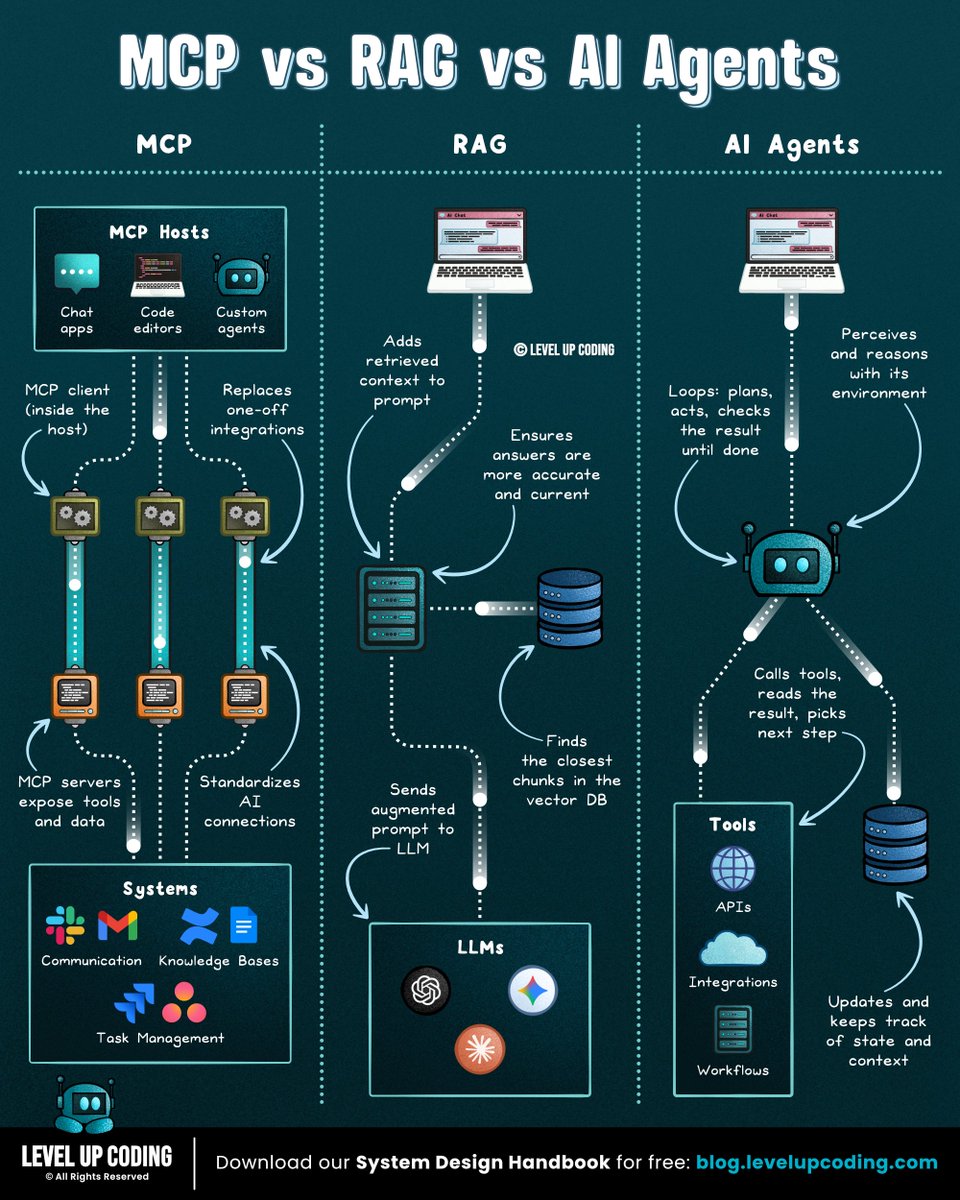
𝗠𝗖𝗣 𝗶𝘀 𝘁𝗵𝗲 𝗰𝗼𝗻𝗻𝗲𝗰𝘁𝗶𝗼𝗻 𝗹𝗮𝘆𝗲𝗿. It gives AI systems a standard way to connect to external systems and capabilities. MCP servers expose tools for querying databases, calling APIs, or taking actions, without requiring custom integrations for every client. But it handles connectivity, not retrieval.
That's where 𝗥𝗔𝗚 comes in. It searches your docs at query time, pulling relevant chunks into the prompt so answers can draw from your data. Keeping it current means updating an index, not retraining the model. In a basic RAG pipeline, the flow is straightforward: retrieve, then answer.
Now with 𝗔𝗜 𝗔𝗴𝗲𝗻𝘁𝘀, the model runs in a loop: plan a step, call a tool, read the result, repeat until the goal is met. That handles multi-step tasks, at the cost of more latency, tokens, and failure points.
So the choice comes down to the gap you're closing: access to systems, knowledge from your data, or action over many steps.
But executing a task successfully doesn't necessarily mean it's still the right task.
Priorities shift, budgets change, and teams move between projects. Both humans and AI agents can keep executing work that no longer aligns with the bigger plan.
The problem is that strategy, capacity, spend, and execution data often live in different systems. By the time a quarterly review reveals the gap between plan and reality, time and budget have already been spent.
Catching that drift early means continuously connecting what was planned with the work actually happening, across both human teams and AI agents.
Tempo Loop brings together time, capacity, spend, and execution data in one unified view across human and AI-agent work.
It answers a simple question without chasing status updates: Are we still working on the right things?
When something drifts, Loop identifies the gap, recommends corrective actions with tradeoff context, and orchestrates approved changes back into the systems teams already use, like Jira.
𝗔𝗴𝗲𝗻𝘁𝘀 𝗹𝗼𝗼𝗽 𝗼𝗻 𝘁𝗮𝘀𝗸𝘀. 𝗧𝗵𝗶𝘀 𝗼𝗻𝗲 𝗹𝗼𝗼𝗽𝘀 𝗼𝗻 𝗽𝗿𝗶𝗼𝗿𝗶𝘁𝗶𝗲𝘀.
𝗦𝗲𝗲 𝗵𝗼𝘄 𝗧𝗲𝗺𝗽𝗼 𝗟𝗼𝗼𝗽 𝘄𝗼𝗿𝗸𝘀 → https://t.co/gG53bFKIYa
What else would you add?
——
♻️ Repost to help others learn AI.
🙏 Thanks to @TempoHQ for sponsoring this post.
➕ Follow me ( Nikki Siapno ) to improve at AI and system design.
Kubernetes visually explained.
Want to learn more? Deep dive is available in my newsletter.
PS: System design is must for engineers. Download my 218 page System Design Handbook for free and join 35,000+ engineers who get my free weekly newsletter → https://t.co/2dn91uoVrJ
8 Deployment Patterns Engineers Should Know:
These patterns all help ship changes, but what actually happens in each strategy is very different and they work at different layers.
Infrastructure Layer
𝟭) 𝗥𝗼𝗹𝗹𝗶𝗻𝗴: the default for stateless services when two versions can safely overlap. Cheap to run, but rollback is just another slow rollout.
𝟮) 𝗕𝗹𝘂𝗲-𝗴𝗿𝗲𝗲𝗻: when you need fast rollback and can afford two environments. A shared database makes it harder than it looks.
𝟯) 𝗦𝗵𝗮𝗱𝗼𝘄: when you're rewriting a critical path and want to test it against real traffic first. You pay for duplicate load and must isolate side effects.
𝟰) 𝗜𝗺𝗺𝘂𝘁𝗮𝗯𝗹𝗲 𝗶𝗻𝗳𝗿𝗮𝘀𝘁𝗿𝘂𝗰𝘁𝘂𝗿𝗲: when config drift keeps causing surprises. Replacing instances with tested images improves consistency, but requires reliable image builds and provisioning.
Release Layer
𝟱) 𝗙𝗲𝗮𝘁𝘂𝗿𝗲 𝗳𝗹𝗮𝗴𝘀: when you want to decouple code deployment from releasing 100% of your changes to everyone instantly. Every flag is a code path you'll have to clean up.
𝟲) 𝗖𝗮𝗻𝗮𝗿𝘆: when a change is risky and your metrics catch regressions fast. A small group of real users still hits the bug.
𝟳) 𝗣𝗿𝗼𝗴𝗿𝗲𝘀𝘀𝗶𝘃𝗲 𝗱𝗲𝗹𝗶𝘃𝗲𝗿𝘆: when you want to control exposure using real production signals. Rollouts can advance or stop based on metrics, but reliable observability is essential.
𝟴) 𝗔/𝗕 𝘁𝗲𝘀𝘁𝗶𝗻𝗴: when the question is "is this better?", not "is this safe?". Results need enough traffic to mean anything.
But these patterns only protect the changes that actually use them.
Feature flags can power canaries, A/B tests, and progressive rollouts. But deciding which changes need flags, setting rollout rules, and cleaning them up still falls to engineers.
LaunchDarkly's new Release Autopilot uses AI agents to automate that setup.
It classifies changes by risk, adds feature flags when needed, and progressively releases changes while monitoring live production signals against defined guardrails. It also helps clean up flags after release.
𝗘𝘅𝗽𝗹𝗼𝗿𝗲 𝗥𝗲𝗹𝗲𝗮𝘀𝗲 𝗔𝘂𝘁𝗼𝗽𝗶𝗹𝗼𝘁 → https://t.co/64qWYbIt6b
What else would you add?
——
♻️ Repost to help others learn deployment patterns.
🙏 Thanks to @LaunchDarkly for sponsoring this post.
➕ Follow me ( Nikki Siapno ) to improve at system design and AI.
𝗠𝗖𝗣 𝘃𝘀 𝗥𝗔𝗚 𝘃𝘀 𝗔𝗜 𝗔𝗴𝗲𝗻𝘁𝘀.
𝗠𝗖𝗣 is the connection layer. It gives AI systems a standard way to connect to external systems and capabilities. MCP servers expose tools for querying databases, calling APIs, or taking actions, without requiring custom integrations for every client. But it handles connectivity, not retrieval.
That's where 𝗥𝗔𝗚 comes in. It searches your docs at query time, pulling relevant chunks into the prompt so answers can draw from your data. Keeping it current means updating an index, not retraining the model. In a basic RAG pipeline, the flow is straightforward: retrieve, then answer.
Now with 𝗔𝗜 𝗔𝗴𝗲𝗻𝘁𝘀, the model runs in a loop: plan a step, call a tool, read the result, repeat until the goal is met. That handles multi-step tasks, at the cost of more latency, tokens, and failure points.
So the choice comes down to the gap you're closing: access to systems, knowledge from your data, or action over many steps.
But executing a task successfully doesn't necessarily mean it's still the right task.
Priorities shift, budgets change, and teams move between projects. Both humans and AI agents can keep executing work that no longer aligns with the bigger plan.
The problem is that strategy, capacity, spend, and execution data often live in different systems. By the time a quarterly review reveals the gap between plan and reality, time and budget have already been spent.
Catching that drift early means continuously connecting what was planned with the work actually happening, across both human teams and AI agents.
Tempo Loop brings together time, capacity, spend, and execution data in one unified view across human and AI-agent work.
It answers a simple question without chasing status updates: Are we still working on the right things?
When something drifts, Loop identifies the gap, recommends corrective actions with tradeoff context, and orchestrates approved changes back into the systems teams already use, like Jira.
𝗔𝗴𝗲𝗻𝘁𝘀 𝗹𝗼𝗼𝗽 𝗼𝗻 𝘁𝗮𝘀𝗸𝘀. 𝗧𝗵𝗶𝘀 𝗼𝗻𝗲 𝗹𝗼𝗼𝗽𝘀 𝗼𝗻 𝗽𝗿𝗶𝗼𝗿𝗶𝘁𝗶𝗲𝘀.
𝗦𝗲𝗲 𝗵𝗼𝘄 𝗧𝗲𝗺𝗽𝗼 𝗟𝗼𝗼𝗽 𝘄𝗼𝗿𝗸𝘀 → https://t.co/gG53bFKIYa
What else would you add?
——
♻️ Repost to help others learn AI.
🙏 Thanks to @TempoHQ for sponsoring this post.
➕ Follow me ( Nikki Siapno ) to improve at AI and system design.
𝗛𝗼𝘄 𝗥𝗔𝗚 𝗮𝗰𝘁𝘂𝗮𝗹𝗹𝘆 𝘄𝗼𝗿𝗸𝘀
(clearly explained in under 2 mins):
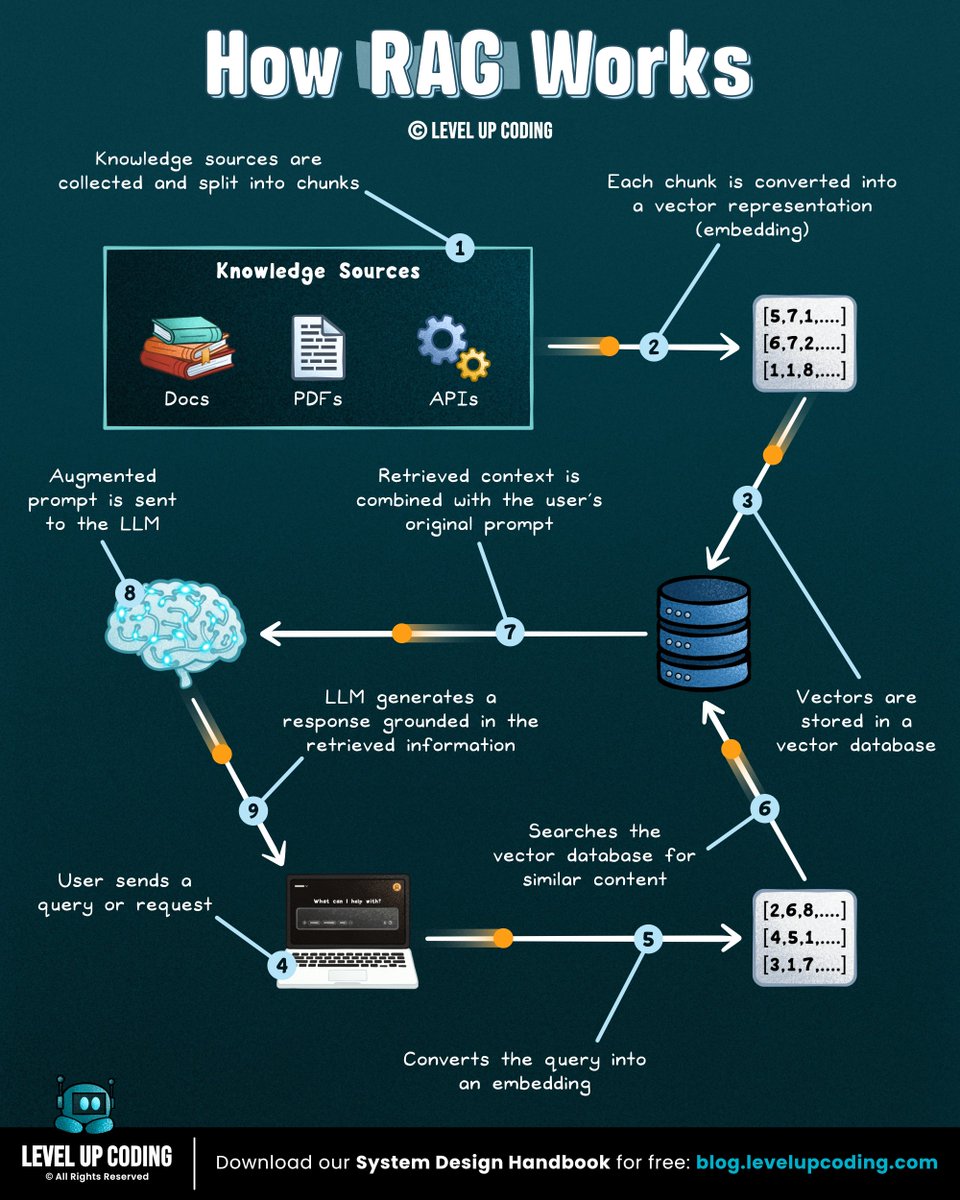
LLMs are powerful, but they only know what’s already in their context.
RAG changes that by retrieving relevant external knowledge before the model answers.
Here's how it works:
𝟭) 𝗜𝗻𝗴𝗲𝘀𝘁 𝘁𝗵𝗲 𝗱𝗮𝘁𝗮
↳ Collect documents, PDFs, or other data sources
↳ Clean and split the content into smaller chunks
𝟮) 𝗖𝗿𝗲𝗮𝘁𝗲 𝗲𝗺𝗯𝗲𝗱𝗱𝗶𝗻𝗴𝘀
↳ Convert each chunk into a vector representation
↳ Semantically similar content produces nearby vectors
𝟯) 𝗦𝘁𝗼𝗿𝗲 𝘁𝗵𝗲 𝘃𝗲𝗰𝘁𝗼𝗿𝘀
↳ Save embeddings in a vector database
↳ Index them for efficient similarity search
𝟰) 𝗥𝗲𝘁𝗿𝗶𝗲𝘃𝗲 𝗿𝗲𝗹𝗲𝘃𝗮𝗻𝘁 𝗰𝗼𝗻𝘁𝗲𝘅𝘁
↳ Convert the user's query into an embedding
↳ Find and retrieve the most relevant chunks
𝟱) 𝗚𝗲𝗻𝗲𝗿𝗮𝘁𝗲 𝘁𝗵𝗲 𝗮𝗻𝘀𝘄𝗲𝗿
↳ Combine the query and retrieved context into a prompt
↳ The LLM uses that context to generate its response
The harder part is connecting chunking, embeddings, storage, retrieval, and generation into one working pipeline.
MongoDB's free RAG course walks you through the entire process, from preparing data and generating embeddings to implementing vector search and connecting everything to an LLM.
You'll build a working RAG application using LangChain and MongoDB, with a Skill Badge to earn along the way.
𝗦𝘁𝗮𝗿𝘁 𝘁𝗵𝗲 𝗙𝗿𝗲𝗲 𝗥𝗔𝗚 𝗖𝗼𝘂𝗿𝘀𝗲 → https://t.co/CCKvpdoebm
What else would you add?
——
💾 Save it
🙏 Thanks to @MongoDB for sponsoring this post.
➕ Follow me ( Nikki Siapno ) to improve at system design and AI.