Innovating Nigeria’s Oil & Gas Sector for a Sustainable Future! We’re merging AI, automation, and local expertise to transform energy operations across the Niger Delta. From cutting emissions to powering communities, we’re building a greener, more inclusive industry for Nigeria.
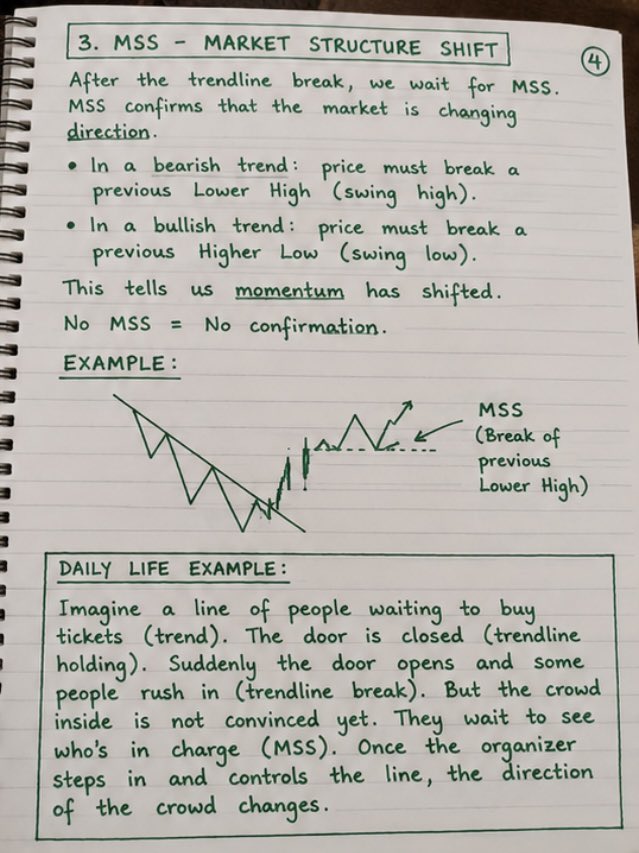
Some people has been asking me to talk about PRICE ACTION… so I decided to study and learn it too 📈✍️
But let me ask 👇
What exactly makes price action so powerful without indicators?
Why do traders focus so much on support, resistance, liquidity & market structure?
And how do you know the exact zone to enter before the market moves? 🤔
We learn every day.
Drop your best explanation or strategy below 👇🔥
BTCUSD Outlook 📉
Waiting for price to tap my key area before looking for sell opportunities.
If price respects the zone, I’ll execute based on confirmation.
If it fails to reach or invalidates the setup, I’ll stay patient and look for another entry.
If you’re struggling to spot high-probability setups, here’s my 4-steps framework that keeps me consistent open this thread 🧵👇 (US30 for example)
😒Follow
🔁 Repost
🔖 Bookmark
❤️ Like to support
Advance Structure Using Candle Range and Key Level.
How to trade trades from Daily Timeframe down to H4 timeframe.
Study with me, like and repost if you find this meaningful
50 CHROME EXTENSIONS THAT ARE ACTUALLY USEFUL
1. uBlock Origin — block every ad
2. Ghostery — see who tracks you
3. Privacy Badger — auto block trackers
4. ClearURLs — remove tracking from links
5. HTTPS Everywhere — force secure browsing
6. OneTab — collapse all tabs instantly
7. Toby — organize tabs in groups
8. Momentum — focused new tab page
9. Workona — workspaces for tabs
10. Session Buddy — save tab sessions
11. Grammarly — fix writing anywhere
12. LanguageTool — grammar in 30+ languages
13. Mailtrack — email open tracking
14. Simplify Gmail — cleaner inbox
15. Boomerang — schedule emails smartly
16. ColorZilla — pick colors from pages
17. WhatFont — identify any font
18. Wappalyzer — see any site's tech
19. Pesticide — outline CSS elements
20. Window Resizer — test responsive design
21. GoFullPage — full page screenshots
22. Nimbus — annotate screenshots fast
23. Loom — record your screen fast
24. Awesome Screenshot — capture and edit
25. Screenity — open source recorder
26. Raindrop — bookmarks that work
27. Save to Pocket — read articles later
28. Speechify — read pages out loud
29. Mercury Reader — distraction free reading
30. Zotero — organize research sources
31. Dark Reader — dark mode every site
32. Bitwarden — free password manager
33. Video Speed Controller — speed up videos
34. Unhook — remove YouTube clutter
35. News Feed Eradicator — kill social feeds
36. SimilarWeb — check site traffic
37. Tampermonkey — run custom scripts
38. ChatGPT for Chrome — AI in every tab
39. Merlin AI — GPT on any website
40. Compose AI — autocomplete your writing
41. Wordtune — rewrite sentences with AI
42. DeepL — AI powered translations
43. Perplexity — AI search assistant
44. Monica AI — AI copilot for browsing
45. Sider AI — ChatGPT sidebar for pages
46. MaxAI — summarize any page with AI
47. Harpa AI — automate web tasks
48. Tactiq — AI meeting transcripts
49. tl;dv — record and summarize meetings
50. SciSpace — understand research papers
Your browser can do 10x more than you think.
Most people never install a single one.