Flocking simulation in Dynamo!
Package is available as "WhatTheFlock" from the package manager.
Sample dyn file: https://t.co/nTm6gpcsL0 (also available in the "extra" folder of the package)
Source code: https://t.co/j5AhlvFwaO
https://t.co/qCl1rfjqFZ
Here are some more simple Python scripts to connect to OpenAI's services from within Dynamo/Grasshopper. This time we access the language model (used in #ChatGPT)
.dyn and .gh files:
https://t.co/ch8i5fdnct
Have fun !
#dynamobim#grasshopper3d
@PaulBus7@DynamoBIM This example was written for CPython3, which is only available in later versions of Dynamo. I tested this on Dynamo 2.17 (I guess 2.15 should work too)
With some simple Python script, we can easily access OpenAI's services (such as DALL-E) from within Dynamo/Grasshopper via web requests.
.dyn and .gh files:
https://t.co/ch8i5fdnct
@DynamoBIM#Grasshopper3d#Rhino3d
@solamour@johntpierson@data_shapes No such version currently in existence but we have heard a couple of very similar suggestions about using lists to pre-setup the dropdown items. Will discuss this with the team in the next sprint :)
@dr_danieldavis One of the participants in a Rhino/Grasshopper Python course that I taught at McNeel Barcelona last year was an industrial designer from the Apple Watch team in Cupertino. Apparently they have a few Grasshopper users there in that team.
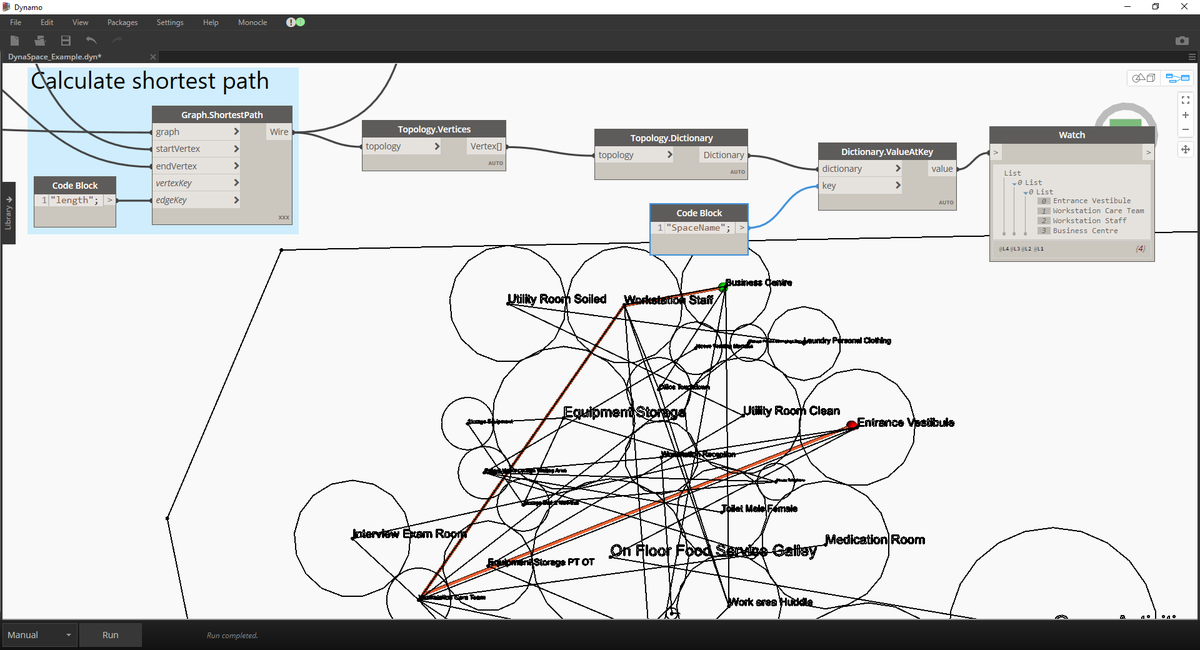
Based on several requests, I uploaded the DynaSpace/Topologic @DynamoBIM dyn to https://t.co/FA2soUDT6v. Also, as shown below, when you get the shortest path and examine the dictionaries of the vertices, it tells you the space names, in order, for getting from A to B.