Donc on peut siphonner tout sans se soucier des droits d’auteur, mais en revanche on accepte pas de se faire siphonner par les Chinois.
C’est quand même l’arroseur arrosé :-)
https://t.co/pdxP8WAjPu
HTTP Status Code You Should Know. We just made a YouTube video on this topic. The link to the video is at the end of the post.
The response codes for HTTP are divided into five categories:
Informational (100-199)
Success (200-299)
Redirection (300-399)
Client Error (400-499)
Server Error (500-599)
These codes are defined in RFC 9110. To save you from reading the entire document (which is about 200 pages), here is a summary of the most common ones:
Over to you: HTTP status code 401 is for Unauthorized. Can you explain the difference between authentication and authorization, and which one does code 401 check for?
–
Subscribe to our weekly newsletter to get a Free System Design PDF (158 pages): https://t.co/uc5M7CdXXC
Git Merge vs. Rebase vs. Squash Commit!
What are the differences?
When we 𝐦𝐞𝐫𝐠𝐞 𝐜𝐡𝐚𝐧𝐠𝐞𝐬 from one Git branch to another, we can use ‘git merge’ or ‘git rebase’. The diagram below shows how the two commands work.
𝐆𝐢𝐭 𝐌𝐞𝐫𝐠𝐞
This creates a new commit G’ in the main branch. G’ ties the histories of both main and feature branches.
Git merge is 𝐧𝐨𝐧-𝐝𝐞𝐬𝐭𝐫𝐮𝐜𝐭𝐢𝐯𝐞. Neither the main nor the feature branch is changed.
𝐆𝐢𝐭 𝐑𝐞𝐛𝐚𝐬𝐞
Git rebase moves the feature branch histories to the head of the main branch. It creates new commits E’, F’, and G’ for each commit in the feature branch.
The benefit of rebase is that it has 𝐥𝐢𝐧𝐞𝐚𝐫 𝐜𝐨𝐦𝐦𝐢𝐭 𝐡𝐢𝐬𝐭𝐨𝐫𝐲.
Rebase can be dangerous if “the golden rule of git rebase” is not followed.
𝐓𝐡𝐞 𝐆𝐨𝐥𝐝𝐞𝐧 𝐑𝐮𝐥𝐞 𝐨𝐟 𝐆𝐢𝐭 𝐑𝐞𝐛𝐚𝐬𝐞
Never use it on public branches!
–
Subscribe to our weekly newsletter to get a Free System Design PDF (158 pages): https://t.co/uc5M7CdXXC
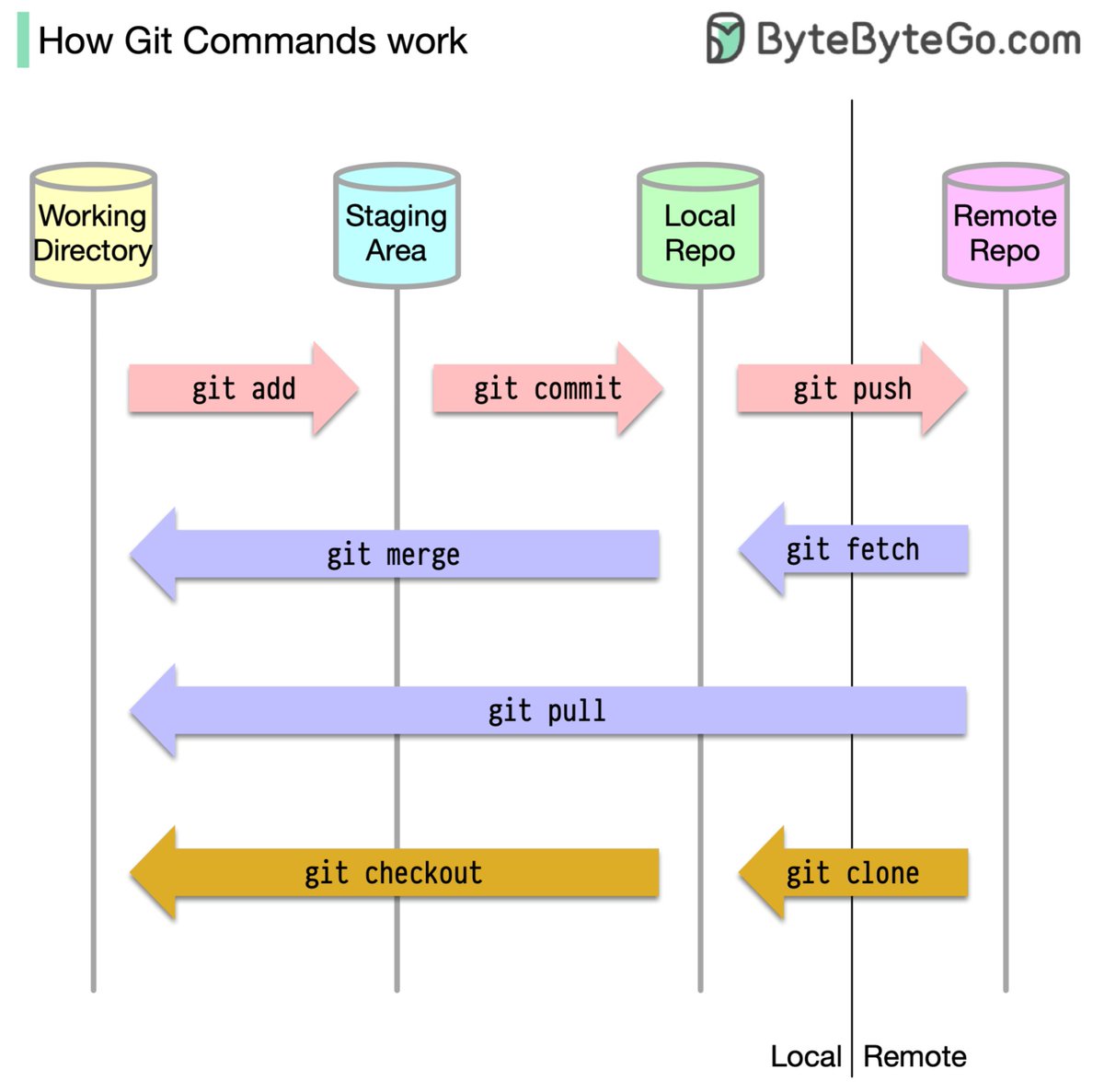
How does Git work?
To begin with, it's essential to identify where our code is stored. The common assumption is that there are only two locations - one on a remote server like Github and the other on our local machine. However, this isn't entirely accurate. Git maintains three local storages on our machine, which means that our code can be found in four places:
- Working directory: where we edit files
- Staging area: a temporary location where files are kept for the next commit
- Local repository: contains the code that has been committed
- Remote repository: the remote server that stores the code
Most Git commands primarily move files between these four locations.
Over to you: Do you know which storage location the "git tag" command operates on? This command can add annotations to a commit.
–
Subscribe to our weekly newsletter to get a Free System Design PDF (158 pages): https://t.co/FIzCeaWsZV
Chrome Dev Tools 💡
You may not know that we can override response headers in Chrome Dev Tools 🤩
This can be very handy for handling CORS errors locally until they get fixed from the API server ✅👇
What are the differences among database locks?
In database management, locks are mechanisms that prevent concurrent access to data to ensure data integrity and consistency.
Here are the common types of locks used in databases:
1. Shared Lock (S Lock)
It allows multiple transactions to read a resource simultaneously but not modify it. Other transactions can also acquire a shared lock on the same resource.
2. Exclusive Lock (X Lock)
It allows a transaction to both read and modify a resource. No other transaction can acquire any type of lock on the same resource while an exclusive lock is held.
3. Update Lock (U Lock)
It is used to prevent a deadlock scenario when a transaction intends to update a resource.
4. Schema Lock
It is used to protect the structure of database objects.
5. Bulk Update Lock (BU Lock)
It is used during bulk insert operations to improve performance by reducing the number of locks required.
6. Key-Range Lock
It is used in indexed data to prevent phantom reads (inserting new rows into a range that a transaction has already read).
7. Row-Level Lock
It locks a specific row in a table, allowing other rows to be accessed concurrently.
8. Page-Level Lock
It locks a specific page (a fixed-size block of data) in the database.
9. Table-Level Lock
It locks an entire table. This is simple to implement but can reduce concurrency significantly.
–
Subscribe to our weekly newsletter to get a Free System Design PDF (158 pages): https://t.co/uc5M7CdXXC
How does REST API work?
What are its principles, methods, constraints, and best practices?
I hope the diagram below gives you a quick overview.
Subscribe to our weekly newsletter to get a Free System Design PDF (158 pages): https://t.co/C9OIBVgldV