HIRING:
Fashion Illustrator (NYSC Corps Members Only)
Location: Abuja
Job schedule: Onsite
Budget: 100 - 120k Net
Apply here: How to apply: https://t.co/ofQ7C3xYZR
If you’re job hunting, here’s how I’d use ChatGPT to review my CV without allowing it to rewrite my entire career history.
Instead of asking it to “rewrite my CV and make it professional”, I’d use these five prompts.
1. Check whether my CV is suitable for the role.
“Act as a recruitment professional. Review my CV against this job description. Identify the requirements I meet, those I partially meet and those I don’t currently demonstrate. Don’t rewrite anything yet.”
2. Identify my weakest sections.
“Review my CV and identify the five weakest areas that could make a recruiter question my suitability for this role. Explain why each is a problem.”
3. Evaluate my achievement statements.
“Identify statements in my CV that describe responsibilities rather than achievements. Suggest how I can make them more specific and results-oriented without inventing information.”
4. Check my keywords.
“Compare my CV with this job description. Identify important skills and keywords that are missing from my CV but that I genuinely demonstrate through my experience.”
5. Conduct a recruiter’s review.
“Imagine you have 30 seconds to review my CV for this position. What would make you shortlist me? What would make you hesitate? Give me an honest assessment.”
One important thing: Don’t blindly accept every suggestion ChatGPT gives you.
It can exaggerate your experience, invent achievements or introduce skills you don’t have.
Your job is to verify every recommendation before using it.
The goal isn’t to make ChatGPT write a beautiful CV. It’s to make sure your CV communicates your actual value clearly.
Save this before your next job application.
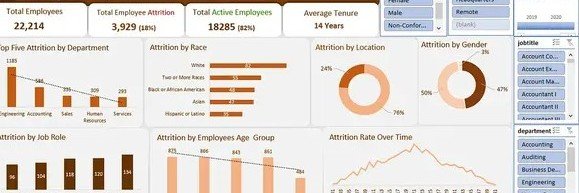
One of the best decisions I made in advancing my career this year is finding a niche and transitioning into HR.
The goal is to go fully into HR/people analytics and I love how it's going so far.
Its been going great with @Ajidng community and support from @nsemeke33
(1)
@Ajidng@nsemeke33 I may not have everything figured out yet, but taking a step is better than none.
I'll be documenting my learnings here as time goes on.
So, watch out for this space if you're a job seeker, data analyst/enthusiast, beginners in hr. You can learn one or two from here.
(2)
Welcome to November good people 🙂
It's been ages since I posted here.
I lost this account around July this year and after series of Email and rigmaroling with the X help centre, I was able to retrieve my account last month October.
I'm so grateful to God and to X 🙏
Instead of telling Claude, "write code." To build your portfolio website,
Here is a good prompt you can give to it to help you create one:
Portfolio prompt
Create a modern, responsive personal portfolio website for a data analyst/data scientist.
## INPUT DATA
I will provide:
1. My CV (extract name, bio, skills, experience, education, tools, and achievements from it)
2. Three Medium article links: ( depending on where you have your projects, list them and inserts the links)
## GOAL
Build a clean, professional portfolio website that highlights my analytical skills, storytelling ability, and real-world project impact. The website should be optimized for recruiters, hiring managers, and collaborators.
## DESIGN STYLE
- Minimalist, modern, and elegant
- Use a tech/data aesthetic (subtle grids, charts, or abstract data visuals)
- Color palette: dark mode or soft neutral tones with one accent color
- Typography: clean sans-serif (professional and readable)
- Smooth scrolling and subtle animations (fade-ins, hover effects)
## WEBSITE STRUCTURE
### 1. HERO SECTION
- My name
- Title (e.g., Data Analyst | Data Scientist | Business Intelligence Analyst)
- Short 1–2 sentence value proposition (derived from CV)
- CTA buttons:
- "View Projects"
- "Download CV"
### 2. ABOUT SECTION
- Short professional summary (from CV)
- Key strengths (data storytelling, analytics, visualization, etc.)
- Tools & technologies (icons preferred: Python, SQL, Power BI, Excel, etc.)
### 3. PROJECTS SECTION (MAIN FOCUS)
Create 3 project cards, each with:
- Project title
- Short summary (problem → approach → insight)
- Key tools used
- 1–2 key insights or outcomes
- Button: "Read Full Case Study" (links to Medium article)
Projects:
(List your projects)
Each project should look like a case study preview, not just a link.
### 4. EXPERIENCE / SKILLS SECTION
- Extract from CV
- Highlight measurable impact where possible
- Include both technical and analytical skills
### 5. CV SECTION
- Provide a downloadable CV button
- Optionally show a short preview
### 6. CONTACT SECTION
- Email
- LinkedIn
- Medium profile
- Optional: GitHub
## FUNCTIONAL REQUIREMENTS
- Fully responsive (mobile, tablet, desktop)
- Fast loading
- Clean navigation (sticky navbar)
- Accessible (good contrast, readable text)
## OUTPUT FORMAT
- Generate complete HTML, CSS, and optional JavaScript
- Code should be clean, well-structured, and ready to deploy
- Use semantic HTML
- Include comments for easy customization
## OPTIONAL ENHANCEMENTS
- Add a “Featured Insight” highlight from one project
- Add subtle data visual elements (charts/graphs style design)
- Add hover animations on project cards
## IMPORTANT
- Do NOT use placeholder lorem ipsum
- Use actual content extracted from my CV
- Make the tone professional, confident, and results-oriented
- Prioritize clarity and storytelling over decoration