🎬✨ CAPCUT PRO LIFETIME GIVEAWAY ✨🎬
Unlock CapCut Pro FOREVER for FREE! 💎🔥
✅ No Watermark
✅ Premium Effects & Templates
✅ Full Pro Features Unlocked
✅ Lifetime Access
🎯 How to Join:
1️⃣ Follow the account
2️⃣ Like & Retweet 🔁
3️⃣ Comment "CAPCUT" 👇
🏆 Winner will be announced soon. Good luck everyone! 🍀
80+ AI tools that can save you hundreds of hours every month 🚀
The smartest creators aren’t working harder anymore — they’re using AI smarter.
Here are some of the best AI tools across every category 👇
💡 Research • ChatGPT
• Copilot
• Gemini
• Perplexity
• Abacus
🎨 Image Generation • Midjourney
• DALL·E 3
• Stability AI
• Fotor
• Microsoft Designer
✍️ Copywriting • https://t.co/ut4bjkEvMn
• Rytr
• Writesonic
• AdCreative AI
📝 Writing • Jasper
• QuillBot
• HIX AI
• Jenny AI
• TextBlaze
🌐 Website Building • Framer
• Durable
• 10Web
• Style AI
🎬 Video Creation • Runway
• HeyGen
• InVideo
• Opus Clip
• Klap
🎤 Audio & Voice • ElevenLabs
• Lovo AI
• Adobe Podcast
• Songburst AI
📊 Presentations • Gamma
• Beautiful AI
• SlidesAI
• Decktopus
⚡ Automation • Zapier
• Make
• Bardeen
• Xembly
🎯 UI/UX & Design • Figma
• Canva
• Uizard
• Photoshop
• Clipdrop
📈 Productivity • Notion AI
• Merlin
• TinyWow
• Personal AI
📱 Social Media • Typefully
• Hypefury
• TweetHunter
• Taplio
🔖 Bookmark this thread — you’ll use these tools daily.
Follow @Jeffar_AI for more AI tools, creator hacks & automation tips 🚀
Stop telling Claude:
❌ "Do this."
❌ "Write code."
❌ "Fix this error."
You're treating a senior AI like a junior intern.
7 prompts you can copy-paste directly to unlock dramatically better outputs:
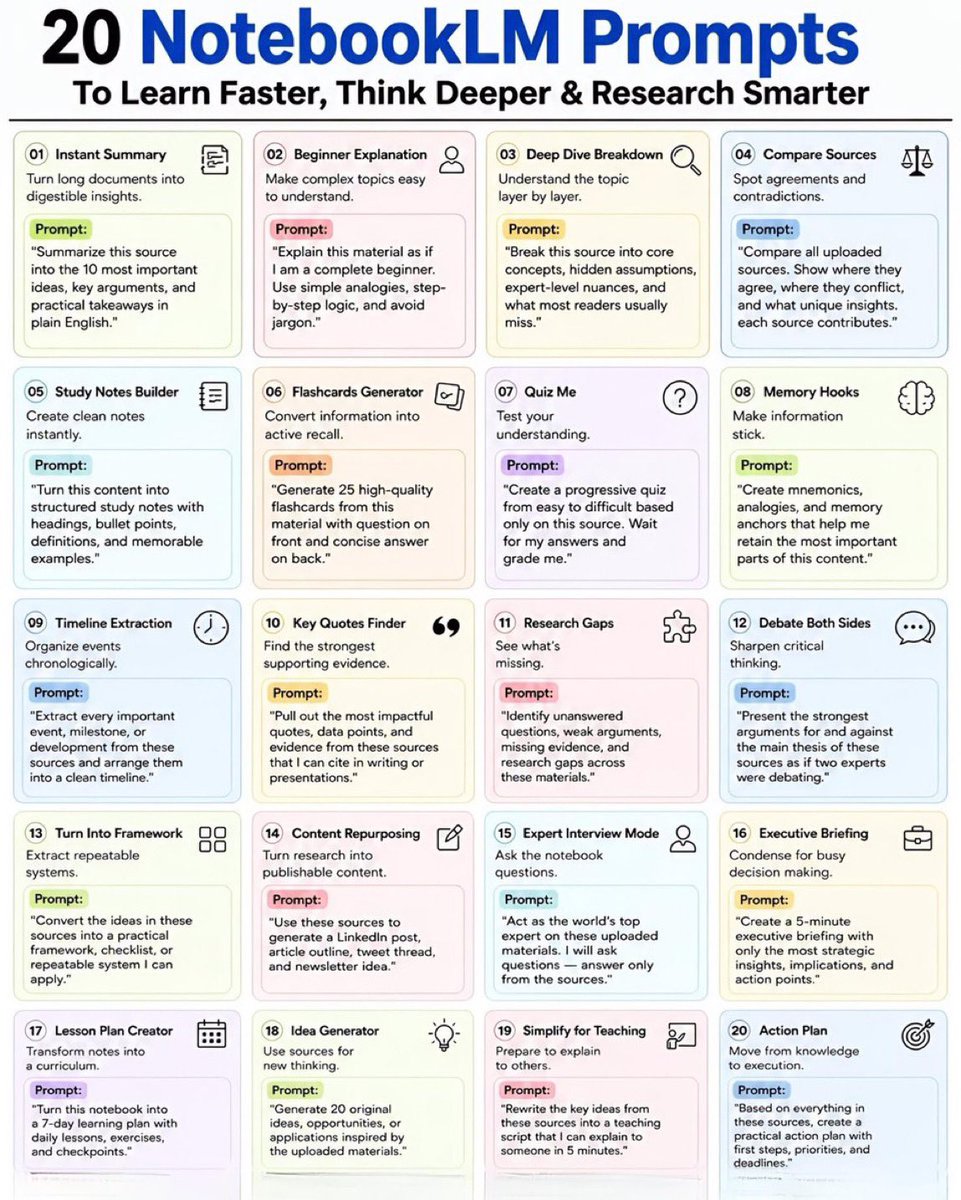
20 NotebookLM Prompts
To Learn Faster, Think Deeper & Research Smarter
01. Instant Summary
Turn long documents into digestible insights.
Prompt: “Summarize this source into the 10 most important ideas, key arguments, and practical takeaways in plain English.”
02. Beginner Explanation
Make complex topics easy to understand.
Prompt: “Explain this material as if I am a complete beginner. Use simple analogies, step-by-step logic, and avoid jargon.”
03. Deep Dive Breakdown
Understand the topic layer by layer.
Prompt: “Break this source into core concepts, hidden assumptions, expert-level nuances, and what most readers usually miss.”
04. Compare Sources
Spot agreements and contradictions.
Prompt: “Compare all uploaded sources. Show where they agree, where they conflict, and what unique insights each source contributes.”
05. Study Notes Builder
Create clean notes instantly.
Prompt: “Turn this content into structured study notes with headings, bullet points, definitions, and memorable examples.”
06. Flashcards Generator
Convert information into active recall.
Prompt: “Generate 25 high-quality flashcards from this material with question on front and concise answer on back.”
07. Quiz Me
Test your understanding.
Prompt: “Create a progressive quiz from easy to difficult based only on this source. Wait for my answers and grade me.”
08. Memory Hooks
Make information stick.
Prompt: “Create mnemonics, analogies, and memory anchors that help me retain the most important parts of this content.”
09. Timeline Extraction
Organize events chronologically.
Prompt: “Extract every important event, milestone, or development from these sources and arrange them into a clean timeline.”
10. Key Quotes Finder
Find the strongest supporting evidence.
Prompt: “Pull out the most impactful quotes, data points, and evidence from these sources that I can cite in writing or presentations.”
11. Research Gaps
See what’s missing.
Prompt: “Identify unanswered questions, weak arguments, missing evidence, and research gaps across these materials.”
12. Debate Both Sides
Sharpen critical thinking.
Prompt: “Present the strongest arguments for and against the main thesis of these sources as if two experts were debating.”
13. Turn Into Framework
Extract repeatable systems.
Prompt: “Convert the ideas in these sources into a practical framework, checklist, or repeatable system I can apply.”
14. Content Repurposing
Turn research into publishable content.
Prompt: “Use these sources to generate a LinkedIn post, article outline, tweet thread, and newsletter idea.”
15. Expert Interview Mode
Ask the notebook questions.
Prompt: “Act as the world’s top expert on these uploaded materials. I will ask questions answer only from the sources.”
16. Executive Briefing
Condense for busy decision making.
Prompt: “Create a 5-minute executive briefing with only the most strategic insights, implications, and action points.”
17. Lesson Plan Creator
Transform notes into a curriculum.
Prompt: “Turn this notebook into a 7-day learning plan with daily lessons, exercises, and checkpoints.”
18. Idea Generator
Use sources for new thinking.
Prompt: “Generate 20 original ideas, opportunities, or applications inspired by the uploaded materials.”
19. Simplify for Teaching
Prepare to explain to others.
Prompt: “Rewrite the key ideas from these sources into a teaching script that I can explain to someone in 5 minutes.”
20. Action Plan
Move from knowledge to execution.
Prompt: “Based on everything in these sources, create a practical action plan with first steps, priorities, and deadlines.”
❤️ Like
🔁 Retweet
🔖 Bookmark
Follow @iansh04_ for more such posts
🚀 Stop working longer hours.
These 80+ AI tools can help you finish days of work in a fraction of the time. ⚡
🧠 Research & Learning • ChatGPT
• Gemini
• Perplexity
• Copilot
• Abacus
🎨 AI Image Creation • Midjourney
• DALL·E 3
• Stability AI
• Fotor
• Microsoft Designer
✍️ Writing & Content • Jasper
• QuillBot
• Rytr
• https://t.co/TlSZDh9MM1
• Writesonic
🌐 Website Building • Framer
• Durable
• 10Web
• Style AI
🎬 Video Production • Runway
• HeyGen
• InVideo
• Opus Clip
• Klap
📊 Presentations • Gamma
• https://t.co/e8QTGyUG13
• Decktopus
• SlidesAI
⚙️ Automation • Zapier
• Make
• Bardeen
• Xembly
🎧 Audio & Voice • ElevenLabs
• Adobe Podcast
• Lovo AI
• Songburst
🎯 Design & UI • Canva
• Figma
• Uizard
• Clipdrop
• Photoshop
📈 Social Media Growth • Typefully
• Hypefury
• Taplio
• TweetHunter
The biggest advantage isn't using a single AI tool.
It's combining the right tools into a workflow that saves time, increases output, and scales your results.
🔖 Save this list for future reference.
💬 Which AI tool has become part of your daily routine?
Want to stay ahead in AI?
Stop following hundreds of accounts.
Follow the people actually building the future at the frontier labs. 🧵
🧠 Anthropic
• @karpathy - one of the best AI educators on X, now at Anthropic
• @bcherny - creator of Claude Code, shares practical tips and workflows
• @trq212 - Claude Code engineer with deep technical insights
⚡ OpenAI
• @polynoamial - reasoning research and technical deep dives
• @gabriel1 - works on Sora, shares valuable career and product insights
• @jxnlco - developer experience lead, frequent Codex updates and learnings
🔷 Google AI
• @OfficialLoganK - fastest source for Gemini and AI Studio updates
• @ammaar - product/design insights and AI-building workflows
• @fofrAI - creative use cases and experiments with generative AI
🚀 Cursor
• @leerob - product updates, AI coding workflows, and developer insights
• @ericzakariasson - practical Cursor tips and advanced usage patterns
• @mntruell - Cursor CEO, major releases and roadmap updates
🤖 xAI
• @milichab - Grok updates, experiments, and platform developments
• @skcd42 - covers key Grok launches and ecosystem news
The fastest way to learn AI isn't another course.
It's learning directly from the people building the tools everyone else will be using next year.
🔖 Bookmark this list.
♻️ Share it with someone learning AI.
➕ Follow for more AI resources, tools, and engineering insights.
LinkedIn growth isn't about hacks.
It's about:
→ Value
→ Engagement
→ Trust
→ Patience
Most people quit too early.
Consistency wins.
What's the most underrated growth factor? 👇
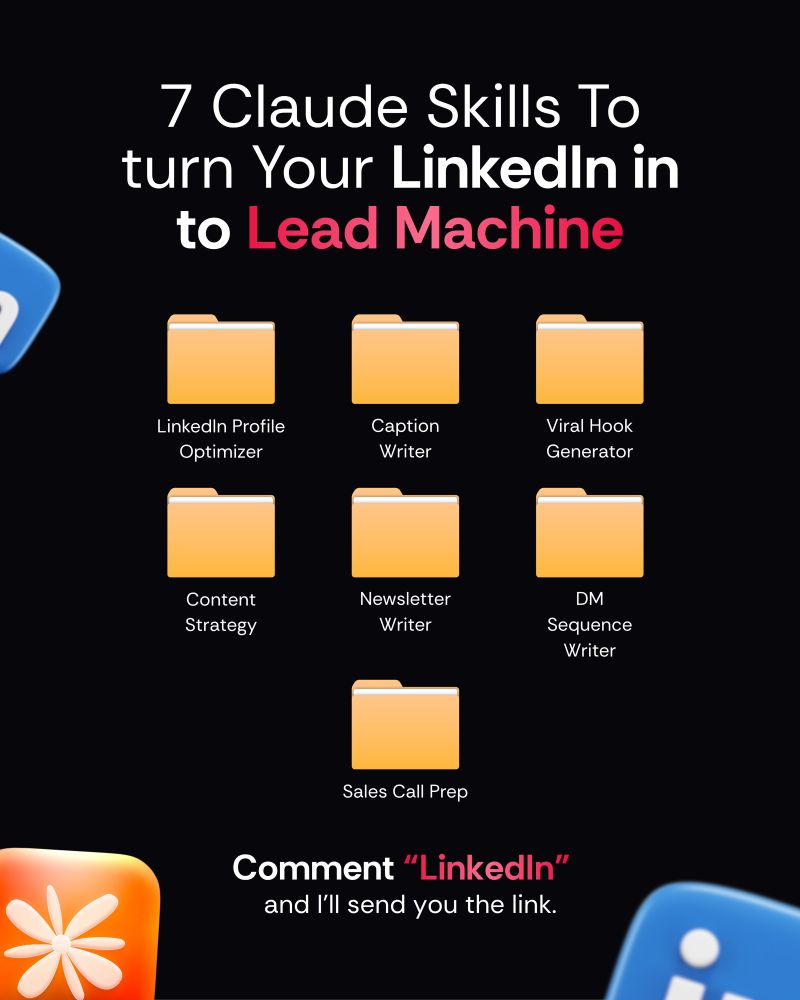
"Comment "LinkedIn" and I'll send you the link.
FORGET PowerPoint.
Claude can build an entire presentation in minutes!
No templates.
No design skills.
No all-nighters before the big meeting.
Just 6 prompts that do the work for you.
👇
📌 Prompt 1. The Blueprint
"Act as a senior presentation strategist. Build a blueprint for [topic].
Give me:
- The ONE message they must remember
- Who the audience is + what they care about
- 3 angles that hook them emotionally
- The slide-by-slide flow
- Ideal slide count
Keep it tight. No filler."
📌 Prompt 2. The Structure
"Create a slide-by-slide outline for [topic].
For each slide:
- Title
- One-line purpose
- What the audience should feel
Make the sequence build like a story — tension, then payoff."
📌 Prompt 3. The Story Frame
"Turn [topic] into a presentation built on narrative.
Hook → grab attention in 5 seconds
Problem → the pain they feel
Insight → the part they didn't expect
Solution → what to do about it
Proof → one stat or example
Takeaway → a single clear action
Cut anything that doesn't move the story forward."
📌 Prompt 4. The Visual Direction
"Act as a presentation designer. For each slide on [topic], recommend:
- A visual that carries the emotion (image, not clipart)
- The right format for any data (chart type, not a table dump)
- An icon or grid layout for lists
Suggest a clean 3-color palette and one font pairing."
📌 Prompt 5. The Content
"Write the full slide content for a [number]-slide deck on [topic].
Per slide:
- A punchy title (6 words max)
- 3–5 bullets, under 10 words each
- One speaker note for delivery
Audience: [describe]. Tone: [professional/casual]."
📌 Prompt 6. The Build
"Now build it.
Create the full presentation on [topic] as a downloadable file.
[number] slides with bold titles, tight bullets, and speaker notes on every slide.
Clean layout, logical flow from open to close, ready to present."
Most people still build slides line by line.
Manually. Slowly. Painfully.
The shift isn't about saving time.
It's about showing up sharper than everyone in the room.
While they format bullet points, you're already prepping the meeting.
Do this:
1. Save this post (you'll come back to it)
2. Pick 1 prompt → build your next deck with it
3. Send it to someone still fighting with templates
📌 Fast. Clean. No excuses.
1. Follow @coder_surya
2. Save the post.
3. Repost to your network.
4. Join AI Community: https://t.co/ioQEJKhR1q
____________________________
Most people don't realize this:
Copying and pasting from ChatGPT is the fastest way to sound generic.
And yes, people notice it instantly.
That's why AI-written content often gets flagged or ignored.
Here are 8 prompts that make it sound human: 👇
(Save them - this changes everything.)
🚨 BREAKING: I asked Claude to improve my LinkedIn profile.
It didn’t just improve it. It made it a recruiter magnet.
Here are the 7 exact prompts I used:
🧵 Introducing Rodin Gen-2.5.
The world's first AI 3D generator to hit 10M+ polygons — all the way down to skin microstructures.
And for everyday props? 1 million-polygon models in just 4 seconds.
Higher geometry. More faithful textures. Faster batch generation. 👇
Those who use Copilot in Excel are still stuck in 2023.
Those who use Claude with basic prompts are already 5x faster in 2026.
I'm leaving you the 7 prompts that will change your life.
(💾 Save this like gold)
INSTEAD OF WATCHING AN HOUR OF NETFLIX TONIGHT.
This 60-minute Cambridge lecture by Demis Hassabis will teach you more about the future of AI than most people will learn in the next 5 years.
Bookmark it now.










![coder_surya's tweet photo. FORGET PowerPoint.
Claude can build an entire presentation in minutes!
No templates.
No design skills.
No all-nighters before the big meeting.
Just 6 prompts that do the work for you.
👇
📌 Prompt 1. The Blueprint
"Act as a senior presentation strategist. Build a blueprint for [topic].
Give me:
- The ONE message they must remember
- Who the audience is + what they care about
- 3 angles that hook them emotionally
- The slide-by-slide flow
- Ideal slide count
Keep it tight. No filler."
📌 Prompt 2. The Structure
"Create a slide-by-slide outline for [topic].
For each slide:
- Title
- One-line purpose
- What the audience should feel
Make the sequence build like a story — tension, then payoff."
📌 Prompt 3. The Story Frame
"Turn [topic] into a presentation built on narrative.
Hook → grab attention in 5 seconds
Problem → the pain they feel
Insight → the part they didn't expect
Solution → what to do about it
Proof → one stat or example
Takeaway → a single clear action
Cut anything that doesn't move the story forward."
📌 Prompt 4. The Visual Direction
"Act as a presentation designer. For each slide on [topic], recommend:
- A visual that carries the emotion (image, not clipart)
- The right format for any data (chart type, not a table dump)
- An icon or grid layout for lists
Suggest a clean 3-color palette and one font pairing."
📌 Prompt 5. The Content
"Write the full slide content for a [number]-slide deck on [topic].
Per slide:
- A punchy title (6 words max)
- 3–5 bullets, under 10 words each
- One speaker note for delivery
Audience: [describe]. Tone: [professional/casual]."
📌 Prompt 6. The Build
"Now build it.
Create the full presentation on [topic] as a downloadable file.
[number] slides with bold titles, tight bullets, and speaker notes on every slide.
Clean layout, logical flow from open to close, ready to present."
Most people still build slides line by line.
Manually. Slowly. Painfully.
The shift isn't about saving time.
It's about showing up sharper than everyone in the room.
While they format bullet points, you're already prepping the meeting.
Do this:
1. Save this post (you'll come back to it)
2. Pick 1 prompt → build your next deck with it
3. Send it to someone still fighting with templates
📌 Fast. Clean. No excuses.
1. Follow @coder_surya
2. Save the post.
3. Repost to your network.
4. Join AI Community: https://t.co/ioQEJKhR1q
____________________________](https://pbs.twimg.com/media/HJ4qdpEaMAE139G.jpg)