Just made some major changes to my Bento and I have to say, I’m feeling pretty awesome about it. I’m sure everyone else is gonna be super jealous because I’m taking my link-in-bio game to the next level.
https://t.co/1NLJPUlGm3
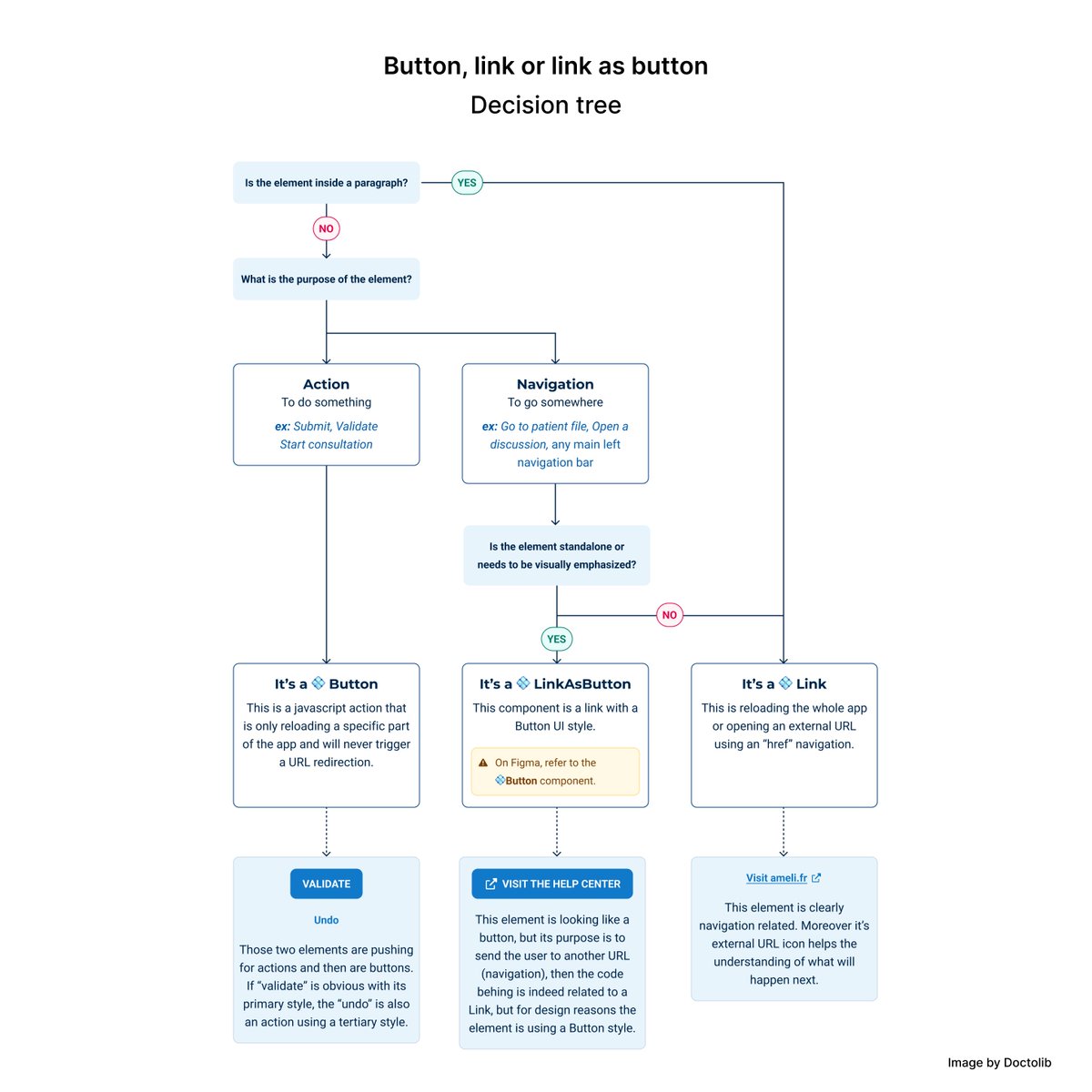
💎 UI Design Decision Trees
Collection of decision trees for all key areas of product design:
Navigation: https://t.co/kZtgk4kd06
Data input forms: https://t.co/j2hgklVCI2
Links & buttons: https://t.co/XkkrNGOhqz
Error state: https://t.co/WyyO9LLd5K
Boost your UX Skills with this Excellent UX Mapping Methods Comparison Cheat Sheet 🔥🔥
Save to Bookmarks for reference 🙌
Summary:
Empathy maps, customer journey maps, experience maps, and service blueprints depict different processes and have different goals, yet they all build common ground within an organization.
Four Types of Mapping:
1. Empathy Mapping
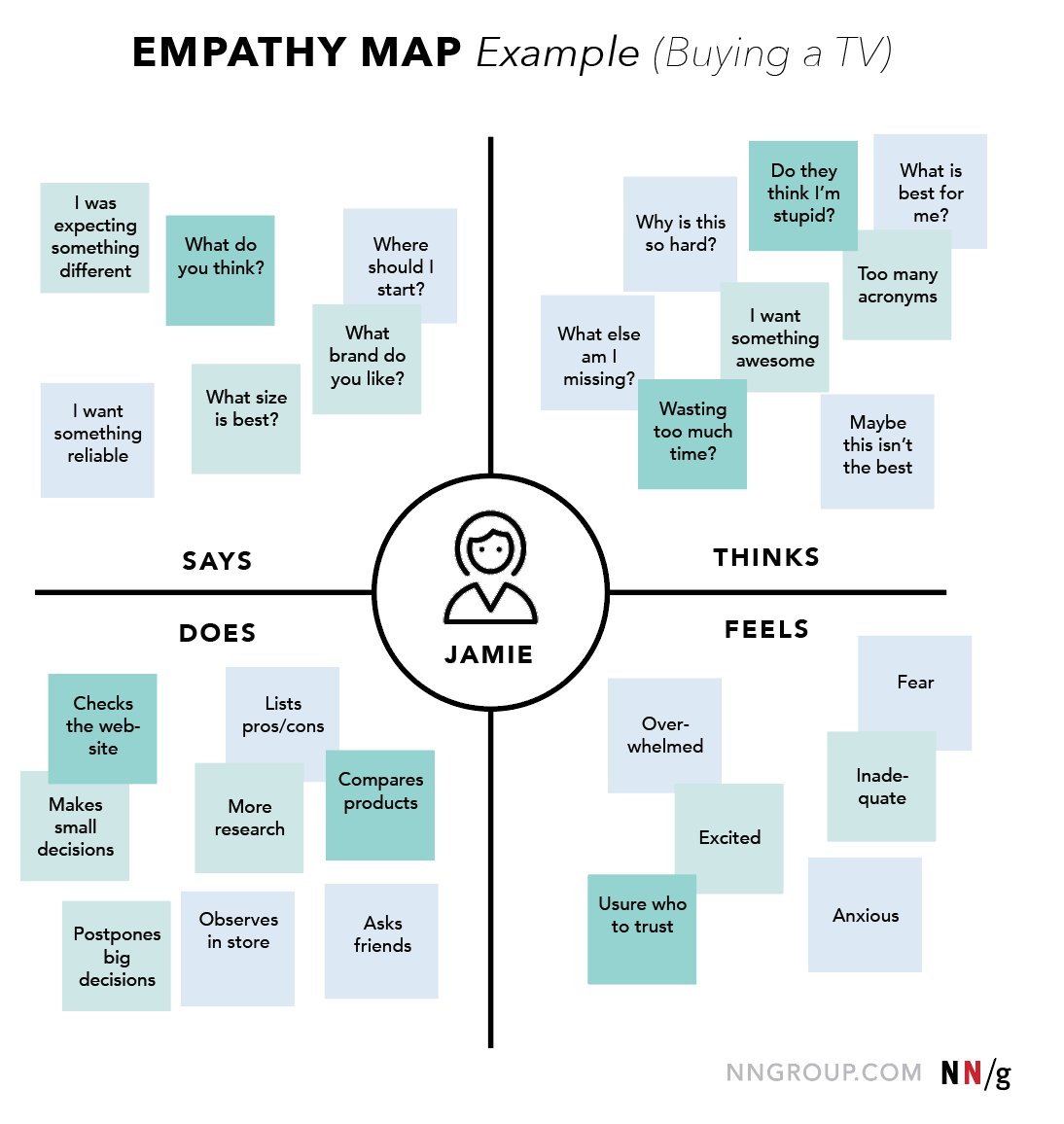
An empathy map is a tool used to articulate what we know about a particular type of user. It externalizes user knowledge in order to 1) create a shared understanding, and 2) aid in decision making.
Characteristics:
- The map is split into 4 quadrants: Says, Thinks, Feels, Does.
- It shows user’s perspective regarding the tasks related to the product.
- It is not chronological or sequential.
- There is one empathy map for each persona or user type (1:1 mapping).
Why use it:
- To build empathy for your users
- To force alignment and understanding about a user type
When to use it:
- Beginning of any design process
- When categorizing research notes from a user interview
2. Customer Journey Mapping
A customer journey map is a visualization of the process that a person goes through in order to accomplish a goal tied to a specific business or product. It’s used for understanding and addressing customer needs and pain points.
Characteristics:
- The map is tied to a specific product or service.
- It is split into 4 swim lanes: phases, actions, thoughts, mindsets/emotions.
- It reflects the user’s perspective:
- Including her mindset, thoughts, and emotions
- Leaving out most process details
- It is chronological.
- There is one map per persona/user type (1:1 mapping).
Why use it:
- To pinpoint specific customer journey touchpoints that cause pain or delight
- To break down silos to create one shared, organization-wide understanding of the customer journey
- To assign ownership of key touchpoints in the journey to internal departments
When to use it:
- At any point in the design process, as a reference point amongst a team throughout a product design cycle
3. Experience Mapping
An experience map is a visualization of an entire end-to-end experience that a “generic” person goes through in order to accomplish a goal. This experience is agnostic of a specific business or product. It’s used for understanding a general human behavior.
Characteristics:
- It is not tied to a specific product or service.
- It is split into 4 swim lanes: phases, actions, thoughts, mindsets/emotions.
- It offers a general human perspective; it is not a specific to a particular user type or product/service.
- It depicts events in chronological order.
Why use it:
- To understand a general human behavior
- To create a baseline understanding of an experience that is product/service agnostic
When to use it:
- Before a customer journey map in order to gain understanding for a general human behavior
- When converging multiple experiences (tool and specific user agnostic) into one visualization
4. Service Blueprinting
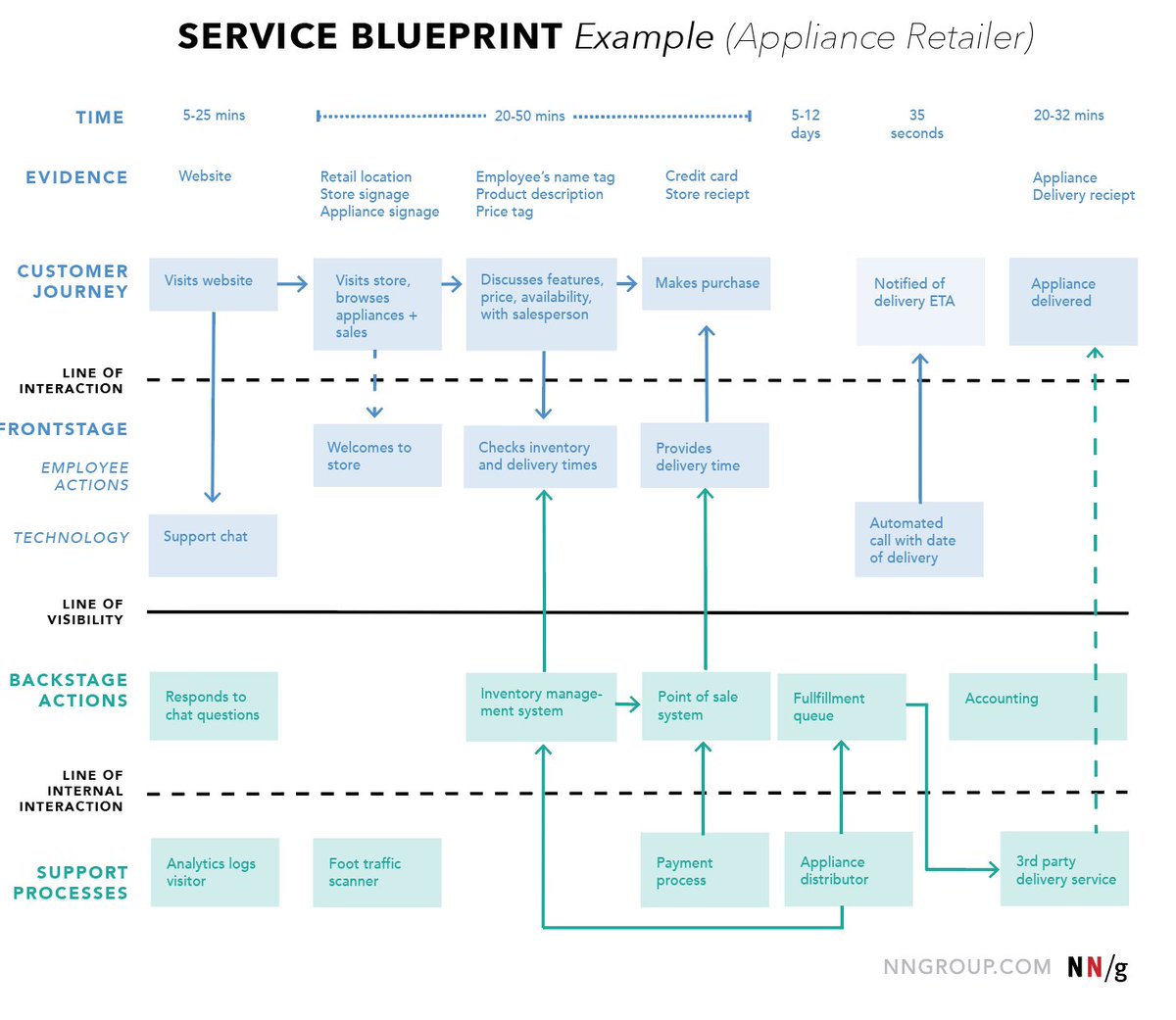
A service blueprint visualizes the relationships between different service components — people, props (physical or digital evidence), and processes — that are directly tied to touchpoints in a specific customer journey.
Characteristics:
- It is tied to a specific service.
- It is split into 4 swim lanes: customer actions, frontstage actions, backstage actions, and support processes.
- It reflects the organization’s perspective:
- Focusing on the service provider and employees
- Leaving out most customer details
- It is chronological and hierarchical.
Why use it:
- To discover weaknesses in the organization
- To identify opportunities for optimization
- To bridge crossdepartment efforts
- To break down silos and create one shared, organization-wide understanding of how the service is provided
When to use it:
- After customer journey mapping
- Before making organizational or process changes
- When pinpointing a funnel or breakpoint internally
by @NNgroup
#ux #uxdesign #ui #uidesign #productdesign #userexperience #uxstrategy #webdesign #psychology #research #uxresearch #usertesting #usability #uxmethods #prototype #designresearch #business #startup
Grab these Excellent UI/UX Learning Cheatsheets to boost your Design Career! 🔥🔥
FREE Cheatsheets attached 🙌
Learn about:
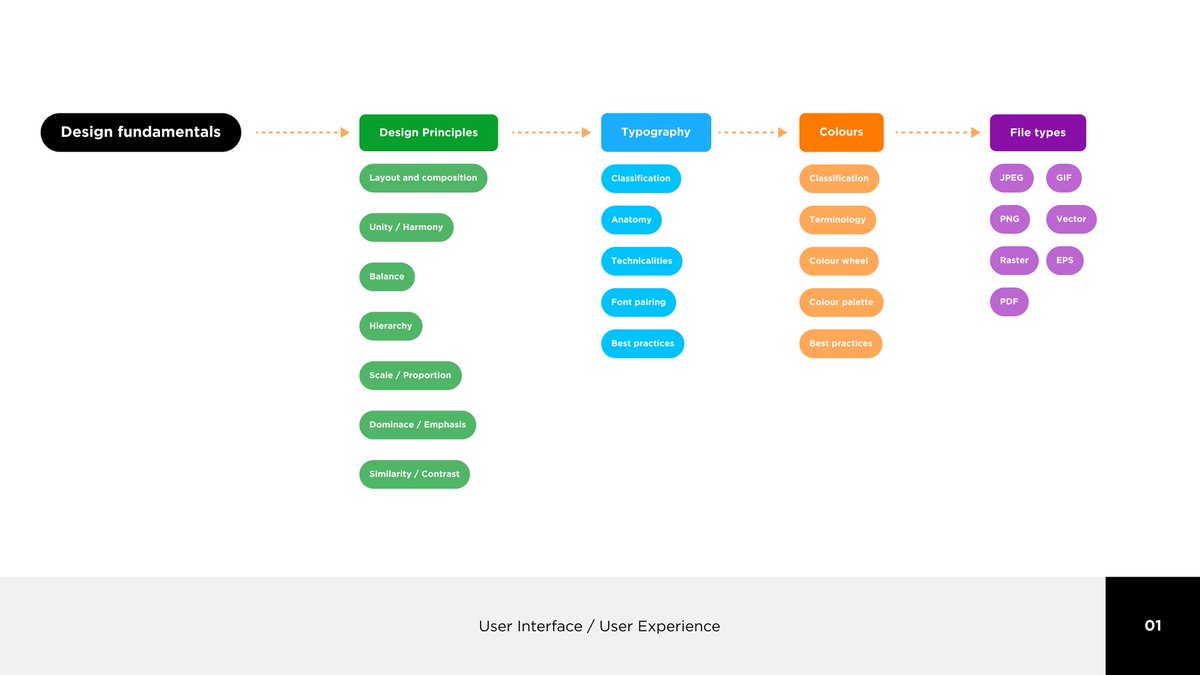
1. Design Fundamentals
- Design Principles, Typography, Colours and File Types
2. UI Design
- Design guidelines and principles, Wireframes, Prototyping and Building a Design System
3. UX Design
- UX Principles and design philosophy, UX Documentation, UX tools and UX research
4. Figma
- Intro to Figma, Working in Figma, More advanced Figma and Collaboration
By Andy Chan
#ux #ui #uxdesign #uidesign #productdesign #website #websitedesign #uxstrategy #learn #cheatsheet #figma #designfundamentals #userexperience #visualdesign #graphicdesign #business #startup #mobile
Learn about Design Thinking Process to improve your UX/UI Designs
With FREE PDF Cheatsheet!
What is Design Thinking?
Design Thinking is a design methodology that is used for solving design problems using human-centric approach. It allows to tackle ill-defined and complex user problems and provide creative and effective solutions to it through empathizing with the user.
Design thinking process is iterative
Discover:
- User interviews
- Stakeholder interviews
- Surveys
- Data analysis
- Metrics
- Competitors
- Focus groups Observation
- Clustering insights
- Context mapping
- Customer journey maps
Define:
- Personas
- Empathy maps
- User journeys Storyboards
- User stories
- Problem statement
- Narratives
- Assumptions mapping
- Task analysis
Jobs to be done- Comparative analysis
Ideate:
- Brainstom sessions
- Mind maps
- Affinity maps
- Storyboard
- Card sorting
- User journeys
- User flows
- Information architecture
- Service blueprints
- Business model canvas
- Crazy 8’s
- Design principles
Prototype:
- Paper prototypes
- Micro-interactions
- Detailed user flows
- Mockups
- Interactive prototypes
- Wireframes
- High fidelity design
- Design hand-offs
- Design documentation
- HTML/JS prototypes
Test:
- Usability testing
- Shadowing
- A/B testing
- SUS surveys
- Heuristic evaluation
- QA
- Analytics
- Performance testing
- Observations
- Desirability evaluations
- Metrics
- Eye tracking
Practical Tips:
- Design process is not linear, it has a parallel and iterative nature. Designer can dive into different phases depending on a situation.
- Use visual and object languages to communicate your ideas.
- Empathize with users to understand their psychological and emotional needs and what is meaningful to them.
- Generate ideas by alternating divergent and convergent thinking.
- Rapid prototyping is a powerful technique that allows to avoid a lot of debates and establish a shared understanding in the team. Use it all the time.
by @uxhints_com
#ux #uxdesign #ui #uidesign #productdesign #uxprocess #uxstrategy #design #designthinking #research #userresearch #uxresearch #usertesting #usability #usabilitytesting #prototyping #agile #mvp #startup #digital #ideation #usercentreddesign #userempathy #business #figms
The Ultimate UX Research Cheat Sheet 🚀🔖
How to use it:
EXAMPLE QUESTION:
- An example question or scenario that you might be faced with that relates to the higher level topic
PRIMARY RESEARCH METHOD:
- The main research approach used for resolving this type of research request. While it is the main one, it won’t always be the most suitable to gather all the necessary information so there are alternatives ones suggested in the next section.
ADDITIONAL/ALTERNATIVE RESEARCH METHODS:
- These are different approaches you can take; away from the main research method. You may choose to do so if, for example, you do not have the time or resource to use the main option or to use as a supplementary method to help with research triangulating.
UX LAWS AND GUIDELINES TO CONSIDER:
- These are various principles and established ways of designing thinking that are relevant to the different research questions.
BIASES TO BE AWARE OF:
- The different biases that you, stakeholders or the user may experience during this research question. Being aware of them helps mitigate the risk it has on the insights.
MAPPING TECHNIQUES:
- These are a collection of mapping techniques that could be used before, during or after the research is conducted to make best use of the time and embed a process that can help support the team
by Aaron Christopher
#ux #uxdesign #ui #uidesign #productdesign #userexperience #webdesign #psychology #research #uxresearch #usertesting #usability #uxmethods #prototype #designresearch #webdesign #mobile #css #html #js #users #uxlaws #uxstrategy #business #ecommerce
@theuichamp Please explain the colors according to the 60-30-10 Color Rule, such as which color takes up 60%, which color 30%, and which color 10%, based on the screen design you uploaded here. This will make it easier to understand the rule. By the way, you have done a very well-informed.