❗️ Market.CSGO CAN TRACK AN ITEM’S PRICE FOR YOU!
A fresh batch of updates is now live on Market.CSGO – with new features, UI improvements, and several bug fixes.
🔔 Set your target price – Market.CSGO will notify you when the item drops to that price.
🧍 3D Agent Viewer – you can now inspect not only weapons, but agents in 3D as well.
💳 Transparent top-up fees – fees are now displayed directly next to each payment method, so you know exactly how much you’ll pay in advance.
⚡️ Trade status hints were also improved, one-click screenshots were added to the 3D Viewer, and links to official social media channels are now available in the user menu.
More changes:
• Fixed incorrect charm color display in the 3D Viewer
• Added one-click high-quality screenshots from the 3D Viewer without UI elements
• Added hints telling you when MarketApp needs to be launched to speed up transaction processing
• Added price drop alerts for items, except Alfaskins
• Open support tickets now display the full creation date
• Updated and refreshed website translations across all available languages
• Fixed an infinite loading bug on the “Add to cart” button when clicked repeatedly
• Fixed transaction history layout issues caused by overly long player nicknames
All changes are already live on Market.CSGO – jump in, try them out, and let us know what you think in the comments 💙
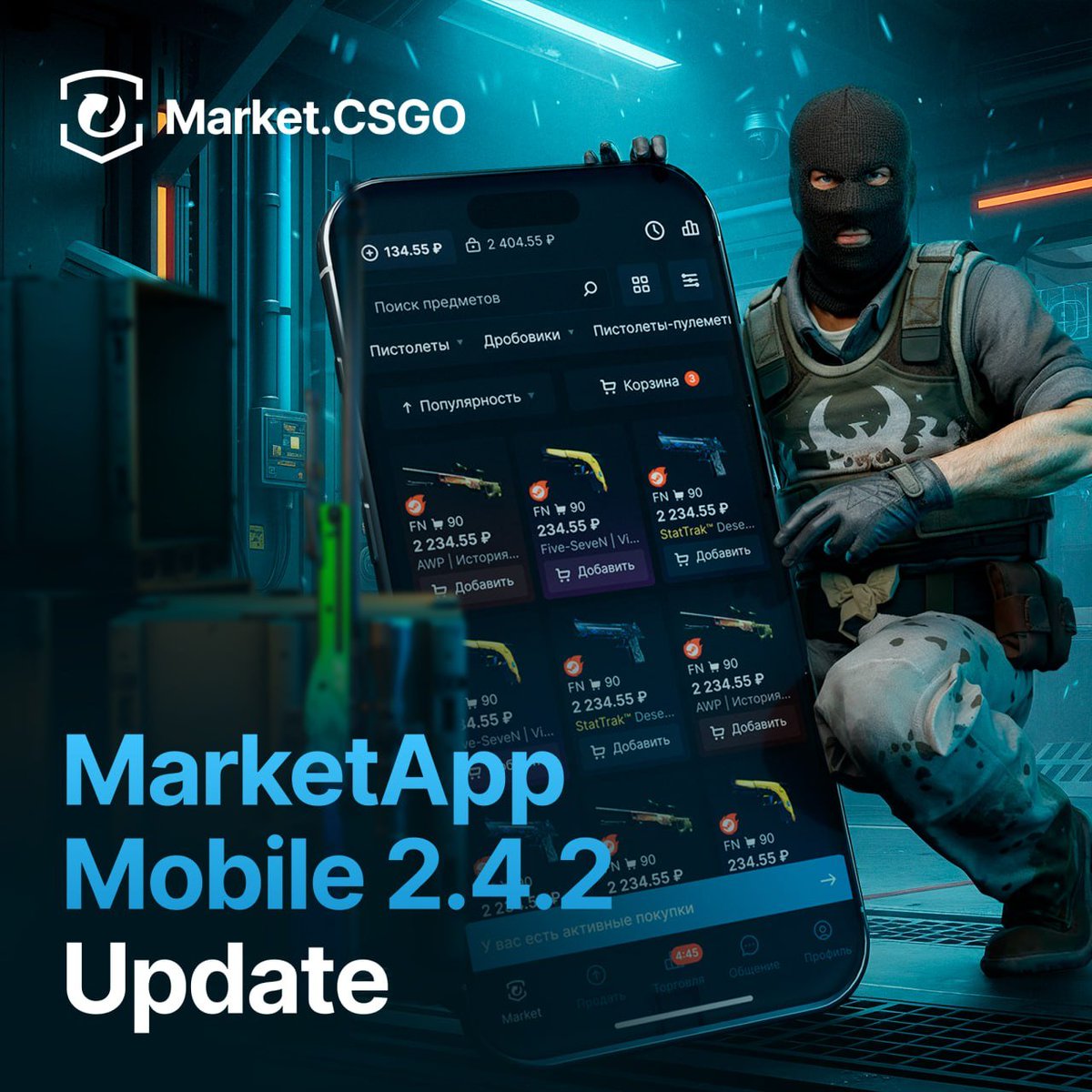
📱 MarketApp Mobile 2.4.2 – FASTER SALES, BETTER TRADE HISTORY
A new version of MarketApp Mobile 2.4.2 is out – this update focuses on a few changes that should make selling and checking your transaction history much easier.
⚡️ Quick Sale has been upgraded: the screen got a refreshed design, and you can now list an item at the best available price with a single tap.
📊 Transaction history is also more informative now – values are displayed even for pending and canceled trades. A bug that could prevent some successful trades from appearing in the history has also been fixed.
What else changed 👇
• Sales chart – now shows the most recent sales by default
• Item counter – restored the block showing the total number of matching skins for sale
• Android – added a warning about potential incompatibility between the “Sound in mute mode” option and some firmware, such as OriginOS
The update is already live on Google Play: https://t.co/lf5GjTM8hc
and the App Store: https://t.co/54lu6nZRZc
Since around 12:00, we’ve been experiencing issues with one of our servers, which has affected the availability of the entire service.
Our team is still working on a fix. ❤️🩹
Sorry for the inconvenience, and thank you for your patience.
Since around 12:00, we’ve been experiencing issues with one of our servers, which has affected the availability of the entire service.
Our team is still working on a fix. ❤️🩹
Sorry for the inconvenience, and thank you for your patience.
🖥️ MarketApp Desktop 4.5.0 Update
MarketApp Desktop keeps getting better! In this version, we've seriously refreshed the design of many screens - they've become not only more functional and logical, but have also laid a solid foundation for large-scale future updates.
What’s new:
💸 Flexible Balance Transfers
▫️ Partial transfers: in the summer, we added a convenient feature - transferring balance between MarketApp accounts without using the API. Now we've made it perfect: you no longer need to transfer the entire amount at once; you can send exactly as much funds to another account as you need!
🎨 Interface and Navigation
▫️ A fresh look at trades: completely modernized the appearance of the trade history and the list of current trades.
▫️ Smart settings: updated the design of the settings screen. The buttons are now larger, and the parameters themselves are logically grouped. The app language toggle has also been moved here.
▫️ Added a useful tooltip for configuring the number of parallel requests.
⚙️ Steam Management and Control
▫️ Steam tab: a dedicated Steam tab has appeared on the accounts screen. Now the current balance, Steam Guard status, and additional actions are always at hand.
▫️ Everything in its place: moved and organized all settings related to Steam Guard. They are now easy to find via an intuitive path: Accounts → Settings → Steam Settings.
▫️ Full data control: added the ability to completely disable the interaction of your Steam account with the Market.CSGO and Alfaskins servers. At the same time, the app will continue to flawlessly accept Steam trades (in manual or automatic mode).
🛡 Stability and Security
▫️ Steam Guard protection: promptly fixed a bug that, under certain rare conditions, could lead to the loss of Steam Guard data.
The updated MarketApp Desktop is already available for Windows, macOS, and Linux: https://t.co/oWPFqJutuA
How do you like the new design? Be sure to share your impressions on our Feedback Portal: https://t.co/3xFfQw2Jzb💙
OVH is currently undergoing scheduled maintenance, which has affected the operation of our service.
The website and API requests may be temporarily unavailable.
Once the maintenance on OVH’s side is completed, our service will return to normal operation.
You can monitor the maintenance status here: https://t.co/nz5KLhT2vt
⚙️ August Market.CSGO Update
Summer is coming to an end, but we continue to make the Market more convenient and secure. This month, we've added a visual skin filter, updated navigation, and fixed several annoying bugs.
✅ Palette in Your Hands
▫️ Building the ideal inventory: you can now filter skins on the main page by color. Building themed loadouts in a single color style is now easier than ever!
✅ Ecosystem and Navigation
▫️ The Market is always with you: completely redesigned our app download page. Trade with comfort from any device, anywhere!
▫️ Useful footer: updated the links at the bottom of the site: added a quick guide on selling skins and refreshed our social media section. Make sure to subscribe - we have plenty of giveaways and other cool content!
▫️ Readability: links in the FAQ section are now highlighted in blue for better visibility.
▫️ Globalization: updated and refreshed website translations across all available languages.
✅ Bug Fixes
▫️ Fixed a bug where the system allowed topping up an account balance without confirming an email address or phone number.
▫️ Resolved an issue where the in-game inspect button would slyly disappear upon revisiting an item page.
▫️ Fixed a broken link for the "Where can I find the exchange link?" button in basic account settings.
These new features are already live on Market.CSGO. Leave your feedback on our Feedback Portal: https://t.co/3xFfQw3hoJ💙
⚙️ Market.CSGO Updates and Improvements
Fresh improvements have made their way to the website! One of the most highly requested features among users is detailed skin inspection. We have been working hard on updating it and are finally ready to show the results.
✅ Advanced 3D Skin Viewer!
First of all, we are glad to announce that the 3D viewer on the website is working stably again. You can still launch it by clicking the "View in 3D" button on the item page.
But that's not all:
▫️ First-person mode: added a view change button. Now you can inspect the skin right in your hands, exactly like in the game itself!
▫️ Animations and sound: in first-person mode, you can now trigger in-game animations. Weapon switching, reloading, inspecting, and shooting - all with their original sounds!
✅ Interface and Trading
▫️ Quick sale for everyone: this feature is now available for accounts using Dollars and Euros.
▫️ Color indication: skins on the quick sale page now have a colored background that depends on their rarity (just like on the main Market).
▫️ Smart price editing: the price change window now displays the item's phase. We've also removed the unnecessary duplicate text regarding the skin's condition.
▫️ Less clutter: hid the manual skin data load button on the sell page, as Steam now transmits all necessary information automatically. We also removed the outdated notification about the introduction of the trade protection system.
✅ Bug Fixes
▫️ Navigation logic: when returning from an item page back to the main page, previously set filters are now reset.
▫️ Display accuracy: fixed the incorrect image display in the price editing window for skins with specific phases.
▫️ Autobuy and mobile version: fixed a bug when placing an auto-buy request with insufficient balance, and eliminated text flickering on smartphones when trying to place an order for more than 100 items.
▫️ Fixed discovered typos and text issues.
Noticed something not working right, or came up with a useful feature? Post it on our Feedback Portal: https://t.co/3E3SgxH49r
Every opinion matters 💙
⚙️ MarketApp Extension 1.9.1 Update
Sometimes the best updates aren't global redesigns, but targeted improvements that save you clicks and nerves every day. In this version, we focused on pleasant QoL features to make using Steam even more comfortable.
✅ Steam Market Improvements
▫️ Fast price management: you can now instantly change the prices of items already listed on the Steam Market without extra steps.
▫️ Added a smart warning in case you accidentally set an excessively high price. The trigger threshold for this protection can be flexibly customized.
▫️ Trouble-free beta testing: solved an issue with scrolling on the item page on the Market that occurred for users with the new design enabled.
✅ Inventory and Trades
▫️ Direct transition: a convenient button has been added to the inventory that instantly takes you to that item's page on the Market.CSGO.
▫️ "In Trade" status: if a skin is already involved in an active trade, a corresponding clear mark will appear on it in the trade window - no more confusion.
▫️ Clean history: hid the "View" button for trades that can no longer be opened. And if you haven't had any trades yet, we will show a beautiful welcome notification. The active page is now conveniently highlighted in green in the right navigation menu.
✅ Polish and Bug Fixes
▫️ Trade window: fixed the layout and eliminated minor errors in the exchange window - it now looks neater and works flawlessly.
▫️ Settings: Fixed a bug that prevented disabling the modification of the trade offers page.
The updated MarketApp Extension is already waiting for you in the Chrome and Firefox extension stores. We look forward to your impressions and new ideas on our Feedback Portal: https://t.co/3E3SgxH49r
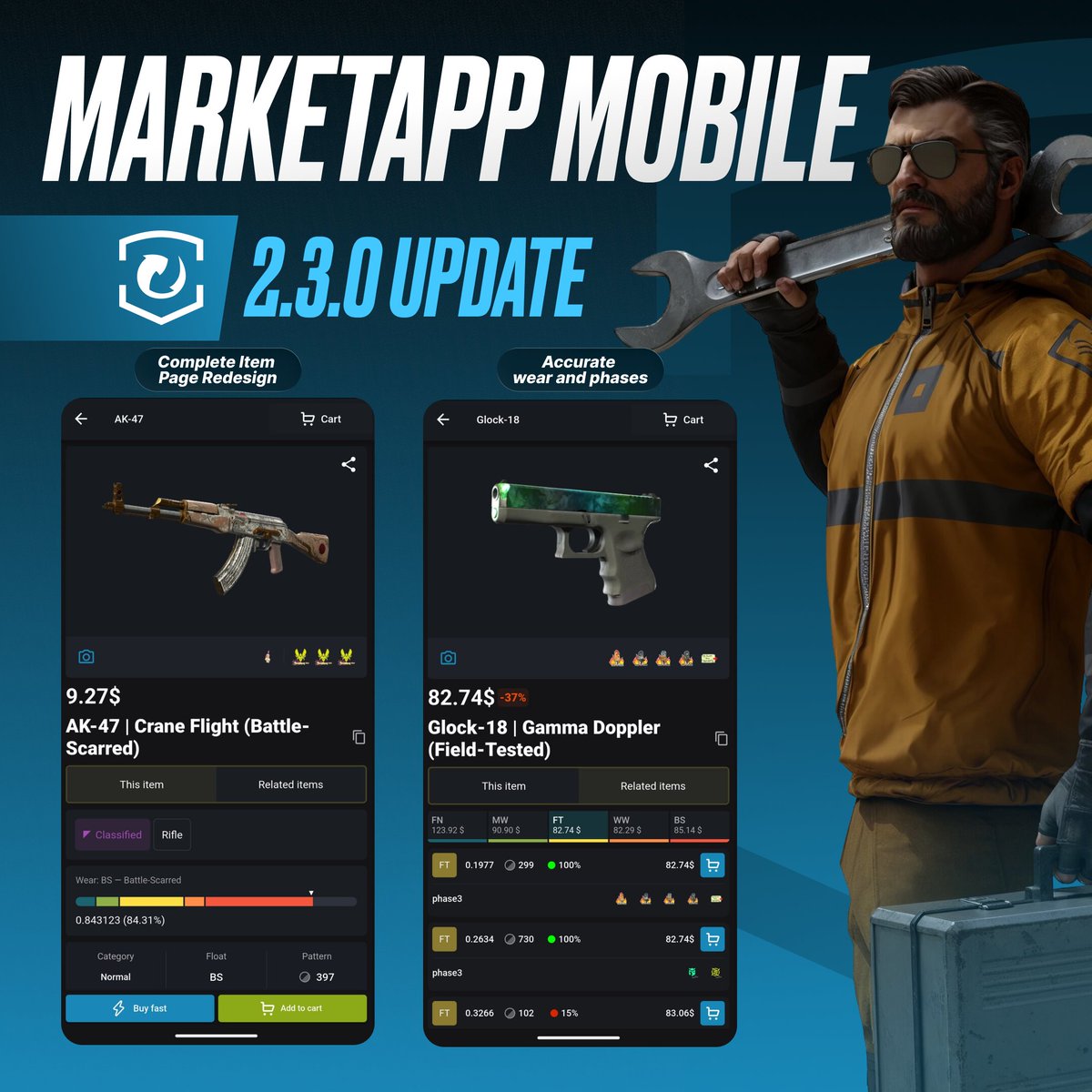
📱 MarketApp Mobile 2.3.0 Update
The number of mobile Market users is growing - in Google Play alone, the app has been downloaded over 100,000 times! Thank you so much for your trust. To make trading from your smartphone even more convenient, we've prepared a major update.
✅ Complete Item Page Redesign
The main skin viewing screen has become more informative and intuitive:
▪️ Stickers and charms in one place: combined stickers and charms into a single interactive block. Tap it to open a viewing carousel. Now you can instantly see both the total value of the attachments and the price of each individual item.
▪️ Essentials at the top: moved the price right under the skin image, and shifted the button to view similar items higher up.
▪️ Accurate wear and phases: set up the correct display of wear percentage (float) and added phase display for eligible skins in the "Related items" section.
▪️ Clean interface: the Steam item description is now located at the bottom of the page, while the block showing the number of auto-buy requests has given way to clear charts and tables.
✅ Upgraded Sales Chart
The chart has become much more intuitive and convenient for analysis:
▪️ Pinch-to-zoom: added gesture support - you can now easily zoom the chart with two fingers.
▪️ Sales volume: added sales volume display so you can better understand market dynamics.
✅ Usability and Interface
▪️ List view: you can now enable a compact skin list mode on the main screen.
▪️ Accurate balance calculation: if you don't have enough funds in your cart upon purchase, the app will instantly prompt you with the exact amount you need to top up.
▪️ Control and security: added the ability to manually check trade protection status, as well as the display of important account notifications (2FA setup, payment password).
▪️ Polish: updated the settings design, removed the unnecessary float refresh button (Steam now passes it automatically), and fixed typos.
The new version is already waiting for you on Google Play: https://t.co/lf5GjTM8hc
and App Store: https://t.co/yUy5Mh7kiC
Hurry up and update! And if you have thoughts on how to make the app even better, share them on our Feedback Portal: https://t.co/3E3SgxH49r 💙
🖥 MarketApp Desktop 4.4.0 Update
Introducing the new version of our desktop app! In this release, we've added full support for Alfaskins and brought in a few cool improvements that will make working with the Market even more comfortable.
✅Full Alfaskins Support
Trading reaches a new level! Now all Alfaskins management is available right in the app:
▪️ Incoming trades: confirm trades without extra steps.
▪️ Full statistics: the complete history of Alfaskins operations is now conveniently displayed in your dashboard.
▪️ Flexible settings: you can enable automatic trade confirmation. And if you don't plan on working with Alfaskins for now, simply disable the display of this tab to avoid distractions.
▪️ Monitoring: the connection status with Alfaskins servers is now always visible on the accounts tab.
✅Useful Interface Improvements
▪️ Window memory: MarketApp Desktop now remembers its position on the screen. After closing, the app will open exactly where you left it. Multi-monitor owners will definitely appreciate this - no more chaos on your desktops!
▪️ Account status at a glance: we can now display current restrictions on your account (VAC bans, Community bans, or Market.CSGO blocks).
▪️ Clear connection status: when losing connection with the Market, a clear banner indicating the reason and current status now appears in the settings.
▪️ API key: brought back the ability to enter your API key in the account settings (this button was previously inactive by mistake).
✅Bug Fixes
▪️ Resolved an issue where the app would throw an error if the proxy server password contained a hyphen (-).
▪️ Fixed an annoying bug where notification sounds were played with a significant delay.
The new version of MarketApp Desktop is already available for Windows, macOS, and Linux: https://t.co/oWPFqJutuA
Thank you for reading this changelog to the end. We are always glad to see your feedback on our ideas portal: https://t.co/3xFfQw2Jzb 💙
We’re currently experiencing some issues with the site due to server problems.
• Reduced number of successfully completed transactions
• Inventory updates may be delayed or not showing correctly
• Slower status updates for purchase and sale transactions
• “Invalid trade link” errors when purchasing items or enabling sales
You can track the sales performance here: https://t.co/rVyB9s5Kq5
Our team is already working on a fix. We’ll keep you updated as soon as everything is back to normal.
Sorry for the inconvenience, and thanks for your patience — we expect everything to be back to normal soon 🤝
We’re currently experiencing some issues with the site due to server problems.
• Reduced number of successfully completed transactions
• Inventory updates may be delayed or not showing correctly
• Slower status updates for purchase and sale transactions
• “Invalid trade link” errors when purchasing items or enabling sales
You can track the sales performance here: https://t.co/rVyB9s5Kq5
Our team is already working on a fix. We’ll keep you updated as soon as everything is back to normal.
Sorry for the inconvenience, and thanks for your patience — we expect everything to be back to normal soon 🤝
☀️ July Website Update
Summer is in full swing, and the Market.CSGO team continues to endlessly polish the website. Every update we make is another step towards making your trades even faster and more comfortable. Here is what we've been working on lately:
✅3D Viewer now available when selling!
We continue to expand the functionality of our 3D Item Viewer. The coveted 3D view button has now appeared right on the item sale page. Want to quickly check a pattern before setting a price? Now you don't even need to launch the game to do this - everything works right in your browser in one click.
✅CSGObuy (Chinese Market)
▫️In connection with the release of the mobile app, we redesigned the apps download page: https://t.co/0XwZ1VgeJZ
▫️Added a link to the apps download page to the footer of the website.
▫️You can now only link a Chinese phone number to your account.
✅Polish and Fixes
▫️Reliable authorization: if you accidentally refresh the page while linking a phone number, the input window will reopen - you will no longer have to request an
▫️SMS code a second time. We also fixed the title in the email linking window.
▫️Interface: fixed the behavior of the Fast buy button when closing the rules window.
▫️To ensure you're always up to date with our innovations, we added a direct link to the update history in the website footer: https://t.co/DHPrKVg9XF
▫️Fixed a bug where price filters would reset upon refreshing the search page.
We invite you to check out the new features and leave your feedback on our ideas portal: https://t.co/3E3SgxH49r
Meanwhile, we've already set off to prepare the next update for you 💙
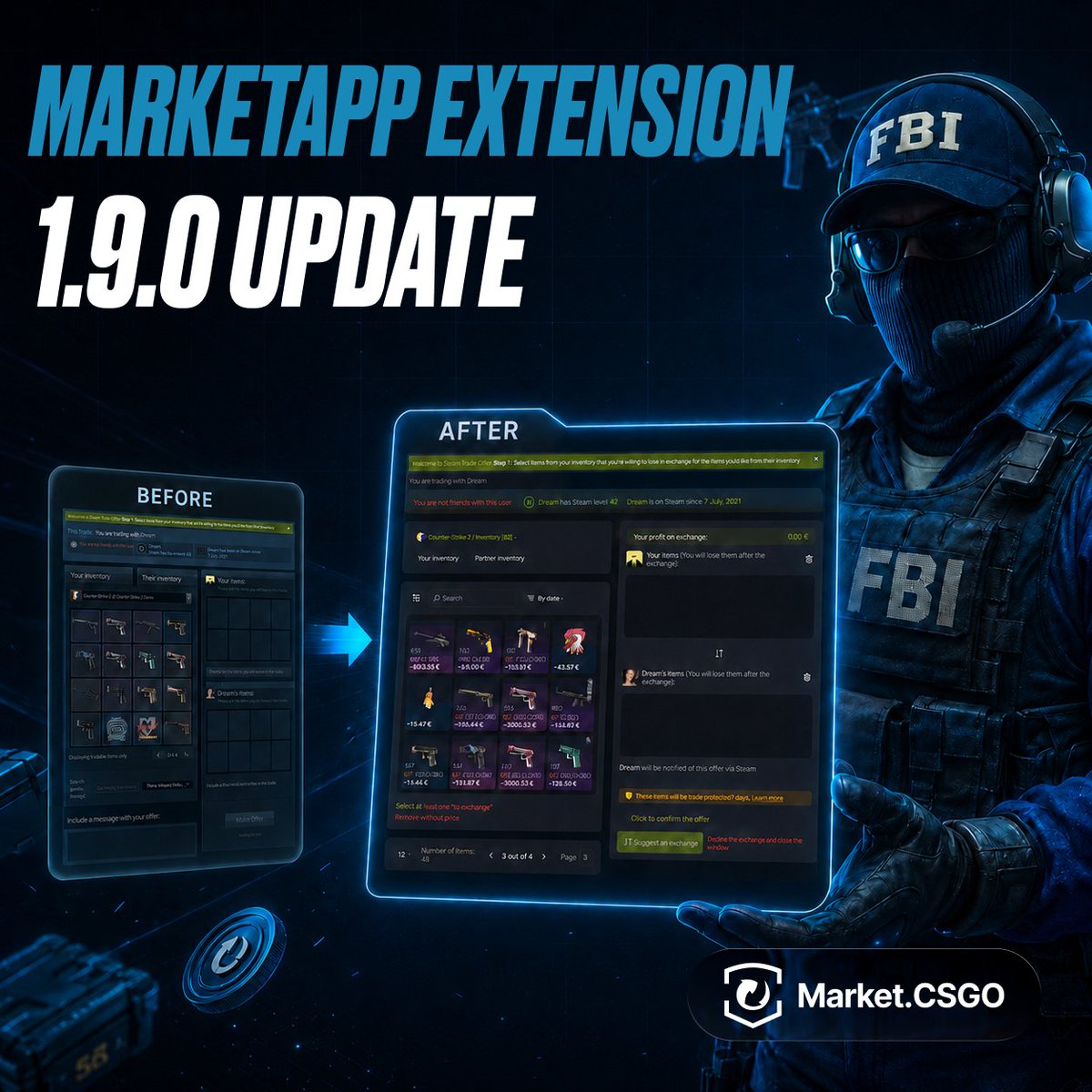
⚙️ MarketApp Extension 1.9.0 Update
There are already over 400,000 extension users! It's a huge number that motivates us to improve not only the Market but Steam itself. While Valve has forgotten about the trade offer page (it feels like it hasn't changed in ages), we took matters into our own hands.
Get ready for a massive trade redesign and smart evaluation tools!
✅Trade Offer Page 2.0
We have completely rebuilt the trade window. Now it's not just an interface from the early 2010s, but a modern trading tool:
▫️Smart start: the CS2 inventory is now selected automatically. We know you want to get your hands on that knife as soon as possible
▫️Economy at a glance: during a trade, the extension automatically calculates your potential profit and immediately shows the estimated value of each skin.
▫️No extra clicks: the quality, category, and wear of skins are now visible at a glance. Plus, the search and filters have logically moved to the top, right above the items.
▫️Bulk management: add all skins to the trade with a single button or remove items with an undefined price in one click. You can now also see the total number of items you and your partner have, and the page size can be customized.
✅Other Perks and Fixes
▫️Fewer clicks, more focus: incoming trades on the trade offers page are now displayed expanded right away, and the right menu is no longer so bulky.
▫️Quick decisions: seeing the profit right in the offers window will help you instantly evaluate the deal, and the new "Accept" and "Decline" buttons will let you close it in a second.
▫️In the extension window itself, your avatar is now displayed instead of the default picture.
▫️Fixed a rare bug where the extension could create a trade even after a sale on the website was marked as unsuccessful.
The new version of the extension is already available in the Chrome: https://t.co/vPqa6Oays8
and Firefox: https://t.co/9Ve74i4uYM
We would love to read your thoughts on the update on our feedback portal: https://t.co/3E3SgxH49r 💙
🛠 For sellers using the API to create trades.
This applies only to users who create and submit trade offers manually through the API. If you trade through the client and browser extension, this does not affect you, and no action is required.
We’re preparing a new system that will automatically cancel “stuck” sell operations — cases where the trade can’t be completed because it wasn’t created or confirmed on time, or the seller went offline. After the rollout, such operations will be marked as failed after 72 hours — the buyer gets refunded, and the seller doesn’t get paid.
Right now, nothing is changing yet and there are no restrictions. This is an advance notice so you have time to review and, if necessary, update your software and trade flow if needed.
❗️Please pay attention to the following:
1. Create the trade offer and confirm it in Steam Guard within 5 minutes after purchase. The remaining time is shown in the "left": N field (seconds) in the api/v2/items?key= method, as well as on the website in the Trading section.
2. If the other user doesn’t accept the trade offer you created within 10 minutes, cancel it.
3. Even if you have no items listed for sale, but you still have active sell operations in stage 1, you must send ping-new with your access token at least once every 3 hours.
4. Build trade offers using the data from trade-request-give-p2p-all.
5. Register the ID of the trade offer you created using trade-ready.
✅ We’ll post a separate update before this system goes live. If you have any questions, contact our support team: https://t.co/9KiPvetvVM
⚙️ Market.CSGO Updates and Improvements
Summer is in full swing, but the Market team is not resting! We have prepared a fresh batch of website updates to make buying and selling skins even more convenient for you 🌞
✅ Trading and Interface
• Balance details: hovering over the top-up button now brings up a pop-up window with detailed information about your account balance.
• Skin phases: added the display of the specific phase right on the Trade page.
• Price updates without reloading: now, after changing the price of an item, the interface updates instantly - no need to reload the page to see the new numbers anymore.
✅ Security and Support
• Scam protection: added a warning banner detailing common scam schemes. It is displayed during your first login to the website.
• Ticket improvements: links in support tickets are now clickable, and the "Send" button itself has been made more noticeable.
✅ Bug Fixes
• Fixed a visual bug in autobuy - now, when deleting one request for a skin with a specific phase, the other phases no longer disappear from the displayed list.
• Fixed the incorrect display of the trade acceptance pop-up window.
• The Gleam giveaway page now correctly adapts to smartphone screens.
We are already hard at work on new useful features. Thank you for continuing to actively share your ideas and feedback on our portal: https://t.co/3xFfQw2Jzb 💙
⚙️ Changes to the item sale history method:
https://t.co/7HmdbbOUTt
The maximum number of sale records stored in the sales history file for each item has been increased from 2,000 to 6,000.