Monolithic views are the most common issue in SwiftUI codebases, especially among inexperienced developers.
While the declarative nature of SwiftUI makes it possible to quickly put together complex user interfaces, it also makes it easy to create massive view bodies that soon become unmaintainable.
In this new article, I show 3 strategies to modularize your code and make SwiftUI views more reusable.
https://t.co/374RegW6Ix
Since a SwiftUI view hierarchy is refreshed every time a source of truth is updated, regular stored properties do not satisfy a complex app’s data flow needs.
That's why SwiftUI offers several property wrappers, which can be confusing when taken in isolation.
Luckily, the list of the primary mechanisms used for generic data flow is short.
🟣 @State allows a view to establish a source of truth that persists across refreshes.
🔵 @Binding and @Bindable allow a view to update data that resides elsewhere.
🟠 @Environment passes data throughout the entire view hierarchy.
Read about them here: https://t.co/j8jOzLsBJS
The MV pattern divides the controller layer into aggregate models and services, but that’s not a novel idea.
📖 In a multitier architecture, it is useful to have controllers access other controllers for separation of concerns and basic encapsulation.
⚡ This proves that you can get rid of a letter in your design pattern acronym, but you can’t get rid of the role MVC controllers fulfill. Call them aggregate models and services, if you like.
💡 Basic software design principles and code reuse require shared objects accessed by multiple views, regardless of what you call these objects.
Read more here: https://t.co/HEToZytUcT
When performing a REST request in a SwiftUI app, you use a subset of HTTP methods to express the actions you want to perform:
🔵 GET to retrieve a resource.
🔵 POST to create a new resource.
🔵 PUT to create a new resource or update an existing one.
🔵 PATCH to update an existing resource.
🔵 DELETE to remove a resource.
There are two options for parameters: the query string in the URL or HTTP headers. The choice typically depends on the API, but, in general:
🟠 The query string is used to pass parameters to the resource being accessed.
🟠 HTTP headers are used to pass request parameters, such as authentication credentials.
Read how to here: https://t.co/4YgZSYGAlq
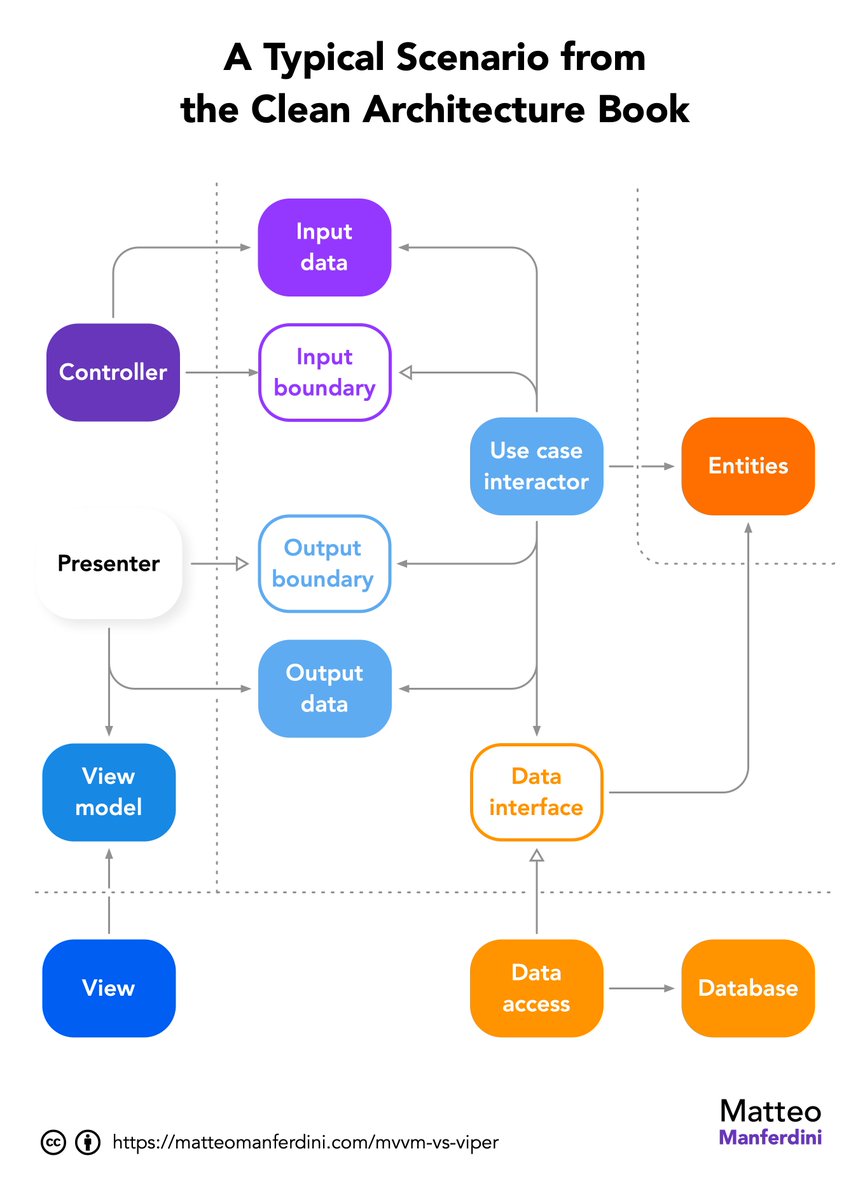
The Clean Architecture book contains a crucial diagram you rarely see when discussing SwiftUI app architecture.
In it, the parallels between Clean Architecture and MVC/MVVM in iOS development are obscured because it introduces novel terms such as interactor, presenter, and entity.
Moreover, the controller and view model components you see in the diagram are not what you would usually identify as such in SwiftUI.
But it still contains useful concepts you can use in your apps.
Read what they are here: https://t.co/F6AJ7eoaj7
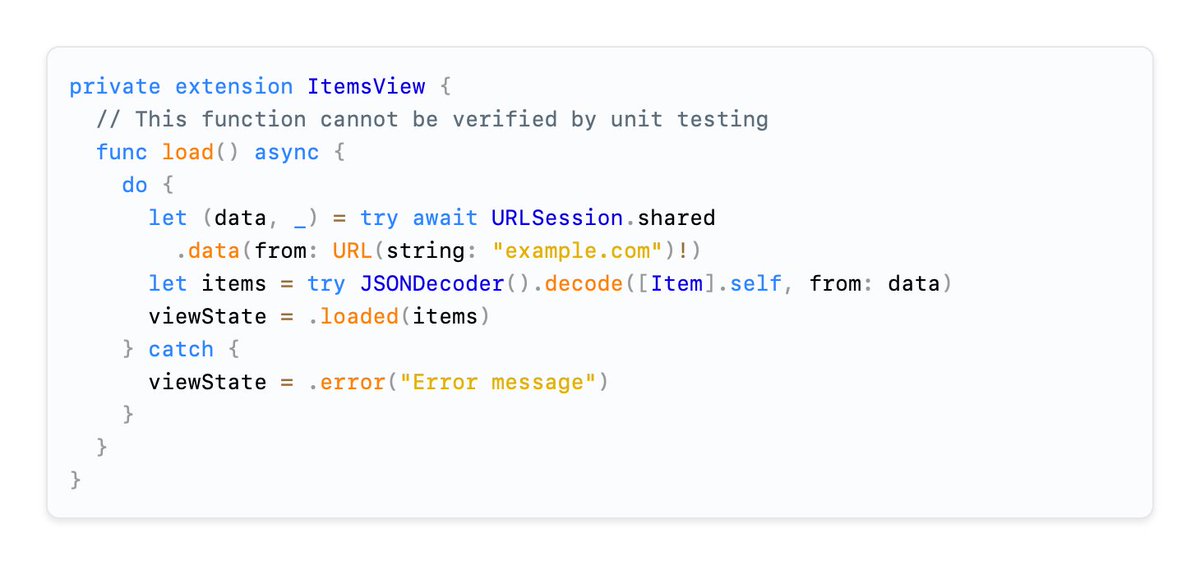
@codediger In this example, it's a simple enumeration. Not something I generally use for state, as explained in the article. It's a piece of code I found online.
The networking and related code that transitions a SwiftUI view through its different states is often a crucial part of your app’s implementation to test.
However, loading view content in private methods is untestable because of how SwiftUI works.
Read how to make that code testable here: https://t.co/qXpXP4CHRi
@MatManferdini I believe, where possible, you should store the returned result of the accessory closure, rather than a reference to the closure itself in your view struct. @squeakytoy did a much better job of explaining this in a session not long ago… https://t.co/ckV0NpTYoZ
Online, you find several design patterns for SwiftUI with different esoteric names. Following a pattern is better than not following one. But, if you look at them closely, you will notice they all have the same structure, like houses.
That's not a coincidence. The most popular pattern is the Model-View-Controller, or MVC, the father of all design patterns.
That’s why I wrote a free 58-page guide on MVC in SwiftUI.
Get it here: https://t.co/EZYNnxRuMl
In a large SwiftUI app, identifying specific navigation routes can be time-consuming, and code updates can affect unrelated parts of the system.
Coordinators let us gather all navigation destinations in a single location, making it easier to understand the app’s entire navigation at a glance without combing through the codebase.
Learn how to use them here: https://t.co/KWOtikq9Rz
Did you know you can pass SwiftUI views as parameters to other views?
This allows you to reduce the number of stored properties and conditional statements, making your view code highly customizable and more reusable.
Read how here: https://t.co/j1Q3WqISVl
Embracing modularity in SwiftUI by distinguishing between root and content views is a game-changer for building scalable, maintainable apps.
By adhering to the single responsibility principle and minimizing coupling, you create views that are inherently more reusable, significantly easier to understand, and a breeze to preview in Xcode.
Read more about the difference here: https://t.co/qgpss2zrtb
Many developers focus on code that is easy and quick to write.
However, you should instead focus on code that is easy to read, because code is written once but read many times.
Learn how to improve your code’s readability with the SwiftUI Architecture Audit: https://t.co/4mPoxvoOIu
In the early stages of a project, it’s tempting to keep all UI logic in a single content view that represents an entire app screen.
However, as your app grows, these views become "monsters" that are difficult to navigate and maintain, violating the Separation of Concerns principle.
Eventually, as code accumulates in a view, you start to recognize patterns that are useful in multiple places.
This leads to copy-pasting the repeated code across different views, inevitably violating the Don't Repeat Yourself (DRY) principle and creating a maintenance nightmare.
Read how to avoid it here: https://t.co/1o8r0LRKy0
In Swift, you can iterate through sequences of elements using a for-in loop with any type conforming to the Sequence protocol.
Similarly, an asynchronous sequence conforms to the AsyncSequence protocol to deliver its values asynchronously over a potentially long period. You can loop over its values using a for-await-in loop.
Read how it works here in detail: https://t.co/ko0FVVv7oj
Every piece of information in a SwiftUI app must be stored in a single source of truth to prevent multiple copies from going out of sync.
Whenever a source of truth is updated, SwiftUI rebuilds the entire view hierarchy.
The word “single” leads some developers to think there should be a central place to store all the app’s data.
However, the idea applies to each unique piece of data. Thus, your app should have multiple sources of truth.
Architectural patterns that force you to put all data in a single “store” are anti-patterns that violate several software design principles.
Read why in this article: https://t.co/bPmTVM5zAo
On the Wikipedia page about MVC, you can read that:
💬 A controller responds to user input and performs operations on data model objects. The controller receives the input, optionally validates it, and then passes the input to the model.
The aggregate models of the MV pattern are also shared objects that can be accessed by multiple views and propagated through the SwiftUI environment, so they are just MVC’s controllers.
Read the details here: https://t.co/yLc7SRzliI
As iOS developers, we are primarily concerned with how REST appears to a client SwiftUI app.
REST operates over HTTP, originally designed to transmit web pages over the internet.
In an HTTP request, you typically include:
🟣 A URL that identifies the resource you want.
🔵 An HTTP method indicating the action you wish to perform.
🟠 HTTP headers that specify parameters for the request.
🟡 Optionally, a body containing data to send to the server.
Read how to create one in Swift here: https://t.co/HdVpeNPgs9
When discussing the Clean Architecture for iOS, you are usually presented with an unhelpful circular diagram.
The assumption is that it clearly shows the structure and principles of the Clean Architecture and its derivatives.
But it doesn’t.
However, it is useful to show the dependency rule, in which inner circles cannot know about outer circles.
Read how to use the diagram correctly here: https://t.co/O5FmXZ074f
Reusable SwiftUI views let you quickly assemble complex user interfaces. They also unify the user experience and make your code easier to maintain. @MatManferdini shares 3 key strategies to do so.
Curated in this week's #swiftleeweekly https://t.co/AizKgVvmMd