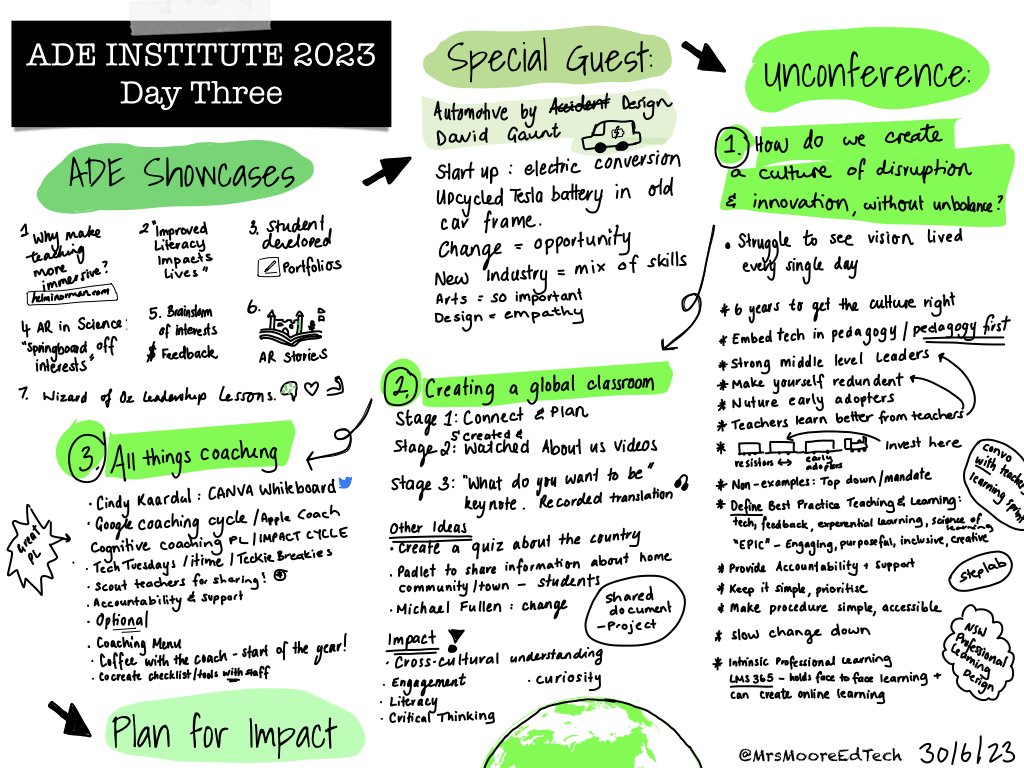
Finally popped the finishing touches on my not-quite-sketchnotes from 2023 APAC ADE Institute. Still in awe of everyone I met, connected with and learned from! #ADE2023
My #WellbeingandiPad Series is now live on the Apple Education Community Forum. I'd love to hear how you are using tools like these in the classroom to promote positive mental health.
Check it out below 👇
https://t.co/Fx3W8oHk4V
#wellbeing#digitalliteracy
Get fresh ideas and inspiration from the Apple Education Community all year long. 🗓🌞🍁❄️🌸
Explore the Apple Education Community and learn new skills for teaching with Apple, then find easy-to-use lesson ideas to put your skills into action.
Here is the Learning Journey for our newest Digital Communication course. It teaches students the skills required to create digital content & communicate ideas using different modes. 1/
Empower students to go beyond words and express new learning with fun animation projects. 📸
See how easy it is to bring photography and animation into any lesson, and find quick resources that you and your students can use today. #AppleEduCommunity
Discover the new #AppleEduCommunity and find quick ideas, creative guides, and lesson templates that are ready to use with students today, tomorrow— or whenever you need them! 💭💡🙌🏾
Did you know you can break apart shapes in #keynote ? Bones shows us how. 😂 Ideas. Possible instructional gifs or other? Animation or sequencing ? @Usingtechbetter@AppleEDU#steam#stem
New school year, new hub for professional learning… Introducing the #AppleEduCommunity. 🎉
Find ideas and resources, connect and share with educators that inspire you, and make learning more meaningful for all your students.
To improve the way I provide feedback on my Students’ work I created digital stickers in Apple Keynote. When using them I always include an audio clip describing how a student went well and also suggest ways to move forward. #edtech#ipad@AppleEDU
Started our @WALKTHRUs_5 journey this week with our secondary teachers! To scaffold our approach, I designed a collaborative digital journal with buttons linked to @teacherhead & @olicav excellent resources. 🙌
I’m excited to be sharing our school’s journey with @AppleEDU technology in secondary school. Check out the two part series on offer in August!
Sign up here or scan the QR code: https://t.co/jBqJHHedwQ
Get your student’s podcasting in the classroom to explore community challenges and how they can help 🎤. Join our Podcasting on iPad sessions to hear from podcast creators of Squiz Kids and get inspired.
📣 NEW! Create a Podcast 2nd Edition! This updated digital workbook has a heap of new content to guide students through the podcasting process. @AppleEDU
1️⃣ Research & Plan
2️⃣ Design & Create
3️⃣ Edit & Publish with @anchor & @ApplePodcasts
Get FREE 👉 https://t.co/hryy2TUx1g
📣 My ‘Create a Podcast’ digital workbook for iPad is perfect for extended projects & guides students through the whole podcasting process! @AppleEDU ⤵️
1️⃣ Research & Plan📝
2️⃣ Design & Create 🎙
3️⃣ Edit & Publish with @anchor 📲
Download FREE 👉 https://t.co/diaj2g0Coi
📣 This week we launched our new Digital Communication course for Year 7 & 8. It is designed to teach students how iPad can be used to communicate learning in innovative ways through photography, video creation, drawing, audio, coding & animation!👇
3 #AugmentedReality Projects for Kids. If your S’s are like me they learn by watching short instructional vids that are project based, allow viewer to connect with other ideas. Here’s a poster to put up. Scan, watch, create! #realitycomposer@AppleEDU@Usingtechbetter#aroniPad