https://t.co/qcsFodMLf6 was born out of a personal need for a flexible, powerful retirement calculator. When the creators, Canadians nearing retirement, found that existing tools didn’t offer the adaptability required for accurate financial planning, ...
New in MayRetire: explore your CPP/QPP and OAS timing
When to start CPP/QPP and OAS is an important part of every retirement plan. We’ve added a Benefits Timing view that lays out the available combinations side by side, so you can see the tradeoffs at a glance.
Each cell shows how a timing combination compares with your current plan, with its total lifetime value (cumulative after-tax retirement income plus ending after-tax estate, in today’s dollars) shown underneath.
Your current timing is the $0 cell, marked with a dashed border (unless it is also the best result). Every other cell shows the gain or loss relative to what you have configured now.
With one different combination selected, you can apply it directly to your plan. Or select up to eight combinations to compare in detail before deciding.
Results depend on your planning horizon, current withdrawal strategy, and other plan settings. Those settings may not be optimal for every timing combination, so this is a tool for exploring tradeoffs, not finding a single “right answer.”
You’ll find Explore Benefits Timing at the bottom of the Government Benefits panel. Have a look and let us know what you think.
You can now set ownership for each rental property: joint, owned by you, or owned by your spouse.
Previously, MayRetire assumed rental properties were jointly owned. With this update, rental income, expenses, mortgage interest, sale proceeds, and related tax impacts can be attributed more accurately in couple plans.
This improvement was added based on user feedback.
A small but meaningful update to MayRetire’s investment portfolio modelling 📊
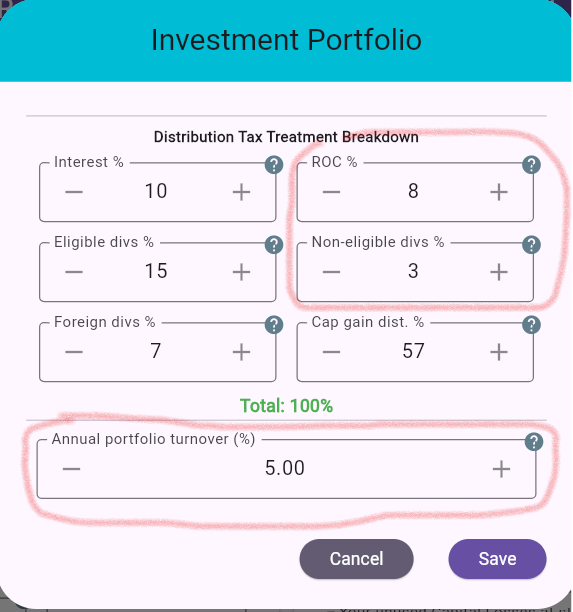
The distribution tax breakdown now includes Return of Capital (ROC) and non-eligible dividends.
ROC is generally not taxable when received. Instead, it reduces the portfolio’s adjusted cost base; once the ACB reaches zero, additional ROC becomes a capital gain.
We’ve also added annual portfolio turnover to help model activity such as rebalancing, tax-gain or loss harvesting, and other portfolio adjustments. The selected portion is treated as sold and reinvested, realizing its share of the embedded capital gain or loss without generating spendable cash.
These additions should make taxable portfolio projections more representative of real-world investing.
Optional Plan Workspace added to MayRetire
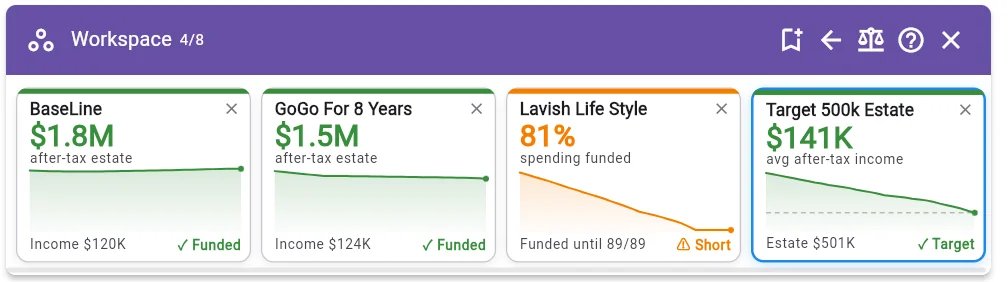
We’ve added an optional Plan Workspace for people who like exploring multiple versions of a retirement plan.
It lets you:
- Keep up to eight plan variants together
- See their key projected outcomes at a glance
- Switch between saved variants
- Add the current plan or import an existing plan file
- Compare variants of your plan with a Plus subscription
This is an optional layer, not a change to the existing workflow. If you prefer working with one plan version at a time, MayRetire continues to work exactly as before, and the Workspace remains hidden.
No action is required. If the Workspace sounds useful, give it a try whenever it’s convenient for you.
More details: https://t.co/i649SEmBk7
New in MayRetire: Management Fee Support
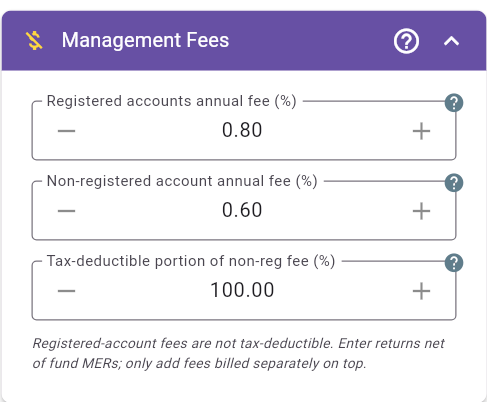
Model MERs, management fees, and advisor fees directly in your retirement projection. MERs can be entered when they aren’t already reflected in expected returns, while eligible separately billed fees for non-registered accounts can include a tax-deductible portion.
Account-level fees are available in MayRetire Free.
MayRetire Plus adds separate percentage or fixed fees for each Investment Portfolio.
Minor MayRetire Improvement: Non-registered accounts now use ACB
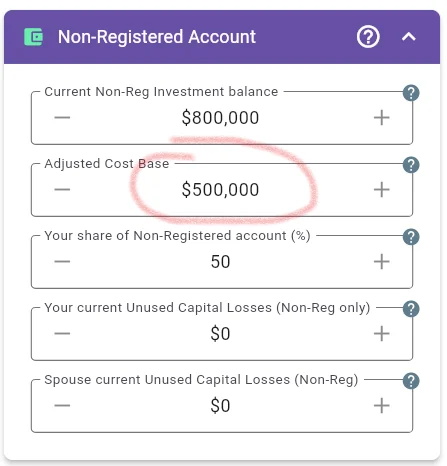
MayRetire now uses Adjusted Cost Base (ACB) for regular non-registered accounts instead of asking for the initial capital gain/loss percentage.
This improvement was made based on user feedback and makes the regular non-registered account consistent with corporate accounts and investment portfolios.
No action is required for existing plans. If your plan previously used the capital gain/loss percentage field, MayRetire will automatically convert it to the equivalent ACB after the upgrade.
This should make the input easier to verify against brokerage and tax records.
MayRetire now lets you set Additional Withdrawals as recurring items.
This is useful for planning larger occasional expenses, such as:
- car upgrades every few years
- major travel
- home renovations
- family gifts
- other periodic spending goals
Instead of creating multiple one-time withdrawals manually, you can now set a withdrawal period and choose a frequency like “Every 2 years,” “Every 5 years,” or “Every 7 years.”
Example: a $40,000 car upgrade starting in year 3, repeating every 7 years for 25 years.
This feature is included in MayRetire Free.
New in MayRetire: Withdrawal Overrides
This is a substantial new planning feature that lets you override the automatic withdrawal strategy for selected accounts and retirement years.
Overrides can help you model personal preferences such as withdrawing round amounts from your RRSP for certain years or fund a major purchase from a chosen account, such as a TFSA.
Use the visual timeline to review overrides, click to add or edit one, or drag across years to create a range.
Because this feature affects core retirement calculations and supports many combinations, please report any unexpected results or usability issues you encounter. Your feedback is appreciated!
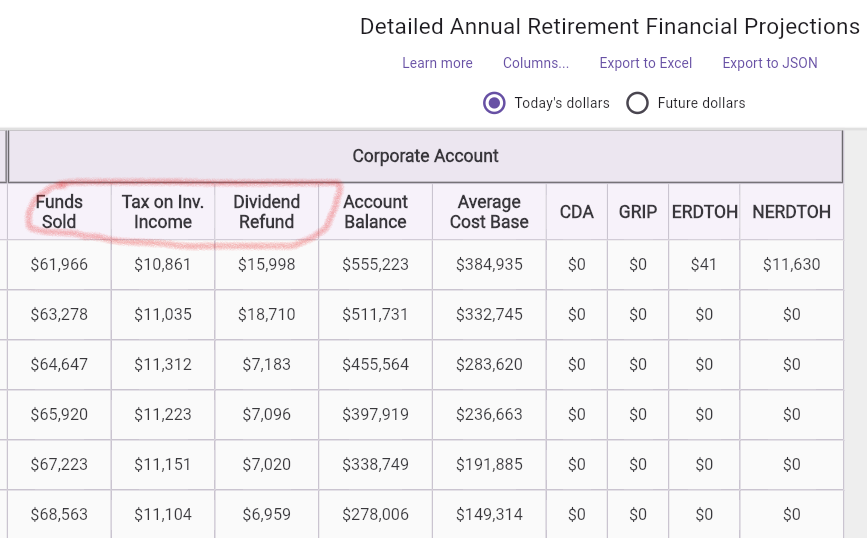
MayRetire update: more corporate account detail is now available in the Detailed Annual Retirement Financial Projections table.
For plans with a corporate investment account, the Corporate Account section now includes:
* Funds Sold
* Tax Paid
* Dividend Refund
These columns make it easier to understand what is happening inside the corporation each year, not just the ending balance and notional account balances.
As usual, the table can be viewed in today’s dollars or future dollars, and exported to Excel or JSON.
New MayRetire update: the Annual Tax Report can now be exported to Excel, and this feature is included in MayRetire Free.
You can choose Today’s dollars or Future dollars, and export the report in Compact, Standard, or Detailed view. The Excel file keeps the tax report layout, with year and spouse columns, frozen headers, and numeric values ready for further review or sharing.
This should make it easier to review projected taxable income, credits, deductions, OAS clawback, and total tax year by year.
Thank you — that means a lot! 🙏
To answer your question: MayRetire Plus is the same tool you're using now — nothing you rely on goes away or changes. The Free/Plus split is simply about which features sit in each tier, not a different product.
And improvements keep coming for both. We've got a long list of features and refinements ahead, and both Free and Plus will keep getting better over time.
Appreciate the support!
An update on the future of MayRetire 🍁
MayRetire began as a small retirement-planning project. It grew into something used by thousands of Canadians who want to understand and take charge of their own retirement - shaped by this community's feedback every step of the way.
That growth is why we're writing today.
Keeping MayRetire accurate and dependable takes real, ongoing work - maintaining tax rules, projection assumptions, and historical data, running support, and building the long list of features still ahead. To keep it going for the long term, MayRetire needs to be sustainable.
So starting August 1st, MayRetire is moving to a Free + MayRetire Plus model.
What stays free - and it's a lot:
CPP/OAS/GIS, RRSP/RRIF, TFSA, LIRA/LIF and non-registered accounts, advanced withdrawal strategies, tax and contribution planning, survivor planning, and detailed reports and exports.
For many typical Canadian retirement plans, the free version is all you'll ever need. And your plans stay yours - saved on your own device, never locked to our servers.
What moves to Plus:
The more advanced planning tools, including Monte Carlo simulation, stress testing and backtesting, plan comparison, suggested adjustments, and RRSP withdrawal-strategy evaluation — plus complex modeling like corporate accounts, rental properties, debts, investment portfolios, defined-benefit pensions, additional incomes, principal residence, whole life insurance, and more.
The rollout:
Now → Aug 1: nothing changes yet — time to explore Plus and decide.
Aug 1: Plus features begin requiring a subscription. Free continues as above.
Intro pricing: Plus is $79/year. You can subscribe today to lock in the intro rate — $49 for your first year (renews at $79/year) — available through Aug 31.
MayRetire is intended for personal and household planning, and it remains the same transparent, local-first tool it's always been — you can always see how every number is calculated, and your data stays with you.
Thank you for being part of this. Introducing Plus is what lets MayRetire keep going and keep getting better for the long haul.
Questions? Reach us anytime at [email protected]
For many Canadians, the TFSA becomes incredibly important in the later stages of life because it drastically simplifies cash flow and tax planning by being completely tax-free.
However, completely deferring your TFSA until the very end doesn't make sense for every retirement plan. Depending on your situation, it might be much more tax-efficient to use a blended approach to cover income shortfalls.
With MayRetire, you can precisely control your TFSA strategy using a few built-in features:
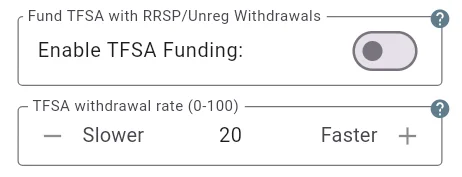
Continuous Funding: By turning on the "Enable TFSA Funding" switch, the tool inherently assumes you want to defer TFSA withdrawals, continuing to fund the account during retirement whenever your plan allows.
Controlling Withdrawals: Instead of a full deferral, you can set a "TFSA withdrawal rate" to specify the percentage of any remaining income shortfall, after CPP, OAS, and RRSP withdrawals, that you plan to cover by withdrawing from your TFSA. For example, if the TFSA withdrawal rate is set to 20%, and you need an additional $10,000, you will withdraw $2,000 from your TFSA. Keep in mind that if this and other sources are not enough to cover the shortfall, you may need to withdraw more from your TFSA or consider other assets.
Smart Automation: MayRetire automatically prioritizes topping up your TFSA during years when there is excess income (such as an intentional RRSP meltdown, a real estate sale, or an inheritance).
A retirement roadmap should adapt to exactly how you want to prioritize your tax-free growth versus your taxable income.
New MayRetire feature: Gradual LIF Unlocking
This feature was suggested by one of MayRetire’s expert users.
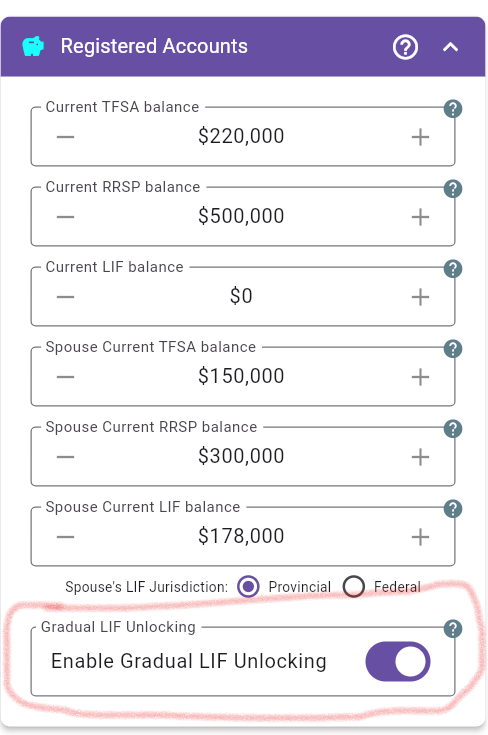
MayRetire now supports Gradual LIF Unlocking. When enabled, it can model the tax-deferred transfer of unused annual LIF maximum withdrawal room into an RRSP/RRIF, where this strategy is supported by the LIF jurisdiction.
This can be especially useful for plans with locked-in retirement funds, because it may affect future flexibility, withdrawal planning, and long-term tax projections.
If you have a LIF/LIRA in your plan, it may be worth checking whether this new option changes your retirement projection.
MayRetire Backtesting Update
Based on user feedback, I’ve updated how historical backtesting works.
Previously, if a retirement plan extended beyond the available historical return sequence, MayRetire filled the remaining years using deterministic projection assumptions. That could make some backtest periods less purely historical.
Now, backtesting uses only the historical return sequence. If a plan runs past the latest historical year, the sequence wraps back to the first historical year, so every starting year gets a full-length test without mixing in projected returns.
You may now see wrapped periods labeled with ~, for example: 2003~1973. That means the sequence starts in 2003, reaches the end of the historical data, then continues from the beginning of the historical sequence through 1973.
If you’ve used MayRetire backtesting before, it may be worth running your plan again to see whether this change affects your historical backtest results
Thanks to the users who pointed this out and helped make the backtest results clearer and more consistent
MayRetire now has initial support for Whole Life Insurance and similar permanent policies with fixed premiums and predictable death benefits.
You can enter an existing policy or test how adding a new policy might affect your retirement plan. The model is intentionally simplified: annual premium, payment duration, current death benefit, and optional benefit growth. That is enough to capture many of the insurance effects that matter in retirement planning, including premium cash flow, survivor support, and estate impact.
This can be especially useful for couple plans, where insurance may change survivor security and final estate outcomes.
Try it to see how insurance affects:
- survivor planning
- estate value
- premium cash-flow needs
debt or collateral-loan scenarios, if applicable
Use actual policy details where possible and review assumptions carefully.
New in MayRetire: Borrow only when needed
You can now model debt as a retirement safety net instead of a planned annual draw.
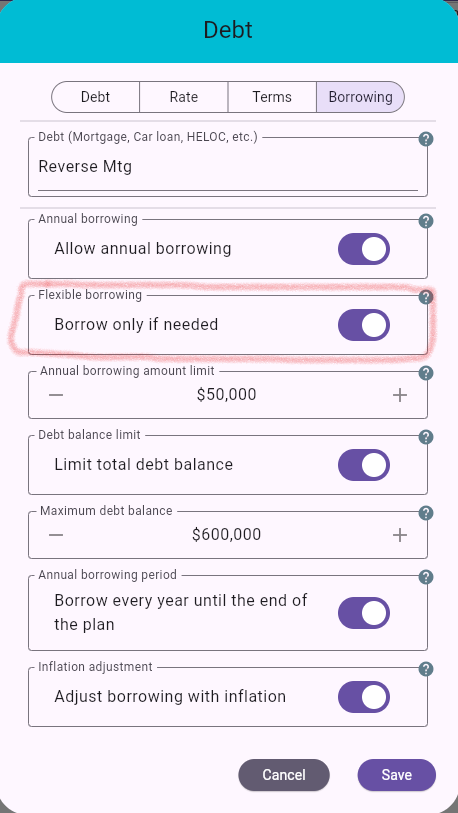
With the new Borrow only when needed option, MayRetire will only use borrowing if other funding sources are not enough to support your required income. If the plan never needs the extra cash, no borrowing happens.
This can help test resilience against difficult scenarios like poor sequence of returns, expensive late-life care, or other unexpected cash needs. It can also help model backstop strategies such as a HELOC, reverse-mortgage-style borrowing, or borrowing against permanent life insurance.
Set an annual borrowing limit, optional maximum debt balance, and see exactly when borrowing is triggered, how much is used, and how it affects income, debt balance, and final estate.