Your computer isn't slow because it's old.
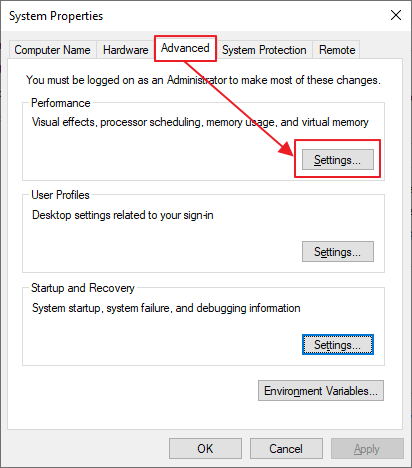
It's slow because Windows ships with 15+ hidden settings draining your speed by default.
I changed 9 of them last week. My laptop went from embarrassing to faster than the day I bought it.
Most people have never touched them.
Thread 🧵
People think learning Claude takes days. It doesn't.
I wrote 17 free guides that teach it in hours:
Claude 101: https://t.co/HNa5MrCLVU
Claude Code: https://t.co/O2kJvFkgan
Claude Skills: https://t.co/jT4uB5Bdjw
Claude Design: https://t.co/q1zjMfeAyg
Claude for Excel: https://t.co/7g3CFNcKrs
How to Prompt: https://t.co/EE46WHU8vg
Claude + Linkedin: https://t.co/9d5stC6grm
Be good at Claude: https://t.co/SVGd967eMQ
Stop writing like AI: https://t.co/JWKUGNKgOS
Claude Certificates: https://t.co/9jKsXWOt66
Claude for your team: https://t.co/U1JsBVCzYH
Claude Connectors: https://t.co/TSAQqOpDeV
Set up Claude Cowork: https://t.co/diDhiKkfjs
Stop Prompting Claude: https://t.co/j1LATSJiat
Claude to sound like you: https://t.co/kDGBpSF7Wh
Stop hitting Claude limits: https://t.co/j5fEzSH5br
Stop using Claude at work: https://t.co/c6X55Thy6t
___
PS: I'm Ruben Hassid, and I want us to master AI before it masters us, with simple instructions.
Follow me never to miss my 2x daily posts.
You want to help someone in your network? ♻️ Repost this so they can find the best free resources.
Google just dropped a free 8-minute lesson on building your first AI agent.
This is the clearest explanation of AI agents and loops you'll find anywhere.
People are paying $500 for courses that teach less than this.
Watch it, then read the step by step guide on building loops for your agents below.
There is an old laptop in your closet.
Gathering dust. Dead battery. Slow processor. You keep it because you feel guilty throwing it away.
That laptop can replace every cloud subscription you pay for.
- Netflix
- Google
- Dropbox
- 1Password
That is $42 a month. $504 a year. To rent things you used to own.
The old laptop in your closet could do all of it.
Now meet CasaOS.
A free and open source system that turns any old laptop, Raspberry Pi, or mini PC into your own personal cloud.
You run one command. In 30 minutes, the laptop becomes a server. You open it from your phone, your TV, your work computer, anywhere in the world.
Then you pick the apps you want from a built-in store. One click each.
- Jellyfin to replace Netflix. Stream every movie and show you own.
- Immich to replace Google Photos. Faces and search included.
- Nextcloud to replace Dropbox. Sync every file across every device.
- Vaultwarden to replace 1Password. All your passwords, your keys.
- Syncthing to keep files in sync across every device, no cloud.
- Home Assistant to control every smart device in your home.
- AdGuard to block ads on every device on your wifi.
Setting up a home server the old way took an entire weekend. Install Linux. Learn Docker. Write config files. Set up storage. Fix errors. Look up every app one by one.
CasaOS does all of that for you. No code. No config files. No Linux skills. You see icons on a screen. You click them.
34,116 stars on GitHub. Apache 2.0. Free forever.
Built by a small team starting September 2021. Runs on Raspberry Pi, Intel NUC, old laptops, and most home servers. Over 100,000 Docker apps can be installed.
A new Raspberry Pi costs $50. The old laptop in your closet costs $0. It already works. It is already in your house.
Netflix charges every month. CasaOS doesn't.
Google charges every month. CasaOS doesn't.
Dropbox charges every month. CasaOS doesn't.
1Password charges every month. CasaOS doesn't.
Here is the wild part.
The laptop you forgot about is more powerful than the web server that ran most websites in 2008.
It is sitting in a drawer. It costs you nothing. It already works.
One command. Thirty minutes. Five hundred dollars a year back in your pocket.
Your files. Your photos. Your movies. Your home.
Your closet just became a data center.
Most people who use Claude Code know 5 commands.
There are way more. And the ones nobody uses are the ones that ship code fastest.
Here's the cheat sheet. Bookmark this. ↓
1. /fork - spawn a background agent that keeps your full conversation. Try a risky fix without losing your thread.
2. /branch - branch the conversation, try a risky idea, merge back. Git for your AI sessions.
3. /schedule - run agents on a schedule. Code review every Monday at 9 AM.
4. /security-review - scan your pending diff for security bugs before you commit.
5. /teleport - pull a web or iOS session into your terminal mid-flow.
The commands you already know (but use 20% of):
6. /init - sets up Claude Code in a fresh project. Creates CLAUDE.md and sets your standards.
7. /agents - opens Agent View. Run up to 10 subagents in parallel, each with its own context.
8. /mcp - manages connected MCP servers. GitHub, Slack, Postgres, anything with MCP support.
9. /plugin - installs bundles of skills, agents, commands, and hooks. One command, full team workflow.
10. /goal - sets a goal Claude tracks across the session. Subagents pick it up automatically.
Keyboard shortcuts that save hours:
11. Ctrl + R - search through your entire Claude Code history.
12. Esc - stop Claude mid-task without losing context. Resume by typing.
13. Shift + Tab - switch between permission modes (default, accept edits, plan, bypass).
14. Ctrl + L - clear the screen without ending your session.
Hooks that enforce your rules automatically:
15. PreToolUse - runs before any tool runs. Block dangerous commands. Scan for secrets.
16. PostToolUse - runs after a tool finishes. Lint your code. Run tests.
17. UserPromptSubmit - runs every time you submit a prompt. Add context. Add guardrails.
18. Notification - triggers on session events. Send to Slack. Send phone alerts.
19. Stop - runs when a session ends. Save state. Push commits. Update task trackers.
Subagents and skills (two separate things):
20. Plan mode - enter with /plan or Shift+Tab. Read-only look at your code before any changes. Drafts the plan, you approve, then it runs.
21. Custom subagents - drop a markdown file in .claude/agents/ with YAML frontmatter. Call them with @code-reviewer or @test-writer. Up to 10 run at once.
22. Skills - reusable expertise in .claude/skills/ as SKILL.md files. Claude picks them up based on context.
23. Plugins - bundles that ship skills, agents, commands, and hooks together. One /plugin command installs an entire team workflow.
Claude AI FULL COURSE that teaches you how to BUILD and AUTOMATE anything.
The people who watch this tonight will wake up tomorrow with a new skill.
Watch it | Bookmark it..
every day before market open, the CBOE publishes exactly where market makers are forced to buy and sell
not a theory, not a pattern - a number that actually moves price
it's called dealer gamma exposure - GEX - and it creates real price magnets quants have traded against for years
here's why it works
when you buy a call option, a market maker sells it to you and has to hedge
that hedge shifts as price moves - they buy when it rises, sell when it falls
negative GEX zones are where they sell into every rally, cap every breakout, crush every momentum move
strikes with highest open interest aren't random - they're gravitational
markets don't break through those levels cleanly because a billion-dollar dealer is actively hedging against it
quants call them gamma walls
data is free, published every morning on the CBOE site - no API, no Bloomberg terminal
retail calls those same levels "resistance" and chalks it up to vibes
bookmark this before it lost
it's not vibes. it's math someone is paid $400k/year to understand while you do it by eyeball
the whole time you thought technical analysis was detecting patterns
you were just watching the shadow of dealer hedging and calling it insight
4 STEPS TO BRING CLAUDE FABLE 5 BACK
1. Download the Fable 5 system prompt:
https://t.co/EnplimpWnK
2. Drop it into your Claude Code project folder
3. Launch Claude with:
claude --dangerously-skip-permissions --system-prompt-file CLAUDE-FABLE-5.md
4. Switch the model to Opus 4.8 Max