@BpFaysal@Takomayuyi@xiaoyukikowo Tako left side - Azur Promilia / Tushan Xiaoyu (Character name)
Xiaoyukiko right side - Nikke / Anis: Star OverSpec (Character name)
100 followers giveaway!!! As a thank you for all the new followers I’ve gotten I’m doing a big Wuwa giveaway!
-3x Lunite subscriptions
-2x 3280 Lunite packs
Rules: just❤️and repost and must be following the winner’s will receive dm’s at the end of the week!
#wutheringwaves
All Paid Courses (Free for First 4500 People)
𝗣𝗮𝗶𝗱 𝗖𝗼𝘂𝗿𝘀𝗲 𝗙𝗥𝗘𝗘 (PART - 1)
1. Artificial Intelligence
2. Machine Learning
3. Prompt Engineering
4. Claude,Chatgpt,Grok
5. Data Analytics
6. AWS Certified
7. Data Science
8. BIG DATA
9. Python
10. Ethical Hacking
(72 Hours only )
To get-
1. Follow me to get DM
2. Like + RT
3. Reply " All "
We're honored to share that Wuthering Waves' official YouTube channel has reached 1,500,000 subscribers!
A heartfelt thank you to every Rover for your unwavering support and companionship. It means the world to us, and we look forward to creating even more unforgettable memories together on this journey.
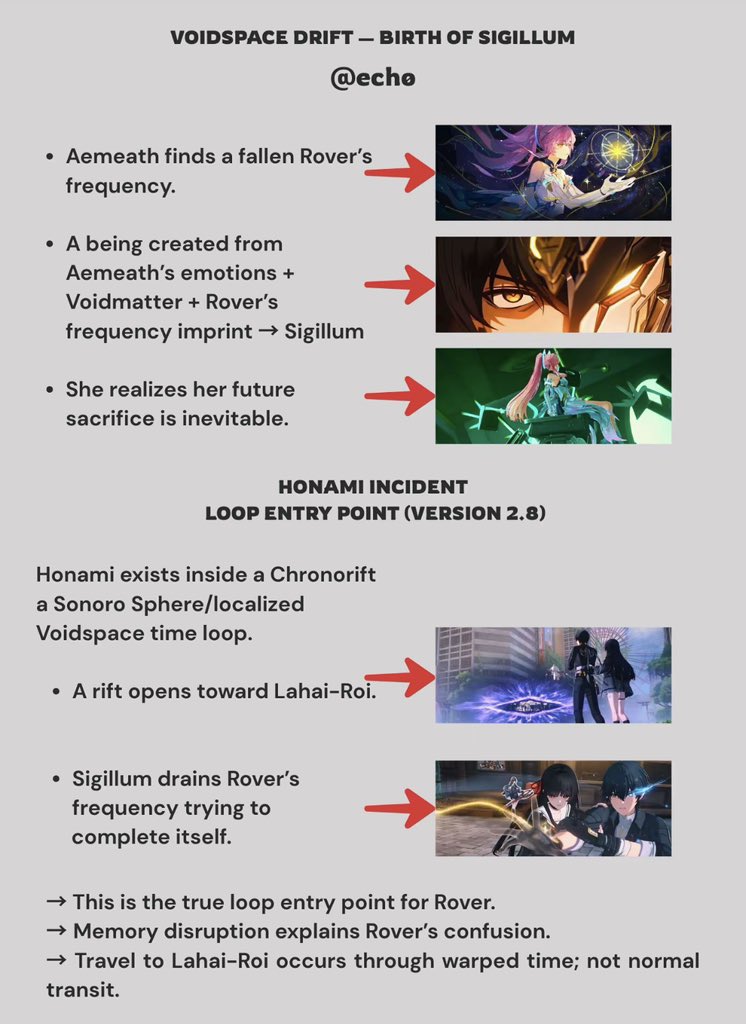
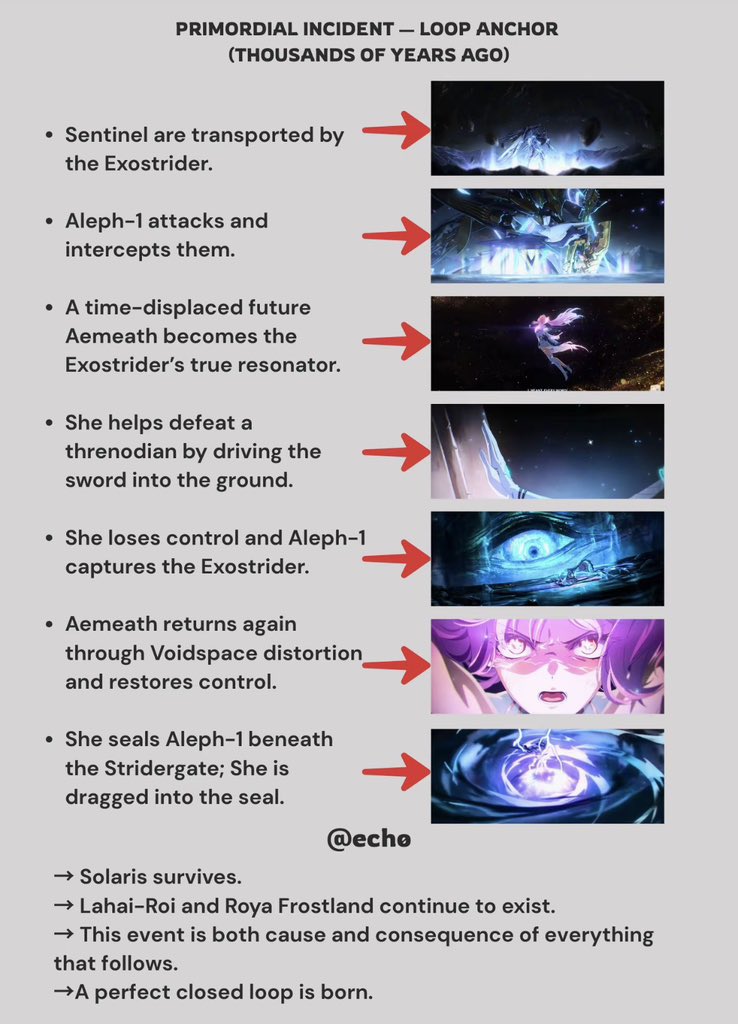
With the 2nd anniversary just around the corner, a new adventure is about to unfold. Let's continue forward together and witness an even more vibrant and enchanting Solaris!
Follow @Wuthering_Waves and repost. 10 winners will be chosen for a $20 Amazon Gift Card.
#WutheringWaves
Some advanced VLC tricks most people never use:
1. Play & Download YouTube Videos Inside VLC
VLC media player can stream YouTube videos directly.
How:
1Media → Open Network Stream
2Paste the YouTube link
3Click Play
You can even extract the direct media link and download it.
2. Increase Volume to 200%
VLC lets you boost audio up to 200% ; very useful for quiet recordings or forensic audio reviews.
3. Fix Broken or Corrupted Videos
VLC can attempt to repair damaged AVI files automatically when you open them.
Go to: Tools → Preferences → Input/Codecs → Set “Damaged or incomplete AVI file” to Always Fix
4. Record Your Screen (Without Extra Software)
1Media → Open Capture Device
2Select Desktop
3Choose frame rate
4Click Play → Record
Perfect for quick demos or capturing evidence during analysis.
5. Convert Audio/Video Formats
Media → Convert/Save You can convert:
•MP4 → MP3
•MKV → MP4
•WAV → FLAC
Great for preparing files for different devices.
6. Stream From CCTV / IP Cameras
You can open RTSP streams like:
rtsp://username:password@IP:port/stream
Very useful in network monitoring and digital forensics work.
7. Frame-by-Frame Analysis
Press E on your keyboard to move video one frame at a time.
Perfect for:
•Investigations
•Timestamp verification
•Motion analysis
8. Add Watermarks & Logos
Tools → Effects & Filters → Video Effects → Overlay You can add a logo or watermark during playback or recording.
9. Adjust Video Effects Like a Pro
You can tweak:
•Brightness
•Contrast
•Gamma
•Saturation
•Crop
•Rotate
Good for enhancing low-light footage.
10. Play ASCII Mode (Yes, Really 😂)
VLC can convert your video into ASCII art in real time. (It’s under Video Effects → Advanced → Color ASCII Art)