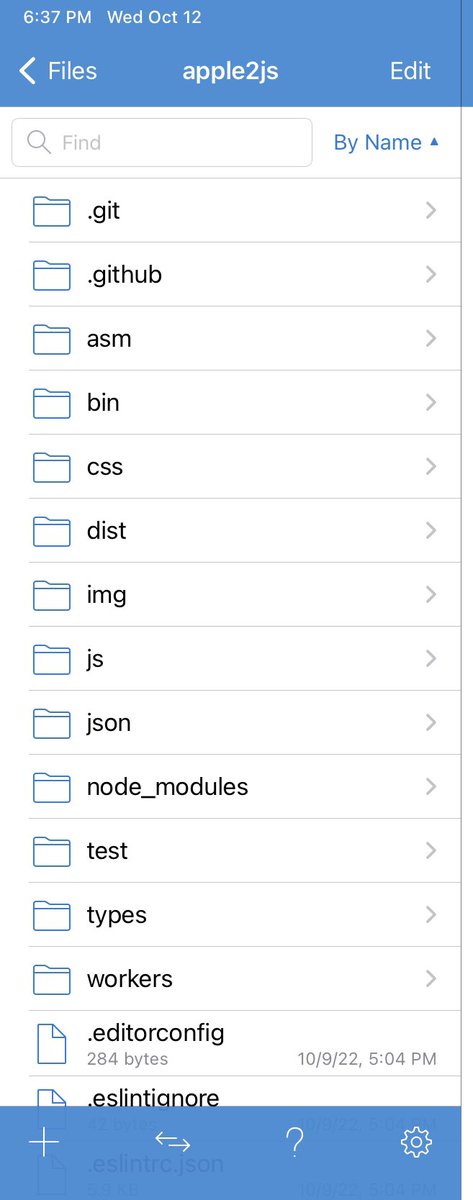
@davidobot_, Hi. I'm a novice lua/js programmer (iPad) & like your love.js port. Are you considering adding the ability to create single file html loves to use on client browsers like schellingb did? If not, any tips on adding https://t.co/cs2t4QZDv4 and love.wasm inline? Thx.
@B_Schelling , I'm a novice mobile (iOS) lua/js user who is enjoying your Love 2d builder in the browser. Any chance will update to Love 2d >=11.0? I'd like to use g3d module but when I try it I get init error: can't parse https://t.co/ty5C4tTefU.setDepth statement (needs 11.0).
@Tyriar, would you explain more about what the xterm.js webgl addon does? It sounds like it should render webgl content somehow from an xterminal. However, as a novice linux/js user, I thought X11 handles openGL calls & xterm just displays a text console inside a X11 window? Thx
@Tyriar Yes, thank again, @Tyriar. As a novice, I don't know all that xterm.js does, but know the QEMU browser port ("copy x86") uses it to create terminals in browsers. One of the demos creates a working ArchLinux terminal which actually can display a X11 GUI in a browser. (Continued)
@Tyriar Thanks, @Tyriar. I hadn't realized that the drawing of the terminal itself was slow enough to benefit from webGL GPU acceleration. I had hoped the xterm add-on (or another js addon) might allow opening up a webGL GPU accelerated glx window from xterm.js.
@whscullin Fyi, AppleIIjs running locally without internet connection on iPad Pro. Works great! Some minor issues when running locally (e.g. not displaying icons for disk loading) but nothing major :-)
@whscullin, hello. I'm a novice mobile javascript programmer (iPad) and love your AppleIIjs emulator & installed it to run locally on my iPad. However, its my first time using node.js: what is the min files I need to run it locally & how man of the node.js files are needed? Thx.
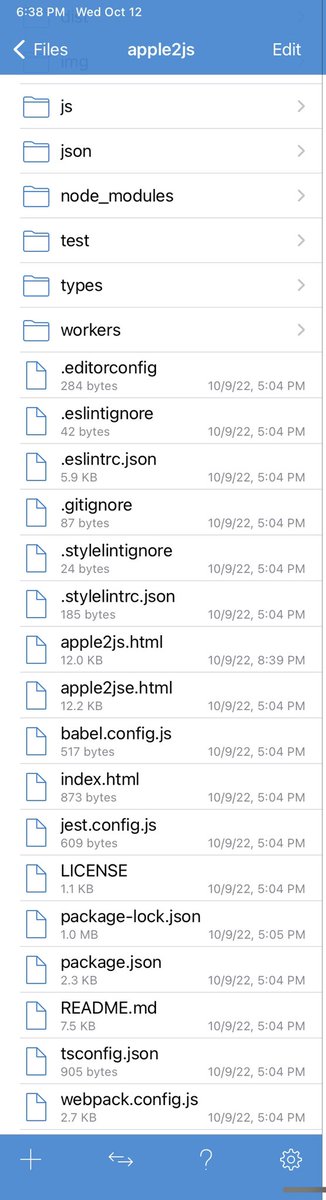
@whscullin Thanks, Will :-). Since I just want to run Apple2js locally in my IDE/browser, I was just wondering if I needed all of the folders that I downloaded from github (e.g. all the node.js/npm & non-index html, emulator js and css files). Attached screenshots of what's installed now.
@hfpreston Thanks, Hank! So, then DHCP (and not the user through IP addr add) sets the LAN start address (src IP) in your IP route show example: default via 172.16.211.2 dev ens160 proto dhcp src 172.16.211.128?
@hfpreston, thx for the great into to Linux networking you wrote in July! I'm a novice Linux user troubleshooting a network. Is the ipv4 address used to add an IP address to an interface the "src" or non-src one (e.g. 172.16.211.0/24 vs 172.16.211.128 in your ip route example)?
@UTMapp@UTMapp, to clarify, will there now be 4 increasing levels of speed performance for UTM on the M1 iPad (UTM SE, UTM w/JIT, UTM w/Hypervisor but no JIT, UTM w/Hypervisor & JIT)? & will the two fastest performance levels be limited to iPad OS 15.4.1 or below for now? Thanks :-)
@UTMapp Osy, could you clarify what is meant by backing up one's VM as the new UTM release won't open prior VMs? Does that mean we need to convert our old saved VMs to a new format to use in the new UTM release or we won't be able to use old VMs at all? Thanks.
@UTMapp: Osy, I’m still perplexed why some accel 3D apps work great (DevilutionX) and others don’t (Portal). Just made a simple 3D frame with rgl/R and didn’t render labels right. On hunch got attached Xonotic to work (small screen/JIT to save mem). Because both use SDL2?
@UTMapp The last option is to port the OpenGL driver of macOS to iOS. I don't recommend this. It will certainly need some dirty binary hacking.
Good luck,
Akihiko Odaki
Fyi, in case this information is helpful. --Mike
@UTMapp The fourth option is to hack Virgl to work with iOS's OpenGL implementation. Maybe this is the easiest option, but it may be dead-end if the implementation is too buggy or limited. It is deprecated anyway.
@UTMapp It should be possible to port the driver to iOS with sufficient amount of hacking. This is the hardest as fixing the driver is likely to need reverse-engineering of graphics stack of macOS/iOS, but it brings the maximum flexibility.
@UTMapp The third option is to use asahi driver of Mesa. It is an open-source OpenGL driver for M1. Note that it is still in early-stage of development. It is being developed for Asahi Linux, but the development is currently done on macOS...