@reduzio like style to an Event Sheet or Scratch style, it will just end up resetting the slow progress to having a good visual script for Godot, so I think it should stick to improving what its got. Some improvements to Godot’s visual script may help out with its visual shaders too, ...
@Melika9797 If you're using Blender 3.0 Beta/3.1 Alpha, maybe it could also be related to the Cycles changes, as I've noticed some scenes look lit a little different.
@Melika9797 As the lighting doesn't look too far off in some places, my guess is that maybe the Image Texture nodes for the Base Color might have their Color Space set to something other than sRGB?
@reduzio I'd say stick to the standard. As the proposal's discussion a couple months ago showed, its really difficult to find names that really fit any better. I doubt many dev beginner devs will figure out how to use the physics bodies without a tutorial anyway, even knowing what they do
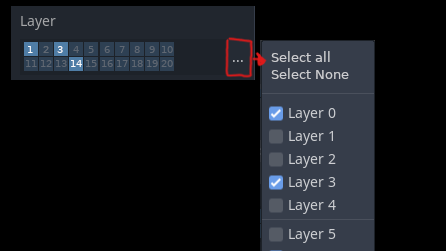
@reduzio ...with numbers in the buttons and Select All/None in menu. I second the idea of having the option to globally enable/disable layers for your project.
@reduzio I haven't had a problem when only using a couple layers, and the inspector has too many clicks already. Also what happens to the inspector if you use a lot of layers? 19 extra lines? At that point its confusing which layers you excluded too. I suggest using the same, but...
@kobligo@NathanGDQuest (3) would have to do something like translation += get_forward_vector() * distance. And scale is usually only useful in "Object Space", otherwise it could get warped. The problem is the distinction wasn't made very distinct, making it difficult to understand, and I think even...
@kobligo@NathanGDQuest (2) the gizmo relative to it's own rotation, not the parent's (maybe there could even be all 3 options there), even though the property is relative to the parent. "Object Space" is useful too, for example it can be used to move something forward, while in Unity or Unreal you...