For All MyIPCam users who have 17-20 MyIPCam activations now have 5 activations as a bonus.
Browser addon for ip cameras:
https://t.co/0Kd91cFVRr
#MyIPCam#extension#addon#ipcamera
How to return "Add to Chrome" button for MyIPCam extension for the current version 1.2.10.
Open in Chrome flags page:
chrome://flags
Disable 3 items - see figure. After these actions you can install MyIPCam again.
(Version 1.3.1 still under review)
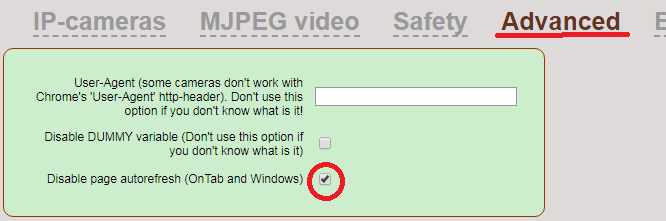
(1/2) Some cameras don't work in MyIPCam with Chrome browser.
For example Hikvision DS-2DE2A404IW-DE3 or some D-Link cameras.
To avoid these problems, you can use the advanced settings in MyIPCam (see image).
(2/2) All you need is copy HTTP-AGENT string from another browser into "User-Agent" field:
Mozilla/5.0 (Windows NT 10.0; Win64; x64) AppleWebKit/537.36 (KHTML, like Gecko) Chrome/110.0.0.0 Safari/537.36 Edg/110.0.1587.57
This string is "HTTP-AGENT" value for Edge browser.
How to get full version and support MyIPCam project. Just visit "buymeacoffee" site and pay small amount. Leave your email as a comment.
https://t.co/ALtpTR53gN
@esctec_nl MyIPCam extension trying to use flash when you tune on something in the tab "RTMP video" (myipcam options). But now when flash is disabled in all browsers, the tab "RTMP video" is not actually. Use tabs "MJPEG video" or "IP cameras".
For new #Reolink firmware:
Copy into the "Use snapshot path" item:
/cgi-bin/api.cgi?cmd=Snap&channel=0&rs=wuuPhkmUCeI9WG7C&user=user_login&password=1234&width=1920&height=1080
Replace user and password on yours. Don't forget width & height params. Don't click Autoscan after it.