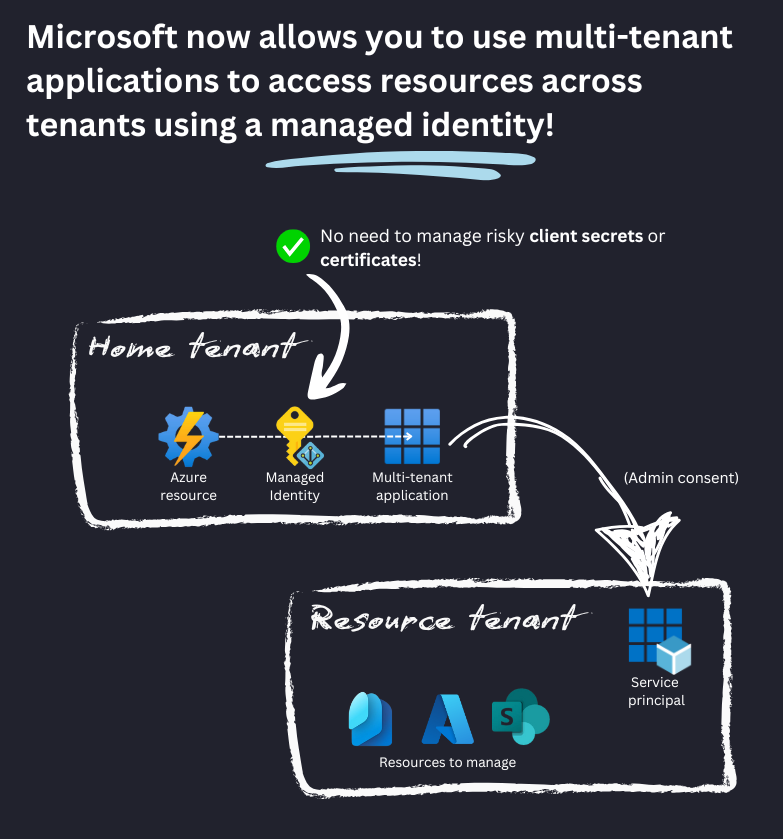
Great news and blog article, including the explanation.
[News] Microsoft now allows connecting to Multi-tenant apps using Managed Identities
https://t.co/6BC2XHKliC
Credit: Daniel Bradley
#MicrosoftAzure#EnterpriseApps
HOW TO CONFIGURE PLATFORM SSO FOR MACOS VIA MICROSOFT INTUNE
Microsoft Intune now allows you to configure Platform SSO (Single Sign-On) for Apple macOS devices. Platform SSO is an extension to the existing Microsoft Enterprise SSO plug-in that brought single sign-on (SSO) to macOS using Microsoft Entra ID accounts.
The principle of how Platform SSO works is very similar to Windows Hello for Business. A user can use biometrics (Touch ID / Face ID) to log in to macOS. When secure enclave is set as the authentication method, hardware-backed cryptographic keys are used in the background, which are then used to authenticate the user instead of the standard Microsoft Entra ID credentials and tokens. This provides phishing-resistant authentication.
Watch my YouTube video bellow on how to configure Platform SSO for macOS via Microsoft Intune 👇 👇
https://t.co/QgP1WSe1J4
#intune #entraid #platformsso #macos #microsoftentraid #cswrld #tips #videotutorial
🎯 Coming Soon: Device Offboarding Manager!
Tired of deleting device objects one by one across multiple portals? This tool has you covered - automatic deletion made easy.
Excited to introduce my PowerShell-powered GUI tool, crafted to make your device offboarding from Microsoft Intune, Autopilot, and Entra ID a breeze!
ℹ️ Preview drops next week, with upcoming step-by-step guidance for MDE and ABM offboarding too.
(Yes, this is a new iteration of my Intune Offboarding Tool and will replace it)
#MSIntune #PowerShell
🚨 Une affaire fait trembler le Royaume-Uni (et le monde entier) : le scandale des #groominggang revient sur le devant de la scène.
Des milliers de jeunes filles exploitées, une impunité choquante et des autorités complices. Vous n’avez pas idée de l’ampleur de ce drame.
Je vous explique tout dans ce thread ⬇️
(🧵 1/18)
🔐 Understanding Group Policy Permissions in Active Directory
I've created a visualization of Group Policy permissions to help security teams better understand AD security controls.
Key permission categories covered:
✅ GPO Object Permissions (GpoApply, GpoRead, GpoEdit, etc.)
✅ Domain-Level Permissions (SOM creation rights)
✅ SOM (Site/OU/Domain) Permissions
✅ WMI Filter Permissions
✅ Starter GPO Permissions
Why this matters:
+ Proper GPO permission management is important for AD security
+ Misconfigurations can lead to privilege escalation
+ Understanding these permissions is key for security assessments
+ Essential knowledge for AD admins and security teams
Want to discuss AD security? Let's connect! 🤝
#ActiveDirectory #Security #Microsoft #IAM #CyberSecurity #Windows #MicrosoftSentinel #MSFT
Microsoft recently announced 𝐦𝐚𝐧𝐚𝐠𝐞𝐝 𝐢𝐝𝐞𝐧𝐭𝐢𝐭𝐲 𝐟𝐞𝐝𝐞𝐫𝐚𝐭𝐢𝐨𝐧 with App Registrations to secure 𝐦𝐮𝐥𝐭𝐢-𝐭𝐞𝐧𝐚𝐧𝐭 𝐦𝐚𝐧𝐚𝐠𝐞𝐦𝐞𝐧𝐭 but didn't show how to use it practically. Well, here is how⚡https://t.co/lDolXPvjux
The problem is that Microsoft only gave us working examples using C#, which is great for developers, but not so much for admins, consultants or anyone who works with PowerShell... thankfully Stephan van Rooij was hot on the case and built a working PowerShell module to solve the problem!
This new feature means that you can now connect to a multi-tenant app using a managed identity from your source tenant while specifying the tenantid of an external tenant to be able to manage it. If you are an MSP, the external tenant could be your customer or another company-owned tenant for larger enterprises.
#Entra #Graph #Microsoft
🎓 2025 BOOKMARK! Your Ultimate #Windows365 Learning Guide to unlock it’s power for your organization. It includes slides, events, blogs, book and much more.
⭐️ As move into #2025: To kick this year off with a tradition, here’s your comprehensive new guide to mastering Windows 365 in the year 2025!
➡️ Let’s jump straight in https://t.co/yNpo0TmnkG
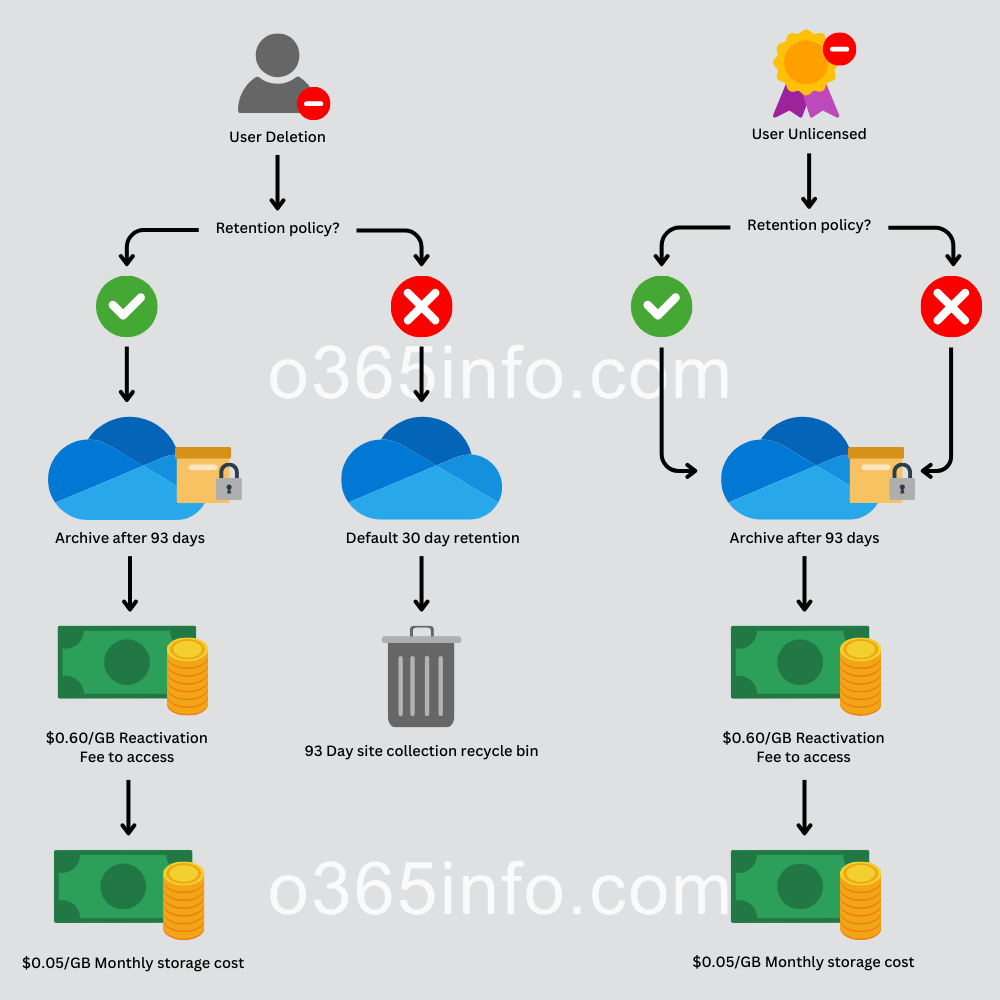
IMPORTANT: New storage costs and policies for unlicensed OneDrive accounts starting January 2025!
𝐒𝐮𝐦𝐦𝐚𝐫𝐲:
Starting January 2025, the storage cost of unlicensed OneDrive accounts will be charged to the billing information specified in M365 Archive if you opt into billing for unlicensed accounts.
If you don't opt-in, these accounts may be deleted after 180 days of being unlicensed.
These changes do not apply to EDU, GCC, or DoD customers.
𝐂𝐡𝐚𝐫𝐠𝐞𝐬 𝐟𝐫𝐨𝐦 𝐚𝐫𝐜𝐡𝐢𝐯𝐞𝐝 𝐚𝐜𝐜𝐨𝐮𝐧𝐭𝐬 𝐞𝐱𝐚𝐦𝐩𝐥𝐞:
If an organization has 100 unlicensed OneDrive accounts, each consuming 1 TB for a total of 100 TB, and enforcement occurs between January and March 2025, the 100 unlicensed accounts are automatically archived.
If the organization needs to reactivate a specific account in October 2025 and set up billing, they incur the following costs:
- A one-time reactivation fee of $0.60/GB for 1TB, totaling $614.40.
- A monthly storage fee of $0.05/GB for 100TB, amounting to $5,120/month starting from October 2025.
Read more in the article below:
https://t.co/c2e2MAxXv4
#Microsoft365 #OneDrive
Voir l'effet d'un ballon en pleine tête en slow motion, c'est tellement idiot mais tellement captivant à la fois ! 😂💥
(The Slow Mo Guys)
https://t.co/jyXPcUdCyu
Big changes are coming to device management in 2025.
Microsoft is shifting the authority for Wi-Fi and VPN policies from traditional MDM to the MMP-C platform.
This means that Intune will no longer directly manage these policies; they will instead be handled by MMP-C and WinDC.
Want to know how?
https://t.co/HdrQzcOrZi
➡️ How Wi-Fi and VPN policies are moving to MMP-C
➡️ The role of Declared Configuration in this shift
#Intune #MSintune #Windows #Windows11
🚨🇫🇷 FLASH | "As-tu déjà été cramé en train d'assouvir un plaisir solitaire ?"
Un père de deux petites filles de 11 et 12 ans, qui ont reçu le jeu de société pour Noël, a également décidé de dénoncer son contenu et de le signaler à la DGCCRF, qui aurait "tout de suite pris en charge" sa plainte. Il dénonce 18 cartes "choquantes pour un enfant de 7 ans et plus".
(Julien M. pour Cerfia)
Has anyone setup #macos#platformSSO for shared devices? PSSO is working but Company Portal keeps saying the device isn’t enrolled.
Does anyone have any resources on this? Basically trying to allow multiple users to sign in with Entra credentials.
@IntuneSuppTeam
⚠️ Action required by Dec 27
If you are using #MSIntune to deploy PowerShell scripts or Win32 apps, you will need to grant access to the updated endpoints for your location.
https://t.co/UXxfJxb7t3
Another huge security improvement⚡Microsoft now allows you to federate your app registrations with a Managed Identity, perfect for securely accessing resources in other tenants with multi-tenant apps! > https://t.co/exiwDFfhpd
This change means that you no longer need to store and manage 'stealable' client secrets or certificates to facilitate your connection to multi-tenant applications, especially when using Azure resources such as Azure Automation to run scripts against external tenants!
Currently in private preview, Microsoft hahase released code examples for various Identity libraries, but no support yet for mainstream tools such as the Microsoft Graph PowerShell SDK or Entra PowerShell modules.
#Entra
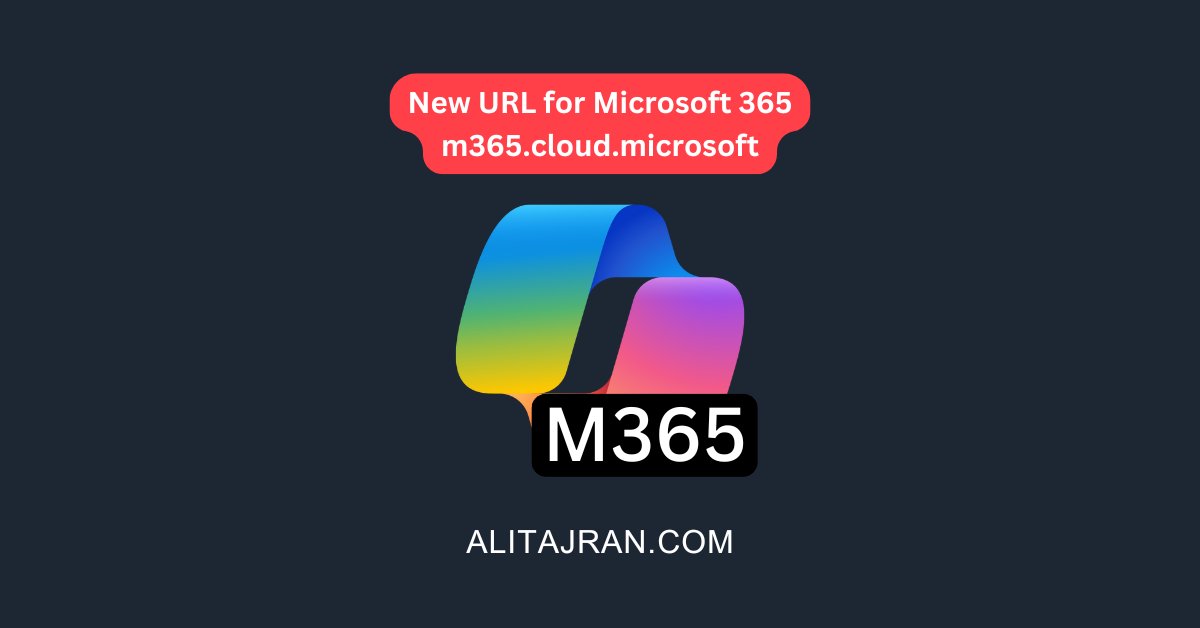
NEW: A new URL for Microsoft 365!
Microsoft is providing a more integrated and seamless customer experience and is pleased to announce a new URL for Microsoft 365: https://t.co/aQulM3CZur.
𝐖𝐡𝐞𝐧 𝐭𝐡𝐢𝐬 𝐰𝐢𝐥𝐥 𝐡𝐚𝐩𝐩𝐞𝐧:
General Availability (Worldwide): The new URL is available now. Microsoft will begin rolling out the redirection from the old URL to the new one in mid-January 2025.
Users visiting https://t.co/A0QdJZKqhW and https://t.co/MjkykTj6Gy will automatically redirect to the new Microsoft 365 URL https://t.co/aQulM3CZur.
𝐇𝐨𝐰 𝐭𝐡𝐢𝐬 𝐰𝐢𝐥𝐥 𝐚𝐟𝐟𝐞𝐜𝐭 𝐲𝐨𝐮𝐫 𝐨𝐫𝐠𝐚𝐧𝐢𝐳𝐚𝐭𝐢𝐨𝐧:
The Microsoft 365 app will continue to be accessible with both URLs. During and after the migration to the new URL, you may notice the new URL in your browser's address bar, even if you initially accessed the old URL.
This change will be on by default.
𝐖𝐡𝐚𝐭 𝐲𝐨𝐮 𝐧𝐞𝐞𝐝 𝐭𝐨 𝐝𝐨 𝐭𝐨 𝐩𝐫𝐞𝐩𝐚𝐫𝐞:
Microsoft expects no major impact on how customers use the Microsoft 365 app. If your organization requires URLs to be allowlisted for network access, please ensure the new URL is allowlisted. Also, to ensure a smooth transition, we recommend updating bookmarks, scripts, and documentation to the new URL.
This rollout will happen automatically by the specified date with no admin action required before the rollout. You may want to notify your users about this change and update any relevant documentation.
#Microsoft365
HOW TO PREVENT USERS FROM JOINING THEIR DEVICES TO MICROSOFT ENTRA ID
By default, all users can join devices to Microsoft Entra ID. This can be risky because users can add their personal computers to Microsoft Entra ID, which is usually undesirable.
However, this is even more of a problem when a user account is compromised, and an attacker would join their own computer to Microsoft Entra ID. Such a computer could then potentially become compliant and gain access to internal applications and services, or bypass some of the restrictions from which compliant devices are excluded. In fact, very often MFA is not required from compliant devices.
📺 Watch my YouTube video bellow for more details 👇 👇
https://t.co/R508epgtS3
#cswrld #videotutorial #entraid #cybersecurity #tips #devicejoin







![david_das_neves's tweet photo. Great news and blog article, including the explanation.
[News] Microsoft now allows connecting to Multi-tenant apps using Managed Identities
https://t.co/6BC2XHKliC
Credit: Daniel Bradley
#MicrosoftAzure #EnterpriseApps https://t.co/D1UkBeQvqb](https://pbs.twimg.com/media/GgrIkm1W8AA4mai.jpg)