🚨SETUP YOUR NEW GROWING SEASON🚨
As harvest winds down, get ready for next year by making your new growing season!
It's as easy as 1-2-3:
1. Click Settings.
2. Go to Growing seasons.
3. Add your new growing season.
Check out our support article here: https://t.co/YzIUH8Qb5O
Oh we’re not messing around. Coolers loaded with more than TWICE the donuts we had last year. Hope y’all’re bringing your sweet teeth to Agronomy on Ice!
Happy #FarmQAFriday!
Have you seen that little yellow warning sign pop up in your FarmQA web app? Then it's time to make a new growing season! Just click on that yellow warning button and we'll redirect you to the Growing Season page. It just takes a few seconds!
🚨SETUP YOUR NEW GROWING SEASON🚨
As harvest winds down, get ready for next year by making your new growing season!
It's as easy as 1-2-3:
1. Click Settings.
2. Go to Growing seasons.
3. Add your new growing season.
Check out our support article here: https://t.co/YzIUH8Qb5O
Happy #FarmQAFriday!
Once your soil sample data has been imported to your FarmQA account, you're ready to start creating management zones. Go to your 'Soil' page, click the 'Create management zones' button, and easily create your zones in our Zone designer!
Happy #FarmQAFriday!
Can't see your soil markers in the FarmQA mobile app? Head over to the Soils page in the web app and click on the 'Turn sample locations into permanent markers' button. You'll then be able to see your soil markers in across FarmQA!
Happy #FarmQAFriday!
Viewing soil test results in the FarmQA web app is a cinch! Turn on your soil sample markers and click on each marker to see your test results at that location.
Happy #FarmQAFriday!
Want to keep your sampling operation consistent year to year? Pull up your pre-existing grid sampling locations when soil sampling in the FarmQA mobile to ensure you're sampling the same spots year-after-year!
Happy #FarmQAFriday!
Want more info while soil sampling? Upload a soil map from Web Soil Survey as a map layer. Map layers are easy to style to you can easily see the different soil types you're sampling!
Happy #FarmQAFriday!
It's never been easier to collect soil samples. Open up your soil sampling tasks to pull up the locations you want to sample in the FarmQA mobile. Once your sample information has been recorded, we'll store that point for future sampling and data uploads!
Happy #FarmQAFriday!
Keep track of your workload during soil sampling season by creating soil sampling tasks. Tasks can be created right from your mobile device. Tasks can also include sampling locations for each sample you want to pull from your fields!
Happy #FarmQAFriday!
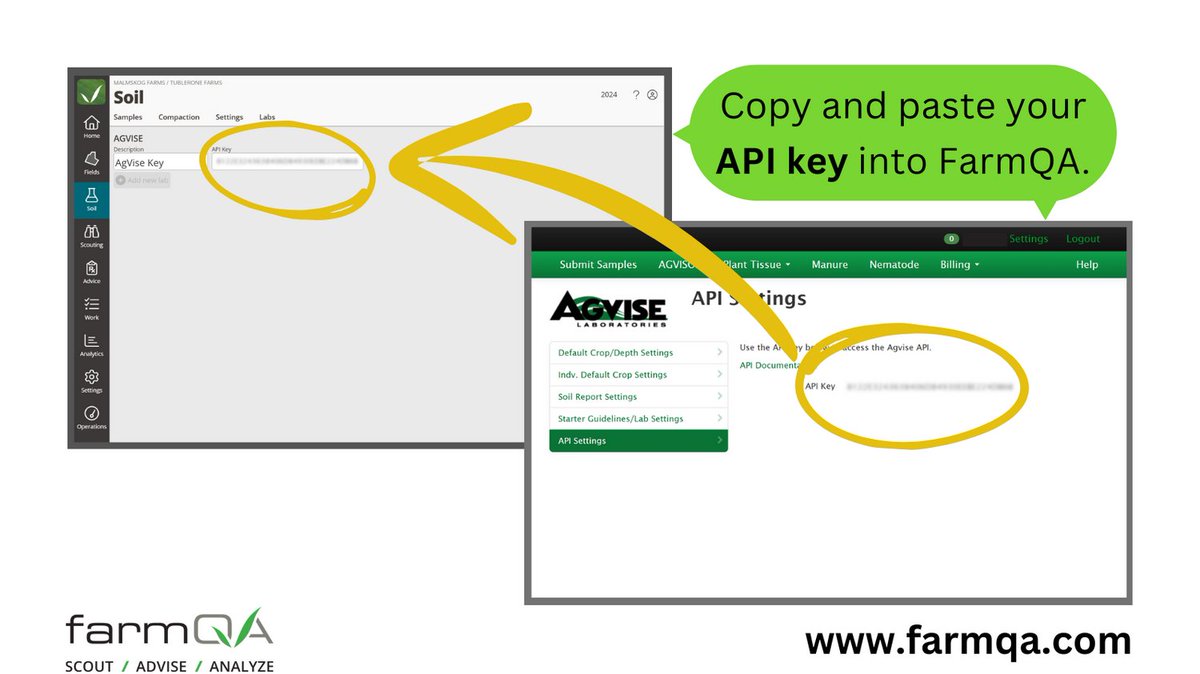
Soil sampling is right around the corner, so make sure your FarmQA account is ready by linking it to your AgVise account. Copy your API key from AgVise and paste it into your Labs page and your soil test results will be brought into FarmQA automatically!
Happy #FarmQAFriday!
Starting to get your crop plans and chemical programs together for next year? Make sure your FarmQA account is ready by using our EPA database integration to easily import chemical products to use for crop planning and recommendation writing!
Happy #FarmQAFriday!
Users can now create tasks from their home page. It's as easy as clicking on one of your fields, selecting 'New Task', and filling out some basic information before your task is off to your scouts and growers!
Happy #FarmQAFriday!
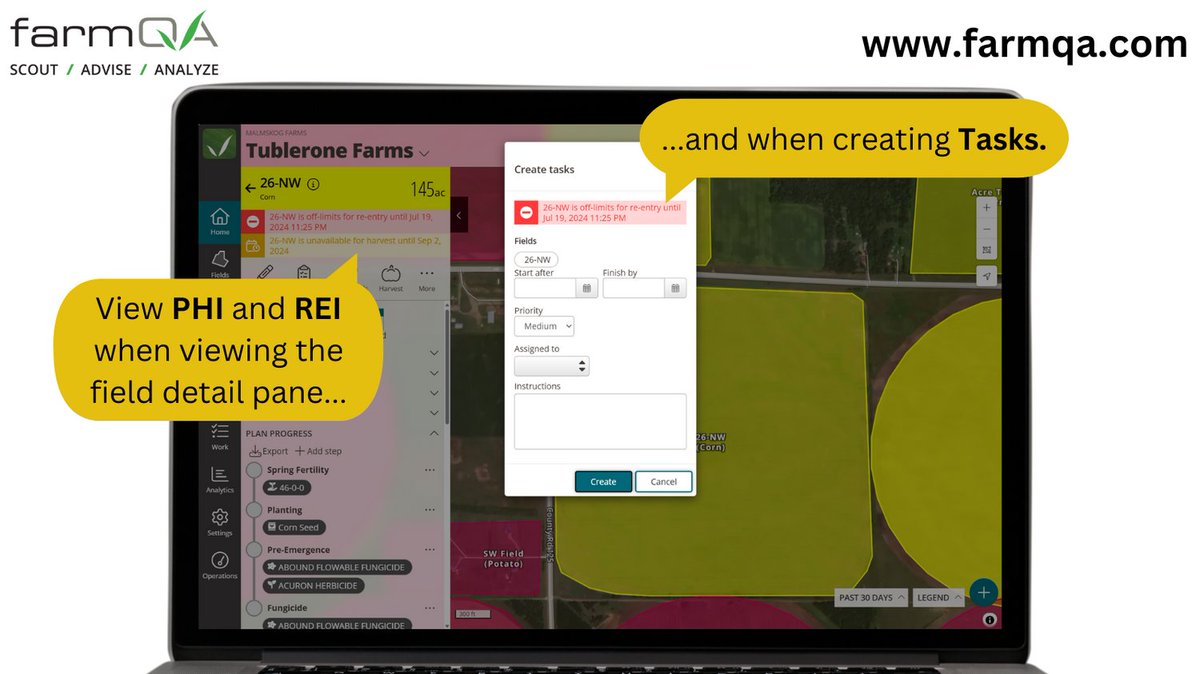
Pre-harvest interval (PHI) and re-entry interval (REI) can now be viewed in your Home page. View this data from the field detail pane when you click on a field, or when you're writing a task so you can keep you and your team safe!
ATTN FARMQA USERS:
FarmQA is currently experiencing an outage preventing users from accessing key features.
The outage is due to a regional issue with Microsoft Azure, the service that hosts FarmQA.
We will keep users up to date as we learn more. Thanks for your patience.
Happy #FarmQAFriday!
Users can now select the navigation app they want to use when navigating to fields within FarmQA. Just go to the Settings page and select the navigation app of your choice!
Happy #FarmQAFriday!
Users can now easily see re-entry interval and pre-harvest interval for their fields from the FarmQA mobile app. FarmQA now uses information from your spray records to keep this information up to date so you and your team can stay safe!
Happy #FarmQAFriday!
Use our Planning feature to keep track of what needs to be done on your fields on the go. Stay flexible and skip steps of your plan as needed or create spray records right from the sprayer as you get the job done!
Happy #FarmQAFriday!
Access your satellite imagery from Planet Labs or Sentinel from your mobile device for directed scouting!. Identify problem spots in your fields using useful metrics like the Modified Soil Adjusted Vegetation Index (MSAVI) to efficiently scout fields!