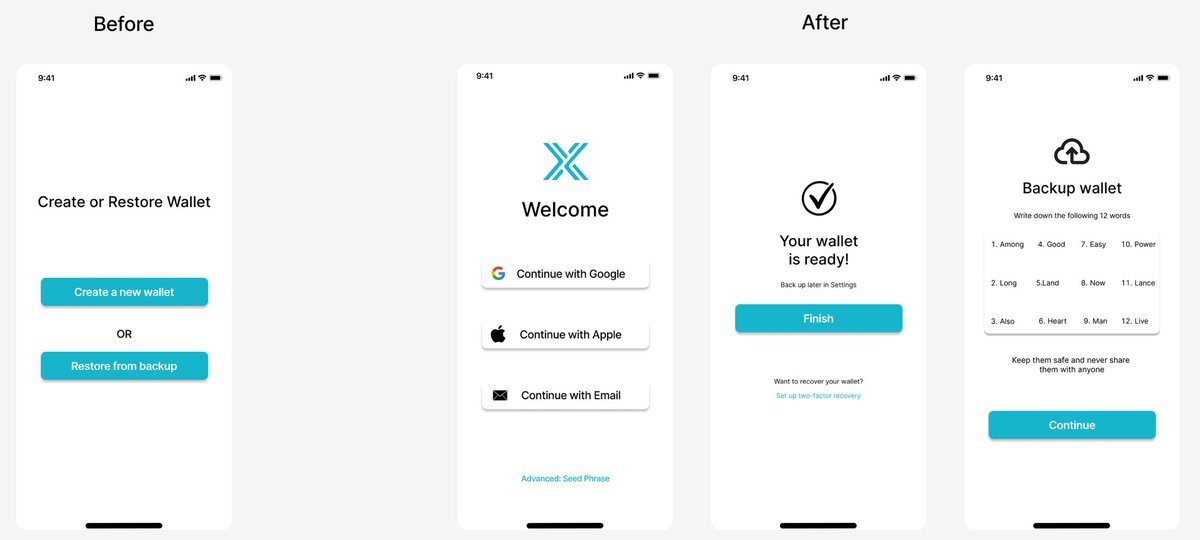
Case Study: Simplifying Exodus Wallet Onboarding
Most crypto wallets still force users to back up a 12-word seed phrase before they can even try the app.
For beginners, that’s confusing and scary many quit before finishing setup.
#UIUX#Web3#exodus
Web3 already feels complicated.
So your UI shouldn’t be.
In Web3 design:
Avoid technical jargon
Use familiar patterns (wallets, tabs, cards)
Use icons with labels
The goal? Make blockchain feel human.
#web3design#cryptoapps#uiuxdesigner
Hick’s Law:
The more choices you give the user, the longer it takes them to decide.
That’s why great designs keep things simple:
Fewer buttons
Clear actions
One primary CTA
Simplicity isn’t basic — it’s strategic.
#uxlaws#uidesign#uiux
Web3 UX Principle
Web3 UX should feel simple even if the technology behind it isn’t
Clear actions
Predictable flows
Zero confusion when signing or swapping
Users shouldn’t need to understand blockchain to use a product.
Good design hides complexity.
#uiux#web3design#defi
What I Learned So Far
One thing UI/UX has taught me
Good design is not about adding more…
It’s about removing everything that doesn’t help the user.
#designthinking#uxinsights
Speed Up Your Workflow
Figma boosters you should master
Auto Layout
Components
Variants
These three alone will 3x your design speed.
#figmatips#uidesign#uxdesigner
The Power of Visual Hierarchy
Visual hierarchy guides the user’s eyes.
Make the most important element the loudest.
Bigger size
Bolder weight
Stronger contrast
Great design tells the user where to look first.
#uiux#visualdesign#web3
Crypto Wallet UI
Problem: Most wallets feel too crowded and confusing.
My approach:
Reduce visual noise
Strengthen spacing
Prioritize key actions (Swap, Receive, Send)
Keep transactions clean and scannable
What do you think about this clean Web3 direction?
#web3#UIUXDesign
The Power of Visual Hierarchy
Visual hierarchy guides the user’s eyes.
Make the most important element the loudest.
Bigger size
Bolder weight
Stronger contrast
Great design tells the user where to look first.
#uiux#visualdesign
UI/UX Preference
> As a designer, what do you enjoy more?
UI – Colors, typography, layouts
UX – Research, flows, problem-solving
Drop your answer 👇
#uiuxcommunity#designjourney
Reduce Cognitive Load
Great UX = Less thinking for the user.
Keep actions obvious
Keep navigation simple
Keep information short
The easier the decision, the better the experience.
#uxdesign#productdesign#uiux
Why White Space Matters
>White space isn’t “empty.”
It creates focus, improves readability, and helps your design breathe.
Crowded screens = confused users.
Use space intentionally.
#uiux#uidesign#uxprinciples
Steve Jobs made that evidently clear
This realization you had is really important
It also makes the designer see "how it looks" differently
From the perspective of making it work optimaly and look visually appealing
I am glad you had this realization in your early days Abbah
Every screen is a conversation between you and the user.
What’s one thing you wish you knew earlier in your design journey?
#uiux#designjourney#uxcommunity
Your Design Journey
When I started learning UI/UX, I focused too much on colors and layouts.
Then I realized design isn’t about how it looks, but how it works.
#uiux#designjourney#uxcommunity
UX Tip: Make your buttons clearn & actionable.
Instead of generic “Submit” or “Click here,” use:
Create Account
Send Message
Download File
Microcopy (the small text) builds user confidence.
It’s a tiny detail that massively improves user experience.
#UIUX#designthinking
A beautiful UI with poor UX is like a fancy door that won’t open smoothly.
Follow me for more UiUX Design Tips
👉 Focus on usability first, then make it look great.
#uiux#design#uxdesign#uidesign
What UI/UX Design Really Means
> Many beginners think UI and UX are the same — but they’re not.
🔹 UI (User Interface) is the look — colors, buttons, typography.
🔹 UX (User Experience) is the feel — how easy it is to use.
#UIUXDesign