AI 일꾼들한테 일 넘기고 혼자 일하는 중임.
여기엔 두 가지만 올림. 하나는 바로 써먹는 AI 팁. 새 도구 소식 중에 혼자 일하는 사람한테 진짜 쓸모 있는 것만 골라서 어떻게 쓰는지까지 적음. 다른 하나는 자동화 맡겼다가 깨진 이야기. 잘된 것보다 조용히 망가진 데서 배울 게 더 많더라.
직접 돌려 보지 않은 건 「써 봤다」고 안 씀. AI로 일 줄이고 싶으면 팔로우해 두셈
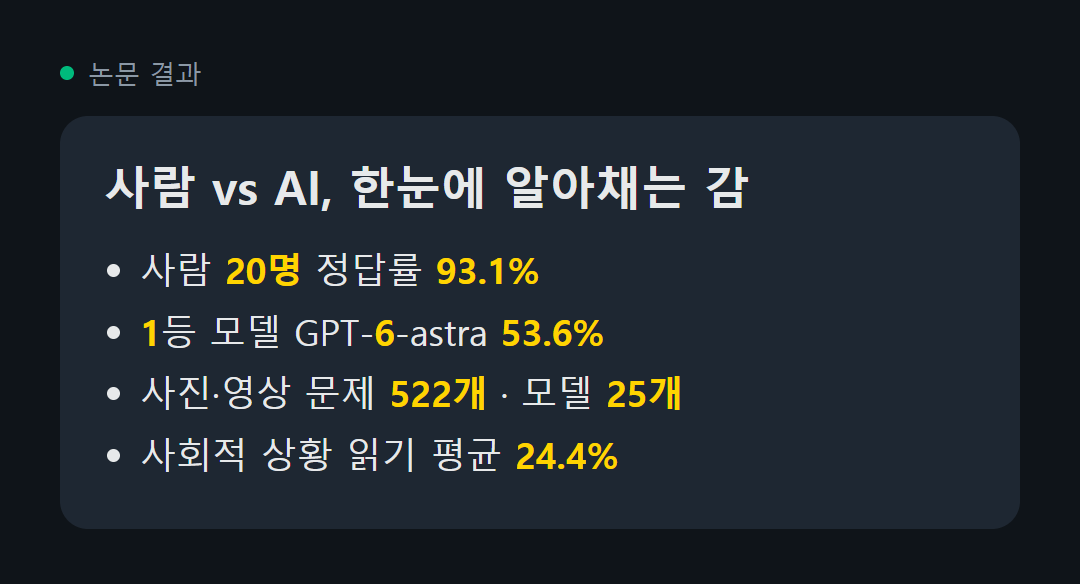
사람 93점, AI 54점. 한눈에 알아채는 감을 잰 시험 결과다.
스케일AI 등 연구진 29명이 10월 6일 arXiv에 올린 논문 Humanity's Sixth Sense 얘기다. 사람이 사진 한 장, 영상 몇 초만 보고 저절로 짐작하는 것들을 AI도 하는지 쟀다.
문제는 사진·영상 522개였다. 방금 전에 무슨 일이 있었을지, 차가 저 틈에 들어갈지, 방 안에서 누가 윗사람인지 같은 걸 물었다. 사람 20명은 93.1%를 맞혔고, 25개 모델 중 1등인 GPT-6-astra는 생각을 최대로 시켜도 53.6%에 그쳤다.
① 영상이 사진보다 어려웠다. 25개 중 23개 모델이 영상에서 점수가 떨어졌다.
② 제일 약한 건 사회적 상황 읽기였다. 평균 24.4%였다.
③ 틀린 답의 53%는 추론보다 앞 단계, 화면을 잘못 본 실수였다.
④ 생각을 더 오래 시킨다고 늘 나아지진 않았다.
AI한테 사진이나 영상을 보고 판단하는 일을 맡겼다면, 분위기나 관계처럼 감으로 읽는 부분은 사람이 마지막에 한 번 더 봐야 한다. 지금 1등 모델도 사람 점수의 절반을 조금 넘는 수준이다.
메타 새 모델 다섯 시간 써 본 개발자, 결국 클로드 코드로 복귀함
메타가 10월 12일 첫 프런티어 모델 Muse Wonder를 냈음. 개인 일·업무 에이전트용으로 만들었고, 독립 평가 사이트 Artificial Analysis 지능 지수에서 52점이 나와 전작 Muse Spark 1.3(48점)보다 4점 올랐음.
그런데 원글 작성자는 다섯 시간 붙잡고 써 본 뒤 영상까지 만들려다 그만뒀다고 함. 만들 필요가 없었다면서 다시 코덱스랑 클로드 코드로 돌아갔다는 짧은 한 줄이 조회 10만을 넘겼음. 같은 평가 사이트 기준으로 과제 하나 푸는 비용도 4.52달러라 비슷한 점수대 모델 중 비싼 편임.
점수표 숫자랑 내 일에 붙는 느낌은 따로 노는 경우가 많음. 새 모델 나올 때마다 갈아타기보다 지금 하던 일 하나를 똑같이 시켜 보고 결과만 비교하는 쪽이 덜 헤맴.
클로드 코드로 소개 영상 뽑을 사람 이거 ㄹㅇ 보셈
코드로 움직이는 그림을 그려 주는 스킬 huashu-art-motion이 해외에서 퍼지는 중임. 깔아 두고 반 고흐 풍으로 해 달라고 하면 별이 소용돌이치는 영상이 나오고, 배경 음악도 코드로 한 음씩 찍어서 박자에 맞춰 줌.
→ 화풍 35개 (주제 상관없이 쓰는 17개 + 미술사 오마주용 18개)
→ 설명 영상 문법 9개 (수학 개념 변형, 데이터 차트, 화이트보드, 키노트풍 등)
→ 참고 영상을 주면 컷·박자·화면 움직임부터 뜯어본 뒤 코드로 다시 만듦
→ 완성되면 제작에 안 낀 에이전트가 결과물만 보고 문제를 찾아냄
저장소를 직접 열어 봤음. 화풍 35개·설명 문법 9개는 README 숫자랑 그대로 맞고, 스타 3.8천 개에 MIT 라이선스임. 다만 원글에 나온 「파랑·보라 배경이 30% 넘으면 납품을 막는다」는 README에서 못 찾았음. 적혀 있는 건 영상 중간에 빈 화면이 끼었는지 거르는 검사 정도임.
주의할 것도 있음. 문서가 전부 중국어라 클로드한테 읽고 한국어로 설명해 달라고 시켜야 하고, 영상을 뽑으려면 uv·ffmpeg·Playwright 크로미움을 먼저 깔아야 함. 내 캐릭터 그림이나 이미지 모델을 안 붙이면 사람은 손이나 뒷모습으로만 나옴.
외주 없이 화풍 바꿔 가며 소개 영상 시안 뽑는 게 되는 거라 이건 저장해 두셈
Claude Code tip: install huashu-art-motion and Opus 5.5 can draw animations in 𝟯𝟱 𝗮𝗿𝘁 𝘀𝘁𝘆𝗹𝗲𝘀 with code. Van Gogh's starry sky swirls. Dalí's clocks drip. And its delivery script rejects any film where almost nothing moves.
You can just ask for an animation in the style of Van Gogh, Monet or Bauhaus, an explainer animation to go with your voiceover, or a character walking through one famous painting after another. Hand it a reference animation and it first breaks down the cuts, the beat and what moves where in the frame, then recreates it in code.
𝗪𝗶𝘁𝗵𝗶𝗻 𝟭𝟬 𝗺𝗶𝗻𝘂𝘁𝗲𝘀 𝗼𝗳 𝗶𝗻𝘀𝘁𝗮𝗹𝗹𝗶𝗻𝗴 𝗶𝘁, Opus 5.5 made this demo video from its 35 built-in styles. It runs from cave painting 40,000 years ago all the way to 2026. The room, the cat and the girl never change; only the style does.
17 that work for any subject: products, data, stories
→ Van Gogh, Matisse cut-outs, Seurat pointillism, Impressionism
→ Analytic Cubism, Lichtenstein pop art, Bauhaus, Russian Constructivism
→ Ghibli watercolor backgrounds, Makoto Shinkai light, Chinese ink wash
→ 8-bit pixel art, vaporwave neon, 2026 flat illustration
→ Pompeii mosaic, early ray-traced CGI, Rembrandt chiaroscuro
18 for time travel, tributes and art-history speedruns
→ Monet's water lilies, Klimt's golden period, Munch, Dalí
→ Hopper, Picasso's blue period, Mucha's Art Nouveau
→ Keith Haring, Kusama polka dots, Jack Kirby comics, 1930s rubber hose cartoons
→ Cave painting, Egyptian tomb murals, Greek black-figure pottery, Dunhuang murals
→ Chinese shadow puppets, Gothic illuminated manuscripts, Renaissance sfumato
Each style spells out what moves in the picture. The eyes on Klimt's robe blink in turn, Hopper's hard-edged patch of sunlight slides slowly across a face, and the 8-bit question block pops out a coin.
9 explainer styles
→ For math and AI concepts, use 3Blue1Brown, where one shape morphs into the next
→ For data, use finance charts: axes first, then the data, and label only one thing
→ For UI steps in a software tutorial, use the keynote look: light-spot background, frosted-glass cards, big numbers
→ To draw relationships as you narrate, use the whiteboard, where the pen tip reveals the line art bit by bit
→ For a collage of graphics and info, use the Vox explainer look: clippings, red lines, highlighter
→ Kurzgesagt, flat with no outlines, moving between tiny and huge scales
→ Storytime, cutting to reaction close-ups and leaving a beat for the joke
→ Kinetic type, with the key word slamming into the frame
→ Presenter-led finance explainers, where you supply the character yourself
The music is synthesized in code too, note by note on a BPM grid. When a film is done, it runs its QA script, then sends an agent that took no part in making it to watch only the finished film and find problems. The delivery script also blocks two more things: 0.3+ seconds of blank frames mid-film, and a blue-purple background in over 30% of the film, a palette it counts as AI slop.
The skill has 𝗮 𝘁𝗶𝗲𝗿 𝗷𝘂𝘀𝘁 𝗳𝗼𝗿 𝗖𝗹𝗮𝘂𝗱𝗲 𝗢𝗽𝘂𝘀 𝟱.𝟱 or stronger models, where it can combine the libraries itself and write its own renderers. All 35 styles are star-rated, and the 20 with three stars are recognizable at a glance and ready to use.
The skill's docs are in Chinese; the prompt below has it read them and talk to you in English.
Rendering video needs uv, ffmpeg and Playwright Chromium.
If you want people on screen, use your own character art or connect an image model to make the frames. Without either, it only draws hands and figures seen from behind.
npx skills add alchaincyf/huashu-art-motion
https://t.co/tGUVjIj4FB
Once it's installed, send this to Opus 5.5 in Claude Code 👇
"Use huashu-art-motion to make me a 15-second animation. The skill's docs are in Chinese; read them and talk to me in English.
1. First check for uv, ffmpeg and Playwright Chromium, and tell me how to install anything that's missing.
2. Ask me what it's about, who it's for, and whether it's landscape or portrait. From the material layer in references/风格配方/INDEX.md, pick 3 styles that fit, three-star ones first. Redesign the composition for my subject in all three, each different from the others, and don't copy the room from the samples. Show me one still frame of each to choose from.
3. Once I pick, give each scene one main action plus two motif loops from that style's card. For Van Gogh, that's the starry sky curling into swirls and the lamp's halo spreading outward. If there's music, use the skill's BPM synthesis and put the motion on the beat.
4. If people need to appear, ask me first: my own character art, frames from an image model, or only hands and figures seen from behind.
5. After rendering, follow the skill's own QA steps: run its QA script first, then send a subagent that took no part in making it to watch only the finished film and find problems, have it write its findings into the 审片/ folder, and deliver with its delivery script. If anything comes up red, fix it and re-render before giving it to me."
AI한테 12시간짜리 연구 맡겼더니 혼자 실험 고쳐 가며 계속함 ㄷㄷ
중국과학기술대랑 알리바바 AMAP 연구진이 10월 9일 arXiv에 올린 TerminalHorizon 논문임. AI 에이전트한테 오래 걸리는 일을 가르치는 연습 문제를 자동으로 만드는 방법을 다룸.
지금 에이전트 학습 자료는 대부분 짧은 시범이라 명령 몇 개 치는 법은 배워도, 긴 일에서 단서 모으고 피드백 보고 방향 틀고 결과물로 마무리하는 건 잘 못 배움. 그래서 연구진은 실제 현업 과제를 돌려 볼 수 있는 작업 환경 1,535개로 바꿨음. 다른 AI한테 먼저 풀게 해서 살펴보기나 검증 같은 중요한 단계를 건너뛰어도 풀리는 환경은 다시 만들었고, 통과한 과제엔 앞 결과에 기대는 요구를 덧붙여 길게 늘렸음. 기록 한 편이 평균 52.8번 주고받기임.
이걸로 Qwen3.5-27B를 학습시켰더니 터미널 작업 시험(Terminal-Bench 2.0) 점수가 41.6에서 55.8로 오름. 12개 시험에서 다 올랐고, 12시간 연구 과제에선 피드백 보고 방법을 고치고 잘 된 개선은 남기면서 실험을 이어 감. 이건 ㄹㅇ 사람 일하는 방식이랑 비슷함.
혼자 일하는 입장에선 이게 꽤 중요함. AI한테 긴 일 맡겼을 때 중간에 흐지부지되는 건 모델 머리보다 길게 일해 본 연습이 모자라서일 수 있다는 뜻임. 데이터랑 모델은 허깅페이스에 공개돼 있음.
앤트로픽에서 레거시 코드를 최신 코드로 바꿔주는 플러그인을 내놨네요.
단순히 바꿔주는게 아니라 제대로 동작하는지까지 검증해준다고 합니다.
오래된 레거시 프로젝트 개선하려는데 엄두도 못내던 횽님들 한번 써보시는것도 나쁘지않을것 같아요~
https://t.co/XKdTavgQmA
MiniCPM-V 4.7, 사진과 문서를 읽는 AI를 아이폰 안에서 돌리는 모델이 나왔습니다
OpenBMB 팀이 10월 12일 공개한 오픈소스 멀티모달 모델입니다. 이미지와 글을 같이 이해하는데, 서버로 보내지 않고 기기 안에서 돌아가게 만든 것이 이번 판의 목표입니다.
→ 35B-A3B 버전은 전체는 크지만 한 번에 일하는 부분이 3B 정도라 폰에서도 돌아갑니다
→ 1B 버전은 더 작고 가볍습니다
→ 다음에 쓸 부분을 미리 불러오는 LES 방식으로 실제 기기에서 5배 빨라졌다고 합니다
→ iOS와 안드로이드를 둘 다 지원합니다
저장소 문서를 직접 열어 보니 아이폰 17 Pro Max에서 메모리 3GB로 초당 13토큰 넘게 나온다고 적혀 있습니다. 라이선스는 Apache-2.0입니다. 고객 사진이나 영수증처럼 밖으로 내보내기 꺼려지는 자료를 다루는 1인 사업자에게 특히 쓸모 있습니다.
다만 원글의 34개 벤치마크 성적은 개발팀 자체 발표입니다. 공식 모델 페이지에는 성적이 그림으로만 있고, 아이패드 속도는 숫자 없이 화면 녹화로만 보여 줍니다. 내 폰 사양으로 직접 돌려 보기 전까지는 기대치를 조금 낮추는 게 맞습니다.
폰에 AI 올려 볼 생각 있으신 분은 저장해 두십시오.
🚀 Introducing MiniCPM-V 4.7, our new open-source MLLM series!
Advancing the Performance–Efficiency Pareto Frontier.
It brings strong multimodal capabilities to iOS and Android devices with extreme efficiency.
Two new models:
🔹 MiniCPM-V 4.7 35B-A3B — Bring SOTA performance to local devices with newly introduced LES (Lookahead Expert Scheduling) technique, a new milestone of on-device multimodal AI.
🔹 MiniCPM-V 4.7 1B — Lightweight, efficient multimodal AI. Easier to deploy.
⚡ What's new?
SOTA performance: Competitive results across 34 benchmarks spanning multimodal understanding, STEM reasoning, OCR and long-video comprehension.
Fast on-device inference: LES predicts and preloads expert weights to reduce inference stalls, boosting 5× speedup on iPad Pro M4 (16GB) with byte-for-byte identical outputs. It enables MiniCPM-V 4.7 35B-A3B to achieve 17+ tokens/s on iPad Pro M4 (16GB) and 13+ tokens/s on iPhone 17 Pro Max, while costing only 3GB memory 🤯
Efficient visual processing: 4× and 16× hybrid visual token compression. Even at 16× compression, 35B-A3B scores 90.4 on OCRBench, 5.2 points ahead of Qwen3.6 35B-A3B.
Easier customization: We introduce Self-Replay Fine-Tuning, a simple way to customize new target capabilities at low cost while maintaining general performance.
Broad hardware support: Day-0 adaptations for Apple, Intel, AMD, Arm and Rockchip, with many more platforms supported through FlagOS!
Download, deploy, and build something we haven't imagined yet. 👀👇
🔗 GitHub: https://t.co/msjm2QlrvX
🤗 Hugging Face: https://t.co/W95QKGhymw
자동화는 잘 돌던 임시 버전을 정식으로 옮길 때 제일 많이 깨짐
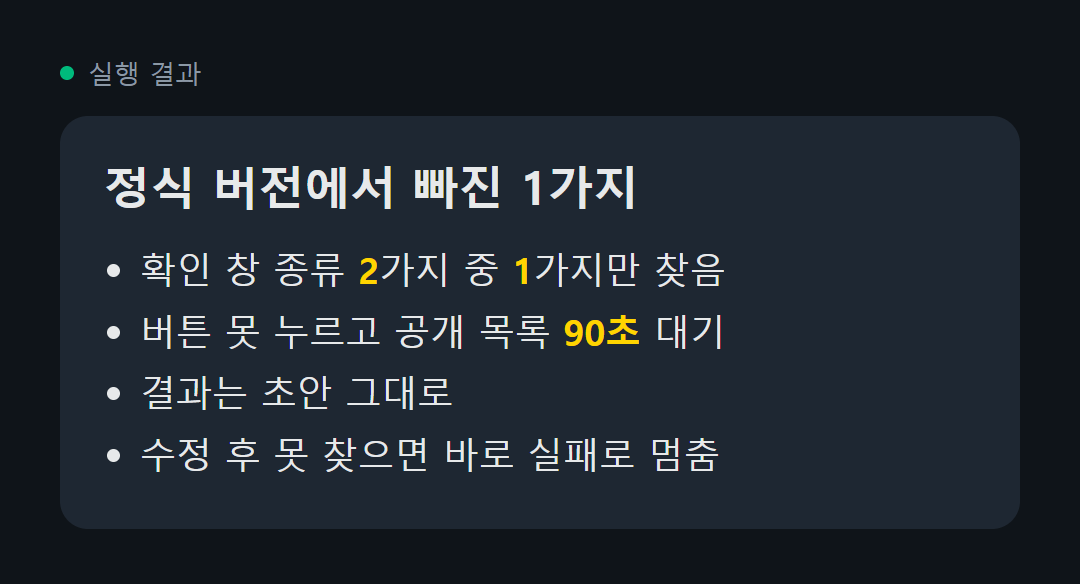
자동으로 글을 올려 두는 작업이 하나 있음. 처음엔 급하게 짠 임시 버전으로 돌렸고 문제없이 올라갔음. 그래서 깔끔한 정식 버전으로 다시 만들었는데, 두 번째 글 올리는 날 글이 공개가 안 되고 초안 그대로 남아 있었음.
원인은 마지막 「정말 올릴까요」 확인 창이었음. 이 창이 뜨는 종류가 2가지인데 정식 버전은 그중 1가지만 찾게 돼 있었음. 임시 버전은 둘 다 찾았는데 옮기면서 그게 빠진 거임. 더 아팠던 건 그다음임. 확인 버튼을 못 눌렀는데도 그냥 넘어가서 공개 목록을 90초나 기다렸고, 끝에는 「올라갔을 수도 있음」이라고 애매하게 보고함.
임시 버전을 정식으로 옮길 사람한테 권하는 거 3개. ① 임시 버전이 실제로 처리하던 경우를 하나씩 적어 두고 새 버전이랑 대조함 ② 꼭 눌러야 하는 버튼을 못 찾으면 기다리지 말고 그 자리에서 실패로 멈춤 ③ 고친 뒤엔 고치기 전 버전이 새 시험에서 진짜 떨어지는지부터 봄
고친 버전으로 다시 올려서 공개된 걸 확인하고 나서야 끝냄. 깔끔하게 다시 짠 코드가 지저분한 임시 코드보다 아는 게 적을 때가 생각보다 많음.
If you're a designer, bookmark this.
1. https://t.co/CgnzwKME3r - 1300+ design prompts with source code to build beautiful websites with AI in minutes.
2. https://t.co/rkr5EPVklx - navbar inspiration
3. https://t.co/r3M3UCRK0l - better footers
4. https://t.co/yfP2cwbPtz - CTA inspiration
5. https://t.co/xrnqcp6NRp - Real product design styles
6. https://t.co/HBefRXMFVM - Hero sections worth stealing
7. https://t.co/qaAFF77ntp - 3D icons for modern interfaces
8. https://t.co/iFjZs9zCsW - Glass UI components and effects
What did I miss?
AI 비서한테 내 사용 기록 다 보여 줘도 첫 화면에서만 도움된다는 연구 나옴
NTU(싱가포르 난양공대)랑 알리바바 쪽 연구진이 9월 말 arXiv에 올린 논문임. 휴대폰 앱을 대신 눌러 주는 AI 비서 얘기임. 지금 흔한 방식은 이 일과 관련 있어 보이는 내 과거 기록을 찾아 통째로 붙여 줌. 연구진이 재 보니 그 도움이 거의 첫 단계에서 다 쓰이고, 중간 단계부터는 기록 안 준 것과 별 차이 없었음.
그래서 만든 방법이 ExpActivator임. 기록을 미리 몰아 붙이지 않고, 지금 보는 화면과 비슷했던 과거 화면을 찾아 그때 누른 걸 참고로 줌. 「매일 이맘때 하던 일」 제안도 시간과 상황이 맞을 때만 하고 애매하면 아무 말 안 함.
숫자로 보면 중간 단계 성공률이 평균 28% 올랐고, 붙이는 기록 양은 기존 방식의 5분의 1 정도로 줄었음. 실험은 82명이 앱 135개를 쓴 기록으로 했음. 추가 학습 없이 붙이는 방식이라는 것도 눈여겨볼 점임.
우리 같은 사람한테 주는 뜻은 이거임. AI한테 일 맡길 때 관련 자료를 처음에 한꺼번에 몰아 주면 시작만 반짝 좋아짐. 단계마다 지금 필요한 예시 하나씩 꺼내 주는 쪽이 덜 헤매고 넣는 글자 양도 덜 듦.
AI 모델 고를 때 토큰 단가 말고 한 건당 비용부터 보셈
Artificial Analysis가 메타 새 모델 Muse Wonder를 시험했는데 지능 점수 52에 한 과제 푸는 데 4.52달러가 나옴. 같은 52점인 GPT-6.1 Sol은 0.72달러임. 점수는 같은데 돈은 6배 넘게 차이 남.
같은 시험 기준 한 과제당 비용(각자 높은 추론 설정)
① GPT-6.1 Sol 52점, 0.72달러로 제일 쌈. 반복 작업 많으면 먼저 시험해 볼 만함
② Gemini 4 Argon 53점, 1.99달러. 점수 대비 가격 균형이 좋음
③ Muse Wonder 52점, 4.52달러. 새로 나온 거라 눈에 띄지만 비용은 높은 편임
④ Claude Sonnet 5.5 56점, 5.46달러
⑤ Claude Opus 5.5 58점, 5.98달러로 점수 1위. 제일 어려운 일 맡길 때 씀
실수하기 쉬운 거 하나. Sonnet 5.5는 100만 토큰당 입력 2달러, 출력 10달러로 GPT-6.1 Sol이랑 단가표가 똑같음. 근데 한 과제에서 읽고 쓰는 양이 달라서 한 건 비용은 7배 넘게 벌어짐. 매일 도는 자동화면 싼 모델로 먼저 돌려 보고 결과가 모자랄 때만 한 칸씩 올리는 게 돈 덜 샘.
모델 바꿀 때마다 꺼내 보게 북마크해 두셈
AI한테 생각하지 말고 답만 하라고 해도 계속 생각함 ㄷㄷ
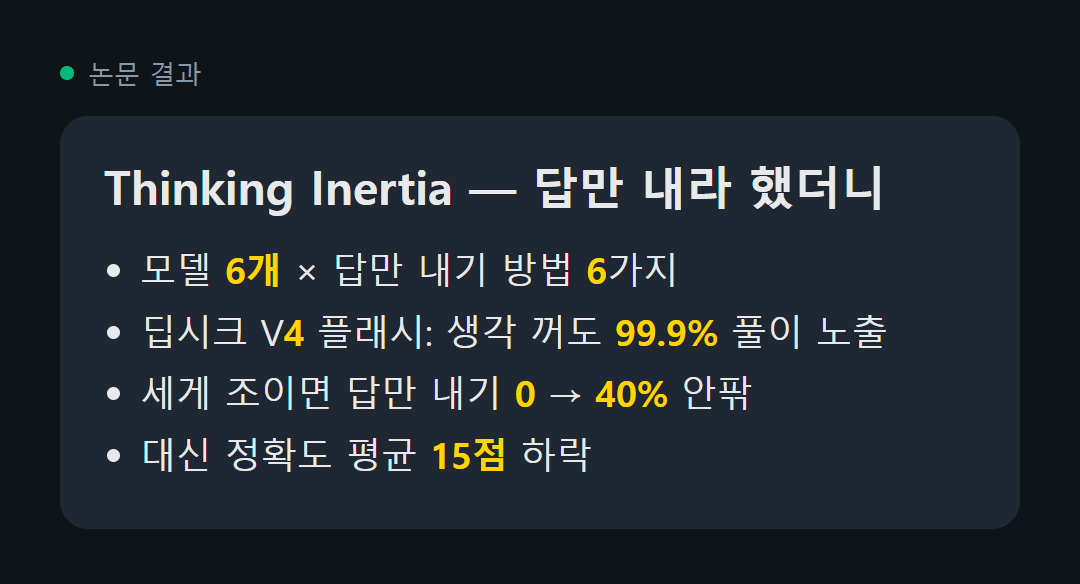
제임스 조우, 필립 토르 등 5명이 쓴 논문이고 NeurIPS 2026 채택으로 올라와 있음. 제목이 Thinking Inertia, 우리말로 하면 생각 관성이라는 뜻임. 모델 6개한테 풀이 없이 답만 내게 하는 방법 6가지를 써 보고, 예/아니오 문제·보기 고르는 문제·자유 서술 문제로 나눠서 답 앞에 뭐가 붙어 나오는지 셌음.
결과가 ㄹㅇ 웃김.
① 딥시크 V4 플래시는 생각 모드를 꺼 놨는데도 자유 서술 답의 99.9%에 풀이 과정이 그대로 보였음
② 자유 서술 문제에서 답만 내라고 세게 조이면 풀이 없는 답이 거의 0에서 40% 안팎까지 늘지만, 정확도가 평균 15점쯤 떨어짐
③ 같은 질문에 고를 답을 같이 주면 답만 내기가 훨씬 쉬워지고, 예/아니오·객관식은 정확도도 거의 그대로였음
답이 열려 있을수록 생각을 못 멈춘다는 얘기임. AI 답을 받아서 그대로 다음 단계로 넘기는 자동화를 돌리는 사람한테 바로 쓸모 있음. 답만 깔끔하게 받고 싶으면 「생각하지 마」 한 줄 넣는 것보다 고를 수 있는 답을 미리 정해 주는 게 잘 먹힘. 열린 질문은 억지로 조이면 정확도를 잃으니까 풀이는 그냥 두고 답 부분만 따로 받는 편이 나음.
발표자료 한 장씩 손으로 만드는 사람 이거 보셈
PPT Master라는 오픈소스가 해외에서 돌고 있음. PDF나 워드 문서, 아니면 주제 한 줄만 주면 AI가 진짜 파워포인트 파일로 뽑아 줌. 슬라이드가 통이미지로 박히지 않고 도형이랑 글자를 하나하나 고칠 수 있는 상태로 나옴. 이게 제일 큼.
→ 차트·표도 파워포인트에서 바로 고치는 형태로 넣을 수 있음
→ 화면 전환·애니메이션 지원
→ 발표자 메모를 읽어 주는 음성 내레이션까지 붙음
→ 클로드 코드·코덱스·커서·제미나이 CLI 같은 AI 코딩 도구 안에서 돌아감
저장소 직접 열어 보니 원글에 적힌 5만 9천 스타보다 늘어서 지금 6만 1천 개 넘음. 라이선스는 MIT임.
다만 한 번에 완성본이 나오진 않음. 만든 사람도 결과 품질은 붙이는 AI 모델 수준에 달렸다고 적어 뒀고, 마무리 손질은 직접 해야 함. 파이썬 설치도 필요해서 완전 처음이면 세팅에서 좀 막힐 수 있음.
보고서·제안서 자주 만드는 사람은 깔아 둘 만함
Stop building PowerPoints by hand.
PPT Master turns a PDF, a doc or just a topic into a real .pptx. editable shapes, native charts, transitions, even voice narration from the speaker notes.
Works inside Claude Code, Codex, Cursor and Gemini CLI.
59K GitHub stars. open-source.
https://t.co/SQysYTt5pd