Lawyers lose weeks manually extracting clauses from 500-page contracts.
Accountants lose days pulling data from scanned invoices.
Researchers lose hours copying tables from locked PDFs.
Manual copy-pasting is the quiet drain on modern productivity.
The team at OpenDataLab built a fix called MinerU.
It is a FREE, open-source parsing engine that turns complex documents, including PDFs, Word docs, Excel sheets, and images, into clean, LLM-ready Markdown and JSON.
Here is why it outperforms standard OCR:
→ It reads multi-column layouts like a human (top to bottom, not left to right)
→ It converts complex tables natively into clean HTML
→ It turns mathematical equations into flawless LaTeX
→ It uses sliding window processing to handle tens of thousands of pages without manual splitting
→ It features native OCR support for 109 languages
While commercial products lock these capabilities behind expensive subscriptions or per-page API limits, MinerU runs entirely on your local machine.
It even supports pure CPU environments if you lack a GPU.
Your sensitive data never leaves your laptop.
Free. Open-source. Nearly 70K stars.
There is a reason builders keep coming back to it!
Repo in 🧵↓
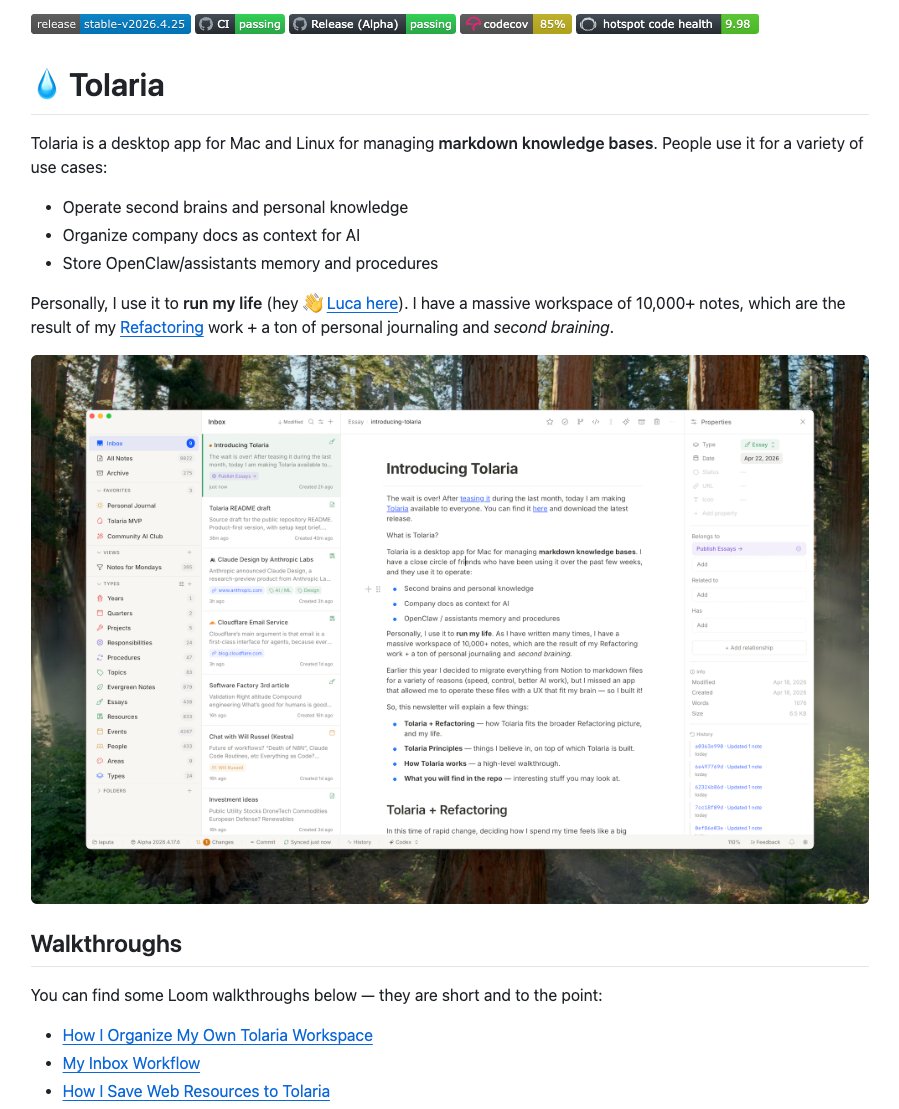
🚨 @Karpathy's LLM wiki concept just became a real Mac app.
It is called Tolaria, a free desktop app for Mac and Linux.
The goal is simple: give humans and AI agents a shared, native environment to build knowledge.
It writes like a modern block editor, but saves everything as plain markdown.
No databases, no proprietary formats, no vendor lock-in.
And because every vault is a Git repo, you get visual version history built right into the app.
The project is also a massive showcase of what AI-assisted engineering can do:
→ Built with Tauri, React, and Rust
→ 100K+ lines of code shipped
→ 3,000+ tests at 85% coverage
→ 9.9/10 code health score
→ 70+ architecture decision records
It includes an out-of-the-box MCP server so tools like Claude Code can read and edit your vault natively.
The Tolaria name and logo remain covered by the project trademark policy.
Best part?
Open source, free forever, no account required 🔥
License: AGPL-3.0-or-later.
repo link in 🧵↓
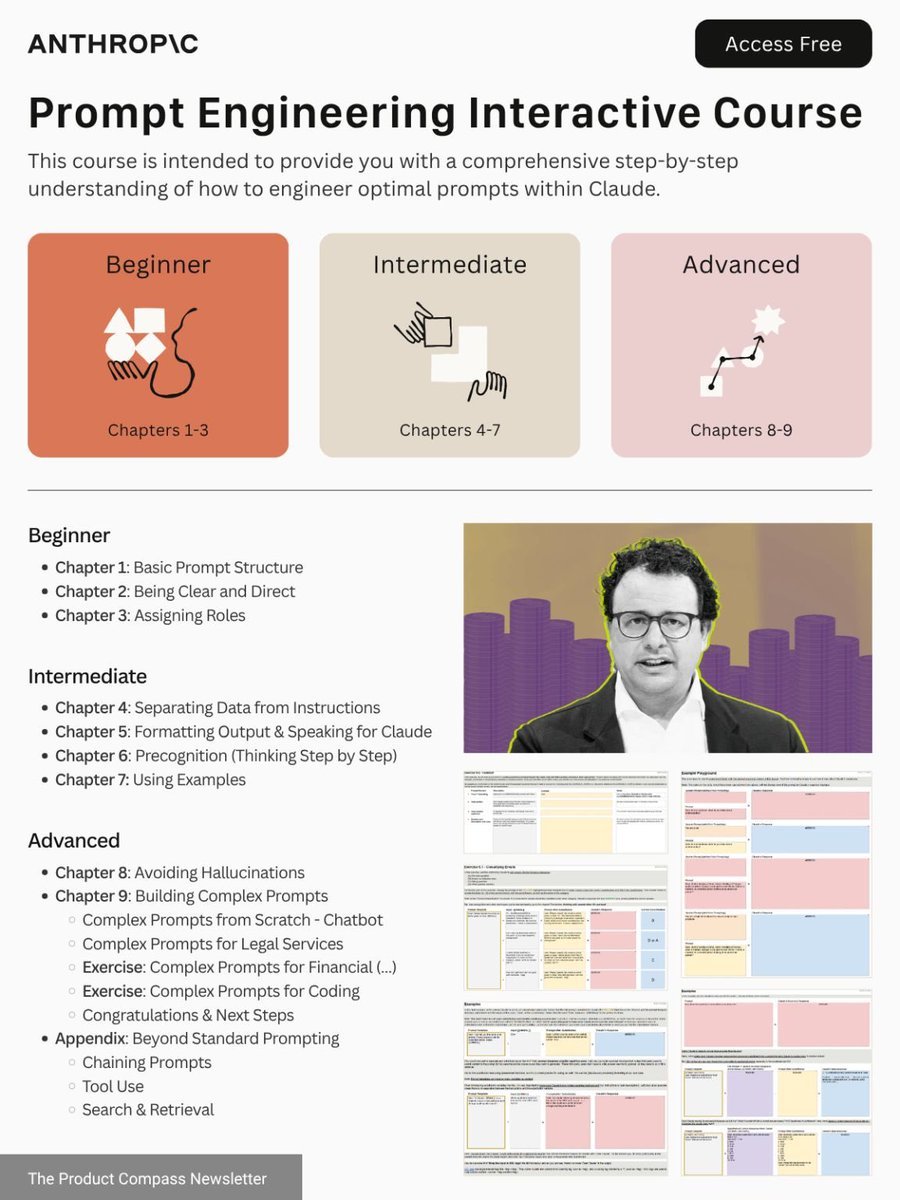
How to climb all 4 layers of Claude in one weekend:
(even if you just signed up yesterday)
✦ Level 1: Claude Chat (Saturday morning)
Go to claude .com/download. Install the app.
Pay the $20. Select Opus 4.6 + Extended Thinking.
Connect Slack, Drive, Notion through Connectors.
Stop writing long prompts. Prompt this instead:
"I want to [TASK] for [SUCCESS CRITERIA]. Use AskUserQuestion before you start."
Most people stay here forever.
You're leaving 90% of Claude untouched.
Claude Basics: https://t.co/jw2qdIbLxJ.
——
✦ Level 2: Claude Cowork (Saturday afternoon)
Go to 'Cowork'. Create a folder "Claude-Cowork."
4 subfolders. About me, template, project & outputs
Create about-me .md: what you do, how you do.
Create anti-ai-style .md: words you'd never say.
Set Global Instructions (Settings → Cowork → Edit):
"Always read my files first, never edit my originals, deliver everything to CLAUDE OUTPUTS."
You just killed prompting.
From now on, your prompt is 2 lines + your folder.
Move on to Cowork: https://t.co/uWTpOI3oyE
——
✦ Level 3: Skills + Plugins (Sunday morning)
Open Cowork. Type: "Use the skill-creator to help me build a skill for [your most repeated task]."
Claude interviews you. Answer and be specific.
It generates a SKILL .md. Test it: "When would you use this skill?" If the description is vague, fix it.
Upload: Settings → Capabilities → Skills → Upload.
Now it fires automatically. No slash command.
Install Plugins: Cowork > Customize > Browse plugin
Skills with about-me .md. Skill handles the process.
Voice file handles tone. Two layers simultaneously.
Set up Claude Skills: https://t.co/SAErc3JcLL
——
✦ Level 4: Code + Computer (Sunday afternoon)
Click the Code tab. Create a folder. Connect GitHub
(free account → Settings → Connectors).
Prompt: "Create a GitHub repo named [project]. Code everything. Don't ask for permissions."
Download VS Code. Install the Claude extension.
Turn on "Skip Permissions" to go 100x faster.
After your session, paste this: "Create a CLAUDE .md file with everything you learned about this project." Now Claude remembers your fonts, colors, and structure forever.
Claude code guide: https://t.co/UgE9xBXnm6
Claude Computer: Settings → Desktop app → turn on Browser use + Computer use.
Connect your phone with Dispatch. Text a task.
Schedule a recurring task: left sidebar → Scheduled → write the prompt → pick the frequency.
Claude Computer: https://t.co/ZfjFaaMknc
This is where you stop working inside Claude.
Claude starts working on your computer.
——
Saturday, you were prompting like it's ChatGPT.
Sunday, Claude is running your screen, building your website, & sending you text updates.
That's all 4 layers. In one weekend.
Most people are still “prompting” Claude.
Power users are building Skills stacks that turn Claude into an AI operating system.
Here are 17 FREE Claude Skills resources (this is the starter pack everyone will be using soon):
👇
OFFICIAL DOCS
• Best Practices — https://t.co/q89KKVPx4p
• Skills Documentation — https://t.co/nAlJgpkHgC
• API Reference — https://t.co/PScirSBakl
• MCP Documentation — https://t.co/WTATXFtr7o
BLOG POSTS
• Introducing Agent Skills — https://t.co/rqgMaKqmH3
• Engineering Blog — https://t.co/nCnlklvapP
• Skills Explained — https://t.co/oOOibsHBQD
• How to Create Skills — https://t.co/vGsln47uWa
• Skills for Claude Code — https://t.co/XoHF8OHSpR
• Frontend Design Skills — https://t.co/xdVqSlw2tC
EXAMPLE SKILLS
• Anthropic Official Library — https://t.co/b4qaS4TxAb
• Partner Skills Directory — https://t.co/QLEctCWvHQ
COMMUNITY LIBRARIES
• https://t.co/hQbHpwKmZt
• https://t.co/Dq7wpyp8Kl
• https://t.co/Dzkhsdb58T
• https://t.co/Os0yGL4r7e
If you're serious about:
• vibe coding
• shipping faster
• building agents
• making money with AI
You need this.
Bookmark now.
Retweet to save for later.
The people who build Skills early will dominate distribution.
🚨 Extracting data from PDFs just got solved.
Someone open-sourced a tool that turns PDFs into Markdown at 100 pages a second 🤯
It’s called OpenDataLoader.
It runs flawlessly on CPU and decodes tables, complex layouts, and nested structures like an absolute pro.
Best part?
100% free and open-source.
Grab the repo link in the 🧵↓
🚨 BREAKING: Claude can now build your YouTube channel like MrBeast’s strategy team — for free.
Here are 7 powerful prompts that can take your channel from $0 to $10,000👇
(Save this before everyone catches on)
Stop telling Claude: "build this"
Stop telling Claude: "write code"
Stop telling Claude: "fix this bug"
You're using a staff-level AI like a junior intern.
Claude performs best when you give:
• role
• constraints
• architecture expectations
• output format
• real-world context
Here are 10 production-grade Claude prompts you can copy-paste:
COURSE CLAUDE 1 JAM FULL GRATIS!!
Orang ini ngebawain course Claude 1 jam gratis dalam bahasa Inggris tapi udah gua kasih subtitle Bahasa Indonesianya juga
Buat kalian yang mau belajar Claude dan gamau ribet, nih udah gua sediain. Isinya itu gimana bisa bikin Claude otomatisasi kerjaan kita sehari-hari
Tonton aja videonya dibawah sini 👇👇, inget ditonton jangan di bookmarks doang ya wkwk
Shoutout to @JulianGoldieSEO for making this video, I'll translate it to Indonesian, so that people in Indonesian also can watch and study Claude.
Most people think Claude Code is only for developers.
It’s not.
A cardiologist just won Anthropic’s hackathon using it.
If you’ve used Cowork, you’re already 70% ready.
Here’s how a PM can start with Claude Code in 7 minutes:
1. Download VS Code
Free for Mac, Windows, Linux
→ https://t.co/MjBYjssirg
It’s just an app.
Like Slack or Notion.
Takes 2 minutes.
2. Install the Extension
Press Ctrl + Shift + X
Search “Claude Code”
Click Install
Tip: Disable GitHub Copilot Chat if it’s active.
3. Open Your Cowork Folder
File → Open Folder
Choose the same folder you use with Cowork.
Your CLAUDE.md and webconnectors already work.
You’re not starting from zero.
Most people miss this.
4. Set Model + Effort
Use:
/model → choose Opus 4.6
/effort → control thinking depth
The VS Code extension also gives UI buttons for this.
5. Your Connectors Follow You
If you connected:
• Gmail
• Slack
• Notion
They automatically work in Claude Code.
No setup.
No config.
6. Use Plan Mode
Before sending a request:
Press Shift + Tab
Claude will:
Propose a plan
Wait for approval
Then execute
You stay fully in control.
7. Let Auto Memory Work
Claude creates MEMORY.md per workspace.
It stores:
• Your workflow patterns
• Preferences
• Project context
Use /memory anytime to review or edit it.
Commands worth knowing:
/model → switch model
/effort → thinking depth
/context → token usage
/memory → manage memory
/loop → recurring tasks
/init → create CLAUDE.md
/review → review PR
/security-review → scan vulnerabilities
/compact → compress conversation
/remote-session → continue on phone
Pro tips most guides don’t tell you:
1️⃣ Pipedream MCP
1 connector → 1,000+ APIs
(Gmail, Stripe, Jira…)
2️⃣ Remote Control
Run claude remote-control in terminal
Continue from https://t.co/5eXK4Ijs7v or mobile
3️⃣ Cascading CLAUDE.md
Root file + folder overrides
Works like CSS inheritance
4️⃣ Cowork + Code combo
Cowork → /schedule (daily automation)
Code → /loop (live monitoring)
Same connectors.
Same CLAUDE.md.
It’s called “Claude Code”.
But you don’t need to be a developer to use it.
You just need to know how to direct AI.
And that’s the real skill now.
Anthropic Academy just dropped FREE AI courses that could replace a $10,000 degree.
$0. No catch. No gatekeeping.
Here are 6 AI courses that could separate you from everyone else in 2026:
Everyone is using Claude.
Only 1% are actually leveraging it.
The difference isn’t access.
It’s the prompt.
I tested 1000+ prompts.
Refined them. Broke them. Rebuilt them.
That’s how I moved into that 1%.
Today I generate $2,000–$4,000/month
Just by giving Claude better instructions.
Most people blame the AI.
The real problem is vague prompts.
So I’m giving away my Top 21 Claude Mega Prompts — copy-paste version.
Universal.
Tested.
Built for real results.
If you know how to instruct AI properly, you gain unfair leverage.
How to get it:
• Follow (so I can DM you)
• Comment “prompt”
• Like + RT
Miss a step = no access
I asked Claude Code to summarize my talk at the Sonar Summit.
Here are the 18 Claude Code tips I shared (and the complete talk below):
1. Always reference files directly using `@filename.py` or `@src/classes/` to constrain the agent.
2. CLAUDEmd → Before writing any code, describe your approach and wait for approval. Ask clarifying questions if requirements are ambiguous.
3. CLAUDEmd → If a task requires changes to more than 3 files, stop and break it into smaller tasks first.
4. Consider creating a `/decompose` command that takes a plan and outputs a list of small tasks to implement one at a time.
5. CLAUDEmd → Describe your tech stack, folder structure, coding conventions, and any anti-patterns you'd like to avoid.
6. Use `/memory` to save any personal preferences that should persist across projects.
7. Create a `.claudeignore` file containing any files the agent shouldn't read or modify.
8. CLAUDEmd → When there's a bug, start by writing a test that reproduces it, then fix it until the test passes.
9. CLAUDEmd → After writing code, list what could break and suggest tests to cover it.
10. Create a `/review-xyz` command that checks for correctness, edge cases, and consistency with codebase patterns.
11. Create a `/test` command that invokes a test sub-agent that runs your test suite.
12. CLAUDEmd → When I say something is wrong, ask clarifying questions before rewriting.
13. Use the `/rewind` command to rollback changes, then give more specific feedback and try again.
14. Use Git worktrees to run parallel agent sessions on different tasks.
15. Use `claude --dangerously-skip-permissions` on a disposable environment to iterate faster while still being able to recover when things go wrong.
16. CLAUDEmd → Every time I correct you, add a new rule to the CLAUDE .md file so it never happens again.
17. Convert any successful, repeatable prompt into a workflow by saving it as a slash command or a skill.
18. Create sub-agents for any repetitive tasks that require a large context or specialized analysis. Reuse these agents without polluting your main context.
🚨 Give your AI agent unrestricted internet access now.
@Scrapling_dev just crossed 20k ⭐ on GitHub 🤯
Here is why it is the ultimate backbone for modern web agents.
It solves the "Brittle Tool" problem.
When a website renames a CSS class, normal bots crash.
Scrapling adapts 🙌
Key Specs:
→ Stealth Mode: Undetectable TLS fingerprints.
→ Smart Routing: Mixes HTTP and Headless for max speed.
→ Performance: 10x faster serialization.
→ Universal: Works everywhere, from CLI to MCP.
The Setup:
1️⃣ Install once: pip install "scrapling[ai]"
2️⃣ Connect the MCP server.
✅ Done.
The best part?
It's 100% FREE and open-source.
I've included the link to Scrapling's repo in the 🧵 ↓
Beyond the winners of our "Built with Opus 4.6 Claude Code Hackathon," there were so many amazing projects that deserve a shoutout.
Today I want to highlight Pasal by Ilham Putra. 280 million Indonesians can't easily search their own laws. Pasal fixes that.
Run OpenClaw for free.
No tokens, no subscriptions, no cloud.
Here’s the GLM 4.7 Flash + Ollama setup.
→ Install Ollama
→ ollama run glm4.7-flash
→ Wait for the 25GB download
→ Link Ollama to OpenClaw
→ Restart Gateway
→ Ask Gateway what model it’s running
Now your agent runs locally and you can spam tasks all day.
Save this video, you’ll never pay per token again.
Want the SOP? DM me. 💬
I solved OpenClaw's memory issue.
(At least, this is the best solution I tried so far).
And yes. Big surprise.
I solved it using RAG.
All major models can now take millions of tokens as context. But the issue remains...
The undisputed number #1 reason your agent is stupid and forgets simple things is because you're bloating context.
So here's how I solved it with OpenClaw.
1️⃣ I installed PostgreSQL + pgvetor
I run my OpenClaw on a Hetzner server, so I installed the database + pgvector extension directly on here.
2️⃣ Create a search tool
Ask your agent to create a search tool for itself.
Every time you ask it to remember something, it should:
- Label the memory
- Create a vector from the label
- Store the label, vector, and raw text in the database
Every time it's asked something it doesn't know, the FIRST thing it should always do is to use the search tool.
3️⃣ Memory CRON/heartbeat
The agent can write to its memory file on-the-go.
Consider this short-term memory.
On a scheduled CRON (or heartbeat), it should "flush" its own short-term memory and store it in the database.
Now, on every new session, the agent has very little context. The most important one is the description of using the search tool to enhance itself based on the task it's given.
✨ Major upsides
- MUCH better memory
- MUCH smarter
- MUCH less token-greedy
👎 Major downsides
- More moving parts
- Complex for non-devs
- Ongoing maintenance
Still. Benefits outweigh the cons here.
If you REALLY want to use OpenClaw professionally, I recommend that you use this 3-tool combo as a base:
- OpenClaw itself
- PostgreSQL + pgvector
- n8n (for API proxies/security)
A warning to my family.
The world as you know it is about to be massively disrupted.
I wasn't going to make this, but I had no choice.
You'll understand why after watching this.
I've used OpenClaw every single day for 50+ days.
Through ClawdBot. Through MoltBot. Through the rebrand and OpenAI partnership.
I made the setup video in the official docs. I built Clawdiverse. I contributed a skill to ClawHub.
Nobody else can tell you what happens after the first month. Here's everything I learned: 20 real use cases, what actually breaks, and every prompt to set them up yourself:
0:00 Nobody has been here for 50 days yet
1:02 What is OpenClaw?
1:49 What 50 days actually looks like
4:53 #1 Morning briefing
5:54 #2 AI art for my e-ink display
7:30 #3 Auto-updates & backups
8:42 #4 Background checks that caught my Netflix payment fail
10:44 #5 Research with parallel sub-agents
12:09 #6 YouTube analytics in plain English
14:51 #7 /summarize any URL
15:28 #8 "Go fix everything" — server migration
16:57 #9 Coding from my phone
17:35 #10 Email triage (draft-only mode)
18:01 #11 Calendar via WhatsApp for my wife
18:35 #12 Voice note transcription
19:25 #13 Coffee shops, weather, reminders
20:59 #14 My agent helped my friend set up for 3 hours in Polish
23:10 #15 Why I migrated to Discord (biggest upgrade)
26:02 #16 Bookmarks replaced Raindrop
27:24 #17 Semantic search across 3,000 Obsidian notes
29:21 #18 WordPress rickroll honeypot
31:02 #19 Excalidraw diagrams via MCP
31:53 #20 Home automation
33:46 Starter pack: 3 workflows for day one
34:29 The honest part — what breaks
42:03 My 50-day scorecard


![rubenhassid's tweet photo. How to climb all 4 layers of Claude in one weekend:
(even if you just signed up yesterday)
✦ Level 1: Claude Chat (Saturday morning)
Go to claude .com/download. Install the app.
Pay the $20. Select Opus 4.6 + Extended Thinking.
Connect Slack, Drive, Notion through Connectors.
Stop writing long prompts. Prompt this instead:
"I want to [TASK] for [SUCCESS CRITERIA]. Use AskUserQuestion before you start."
Most people stay here forever.
You're leaving 90% of Claude untouched.
Claude Basics: https://t.co/jw2qdIbLxJ.
——
✦ Level 2: Claude Cowork (Saturday afternoon)
Go to 'Cowork'. Create a folder "Claude-Cowork."
4 subfolders. About me, template, project & outputs
Create about-me .md: what you do, how you do.
Create anti-ai-style .md: words you'd never say.
Set Global Instructions (Settings → Cowork → Edit):
"Always read my files first, never edit my originals, deliver everything to CLAUDE OUTPUTS."
You just killed prompting.
From now on, your prompt is 2 lines + your folder.
Move on to Cowork: https://t.co/uWTpOI3oyE
——
✦ Level 3: Skills + Plugins (Sunday morning)
Open Cowork. Type: "Use the skill-creator to help me build a skill for [your most repeated task]."
Claude interviews you. Answer and be specific.
It generates a SKILL .md. Test it: "When would you use this skill?" If the description is vague, fix it.
Upload: Settings → Capabilities → Skills → Upload.
Now it fires automatically. No slash command.
Install Plugins: Cowork > Customize > Browse plugin
Skills with about-me .md. Skill handles the process.
Voice file handles tone. Two layers simultaneously.
Set up Claude Skills: https://t.co/SAErc3JcLL
——
✦ Level 4: Code + Computer (Sunday afternoon)
Click the Code tab. Create a folder. Connect GitHub
(free account → Settings → Connectors).
Prompt: "Create a GitHub repo named [project]. Code everything. Don't ask for permissions."
Download VS Code. Install the Claude extension.
Turn on "Skip Permissions" to go 100x faster.
After your session, paste this: "Create a CLAUDE .md file with everything you learned about this project." Now Claude remembers your fonts, colors, and structure forever.
Claude code guide: https://t.co/UgE9xBXnm6
Claude Computer: Settings → Desktop app → turn on Browser use + Computer use.
Connect your phone with Dispatch. Text a task.
Schedule a recurring task: left sidebar → Scheduled → write the prompt → pick the frequency.
Claude Computer: https://t.co/ZfjFaaMknc
This is where you stop working inside Claude.
Claude starts working on your computer.
——
Saturday, you were prompting like it's ChatGPT.
Sunday, Claude is running your screen, building your website, & sending you text updates.
That's all 4 layers. In one weekend.](https://pbs.twimg.com/media/HFc-d84bMAAKsWw.jpg)






![DataChaz's tweet photo. 🚨 Give your AI agent unrestricted internet access now.
@Scrapling_dev just crossed 20k ⭐ on GitHub 🤯
Here is why it is the ultimate backbone for modern web agents.
It solves the "Brittle Tool" problem.
When a website renames a CSS class, normal bots crash.
Scrapling adapts 🙌
Key Specs:
→ Stealth Mode: Undetectable TLS fingerprints.
→ Smart Routing: Mixes HTTP and Headless for max speed.
→ Performance: 10x faster serialization.
→ Universal: Works everywhere, from CLI to MCP.
The Setup:
1️⃣ Install once: pip install "scrapling[ai]"
2️⃣ Connect the MCP server.
✅ Done.
The best part?
It's 100% FREE and open-source.
I've included the link to Scrapling's repo in the 🧵 ↓](https://pbs.twimg.com/media/HCe6KPMbkAALvux.jpg)