Hey everyone! 👋
I have recently started this new account and I’m looking to connect with folks in:
🚀 DevOps
🌍 Open Source
☁️ Cloud
🔐 Security
I'll be sharing cool insights on the latest trends in DevOps and all things cloud. Let’s connect and geek out together! 😎
#DevOpsCommunity #CloudComputing #OpenSource #TechTrends #CloudSecurity
🚀 𝗦𝘁𝗮𝘁𝘂𝘀𝗖𝗮𝗸𝗲 & 𝗖𝗿𝗼𝗻 𝗠𝗼𝗻𝗶𝘁𝗼𝗿𝗶𝗻𝗴: 𝗠𝘆 𝗟𝗮𝘁𝗲𝘀𝘁 𝗧𝗼𝗼𝗹𝘀 🛠️
I’ve been checking out 𝗦𝘁𝗮𝘁𝘂𝘀𝗖𝗮𝗸𝗲 lately, and it’s quickly becoming one of my favorite tools for keeping websites and servers in check. Here’s what it’s good for:
🔍 𝗦𝘁𝗮𝘁𝘂𝘀𝗖𝗮𝗸𝗲 Highlights:
• 𝗨𝗽𝘁𝗶𝗺𝗲 𝗠𝗼𝗻𝗶𝘁𝗼𝗿𝗶𝗻𝗴: Alerts you if your site goes down.
• 𝗣𝗲𝗿𝗳𝗼𝗿𝗺𝗮𝗻𝗰𝗲 𝗧𝗿𝗮𝗰𝗸𝗶𝗻𝗴: Keeps an eye on response times to ensure things stay speedy.
• 𝗦𝗦𝗟 & 𝗗𝗼𝗺𝗮𝗶𝗻 𝗠𝗼𝗻𝗶𝘁𝗼𝗿𝗶𝗻𝗴: No more surprises when certificates or domains are about to expire!
✨ 𝗖𝗿𝗼𝗻 𝗠𝗼𝗻𝗶𝘁𝗼𝗿𝗶𝗻𝗴:
If you’re using 𝗰𝗿𝗼𝗻 𝗷𝗼𝗯𝘀 to automate tasks, StatusCake will monitor them and alert you if anything goes wrong or if they don’t run on time. Super useful for avoiding any hiccups! 😅
Loving how it simplifies monitoring across the board. Can’t wait to dig in more and integrate it into my DevSecOps stack! 💡
#DevSecOps #StatusCake #CronJobs #Automation #Monitoring #WebSecurity #LearningInPublic #CloudOps
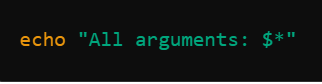
3️⃣ $* – All Arguments (As One String):
Groups all the script inputs into a single string. Useful when passing all inputs together.
Example:
Running ./script.sh apple banana will output:
4️⃣ $# – Number of Arguments:
This gives the count of how many arguments were passed to your script.
Example:
If you run ./script.sh apple banana, it will output:
Learning these makes handling scripts so much easier! 🚀 Who else is digging deeper into scripting? 😎 #ShellScripting #Bash #DevOpsLearning #LinuxTips #TechExplained #DevSecOps #Security #LearningJourney
💡 Understanding Special Variables in Shell Scripting💡
These built-in variables can help you manage script inputs and handle command status like a pro! 🖥️
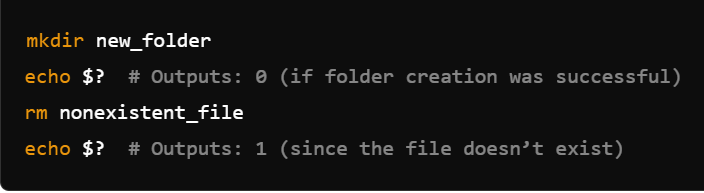
1️⃣ $? – Last Command Status:
This stores the exit status of the last executed command.
0 = Success ✅
Any non-zero value = Error ❌
Example:
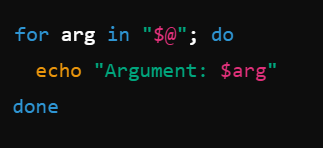
2️⃣ $@ – All Arguments (Individually):
Represents all the arguments passed to your script, treating each one as a separate string. Perfect for looping through inputs.
Example:
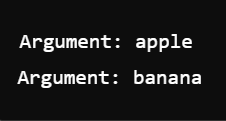
If you run ./script.sh apple banana, this will output:
Getting back to the basics of 𝗦𝗵𝗲𝗹𝗹 𝗦𝗰𝗿𝗶𝗽𝘁𝗶𝗻𝗴 with a few handy tasks! 💻
1️⃣ 𝗧𝗺𝘂𝘅 𝗳𝗼𝗿 𝗠𝘂𝗹𝘁𝗶𝘁𝗮𝘀𝗸𝗶𝗻𝗴:
Learning to split screens in Tmux to manage multiple servers.
𝗛𝗼𝗿𝗶𝘇𝗼𝗻𝘁𝗮𝗹 𝘀𝗽𝗹𝗶𝘁: Ctrl + b, then Shift + ".
𝗩𝗲𝗿𝘁𝗶𝗰𝗮𝗹 𝘀𝗽𝗹𝗶𝘁: Ctrl + b, then Shift + 5.
Super useful for monitoring different sessions at once! 🎯
2️⃣ 𝗣𝗿𝗶𝗻𝘁𝗶𝗻𝗴 𝗧𝗶𝗺𝗲 𝗘𝘃𝗲𝗿𝘆 𝗦𝗲𝗰𝗼𝗻𝗱:
A quick script to print the date and time every second for 10 seconds.
💡 𝗣𝗿𝗼 𝗧𝗶𝗽: Use awk to format the output and show only the day, date, and time:
This helps when you only need specific fields!
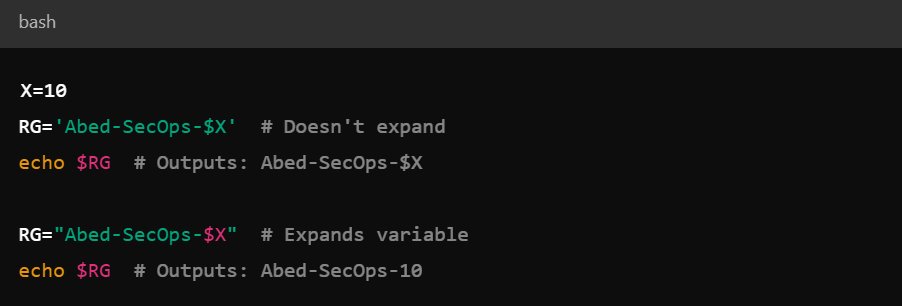
3️⃣ 𝗨𝗻𝗱𝗲𝗿𝘀𝘁𝗮𝗻𝗱𝗶𝗻𝗴 𝗩𝗮𝗿𝗶𝗮𝗯𝗹𝗲𝘀:
When working with variables, single quotes don't expand variables, while double quotes do.
Example:
Learning the difference has been super helpful for managing dynamic data! 🚀
Hope this helps those diving into shell scripting—let's grow together! 💪 #ShellScripting #Tmux #Linux #DevSecOps #DevOpsLearning
Continuing my DevSecOps journey! 🚀 Diving into some amazing tools:
🔍 SonarQube for code quality & security
🔐 HashiCorp Vault for secrets & passwords
🐳 Trivy for container image scanning
🛡️ Ansible Vault for secure secret management
🕵️♂️ CISO insights for staying on top of cybersecurity trends
Loving the process so far—so much to learn and explore! 😎 #DevSecOps #CloudSecurity #TechJourney #DevOpsTools
Starting to dive into DevSecOps tools! 💻🔒
Let’s see where this journey takes me. Will drop my learnings along the way! 🚀
Suggestions are always welcome! 🙌
#DevSecOps#DevOps#Cloud#Learning
🎯 𝗝𝗼𝗶𝗻 𝘁𝗵𝗲 𝗖𝗵𝗮𝗹𝗹𝗲𝗻𝗴𝗲: Whether you’re a beginner or a seasoned pro, this is your chance to learn, share, and grow with the community. 𝗙𝗼𝗹𝗹𝗼𝘄 𝗺𝗲 to stay updated on each post, and feel free to ask questions or share your experiences. Let’s learn Docker together! 💻
👉 𝗛𝗼𝘄 𝘁𝗼 𝗣𝗮𝗿𝘁𝗶𝗰𝗶𝗽𝗮𝘁𝗲:
1. 𝗙𝗼𝗹𝗹𝗼𝘄 𝗺𝗲 here on LinkedIn for daily Docker insights.
2. 𝗧𝗮𝗴 𝘆𝗼𝘂𝗿 𝗳𝗿𝗶𝗲𝗻𝗱𝘀 𝗮𝗻𝗱 𝗰𝗼𝗹𝗹𝗲𝗮𝗴𝘂𝗲𝘀 who want to learn Docker!
3. Share your thoughts, challenges, or tips using hashtag#𝟭𝟱𝗗𝗮𝘆𝘀𝗢𝗳𝗗𝗼𝗰𝗸𝗲𝗿 so we can all grow together.
#Docker #DockerChallenge #DevOps #CloudComputing #Containers #Kubernetes #CloudNative #Microservices #TechLearning #CI_CD #Automation #Containerization #DockerBasics #SRE #CloudEngineer #SoftwareDevelopment #TechCommunity #15DaysOfDocker
🚀 𝗔𝗻𝗻𝗼𝘂𝗻𝗰𝗶𝗻𝗴 𝗠𝘆 𝗗𝗼𝗰𝗸𝗲𝗿 𝗟𝗲𝗮𝗿𝗻𝗶𝗻𝗴 𝗖𝗵𝗮𝗹𝗹𝗲𝗻𝗴𝗲! 🚀
I’m starting a 𝗗𝗼𝗰𝗸𝗲𝗿 𝗖𝗵𝗮𝗹𝗹𝗲𝗻𝗴𝗲 to help everyone—whether you’re new to DevOps or looking to level up—master Docker, from the basics all the way to advanced concepts. 🌟
For the next 𝟭𝟱 𝗱𝗮𝘆𝘀, I’ll be posting daily updates on Docker fundamentals, tips, best practices, and hands-on examples. This challenge will cover everything from setting up Docker to advanced use cases in production environments!
Top 5 DevOps Tools Every Engineer Should Know in 2024 🚀
1. Docker 🐳 for containerization
2. Kubernetes 🚢 for orchestration
3. Terraform 🛠️ for IaC
4. Prometheus & Grafana 📊 for monitoring
5. Ansible ⚙️ for automation
Which tool is your go-to? Drop your favorite in the comments! 👇 Let's discuss! 💬
#DevOps #Cloud #DevOpsTools #Kubernetes #Terraform #Automation #TechCommunity