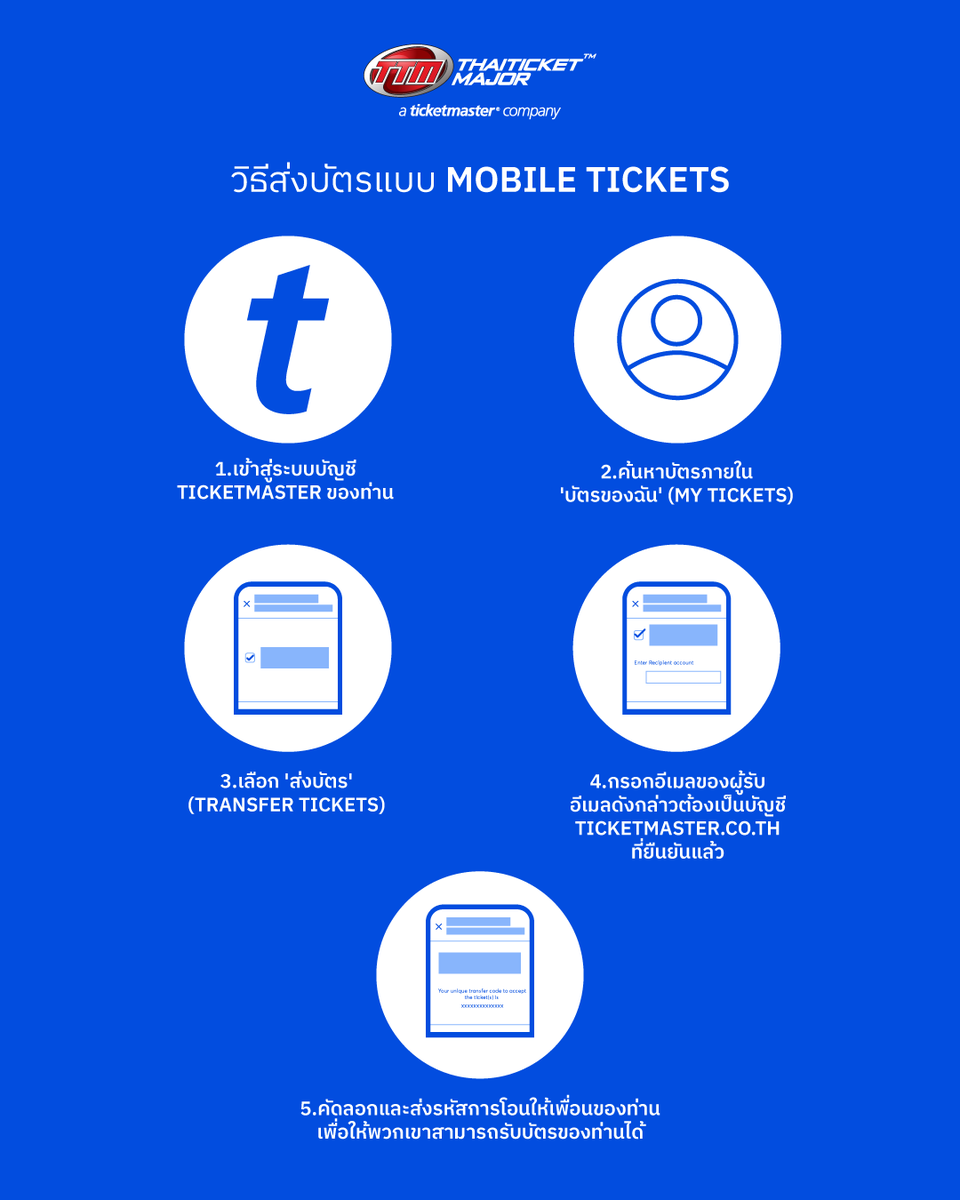
วิธีการโอนบัตร Mobile Tickets ของ https://t.co/gxW83pHvNr ✨🎫
โอนให้เพื่อนง่าย ๆ ไม่ต้องกลัวพลาด! ดูขั้นตอนการ ส่งบัตร–รับบัตร แบบครบทุกขั้นตอนที่นี่
🎟 วิธีส่งบัตรแบบ Mobile Tickets
1️⃣เข้าสู่ร��บบบัญชี Ticketmaster ของท่าน
2️⃣ค้นหาบัตรภายใน 'บัตรของฉัน' (My Tickets)
3️⃣เลือก 'ส่งบัตร' (Transfer Tickets)
4️⃣กรอกอีเมลของผู้รับ อีเมลดังกล่าวต้องเป็นบัญชี https://t.co/9I5CntCTL9 ที่ยืนยันแล้ว
5️⃣คัดลอกและส่งรหัสการโอนให้เพื่อนของท่าน เพื่อให้พวกเขาสามารถรับบัตรของท่านได้
🎟 วิธีรับบัตรแบบ Mobile Tickets
1️⃣ในบัญชี Ticketmaster ของท่าน คลิก 'บัญชีของฉัน' (My Account) ที่มุมขวาบน แล้วเลือก 'รับการโอนบัตร' (Receive Transfer)
2️⃣กรอกรหัสการโ���นเฉพาะที่ได้รับจากเพื่อนของท่าน แล้วคลิก 'ยืนยัน' (Submit)
3️⃣บัตรที่จะถูกโอนจะปรากฏเป็นรายการ หลังจากตรวจสอบบัตรของท่านแล้ว คลิก 'ยอมรับการโอนบัตร' (Accept Ticket Transfer) เพื่อรับบัตร
4️⃣ดูบัตรของท่านได้โดยคลิก 'ที่ได้รับ' (Received) ในเมนู My Tickets ของท่าน
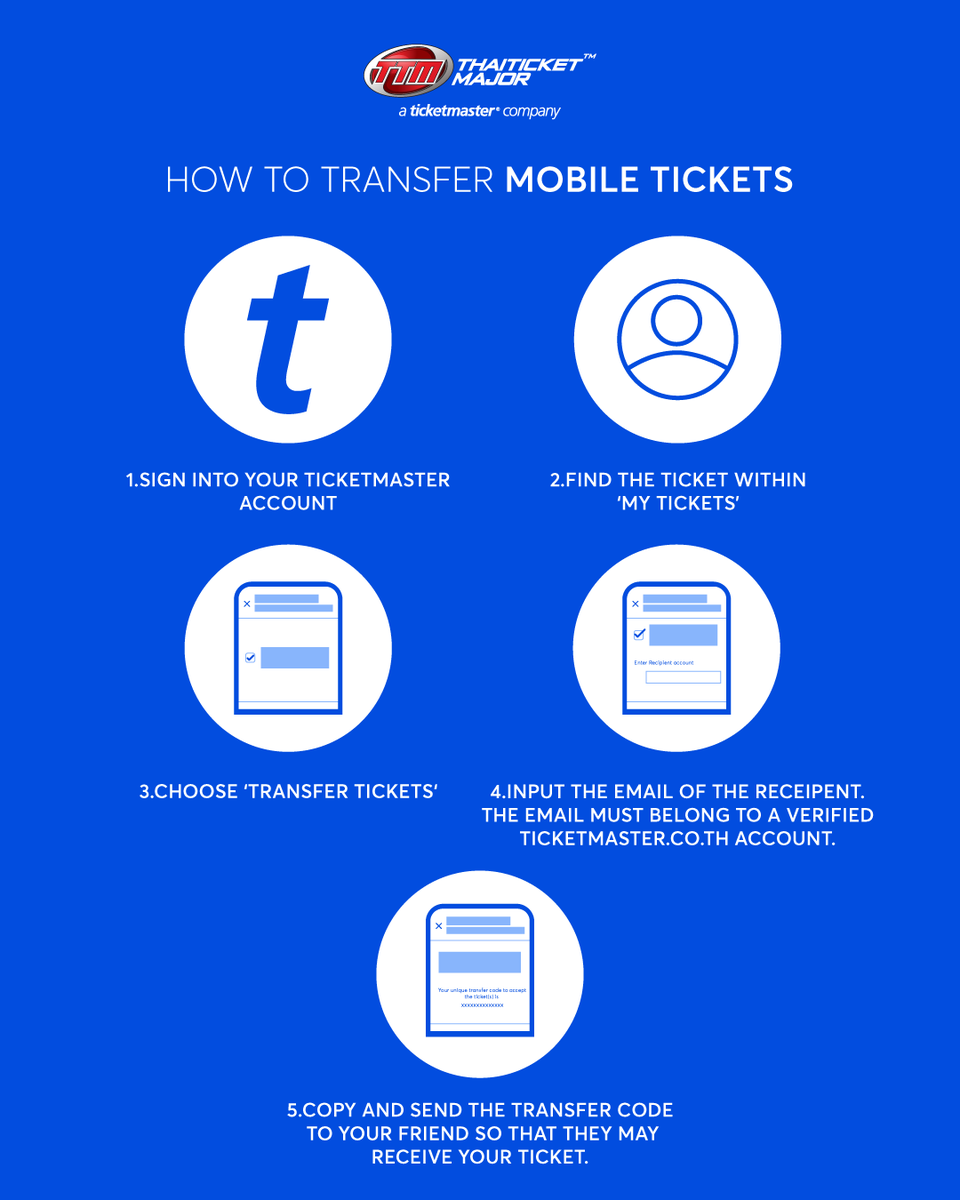
🎟How To Transfer Mobile Tickets
1️⃣Sign into your Ticketmaster account
2️⃣Find the ticket within ‘My Tickets’
3️⃣Choose ‘Transfer Tickets‘
4️⃣Input the email of the receipent. The email must belong to a verified https://t.co/9I5CntCTL9 account.
5️⃣Copy and send the transfer code to your friend so that they may receive your ticket.
🎟 How To Accept Mobile Tickets
1️⃣In your Ticketmaster Account, click ‘My Account’ in the top right and select ‘Receive Transfer’.
2️⃣Enter the unique transfer code received from your friend and click ‘Submit’.
3️⃣Tickets to be transferred will be listed. After confirming your tickets, click ‘Accept Ticket Transfer’ to accept the ticket(s).
4️⃣View your tickets by clicking ‘Received’ in your My Tickets.
#TicketMasterTH
I compiled them into a file so it’s easier for me to look at them. It took me two photobooks to complete and I had so much fun arranging them especially the side and front profile shots! 😚💙💜💗❤️🖤
I totally love the outcome 🥰





![TtoAProjectTH's tweet photo. 𝘌𝘯𝘦𝘳𝘨𝘦𝘵𝘪𝘤, 𝙆𝙀𝙀𝙋 𝙄𝙏 𝙈𝘼𝙉𝙄𝘾
𝘐'𝘮 𝘯𝘦𝘷𝘦𝘳 𝘧𝘢𝘭𝘭𝘪𝘯𝘨 𝘥𝘰𝘸𝘯 𓆩❤️🔥𓆪
#TtoAProjectTH
Let's dress up! - 2026 PLAVE World Tour [KEEP IT MANIC] in Bangkok
#KEEP_IT_MANIC_in_Bangkok
#2026_PLAVE_World_Tour_in_Bangkok
🤍🩶❤️🖤
เตรียมชุดให้พร้อม แล้วมาสนุกด้วยกันวันคอนเสิร์ตนะ!
Dress Code เป็นเพียงกิจกรรมร่วมสนุกเล็ก ๆ เพื่อสร้างสีสันภายในงาน ไม่ใช่การบังคับแต่อย่างใด ทุกท่านสามารถแต��งตัวในสไตล์ที่ชอบและมั่นใจได้เต็มที่ 💃✨](https://pbs.twimg.com/media/HPaNf2vbEAAl0Pq.jpg)