Shell scripting is the one skill that separates DevOps engineers who panic during incidents from those who fix them in minutes.
I spent 8 years in Linux before I got into DevOps.
I wrote a minimalistic ebook on Linux shell scripting that will give you enough knowledge to start writing any shell scripts
I'm giving it away for free.
Follow me + retweet + comment "Living devops" and I'll send you the ebook in DM.
Some low-level design patterns for senior engineers:
1. Read your writes:
https://t.co/q6kgC0XQL9
2. Asynchronous Processing with Futures:
https://t.co/F4eTbfMpM0
3. Request Collapsing:
https://t.co/ER3FiYpKDK
4. What are threads?
https://t.co/Px7EV6rVvU
5. Ordering requests with threads:
https://t.co/aYsYxqrFcm
6. Event Bus Publishers and Subscribers:
https://t.co/ehdBrRmrLc
7. What is a software client library?
https://t.co/MC4D9rXs7J
8. Classes and package structuring:
https://t.co/mKNLwiVfGf
9. Dependency Inversion:
https://t.co/bTPTYDrUO2
10. What is backpressure:
https://t.co/1U3FCQICcg
If you work as a software engineer, you are probably using a few of these patterns already :D
Cheers!
#SoftwareEngineering #LowLevelDesign #DesignPatterns
15 Git Commands you probably didn't know about:
1. 𝐠𝐢𝐭 𝐥𝐨𝐠 --𝐚𝐮𝐭𝐡𝐨𝐫="<𝐚𝐮𝐭𝐡𝐨𝐫>": Shows commits authored by the specified author.
2. 𝐠𝐢𝐭 𝐝𝐢𝐟𝐟 --𝐧𝐚𝐦𝐞-𝐨𝐧𝐥𝐲: Shows only the names of files that have differences between two commits or branches.
3. 𝐠𝐢𝐭 𝐩𝐫𝐮𝐧𝐞: Removes unreachable objects and refs from the local repository.
4. 𝐠𝐢𝐭 𝐝𝐢𝐟𝐟 --𝐬𝐭𝐚𝐠𝐞𝐝: Show the differences between the staging area and the last commit.
5. 𝐠𝐢𝐭 𝐫𝐞𝐟𝐥𝐨𝐠: Shows a log of all the changes made to the refs (branches, tags) in the repository.
6. 𝐠𝐢𝐭 𝐫𝐞𝐬𝐭𝐨𝐫𝐞 <𝐟𝐢𝐥𝐞_𝐧𝐚𝐦𝐞>: Restores the specified file to its state in the last commit, discarding any changes made to the file in the working directory.
7. 𝐠𝐢𝐭 𝐛𝐢𝐬𝐞𝐜𝐭: Use binary search to find the commit that introduced a bug.
8. 𝐠𝐢𝐭 𝐛𝐥𝐚𝐦𝐞 <𝐟𝐢𝐥𝐞_𝐧𝐚𝐦𝐞>: Shows the author and commit details for each line of a file.
9. 𝐠𝐢𝐭 𝐬𝐡𝐨𝐫𝐭𝐥𝐨𝐠: Summarizes the git log output, grouping commits by author.
10. 𝐠𝐢𝐭 𝐥𝐨𝐠 -𝐒 <𝐬𝐭𝐫𝐢𝐧𝐠>: Finds commits that added or removed the given string.
11. 𝐠𝐢𝐭 𝐦𝐞𝐫𝐠𝐞 --𝐬𝐪𝐮𝐚𝐬𝐡 <𝐛𝐫𝐚𝐧𝐜𝐡_𝐧𝐚𝐦𝐞>: Merge a branch, but condense all changes into a single commit.
12. 𝐠𝐢𝐭 𝐟𝐞𝐭𝐜𝐡 --𝐩𝐫𝐮𝐧𝐞: Fetch changes from a remote repository and clean up deleted remote branches.
13. 𝐠𝐢𝐭 𝐬𝐡𝐨𝐰 <𝐜𝐨𝐦𝐦𝐢𝐭>:<𝐟𝐢𝐥𝐞𝐧𝐚𝐦𝐞>: Show the file as it was at the specified commit.
14. 𝐠𝐢𝐭 𝐧𝐨𝐭𝐞𝐬: Allows you to add notes to individual commits without modifying the commit message.
15. 𝐠𝐢𝐭 𝐜𝐥𝐞𝐚𝐧: Removes untracked files from the working directory.
What else you would add to this list?
***
♻️ Repost to help others in your network.
Join my free newsletter: https://t.co/sLUcqnCd1V
Okta is hiring for a Platform Operations Engineer. An entry-level role where you work closely with the SRE team. Potential career growth into Site Reliability Engineering itself.
Experience with GoLang, Terraform preferred!
If you or anyone you know is interested, please reach out!
#Hiring #Okta #DevOps #SRE
We're giving away FREE 1 Month KodeKloud PRO Subscriptions to 9 lucky winners on January 5th, 2024!
🚀 How to Enter:
1️⃣ Like this post
2️⃣ Share this post
3️⃣ Answer below - “What's the ONE thing you're excited to try with KodeKloud PRO and why? How will it uplift your work or upskilling journey?"
📆 Winners will be announced on 4th Jan!
This is your moment!
Join the giveaway now and propel yourself into 2024 with new skills!
Announcing the next Codedamn giveaway in collaboration with @piyushgarg_dev
Since there is a lot of need for free content and giveaways, I feel instead of finding raw MP4 files on telegram groups, we can do it on Codedamn. You get a flawless experience, own the content ethically, and support the instructor too (we'll handle the costs).
This giveaway is for a newly launched Next.js 14 Course by @piyushgarg_dev on Codedamn.
A few things about Next.js: It is a production-ready framework for React.js and brings in many benefits you'd not find directly by using React - SSR, PPR, SSG, performance out of the box, and finally - jobs! A lot of companies prefer starting with Next.js today.
To participate in this giveaway
1. Follow @piyushgarg_dev (the creator of Next.js 14 course) and @mehulmpt (I'll DM you access)
2. Like + RT this tweet
3. Comment below your Codedamn username (you can find it on your profile page)
How the winners will be decided
Everyone who comments their username below before the end of Friday today will be eligible.
There will be 100 winners in total. It will be rewarded to people starting from the oldest account creation date on Codedamn. For example, if you created an account 6 months ago and someone created an account 2 days ago, you will be above that person who created an account 2 days ago.
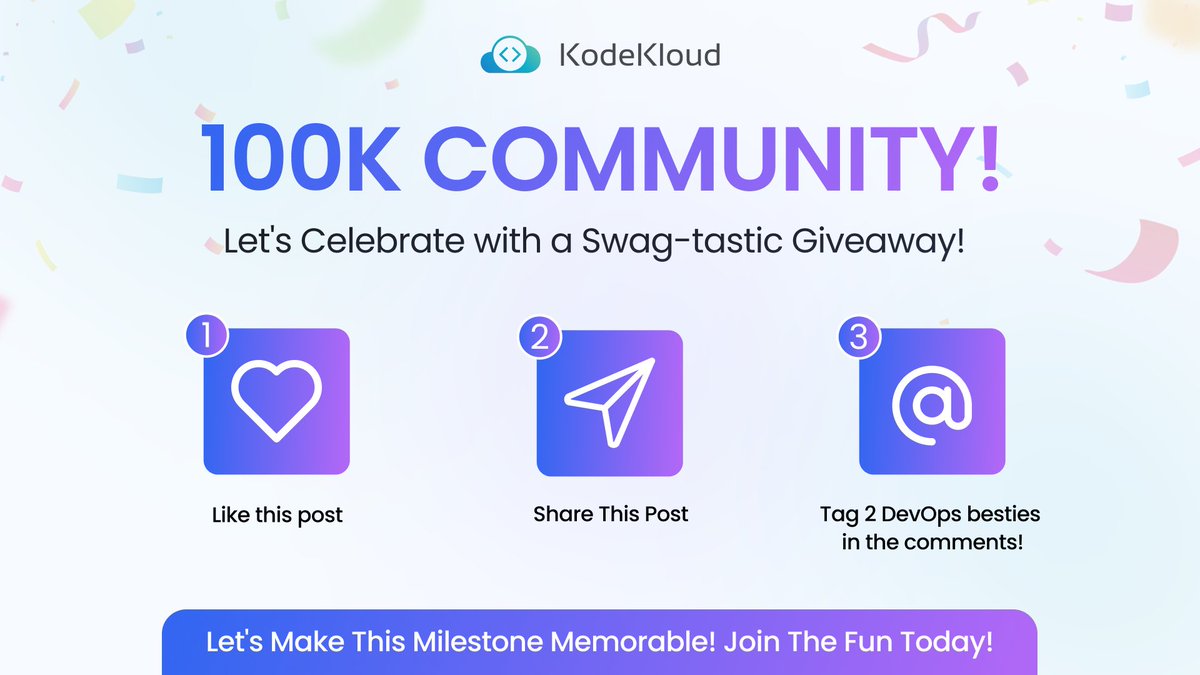
Don't miss your chance to score some EXCLUSIVE #KodeKloud goodies with an epic Swag-tastic Giveaway! 👇
We've just hit a monumental milestone - 100K KodeKloud Community!
How to Enter:
1️⃣ Like this post
2️⃣ Share this post
3️⃣ Tag your 2 DevOps besties below
Stay tuned to find out if you're one of the lucky winners!
#KodeKloud100KGiveaway #DevOps
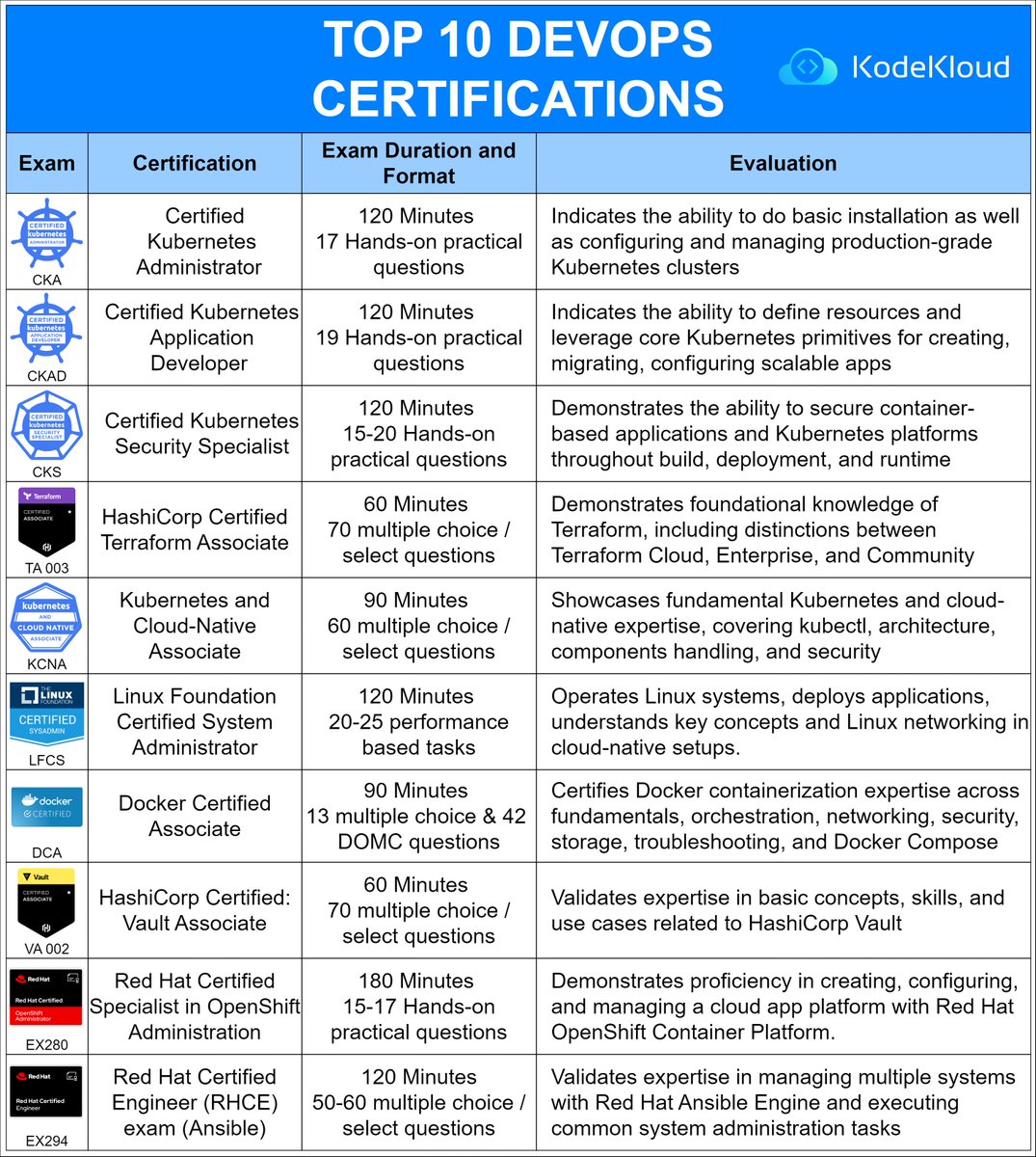
Top 10 DevOps Certifications
Navigating the 10 most in-demand certifications
–
Check out our learning paths:
DevOps: https://t.co/qU8ZMxcRRn
Linux: https://t.co/9HklCW5QzL
🔁 Consider a Repost if this is useful
#kodekloud#devops