💡 Create a dynamic weather forecast in Power BI — live API data, Power Query and native visuals only (.PBIX on the author's site)
🔗 https://t.co/RXmvyg8NiF
👉 Get all our tutorials: https://t.co/KP0l6DUpCz
#powerbi#datafam#dataviz
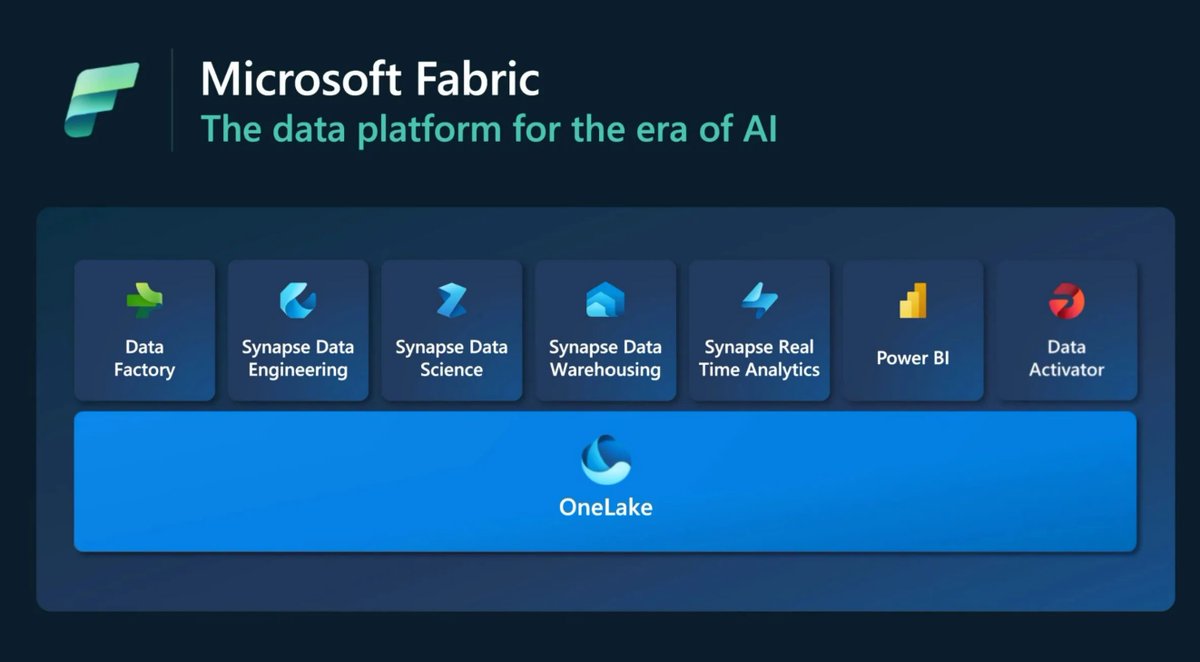
💡 Microsoft Fabric isn't a Power BI rebrand — why it's a paradigm shift for the entire BI lifecycle
🔗 https://t.co/lvcSsxZFQD
👉 Get access to all our tutorials: https://t.co/KP0l6DUpCz
#powerbi#datafam#dataviz
💡 Visual Calculations deep dive — RUNNINGSUM, MOVINGAVERAGE and templates that bypass the DAX ceremony
🔗 https://t.co/SW4Eu7zdw9
👉 Get all our tutorials: https://t.co/KP0l6DUpCz
#powerbi#datafam#dataviz
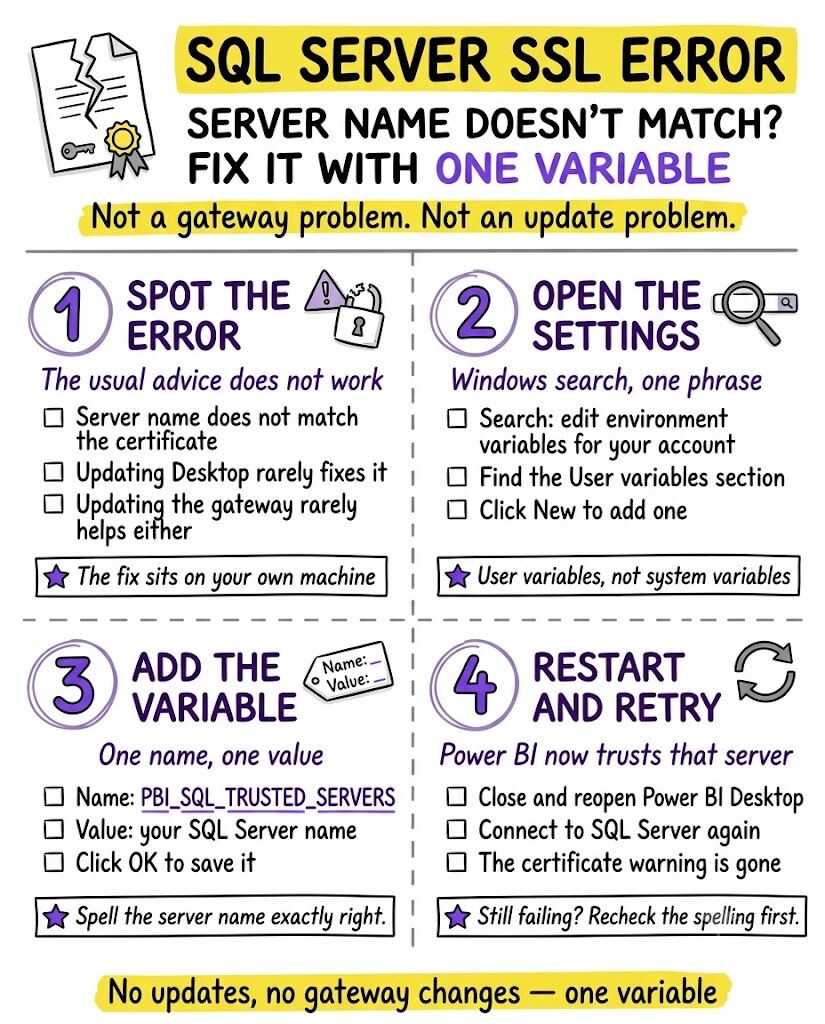
🔎 The SQL Server SSL certificate error in Power BI — a one-environment-variable fix, no gateway changes needed
🔗 https://t.co/gTu0Ss9IIh
👉 Get access to all our tutorials: https://t.co/KP0l6DUpCz
#powerbi#datafam#dataviz
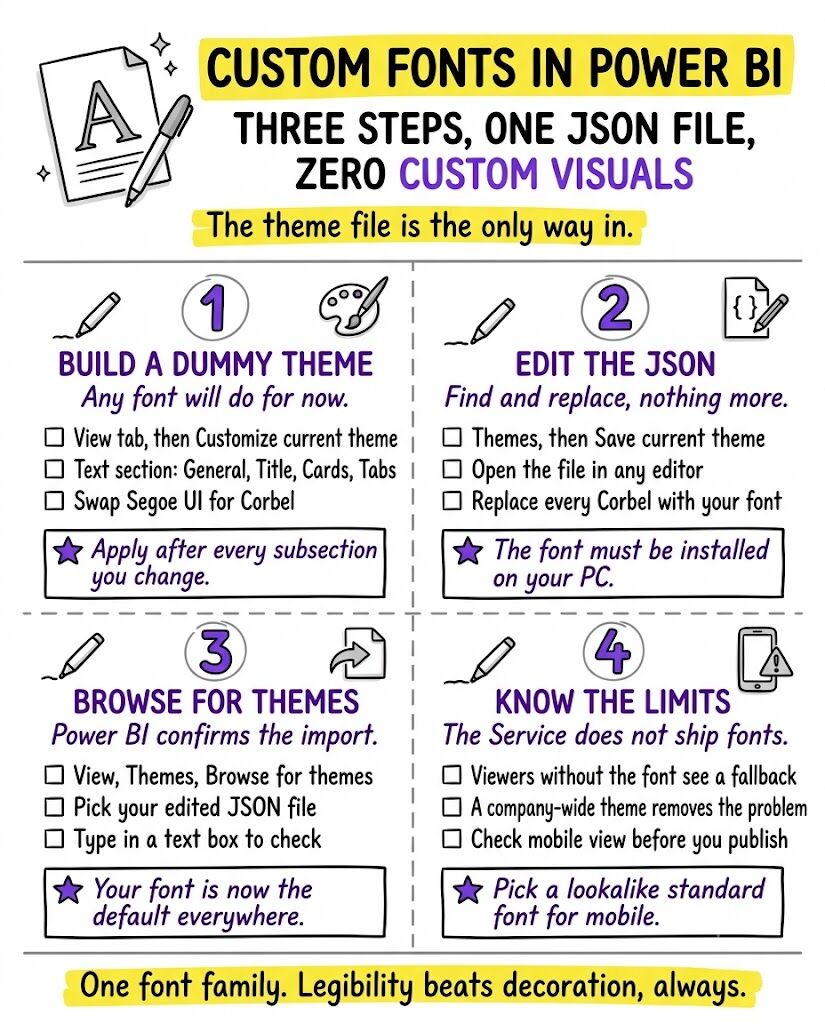
✨ Custom fonts in Power BI with one theme-file trick — plus the limitations to know before you brand everything
🔗 https://t.co/zpvKDfJ07l
👉 Get access to all our tutorials: https://t.co/KP0l6DUpCz
#powerbi#datafam#dataviz
✨ Running totals in DAX — YTD, WINDOW and CALCULATE patterns compared, a classic interview question mastered
🔗 https://t.co/cAhrKlEG7x
👉 Get access to all our tutorials: https://t.co/KP0l6DUpCz
#powerbi#datafam#dataviz
✨ Matrix + bar chart combos that stay perfectly aligned no matter the filters — a heatmap-style walkthrough
🔗 https://t.co/eA4eOfuP8l
👉 Get all our tutorials: https://t.co/KP0l6DUpCz
#powerbi#datafam#dataviz
🔥 Calculation groups for YoY, QoQ & MoM — powerful, but here's why the author still reaches for UDFs in real projects (.PBIX included)
🔗 https://t.co/p6zIjAt80C
👉 Get all our tutorials: https://t.co/KP0l6DUpCz
#powerbi#datafam#dataviz
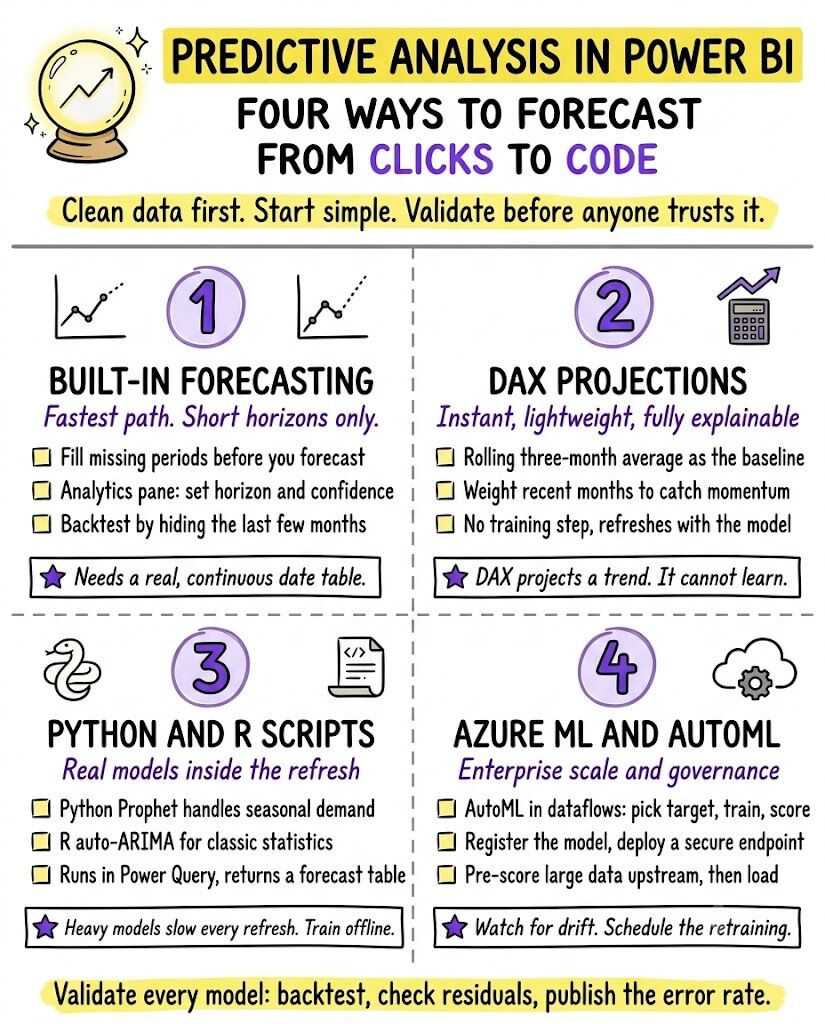
✨ Predictive analysis in Power BI, end to end — from Power Query features to Python, R and Azure ML integration
🔗 https://t.co/zF6mDSvzWd
👉 Get all our tutorials: https://t.co/KP0l6DUpCz
#powerbi#datafam#dataviz
🔥 “Sales are at $2.5 million!” — good or bad? 7 ways to bake the “because” behind your KPIs right into the report
🔗 https://t.co/eFhLBTUuCf
👉 Get all our tutorials: https://t.co/r60KuwXJBA
#powerbi#datafam#dataviz
📊 Add a plug-in “Visual Explorer” to any report — users pick the metric AND how to visualize it (.PBIX included)
🔗 https://t.co/0rS4DLlKfd
👉 Get access to all our tutorials: https://t.co/Me4fOT9SIf
#powerbi#datafam#dataviz
✨ One chart, four different stories — consulting-style framing tricks that change the message without changing the data
🔗 https://t.co/8UufRbhAhX
👉 Get access to all our tutorials: https://t.co/r60KuwXJBA
#powerbi#datafam#dataviz
💡 Version control for Power BI, from simple SharePoint history to full PBIP + Git + deployment pipelines
🔗 https://t.co/zsJQ7EqVkh
👉 Get access to all our tutorials: https://t.co/r60KuwXJBA
#powerbi#datafam#dataviz
✨ DAX User-Defined Functions in practice — 20 real-world, easy-to-implement examples to centralize your code (Part 1)
🔗 https://t.co/W7W3v1M2Bq
👉 Get all our tutorials: https://t.co/r60KuwXJBA
#powerbi#datafam#dataviz
💡 CALCULATE vs CALCULATETABLE — why your measure breaks and which one to choose
🔗 https://t.co/lWctRKO1zg
👉 Get all our tutorials: https://t.co/r60KuwXJBA
#powerbi#datafam#dataviz
💡 HTML & CSS inside Power BI — custom shapes, icons and styling with fewer shapes and measures to maintain
🔗 https://t.co/enX0Bc1eQV
👉 Get all our tutorials: https://t.co/r60KuwXJBA
#powerbi#datafam#dataviz