Still debugging Kubernetes with only kubectl?
These 4 tools save hours during incidents:
🔹 k9s: Cluster dashboard in your terminal
🔹 stern: Multi-pod log tailing
🔹 Kubeshark: Wireshark for Kubernetes
🔹 k8sgpt: AI explains what's broken
Repos 👇
k9s: https://t.co/LDGubuA9Dt
stern: https://t.co/rqZAb64hOw
Kubeshark: https://t.co/0v5TFFersY
k8sgpt: https://t.co/T3W9n8j0RW
Most Devops engineers know PVC, PV, and StorageClass.
Very few understand what actually happens behind the scenes.
Application Pod
↓
PVC (requests storage)
↓
StorageClass (dynamic provisioning)
↓
CSI Driver (EBS/EFS CSI)
↓
PV (actual Kubernetes storage)
↓
AWS EBS / EFS
That's how your MySQL, Jenkins, SonarQube, MongoDB, and Elasticsearch data survives pod restarts.
Interview tip:
PVC = "I need 20GB storage"
StorageClass = "I'll create it automatically"
PV = "Here's your actual storage"
If you're using EKS, the EBS/EFS CSI Driver does the heavy lifting.
Kubernetes storage becomes easy once you understand this flow.
I like Aspire for local development.
But local development is only part of the story.
At some point, you need to run the app somewhere else.
An API.
A Postgres database.
A Redis cache.
In a normal Docker setup, you would need to wire all of this together in a Compose file:
→ Container images
→ Ports
→ Environment variables
→ Connection strings
→ Service dependencies
→ Data volumes
With the Aspire Docker publisher, you describe your app in the AppHost project.
Then Aspire can generate the Docker Compose setup for you.
That means you can:
1. Define the app and its services in C#
2. Run and test everything locally
3. Publish Docker Compose artifacts
4. Move them to your VPS or cloud server
5. Start the app with Docker Compose
There is one important detail:
Aspire does not deploy the app for you.
You still need to build or provide your API image, set real secrets, copy the files to the server, and run the containers.
That is actually a good balance.
You get less manual setup, without hiding how the app is deployed.
I tried this with an API, Postgres, and Redis. Here is how the Docker publisher works and what it generates: https://t.co/PDItkYteLw
When an API request fails, your API still has a job to do.
A plain 500 error is not enough.
The caller needs to know:
→ What went wrong?
→ Was the request invalid?
→ Was the resource missing?
→ Can they fix the request and try again?
And you need logs that help you find the real cause.
The first version of global error handling in ASPNET Core is often simple:
Catch every error in middleware.
Log it.
Return a response.
That works.
Until you have validation errors, missing records, conflicts, and other cases that should return different results.
Then one middleware class starts doing too much.
A cleaner approach is to use modern exception handlers:
→ One handler for validation errors
→ One handler for known app errors
→ One final handler for unexpected failures
→ One standard Problem Details response format
Now each handler has one job.
Your API returns errors in a clear shape.
And your business logic does not need the same error code copied across every endpoint.
Happy paths are easy to demo.
Good error handling is what makes an API feel solid in real use.
I walked through the old approach, the better built-in tools, and the setup I would use in a new ASPNET Core app: https://t.co/AKraxCoTnL
Ya se encuentra disponible #Azure Linux 4.0 en el marketplace para crear máquinas virtuales.
Azure Linux 4.0 es la primera distribución Linux de propósito general mantenida oficialmente por Microsoft para Azure; antes se conocía como CBL-Mariner y ahora es la distro principal de Microsoft para trabajo en la nube.
Es una distribución RPM-based basada en Fedora.
🔐✨ Microsoft habilita Single Sign-On (SSO) para Linux con Entra ID.
Ahora los usuarios pueden autenticarse una sola vez y acceder a apps y recursos corporativos sin repetir credenciales.
✅ Compatible con Ubuntu 24.04/26.04 y RHEL 9/10
✅ Integración con Intune y políticas de acceso condicional
✅ Soporte para MFA resistente a phishing y smartcards
DBeaver lleva 15 años siendo el cliente de base de datos por defecto.
Es potente. Y también es un dinosaurio de Java que tarda 20 segundos en arrancar.
Alguien lo construyó desde cero en Rust y añadió lo que DBeaver nunca tuvo.
Se llama Tabularis. 2.5k estrellas. Apache-2.0. Activo hace 17 horas.
El detalle que más me ha flipado:
Lo construyó una sola persona (@debba_92 ) como experimento de desarrollo asistido por IA.
Quería ver hasta dónde podían llegar los agentes construyendo una herramienta real.
El resultado: 55 releases, 1.192 commits y un cliente de base de datos que compite con herramientas de empresas con decenas de ingenieros.
Lo que tiene que DBeaver no tiene:
✅ Servidor MCP integrado - Claude, Cursor y Windsurf pueden leer tu esquema y ejecutar queries directamente desde el chat
✅ SQL Notebooks con gráficos inline y variables entre celdas
✅ Visual EXPLAIN con análisis de IA del plan de ejecución
✅ Constructor de queries visual con JOINs drag-and-drop
✅ Diagramas ER generados automáticamente
✅ Compatible con PostgreSQL, MySQL/MariaDB, SQLite y ClickHouse via plugin
✅ Editor Monaco con autocompletado inteligente
✅ Sin telemetría, sin cuentas, sin suscripción
Lo que DBeaver sí tiene y Tabularis todavía no:
SQL Server y Oracle. Si los necesitas, DBeaver sigue siendo la opción.
Para todo lo demás: esto arranca en 2 segundos, pesa menos y tu agente de IA puede consultarlo directamente.
el enlace 👇
Un ingeniero de Netflix ha sacado algo tremendo.
¡Promete ahorrarte hasta el 95% de los tokens!
¿Cómo? Comprime tu contexto antes de enviarlo a la IA.
100% en local y compatible con Claude, Cursor, Codex...
24K estrellas en GitHub:
https://t.co/v4Ka8gmGV9
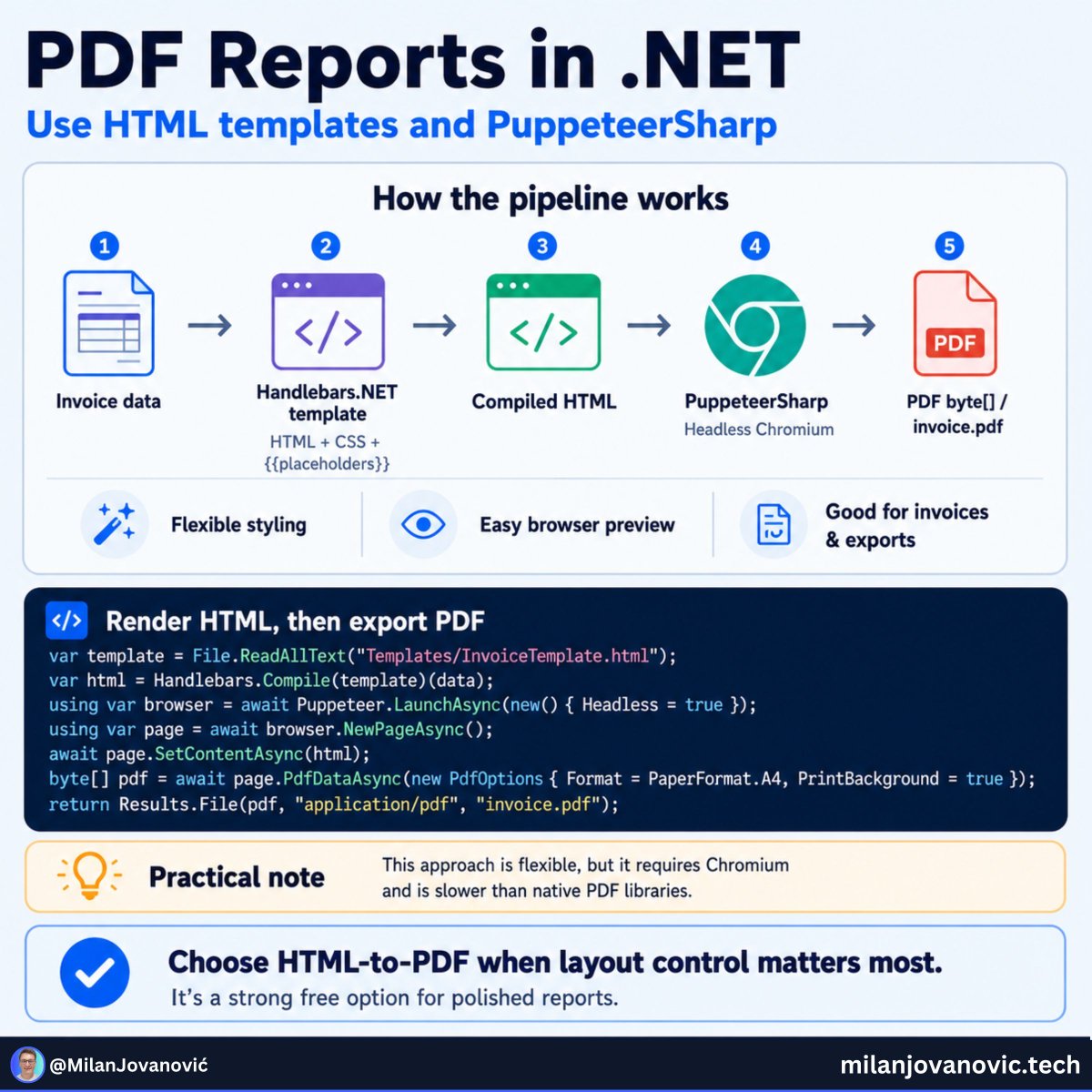
Generating a PDF is easy.
Generating one that looks good?
That is usually where the pain starts.
Invoices, reports, and exports need more than plain text.
You may need:
→ A logo
→ Tables
→ Totals
→ Headers and footers
→ Page numbers
→ Layout that matches your brand
One simple way to do this in .NET is to stop treating the PDF as a special document format.
Build it as HTML first.
Then turn that HTML into a PDF.
This gives you tools you already know:
→ HTML for the content
→ CSS for the design
→ A template engine for live data
→ A headless browser to create the final PDF
I used Handlebars for the template and PuppeteerSharp to render the PDF.
The result is a free approach with full control over the design.
There is a tradeoff.
Running a browser costs more than using a native PDF library.
In my test, the first run took around 12 seconds because Chromium had to be downloaded and started.
After that, a warm PDF render took around 580 ms.
So I would not put heavy PDF work in the middle of every API request.
For invoices, exports, and background report jobs?
This is a very practical option.
Need polished PDF reports in your .NET app without paying for a commercial PDF library?
Here is the full setup: https://t.co/JnG3uUCTOK
I burned 7,000 GitHub Copilot credits in one afternoon. Same prompt, same model in Claude Code: faster, and way more usage per dollar.
Full breakdown: https://t.co/f0OwG3v5HA
Your .NET app has three services, a database, and a message queue.
A request is slow.
Where is the performance problem?
Was it the API?
A database query?
A call to another service?
A failed message handler?
Logs alone often do not give you the full picture.
This is where the Aspire Dashboard is useful.
And you do not need to move your app to Aspire orchestration to use it.
You can run the dashboard as a standalone container next to your existing setup.
Then send OpenTelemetry data from your services to it.
You get:
→ Structured logs in one place
→ Traces across service calls
→ Metrics for requests and errors
→ A much faster way to find slow parts of the system
There is one important limit:
The standalone dashboard stores data in memory (persistence when?!).
That makes it great for local development and debugging.
Not for production monitoring.
So, when I need to understand what a distributed .NET app is doing on my machine, this is one of the simplest tools I can add.
I wrote a short guide showing how to connect the Aspire Dashboard to an existing .NET setup: https://t.co/46sJuWu1AG
The US government, citing national security authorities, has issued an export control directive to suspend all access to Fable 5 and Mythos 5 by any foreign national, whether inside or outside the United States, including foreign national Anthropic employees.
The net effect of this order is that we must abruptly disable Fable 5 and Mythos 5 for all our customers to ensure compliance.
Access to all other Claude models is not affected.
We apologize for this disruption to our customers. We believe this is a misunderstanding and are working to restore access as soon as possible.
Read our full statement: https://t.co/bwn0sximKZ
An experiment in Aspire dashboard extensibility 📊
I recorded a quick demo showing how custom pages could work in the dashboard. Watch to the end. It starts simple and ends crazy 🚀
Note: This is an experiment. No commitments (yet...)
@aspiredotdev