AI, GTM & Operations - I help tech teams have S-tier clarity on what really matters and be ecstatic to execute on even the boldest goals with my 3-step system
want to get more value from AI?
don't start by trying to automate your entire job.
start with one task you repeat every week.
maybe it's formatting reports, sorting feedback, summarizing documents, or preparing meeting notes.
use AI to create a first version of the workflow.
want to get more value from AI?
don't start by trying to automate your entire job.
start with one task you repeat every week.
maybe it's formatting reports, sorting feedback, summarizing documents, or preparing meeting notes.
use AI to create a first version of the workflow.
some of the best business ideas start with problems people complain about every day.
AI can help you spot them.
analyze customer reviews, Reddit discussions, competitor products, and common frustrations.
then look for problems that people repeatedly mention but nobody solves
some of the best business ideas start with problems people complain about every day.
AI can help you spot them.
analyze customer reviews, Reddit discussions, competitor products, and common frustrations.
then look for problems that people repeatedly mention but nobody solves
some of the best business ideas start with problems people complain about every day.
AI can help you spot them.
analyze customer reviews, Reddit discussions, competitor products, and common frustrations.
then look for problems that people repeatedly mention but nobody solves
BUILD YOUR OWN CODING AGENT
Pi is a minimal agent toolkit on GitHub that you shape yourself.
It skips built-in sub-agents and plan mode on purpose.
You add only what you need: extensions, skills, prompt templates and themes.
Share your setup as a package through npm or git
BUILD YOUR OWN CODING AGENT
Pi is a minimal agent toolkit on GitHub that you shape yourself.
It skips built-in sub-agents and plan mode on purpose.
You add only what you need: extensions, skills, prompt templates and themes.
Share your setup as a package through npm or git
BUILD YOUR OWN CODING AGENT
Pi is a minimal agent toolkit on GitHub that you shape yourself.
It skips built-in sub-agents and plan mode on purpose.
You add only what you need: extensions, skills, prompt templates and themes.
Share your setup as a package through npm or git
ANTHROPIC SHARED CLAUDE'S OWN SKILLS
The skills behind Claude's Word, PDF, PowerPoint and Excel files are public on GitHub.
The repo is anthropics/skills.
Each skill is just 1 folder with a SKILL.md file of instructions.
You also get example skills for design, web app testing and branding.
There's a template to start your own skill from.
In Claude Code it takes 2 commands to add them.
Check the license first: the 4 document skills are source-available, not open source.
Anthropic calls them demos, so test before you rely on them.
ANTHROPIC SHARED CLAUDE'S OWN SKILLS
The skills behind Claude's Word, PDF, PowerPoint and Excel files are public on GitHub.
The repo is anthropics/skills.
Each skill is just 1 folder with a SKILL.md file of instructions.
You also get example skills for design, web app testing and branding.
There's a template to start your own skill from.
In Claude Code it takes 2 commands to add them.
Check the license first: the 4 document skills are source-available, not open source.
Anthropic calls them demos, so test before you rely on them.
5 free GitHub repos that make your AI agent far more useful
1. markitdown → give it a PDF, Word or Excel file, get clean Markdown your AI can read (188k ⭐)
2. awesome-free-llm-apis → pick from 16 providers with free API tiers in 1 list (9.8k ⭐)
3. OpenMontage → describe a video, your agent scripts, edits and renders it (64.2k ⭐)
4. graphify → run /graphify . and get a searchable map of your whole codebase (125.4k ⭐)
5. OmniRoute → plug in 1 endpoint, it switches between 150+ free providers when your quota runs out (74.4k ⭐)
all 5 are open source
save this before you pay for another tool 🔖
share it with someone who's building with AI ♻️
5 free GitHub repos that make your AI agent far more useful
1. markitdown → give it a PDF, Word or Excel file, get clean Markdown your AI can read (188k ⭐)
2. awesome-free-llm-apis → pick from 16 providers with free API tiers in 1 list (9.8k ⭐)
3. OpenMontage → describe a video, your agent scripts, edits and renders it (64.2k ⭐)
4. graphify → run /graphify . and get a searchable map of your whole codebase (125.4k ⭐)
5. OmniRoute → plug in 1 endpoint, it switches between 150+ free providers when your quota runs out (74.4k ⭐)
all 5 are open source
save this before you pay for another tool 🔖
share it with someone who's building with AI ♻️
The carrier ETA is not an ETA. It’s the date a vessel expects to reach a port — and that’s four steps away from the thing your planners actually need: when the stock is pickable at the DC.
Illustrative gap, one lane:
→ Carrier ETA — day 0
→ Actual vessel arrival — +2.4 days
→ Berth and discharge complete — +4.1
→ Customs cleared — +5.6
→ Available at the DC — +8.3
Plan to the quoted date and you book labour, book trucks and promise customers eight days early. Then the receiving team absorbs it as “chaos” and nobody connects it back to the number in the planning system.
A usable ETA is modelled, not quoted. The inputs are available and mostly already in your systems:
→ Vessel and carrier history on that specific lane, not fleet averages
→ Port congestion and berth wait patterns by terminal
→ Customs clearance time by commodity code and broker
→ Your own DC receiving capacity on the day the container lands
The first step costs nothing: start measuring the gap between promised and available, by lane and by port. That distribution is the forecast worth building — and it usually shows the delay is systematic, not random.
Three teams forecast the same November. They get three different numbers, and all three are “right”.
Illustrative:
→ National — 1 series, 11,400 units, MAPE 6%
→ Distribution centre — 4 series, 11,950 units, MAPE 11%
→ Store / SKU — 680 series, 12,780 units, MAPE 34%
Finance quotes the first. Supply chain plans to the second. Replenishment runs on the third. Nobody is wrong — the numbers just don’t add up to each other, and the gap gets argued out in a monthly meeting instead of solved in the model.
What actually fixes it:
Decide the planning level first. Replenishment needs store/SKU. Capacity and budget need the top. Both have to come out of one reconciled set, not three independent runs.
Reconcile instead of overwriting. Top-down disaggregation flattens genuine local patterns — the store next to a stadium stops looking different. Bottom-up aggregation carries every bit of SKU-level noise into the national number. Optimal reconciliation uses the accuracy of each level to weight the result and makes everything sum correctly.
Report accuracy where the decision is made. A 6% national MAPE says nothing about whether store 214 has stock on Saturday morning.
Aggregation hides error. Disaggregation reveals it. Neither one creates it — the only question is which level you’re willing to be wrong at.
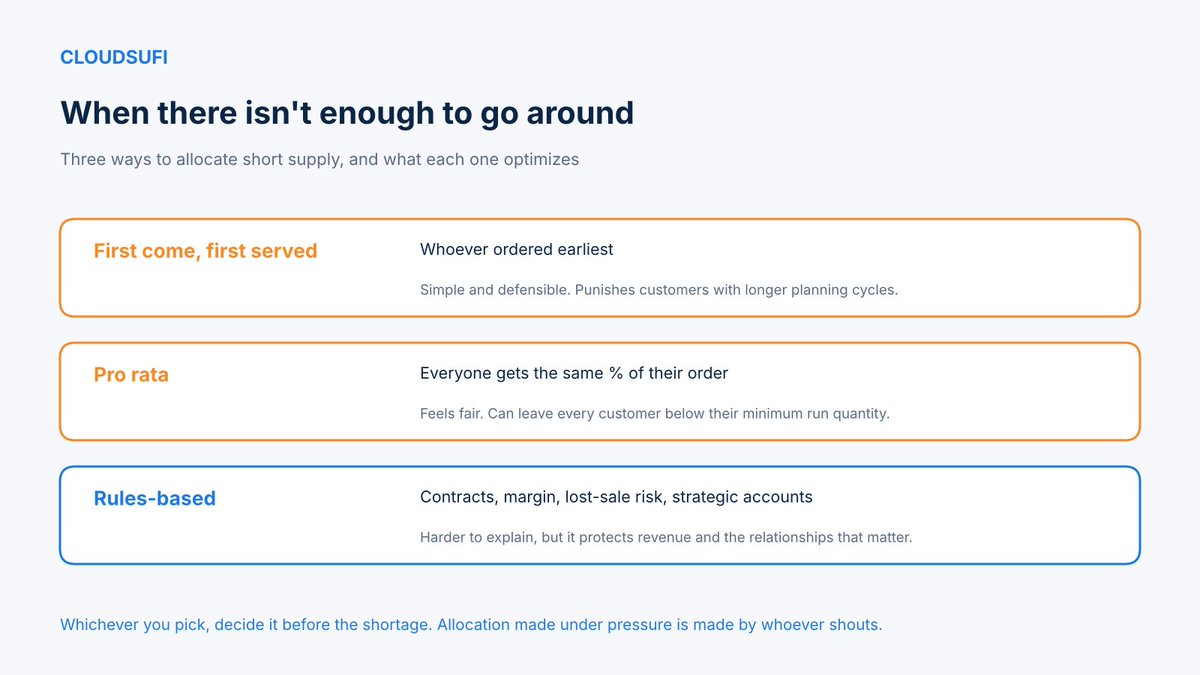
A supplier confirms 60% of what you ordered. Who gets what? 🔀
First come, first served is simple and easy to defend, but it quietly punishes the customers with longer planning cycles, who are often your biggest. Pro rata feels fair and can leave everyone below the quantity that makes their production run worthwhile. Rules-based allocation weighs contractual commitments, margin, the risk of a lost sale and strategic importance. Harder to explain, better at protecting revenue.
What makes any of them work is the data underneath: live supply, firm commitments, customer priority and the cost of being short for each account.
And the real lesson from every shortage: write the allocation policy down before you need it. Decisions made in the middle of one tend to go to whoever escalates loudest. 📋
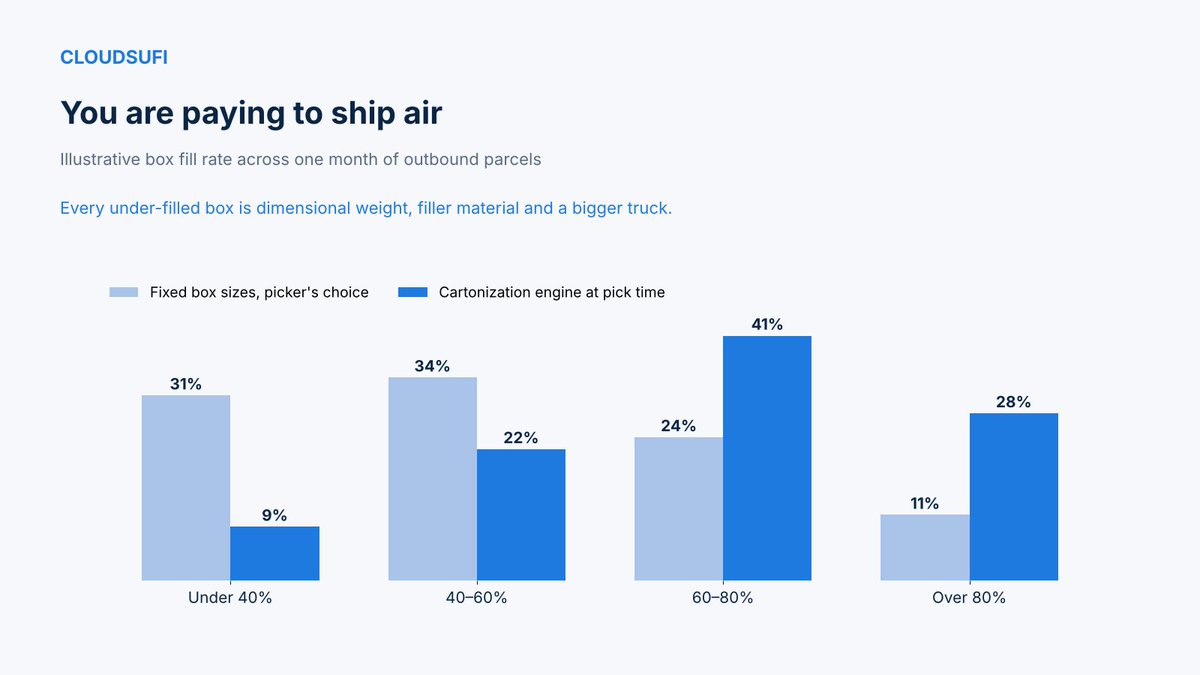
Open a parcel you received this week. How much of it was product, and how much was air? 📦
Most warehouses ship from a small set of fixed box sizes, and the picker chooses by eye. The result is parcels billed on dimensional weight, pallets of filler material and trucks that run out of space before they run out of weight.
A cartonization engine solves it at pick time: given the items in the order and their real dimensions, it chooses the smallest box that works and tells the picker how to pack it.
In this illustrative month, 31% of parcels were under 40% full before, and 9% after. The share filled above 80% rose from 11% to 28%.
The data it needs is unglamorous: accurate item dimensions. Most of the savings start with measuring your own products properly. 📏
A brand and a retailer could answer each other's hardest questions. Neither can hand over the raw data. 🔐
The brand knows its shipments, promotions and product attributes. The retailer knows point-of-sale, loyalty behavior and what was actually on the shelf. Together they could explain why a promotion underperformed in one region, or which stores lose sales to out-of-stocks. Separately, both are guessing.
A data clean room makes that collaboration possible. Both sides contribute data into a governed environment where only approved queries run, results are aggregated, and neither party can export or re-identify the other's records.
It works for supplier collaboration too, not just retail media: joint forecasting, promotion planning and availability analysis, with the legal and privacy questions settled up front.
Partners don't need your data. They need the answer you can only find together.
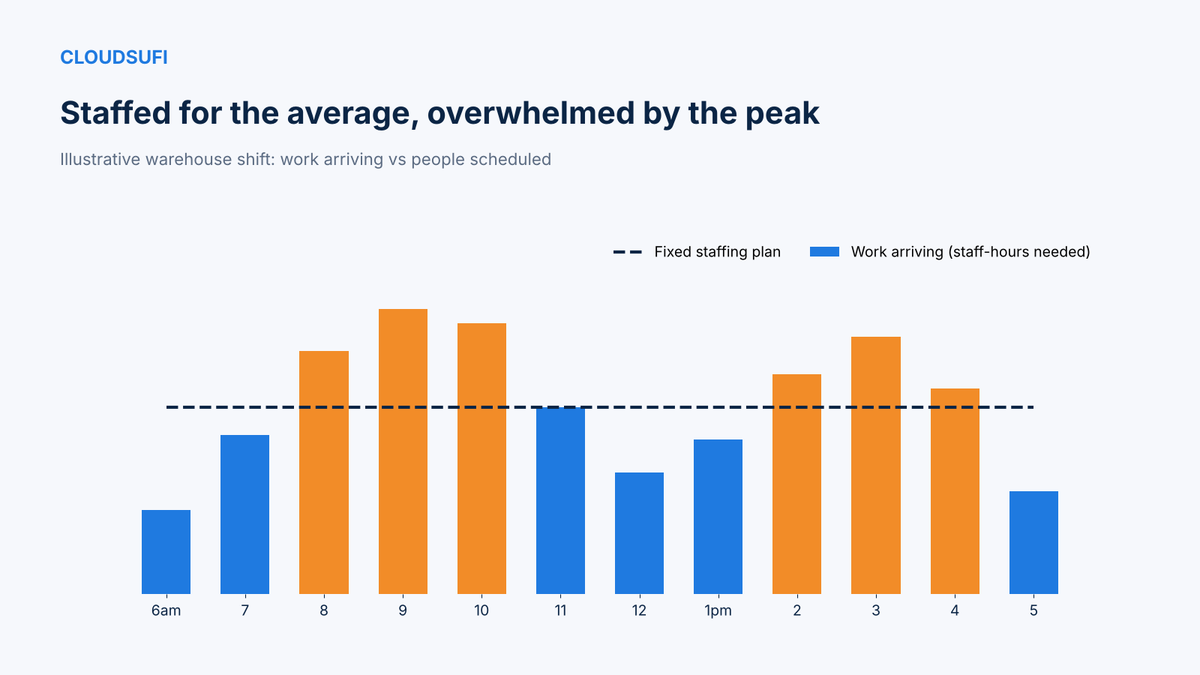
Most warehouses staff for the average day. Almost no day is average. 📦
Work doesn't arrive evenly. Inbound trucks cluster in the morning, e-commerce orders spike after a promotion goes live, and the afternoon pick wave depends on carrier cut-off times. A fixed shift plan means people standing around at 7 AM and the same people falling behind at 9 AM.
The data to fix it already exists: order volumes by hour, historical pick and pack rates by task type, inbound appointments and the promotion calendar. A forecast of workload by hour, translated into staff-hours by task, lets supervisors plan shift starts, break windows and flexible labor a week ahead instead of reacting on the day.
The result is fewer missed cut-offs, less overtime and a calmer floor.
Labor is usually the largest controllable cost in the warehouse. It deserves a forecast too.
How do you forecast demand for a product that has never been sold? 📈
Statistical models need history. A new product has none, so the forecast usually comes down to someone's judgment, and that's how launches end up either with months of unsold inventory or sold out in the first week.
A better approach uses what you do have. Describe the new product by its attributes: category, price tier, size, material, channel. Find past launches that share those attributes. Take the shape of their first 26 weeks of sales and scale it to this launch. Then adjust with real signals: pre-orders, search interest and retailer commitments.
Most importantly, update it weekly. After three or four weeks of actual sales, the launch curve tells you far more than any pre-launch estimate.
A new product isn't a blank page. It's a product your history has seen before, in pieces. 🧩
The supplier with the lowest price often turns out to be the most expensive one. 💸
Sourcing decisions are frequently made on unit price, because that's the number in the quote. Everything else arrives later: freight, duties and tariffs, customs handling, and the inventory you have to hold because the lead time is eight weeks longer.
In this illustrative comparison of the same component, Country A quotes $4.20 per unit, the lowest list price of the three. Once freight, duties and the extra inventory are included, the landed cost reaches $7.30. Country C quotes $6.00 but lands at $6.45.
A landed cost model built on your own purchasing, freight and customs data makes that visible before the contract is signed, and lets you rerun it when tariffs or freight rates change, which lately they do often.
Cash and Cost both improve when you buy on the real number. 📦
For vaccines, fresh food and many medicines, a few hours outside the right temperature can mean the whole shipment is lost. 🌡
Too often, the problem is only discovered at the destination, when someone downloads the data logger and sees that the temperature went out of range somewhere along the way. By then, the product can't be saved, and nobody knows exactly where it happened.
Live sensor data changes that. Temperature readings from trucks, containers and warehouses stream into one platform, and alerts fire as soon as a reading starts drifting toward the limit, not after it has been out of range for hours.
In this illustrative shipment, the temperature climbs when a door is left open at a transfer hub. An alert fires at 8.5°C, the team on site closes the door and adjusts the unit, and the load is back in the safe range shortly after.
Every alert is also stored with its location and cause, so recurring problems, like one hub or one carrier, become visible over time.
Protecting the product starts with seeing the problem while there's still time to fix it.
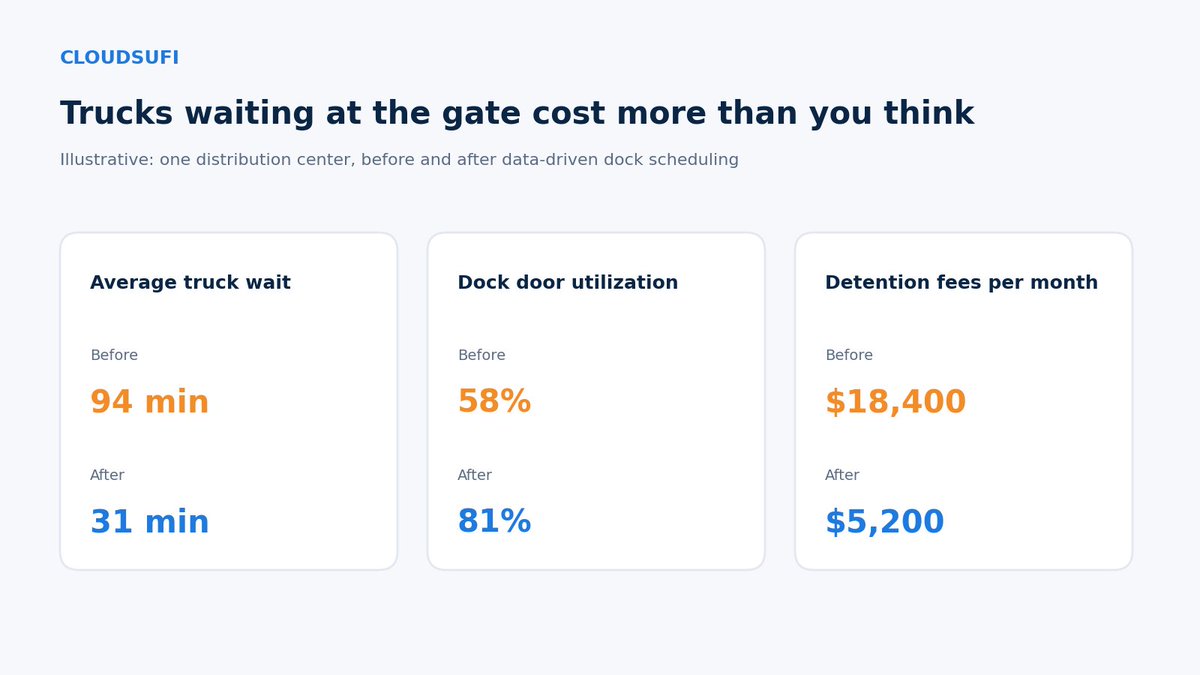
At many distribution centers, trucks spend more time waiting at the gate than being unloaded. 🚛
Carriers arrive whenever they can, several at once in the morning, then none for hours. Drivers wait, dock doors sit idle in the afternoon and detention fees quietly pile up on every invoice.
Data can smooth that out. Combine appointment bookings, live shipment tracking, expected unloading times by load type and labor availability per shift, then schedule each truck into a dock slot that actually fits. When a truck is running late, the schedule adjusts automatically instead of creating a queue.
In this illustrative example, average truck wait time fell from 94 to 31 minutes, dock door utilization rose from 58% to 81% and monthly detention fees dropped from $18,400 to $5,200.
The warehouse didn't get bigger. The day just got better organized. 📦